Ventura PB80 User manual

PB80 12,000mAh WITH 400amp JUMP START
USER MANUAL • UK
GEBRUIKSAANWIJZING • NL
GUIDE DE L’UTILISATEUR • FR
BENUTZERHANDBUCH • DE
MANUAL DEL USUARIO • ES
MANUALE PER L’UTENTE • IT

UK • 2
PB80 USER MANUAL • UK
Thank you for choosing Ventura Portable Power. Always follow
basic safety precautions when using electrical appliances. Read all
instructions carefully, Please keep this instruction manual for easy
reference.
Product Information
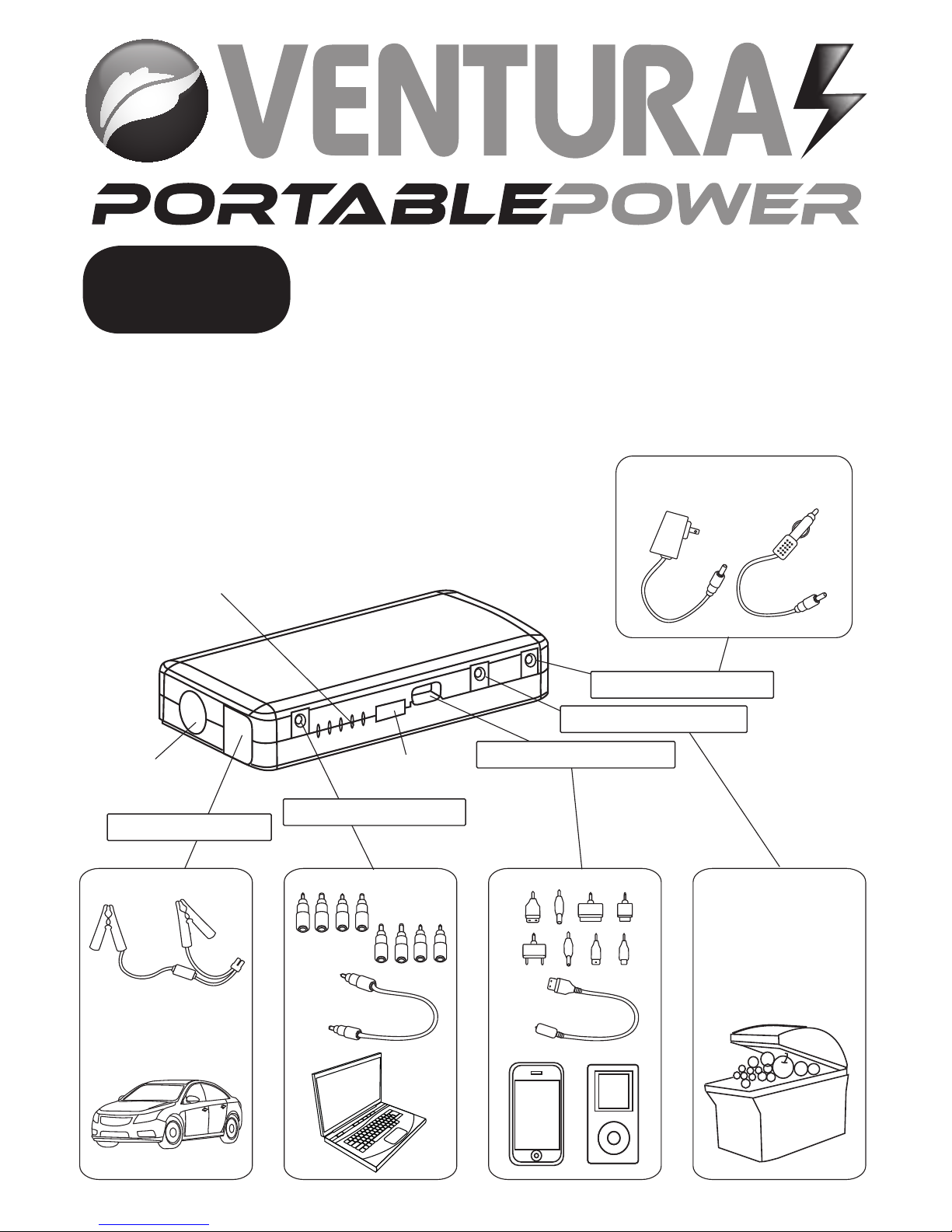
LED Flash Light
Jumper cable
with clamps
Switch cable A Switch cable B
For 12V vehicle
products
Home
adaptor Car
adaptor
Jump start socket 19V 3.5A output port
LED indicators
Operation
button
USB 5V 2A output port
12V 10A output port
12V 1A input port

UK • 3
Operation
Press the Operation Button to check the storage level of your PB80
powerbank.
Indicator Unlit 5 Flashing 1 solid 2 solid 3 solid 4 solid 5 solid
Storage level 0% 10% 20% 40% 60% 80% 100%
The LED indicators will flash one by one during charging. The current
storage level will be indicated by the number of LED’s illuminated. Once
your PB80 is fully charged or if charging is paused, the LED’s will power
off.
Charging your PB80 Powerbank using the Home charger.
1. Connect the home charger included to the 12V 1A input port on your
PB80.
2. Plug the opposite end of the Home charger in to a standard AC wall
socket and allow to charge until all the LED indicators have powered off.
Charging your PB80 Powerbank using the Vehicle charger.
1. Connect the vehicle charger included to the 12V 1A input port on
your PB80.
2. Plug the opposite end of the vehicle charger in to the cigarette lighter
socket in your vehicle and allow to charge until all the LED indicators
have powered off.
Jump starting a 12V vehicle
1. Ensure that your PB80 is showing at least 3 LED power level indicators.
If your PB80 is showing less than 3 LED power level indicators it may not
have enough power to Jump start your vehicle.
2. Connect the RED clamp to the vehicle’s positive (+) battery terminal
and the BLACK clamp to the vehicle’s negative (-) battery terminal.

UK • 4
1 2 3 4 5
3. Connect the jump start cable to the jump start socket.
4. Start the vehicle as normal.
5. Once the vehicle has started, ensure that you disconnect the clamps
from the vehicles battery terminal within 30 seconds.
Charging a mobile, smart phone or tablet.
1. Connect Switch cable B to the USB 5V 2A output socket.
2. Select the appropriate connector and connect it to your mobile,
smart phone or Tablet.
3. Press the Operation button to begin charging.
User tip: Alternatively use the USB charging cable provided with your
device.
Charging a 19V Laptop or Notebook.
1. Connect Switch cable A to the USB 19V 3.5A output socket.
2. Select the appropriate connector for your Laptop or Notebook and
connect it to Switch cable A and then plug in to the power/charging
socket on your device.
3. Press the Operation button to begin charging or to power your
device.

UK • 5
Powering 12V vehicle accessories and electronic devices.
1. Connect the optional Switch cable to the 12V 10A output socket.
2. Connect the optional Switch cable to the 12V device you wish to
power.
3. Press the Operation button to start power supply.
Using the LED light.
There are 4 LED light modes, standard, strobe, SOS and off. To power on
the LED light, press and hold the Operation button for 3 seconds. Press
the Operation button lightly to switch between modes.
What’s included?
PB80 Powerbank x 1 AC Home charger x 1
Switch cable A x 1 DC Vehicle charger x 1
Switch cable B x 1 Jump start cable with clamps x 1
Mobile/Smart phone/tablet connectors x 8 Protective carry case x 1
Laptop/Notebook connectors x 8 Protective silicon case x 1
AC Home charger x 1 User manual x 1
Technical specifications
Size 160 x 75 x 28mm
Weight 420g
Battery Capacity 44.4Wh
Output 5V 2 A; 12V 10A; 19V 3 .5A;
Input 12V 1A
Full charging time 3 hours
Starting current 2 00A
Peak current 4 00A
Operating temperature -20° ~ 60°

UK • 6
Frequently Asked Questions
Q: How do I power off my PB80?
A: Your PB80 will power off automatically once charging is complete or
after a short period of inactivity.
Q: How many times can my PB80 charge for my cell phone?
A: Approximately 7 times.
Q: How long will my PB80 take to fully charge my mobile or smart
phone?
A: Approximately 1 hour.
Q: How long will my PB80, if full charged, supply power to a Laptop or
Notebook?
A: 2-3 hours
Q: How long will my PB80 remain charged when not in use?
A. 6-12 months, however, we suggest to recharge it every 6 months.
Trouble Shooting
Problem Possible cause Remedy
No response when
pressing the operation
button.
Low voltage protection
has been activated.
Connect the Home or
Vehicle charger to the
12V 1A input socket to
reset your PB80.
My PB80 gets warm
when charging/
powering a Laptop or
Notebook.
The charging current is
higher than 3.5A
Remove the battery
from the Laptop or
Notebook and use
your PB80 to power it
independently instead.

UK • 7
!
!
!
Warning!
1. When jump starting a vehicle ensure that the jump starter cable is
correctly and tightly connected to the jump start socket on your PB80.
2. Ensure that the jump start cable clamps are correctly connected to
the positive (+) and negative (-) terminals of the vehicle’s battery before
attempting to jump start your vehicle. Before connecting the clamps,
ensure that the battery terminals are clean. Do not attempt to jump
start your vehicle more than 3 times in quick succession as you will
damage your PB80.
3. Do not reverse the polarity. Reversing the polarity will damage your
PB80 and invalidate the warranty.
4. Do not disassemble your PB80; there are no user-serviceable parts
inside. Disassembling your PB80 may result in exposure to shock and/or
electrical or mechanical hazards and will invalidate any warranty.
Always take care when using the appliance
Your PB80 is not intended for use by young or infirm persons without
supervision
Do not use as a toy
Do not allow your PB80 to become wet
Do not immerse your PB80 in water
Do not operate your PB80 in explosive atmospheres, such as in the presence of
flammable liquids, gases or dust
Do not modify or disassemble your PB80
Do not expose your PB80 to extreme heat.
Do not store in locations where the temperature may exceed 70°C
Charge only at ambient temperatures between -20°C and 60°C
Charge only using the chargers provided with your PB80.
Under extreme conditions, battery leakage may occur. Carefully wipe the
liquid off using a cloth and avoid skin contact. In case of skin or eye contact,
rinse immediately with clean water and seek medical attention. Service under
Warranty

UK • 8
Service under Warranty
Your device comes with a standard one year manufacturer’s warranty.
If, for some reason, your unit requires service under warranty return
your device, via special delivery (insured) and in suitable packaging to:
The Returns Department,
Performance Products Limited,
Cleaver House, Sarus Court,
Manor Park, Cheshire WA7 1UL
Enclose the following information:
(a) Your name, address and a full description of the problem.
(b) A telephone number where you can be reached during business
hours.
(c) Your units’serial number.
Disposal of Old Electrical & Electronic
Equipment (applicable in the European Union).
This symbol on a product or its packaging indicates
that this product shall not be treated as household
waste. It should be handed over to an applicable
collection point for the recycling of electrical
equipment. By ensuring that this product is disposed
of correctly you will help/prevent potential negative
impact on the environment. The recycling of materials
will help to conserve natural resources. For further
details about recycling please contact your local civic
office or the shop where it was originally purchased.
Disposing of the Battery
Please check with your local waste management service authority
regarding regulations for the safe disposal of the battery. The battery
should never be placed in municipal waste. Use a battery disposal
facility if available

NL • 9
PB80 GEBRUIKSAANWIJZING • NL
Gefeliciteerd met de aanschaf van de Ventura Portable Power. Houd
u bij het gebruik van elektrische apparaten altijd aan elementaire
veiligheidsvoorschriften. Lees alle instructies zorgvuldig door, Houd
deze gebruiksaanwijzing bij de hand zodat u er
gemakkelijk dingen in kunt opzoeken.
Productgegevens
LED-knipperlicht
Startkabel met
klemmen
Schakelaarkabel
ASchakelaarkabel
B
Voor
12V-voertuig-
producten
Thuis-
adapter Auto-
adapter
Startcontact 19V/3,5A-uitgang
LED-indicators
Bedieningsknop USB 5V/2A-uitgang
12V/10A-uitgang
12V/1A-ingang

NL • 10
Bediening
Druk op de bedieningsknop om het energieniveau van uw PB80-
powerbank te controleren.
Indicator Uit 5
knipperend 1
onafgebr. 2
onafgebr. 3
onafgebr. 4
onafgebr. 5
onafgebr.
Energieniveau 0% 10% 20% 40% 60% 80% 100%
Tijdens het opladen knipperen de LED-indicators een voor een. Het
huidige energieniveau wordt aangegeven door het aantal LED’s dat
brandt. Wanneer uw PB80 volledig opgeladen is of als het opladen is
onderbroken, gaan de LED’s uit.
De PB80-powerbank opladen met de thuislader
1. Sluit de meegeleverde thuislader op de 12V/1A-ingang van de PB80 aan.
2. Steek het andere uiteinde van de thuislader in een
standaardwandcontactdoos en laat de powerbank opladen totdat alle
LED-indicators uit zijn.
De PB80-powerbank opladen met de voertuiglader
1. Sluit de meegeleverde voertuiglader op de 12V/1A-ingang van de
PB80 aan.
2. Steek het andere uiteinde van de voertuiglader in de aansluiting voor
de sigarettenaansteker in uw voertuig en laat de powerbank opladen
totdat alle LED-indicators uit zijn.
Een 12V-voertuig starten
1. Controleer of minstens 3 energieniveau-LED’s van de PB80 branden.
Als minder dan 3 LED-indicators op de PB80 branden, heeft deze
mogelijk niet genoeg capaciteit om uw voertuig te starten.
2. Sluit de RODE klem op de positieve (+) accupool, en de ZWARTE klem
op de negatieve (-) accupool van het voertuig aan.
Table of contents
Languages:
Other Ventura Accessories manuals