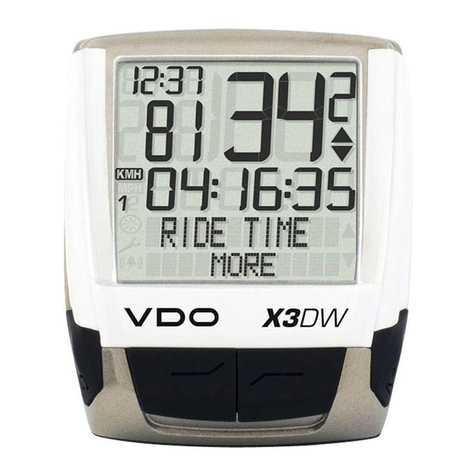
VDO M5 User manual

www.vdocyclecomputing.com/service
ENGLISH
Installation video
Operating video
Settings video

2
M5
Preface
Pack contents
Congratulations
In choosing a VDO computer, you have opted for high-quality
device with first rate technology.
To optimally use the computer, we recommend that you read
this manual carefully. It contains full operating instructions
and many useful tips.
We hope you enjoy cycling with your VDO computer.
Cycle Parts GmbH
First, please ensure that the contents of this pack are
complete:
1 VDO computer
1 battery for the computer
1 speed transmitter, battery installed
1 handlebar bracket
1 spoke magnet (clip magnet)
cable ties for attaching the bracket and
the transmitter
1 quick-start instruction manual

3
M5
Table of contents
Display .................................................................. 04
Buttons ................................................................. 07
Functions .............................................................. 08
Accessing the total values ..................................... 11
Operation while cycling ......................................... 13
Sleep mode ........................................................... 13
Attaching the handlebar bracket ........................... 14
Attaching the speed transmitter ............................ 15
Inserting the computer into the bracket ................. 16
Pairing the transmitter (initial use) ........................ 16
Function testing .................................................... 17
Settings ................................................................ 18
Language....................................................................... 18
Unit ............................................................................... 20
Wheel circumference ..................................................... 22
My data ......................................................................... 26
Sensor selection..............................................................28
Clock ............................................................................. 30
Switching the beeper on or off.........................................32
Total distance ................................................................ 33
Total ride time ............................................................... 35
Total calorie burn ........................................................... 37
Setting the navigator ............................................. 39
Resetting the navigator to zero .............................. 40
Trip section counter .............................................. 41
Resetting the trip section counter to zero .............. 42
Resetting trip data after the trip ............................ 42
Bike selection: bike 1 or bike 2 .............................. 43
Backlight mode...................................................... 44
Heart rate option ................................................... 45
Activating the heart rate option ..................................... 45
Display when using the heart rate option ....................... 46
Button allocation with the heart rate option ................... 46
Functions in the heart rate option .................................. 47
Selecting heart rate zones ............................................. 49
Cadence option ..................................................... 50
Activating the cadence option ........................................ 50
Display when using the cadence option ......................... 51
Button allocation and functions
with the cadence function ............................................. 52
Attaching the cadence transmitter ................................. 52
Heart rate and cadence options
simultaneously activated ...................................... 52
Display with heart rate and cadence .............................. 53
Buttons/functions with
heart rate and cadence options ..................................... 54
Battery status indicator ......................................... 55
Replacing the battery in the computer ................... 55
Replacing the battery in the speed transmitter ...... 56
Terms of guarantee ............................................... 57
Troubleshooting .................................................... 58
Technical specifications ........................................ 59

4
M5
Display
The VDO M5 has a large, easy-to-read display that can be
divided into four areas.
Area 1:
The top line permanently displays the time on the left and the
temperature on the right.
If the heart rate function is selected: the heart rate is
permanently displayed on the left.
If the cadence function is selected: the cadence is
permanently displayed on the right.
If the heart rate + cadence option is selected:
the heart rate is displayed on the left and the cadence on
the right.
Area 2:
The middle line of the display permanently indicates the
current speed.
Area 3:
The third line uses clear text to display a description of
the selected indicator function.
Area 4:
The bottom line of the display shows the value for
the selected function.
Display with heart rate option
Display with cadence option
Display with heart rate + cadence option
Area 1
Area 2
Area 3
Area 4
Area 1
Area 1
Area 1

5
M5
Display
On the right of the display, under
the speed indicator, the unit kmh
or mph is displayed.
“ ”
The VDO M5 can be used on two bikes. The
indicator icons 1 and 2 show you whether
your VDO M5 is currently using the settings
for bike 1 or bike 2.
A description of how to switch between bike
1 and bike 2 can be found on page 43.
“UP/DOWN arrow”
The arrows indicate whether you are
currently travelling quicker or slower
than your current average speed.

6
M5
Display
The following icons are shown on the left of the display next
to the speed:
“ ”: the icon is ON
if the trip section counter has been started.
A more detailed description of the trip section counter can be
found on page 41.
Light mode ON/OFF
This icon indicates whether the display backlight mode is
switched on or off.
Left/right arrows next to the description of the selected
indicator function (area 3 of the display).
In setting mode, these arrows indicate that you can scroll by
pressing the BIKE or the TOTAL/PULSE/CAD (TPC) button or
increase/reduce the value with both buttons.

7
M5
Buttons
The VDO M5 has three buttons. SET
In function mode:
– Scroll backwards through the functions
– Open the setting mode (press and hold)
– Access the total values for distance
and ride time (press and hold)
In setting mode:
– Open the setting
– Confirm the setting once ready
– Exit setting mode and return to
function mode
BIKE
In function mode:
– Access the functions
(scroll forwards through the functions)
– Reset trip data to zero
(press and hold)
In setting mode:
– Scroll in the setting menu (forwards)
– Change the data to be set (increase)
– Exit setting mode (one level back);
hold down button a second time,
back to function mode
TPC (TOTAL/PULSE/CAD)
In function mode:
– Access the totals for distance/ride time
– Access the heart rate functions if
the heart rate option is activated
– Access the cadence functions if
the cadence option is activated
In setting mode:
– Scroll in the setting menu (backwards)
– Change the data to be set (decrease)

8
M5
Functions
The VDO M5 has the following functions:
Current speed
The current speed is permanently shown on the display.
For a wheel circumference of 2,155 mm, the maximum
possible speed is 199 kmh or 124 mph.
Time
The current time is permanently displayed at the top left.
ATTENTION: if the HEART RATE option is activated,
the current heart rate is displayed here. See page 45.
Current temperature
The current temperature is permanently displayed on
the top right.
ATTENTION: if the CADENCE option is activated,
the current cadence is displayed here. See page 50.
With
HEART RATE option
With
CADENCE option

9
M5
Functions
Average speed
for the current trip
The average speed is specified to two decimal places.
Press the BIKE button to access the following information:
Current distance
The current distance counts up to 9,999.99 km or miles.
If this value is exceeded, the counter restarts the current
distance count at zero.
Current ride time
The current ride time counts up to 99:59:59 HH:MM:SS.
If this value is exceeded, the ride time counter restarts at
zero.
Maximum speed
for the current trip
The maximum speed is specified to two decimal places.

10
M5
Functions
Section distance
Shows the distance travelled while the trip section counter is
activated.
Navigator
The navigator is a second, completely independent
trip distance counter.
The navigator is used to measure trip sections.
The navigator is particularly helpful when riding a route
shown in a road book (e.g. Moser Bike Guide).
The navigator can:
– be reset to zero as often as desired and
independently of the trip distance counter
– be preset to a specific value
– count forwards or backwards from this value
Information on how to operate the navigator can be found
on page 39.
Navigator setting range: -99.99 to +999.99 km or miles.
Section time
The VDO M5 has a trip section counter.
The trip section counter is like a stopwatch.
If the trip section counter is running, the section time is
recorded, as with a stopwatch. When the trip section counter
is running, the section distance is also recorded.
The trip section counter is started and stopped by pressing
the BIKE + SET buttons (simultaneously press both buttons –
do NOT hold).
ATTENTION: the trip section counter stops automatically
when the speed is zero.
Other manuals for M5
2
Table of contents
Other VDO Bicycle Accessories manuals