
UMX MXC-570 User manual

1
Mobile Phone
User Guide

2
Contents
1. Safety and Cautions …………………………………………………………………………………………7
2. Look and Feel …………………………………………………………………………………………………8
3. Getting Started……………………………………………………………………………………………… 10
Box contents ………………………………………………………………………………………………… 10
Installing the battery …………………………………………………………………………………… 11
Charging your battery …………………………………………………………………………………… 11
MicroSD Card Loading…………………………………………………………………………………… 12
4. Essential Topics …………………………………………………………………………………………… 13
Communication Control keys ………………………………………………………………………… 13
Navigation keys and Soft keys ……………………………………………………………………… 14
Standby screen……………………………………………………………………………………………… 14
The Keypad ………………………………………………………………………………………………… 14
Backlight ……………………………………………………………………………………………………… 14
Alert modes ………………………………………………………………………………………………… 15
5. Display Icons ………………………………………………………………………………………………… 15
6. Basic Operations…………………………………………………………………………………………… 17
Turning on the phone ……………………………………………………………………………………17
Turning o the phone ……………………………………………………………………………………17

3
Answering a call ……………………………………………………………………………………………17
Dialing a phone number…………………………………………………………………………………17
Rejecting an incoming call ……………………………………………………………………………17
Dialing a number from call history …………………………………………………………………18
Ending a call …………………………………………………………………………………………………18
Dialing a number from Contacts ……………………………………………………………………18
Adding a Contact……………………………………………………………………………………………18
Silencing a ring………………………………………………………………………………………………19
Adjusting the volume during a call …………………………………………………………………19
Missed call ……………………………………………………………………………………………………19
7. Using the Menu ……………………………………………………………………………………………20
Accessing the main menu ………………………………………………………………………………20
Returning to the previous menu ……………………………………………………………………20
Returning to the standby screen from anywhere in the menu …………………………20
8. Messages ………………………………………………………………………………………………………22
New text Message (SMS) ………………………………………………………………………………22
Inbox ……………………………………………………………………………………………………………23
Outbox …………………………………………………………………………………………………………23
Sentbox…………………………………………………………………………………………………………24
Draftbox ………………………………………………………………………………………………………24

4
Template ………………………………………………………………………………………………………24
Deferred ………………………………………………………………………………………………………25
Hot Messages ……………………………………………………………………………………………… 25
Settings…………………………………………………………………………………………………………25
Delete……………………………………………………………………………………………………………25
Voice Mail ……………………………………………………………………………………………………25
Picture Messaging (MMS) ………………………………………………………………………………25
Create a Picture Message (MMS) ……………………………………………………………………26
Inbox ……………………………………………………………………………………………………………26
Outbox …………………………………………………………………………………………………………27
Drafts ……………………………………………………………………………………………………………27
Sent ………………………………………………………………………………………………………………27
Templates ……………………………………………………………………………………………………28
Settings…………………………………………………………………………………………………………28
9. Contacts ………………………………………………………………………………………………………29
To enter a contact …………………………………………………………………………………………29
To dial from your contacts list ………………………………………………………………………29
Contact list ……………………………………………………………………………………………………29
Create New Contacts ……………………………………………………………………………………29
Group ……………………………………………………………………………………………………………29

5
Set Speed Dial ……………………………………………………………………………………………30
Memory info ……………………………………………………………………………………………… 30
10. Downloads …………………………………………………………………………………………………30
11. Tools & Games …………………………………………………………………………………………… 30
Alarm …………………………………………………………………………………………………………31
Notes …………………………………………………………………………………………………………31
Calculator……………………………………………………………………………………………………31
Stopwatch …………………………………………………………………………………………………32
World Time …………………………………………………………………………………………………32
Calendar ……………………………………………………………………………………………………32
Downloads …………………………………………………………………………………………………33
Games…………………………………………………………………………………………………………33
12. Call History …………………………………………………………………………………………………34
Missed calls…………………………………………………………………………………………………34
Received calls………………………………………………………………………………………………34
Dialed calls …………………………………………………………………………………………………35
Delete log ……………………………………………………………………………………………………35
Call time …………………………………………………………………………………………………… 35
13. Profiles ……………………………………………………………………………………………………… 35

6
14. Settings ………………………………………………………………………………………………………37
Phone Setup ………………………………………………………………………………………………37
Display Setup ………………………………………………………………………………………………37
Call Setup ……………………………………………………………………………………………………37
Security Setup ……………………………………………………………………………………………38
Phone Info …………………………………………………………………………………………………39
15. Internet ………………………………………………………………………………………………………39
16. Camera Operation ………………………………………………………………………………………40
17. Multimedia …………………………………………………………………………………………………40
Audio Player ………………………………………………………………………………………………41
Camera ………………………………………………………………………………………………………41
Recorder ……………………………………………………………………………………………………42
Gallery ………………………………………………………………………………………………………42
18. Bluetooth ……………………………………………………………………………………………………43
19. Text Input Method ……………………………………………………………………………………… 44
Appendix I Common Fault Diagnoses ………………………………………………………………45
Appendix II Abbreviations and explanations ……………………………………………………46

7
1. Safety and Cauons
• Switch o the mobile phone in the vicinity of chemical plants, gas staons and other locaons containing
explosive objects.
• Keep the mobile phone away from small children.
• Switch o the mobile phone as instructed where signs are present.
• Switch o the mobile phone before boarding planes and during ight.
• Obey the local laws while driving. When hands free funcon is available, use the hands free calling device
to ensure safety.
• Take special care when using the mobile phone in the vicinity of such devices as pacemakers, hearing aids
and electro-medical equipment, which may be aected by the mobile phone. When using other medical
equipment, verify with suppliers and medical sta that the equipment will not be aected.
• There is no warranty or guarantee for accessories not produced by the original mobile phone manufacturer.
• Never aempt to disassemble the mobile phone. Opening the unit may void any warranty.
• Aempng to charge the mobile phone without the baery installed can damage the phone and create a
re hazard.
• Charge the mobile phone in a well-venlated environment, and keep it away from ammable or explosive
objects.
• To avoid demagnetization, keep the handset away from magnetic substances such as magnetic discs or
credit cards.
• Keep the handset away from liquids. Remove the baery if the handset gets wet. Do not aempt to use the
mobile phone under these circumstances.
• Avoid using the mobile phone in extreme temperature environments. Never leave the mobile phone
exposed directly to sunlight or in an extremely humid or dust-lled environment.
• Do not clean the handset with liquids or detergents.
• Do not drop the handset or subject it to strong pressure or any other form of abuse.
8
• The original mobile phone manufacturer will not honor any warranes or guarantees if the above
instrucons are not followed by the mobile phone user.
• Please recycle the Lithium-ion baeries or dispose of them properly. Do not dispose of the baeries by
throwing them into the household waste.
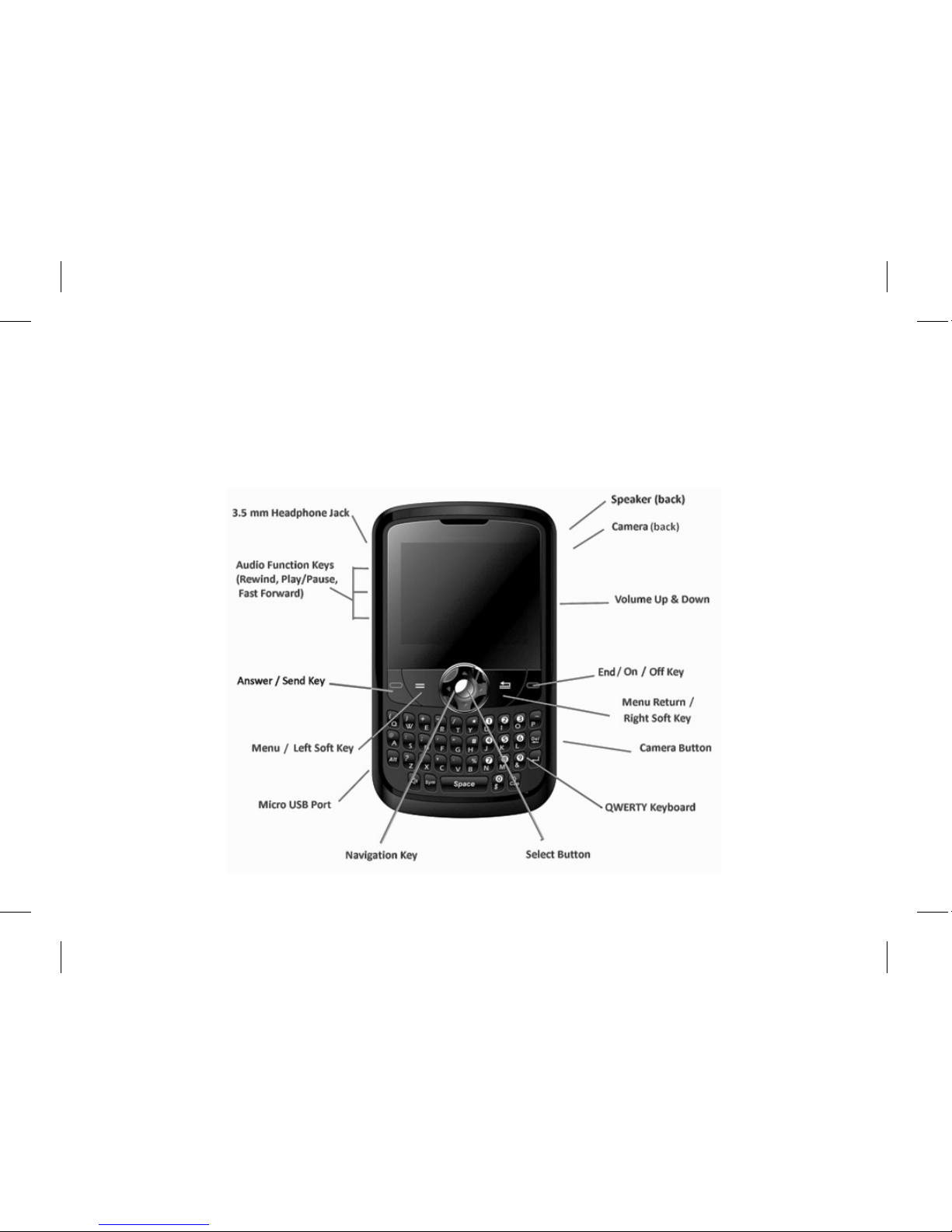
2. Look and Feel
9
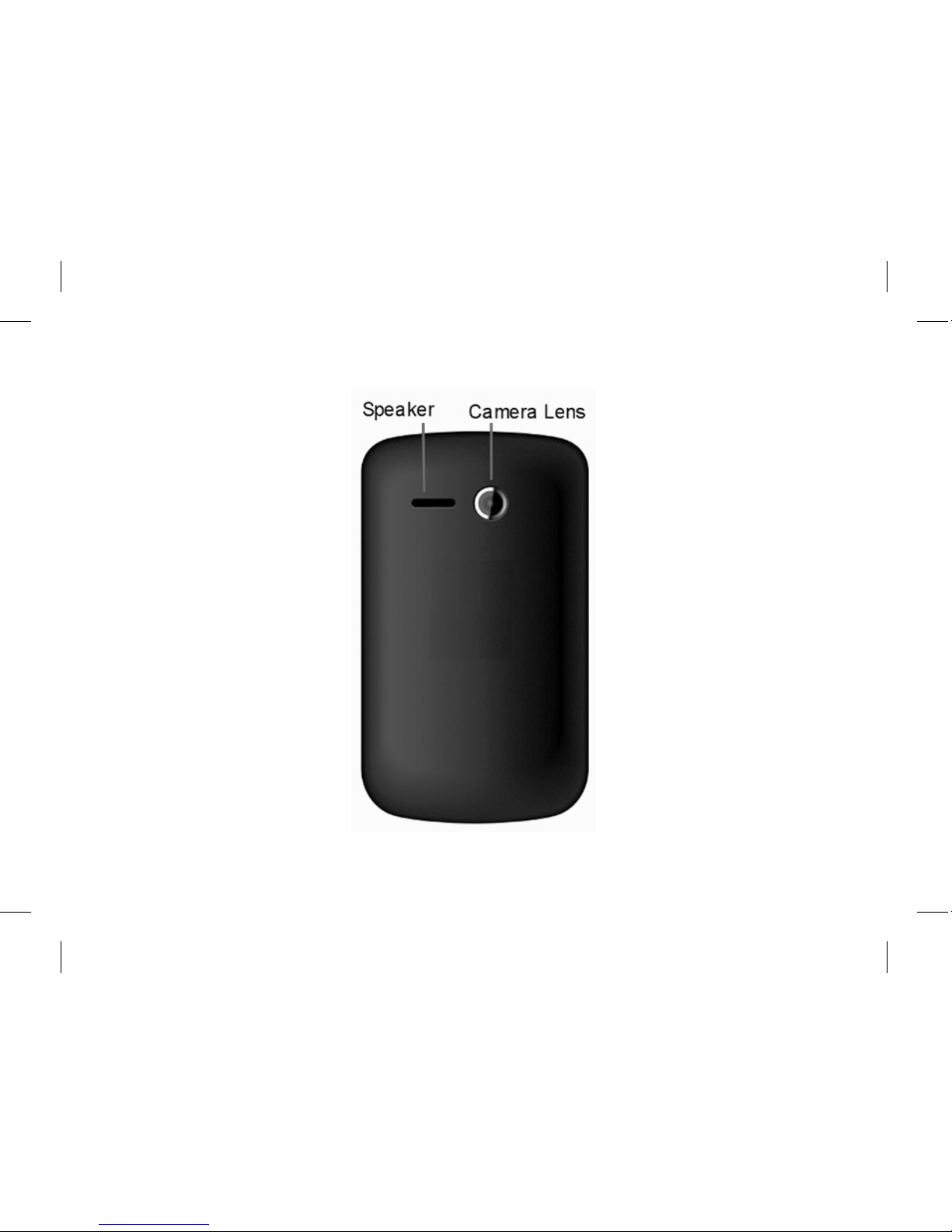
Back cover

10
Right side Left side
3. Geng Started
Box contents
• 1 phone
• 1 baery
• 1 microUSB wall charger
• 1 user manual
• 1 user quick start guide
Installing the baery
1. Remove the rear cover of the phone. There is a slot at the boom rear of the phone for a coin or ngernail.
2. Place the baery in the opening. Be sure that the contacts align between the phone and baery.
3. Replace the rear cover.
Table of contents
Languages:
Other UMX Cell Phone manuals


