TurnOnGreen EV700 User manual

User Guide
EV700
English | 2022

2
Safety Recommendations
Legal Notice
Safety Instructions
Connector Recommendations
Welcome to TurnOnGreen
Get to know your EV700
Charger LED Statuses
Using Your TOG EV700
Plug In and Go!
Adjusting Charger Activation Settings
TurnOnGreen App
Pair EV700 with App
Active Charge Screen
Default Charging
Swipe Card & App
Active Charge Screen
Stop Charging
Modifying the EV700
Adjust Amperage Settings
Schedule Charging
Changing “Conguration” Password
Updating The EV700
Assigning New RFID Cards
Maintenance
Troubleshooting
Contact Us
3
3
3
4
5
6
7
8
9
10
11
13
13
13
14
15
15
16
16
17
19
19
21
22
22
24
Table of Contents

3
3
3
3
4
5
6
7
8
9
10
11
13
13
13
14
15
15
16
16
17
19
19
21
22
22
24
The user must read and fully understand the safety instructions provided. Disregard of or
actions contrary to the safety information and instructions contained in this manual and
printed on the device may lead to electric shock, re and/or severe injury and either damage
to the vehicle or to the EV700 device. Any resulting damage from such actions is excluded
from the warranty. The installation of the EV700 device must be performed by a qualied
electrician in accordance with the perceptive regulation. The information provided in this
Installation Guide does not relieve the user of responsibility to follow all norms and standards
or local regulations that may apply. The EV700 Smart Charger device has been designed,
developed and manufactured to satisfy requirements, safety dispositions and norms in
accordance with the directives presented in the declaration of conformity.
This document is intended to be used as a reference guide for the operation of the charger.
The product images shown are for illustration purposes only and may not be an exact
representation of the product. EV700 reserves the right to make changes to the specications
and processes of the product and documentation at any time without prior notice
• Do not operate if physical defects such as cracking, breakage, corrosion, or other
damage are observed. In this case, please contact your distributor.
• Only an authorised specialist and qualied personnel may open, disassemble, repair,
alter or modify the EV700 device. Unauthorised modication of the EV700 equipment
makes manufacturer warranty void.
• Unauthorised modications or conversions are not allowed.
• Special precautions must be taken with electronic implants. Please contact your medical
device manufacturer to nd out the potential eects that the charging process may cause
to it.
• Do not delete any warning on the device, such as safety symbols, warning notices, rating
plates, identication plates or cable markings.
• Protect your EV700 device from any impact which it may be exposed.
• The charging station does not have its own power switch. Always respect local electricity
rules and regulations, as relevant.
• EV700 Smart Chargers can only be used under the operating parameters specied and
within -25ºC to 40ºC of ambient temperature.
• Do not use your EV700 charger under adverse climatic conditions that could aect the
vehicle or the EV700 device. Do not open the cover in the rain.
Safety Recommendations
Legal Notice
Safety Instructions

4
• Always check the charging cable and the contacts for damage and contamination
before use.
• Never use a damaged charging cable, the vehicle plug, or the infrastructure electrical
outlet to charge.
• Never use contacts that are dirty or wet.
• Only connect the connector to vehicle plug and infrastructure electrical outlets that are
protected against water, moisture and liquids.
• After stopping the charging process, the vehicle connector and the equipment plug can
be disconnected. Never use force to disconnect the vehicle connector from the inlet or
the equipment plug power outlet. Such dangerous activity can cause serious injuries or
even death.
• Depending on the charging station and the electric vehicle, the time to complete the
charging process and the duration of unlocking may vary.
• Some vehicles can be started with the charging cable connected. Be sure to unplug
before driving o.
• Do not use the charging cable with an extension cable or an adapter.
• If the connector emits smoke or begins to melt, never touch the charging cable. If
possible, stop the charging process. In any event, disconnect the power supply from the
EV700 device.
• Keep the charging cable out of the reach of children.
• Be careful with the connector, do not step on it or on the cable.
• The cable should NOT be tightened under ANY CIRCUMSTANCES while connected to
the vehicle.
Important information for the correct disposal of the product in accordance with Directive
2012/19/EC. At the end of its useful life, the product will not be disposed of as urban waste.
It must be taken to a collection center for special and dierentiated waste or to a distributor
that provides this service.
Recommendations

5
Congratulations on your purchase of the EV700
Level 2 Home Charger. We are on a mission to
provide environmentally friendly products and
personalized services that will help make green
energy technology a part of our everyday lives.
Together we can build a better environment for
future generations.
Welcome to TurnOnGreen.

6
Familiarzing yourself
with the EV700
Display Touchscreen
WiFi Status Indicator
Charging Plug
Plug Holster
RFID Reader
LED Status Indicator
Charging Chord
The EV700 is a Level 2 electric
vehicle charger for your home that
comes ready, right out of the box!
Once your EV700 is mounted and
powered properly, take some time to
understand the features of your new
electric vehicle charger.
7
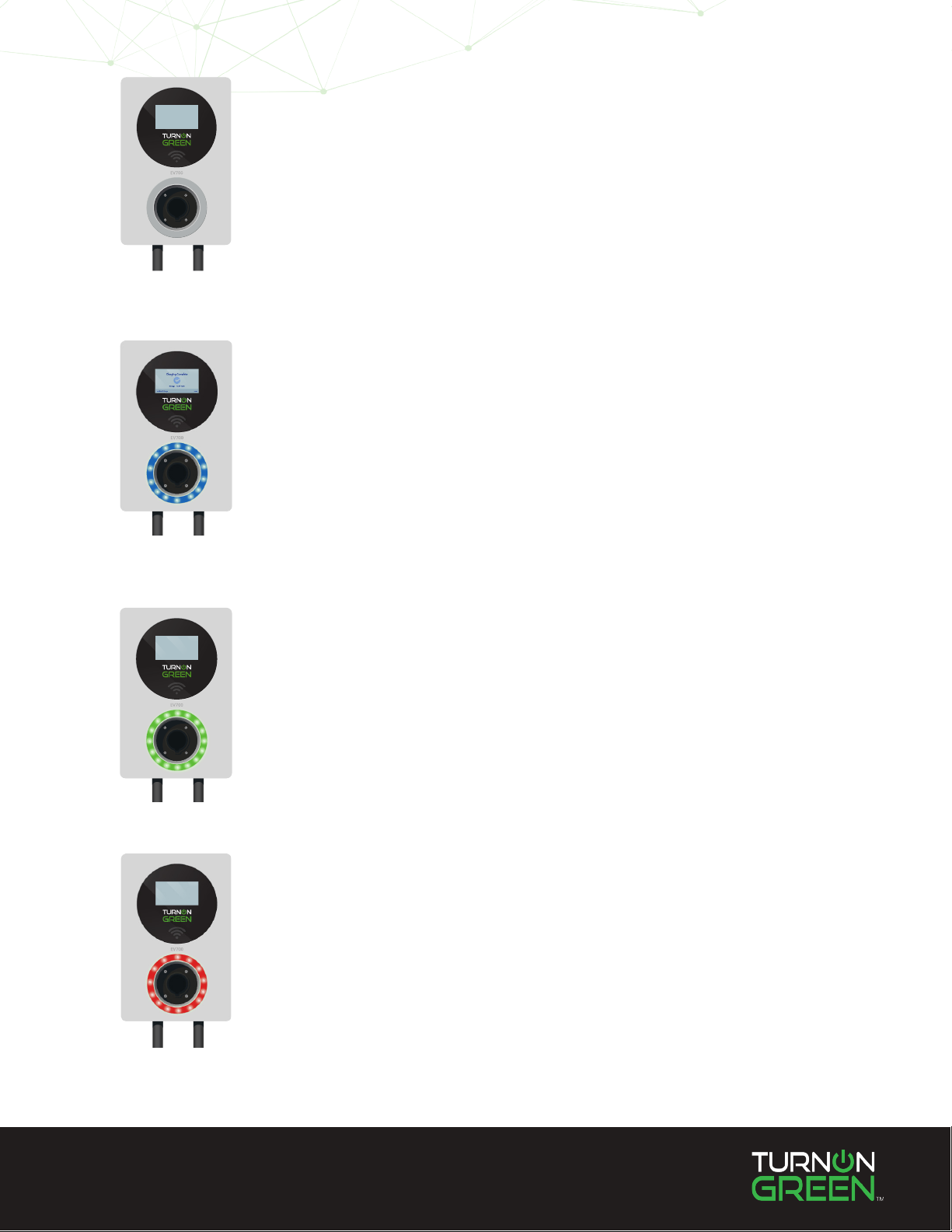
Off
Standy
Charging
If no light is eminating o the LED indicator, and the
touchscreen is not operational, the device is not receiving
power.
A blue light means the EV700 is on standby mode.
If the light is blinking green, your EV700 is currently
charging an electric vehicle.
Error
If the light is red, there is an error. Contact TurnOnGreen.

8
Using Your
TurnOnGreen
EV700

9
Once your TOG EV700 has been mounted properly and is connected to a NEMA 6-50 power outlet it is
ready to charge your electric vehicle. The default operating setting on the EV700 allows you to plug into
your electric vehicle and charge without any additional steps!
Plug your EV700 into your electric vehicle and add up to 30 miles of range to your EV per hour!
Plug-In and Go!

10
If you wish to set a dierent charge
initation function, follow the steps
below:
To alter settings on the EV700
you must enter the default
passcode on your device.
Touch the “Code Enter” bar to
place the cursor, and enter the
numbers below:
123456
Touch the checkmark on the
number pad to proceed.
From here you can change
the voltage settings of your
EV700, or the charge initiation
procedure from the default
plug-and-play to a dierent
option.
Select “Start Mode” to adjust
your charge initiation settings.
Select the gear icon at
the bottom left of the
touchscreen.
1
2
3
Adjusting Charger Activation Settings
Other manuals for EV700
1
Table of contents
Other TurnOnGreen Batteries Charger manuals