
TMI Products vk61 User manual

English
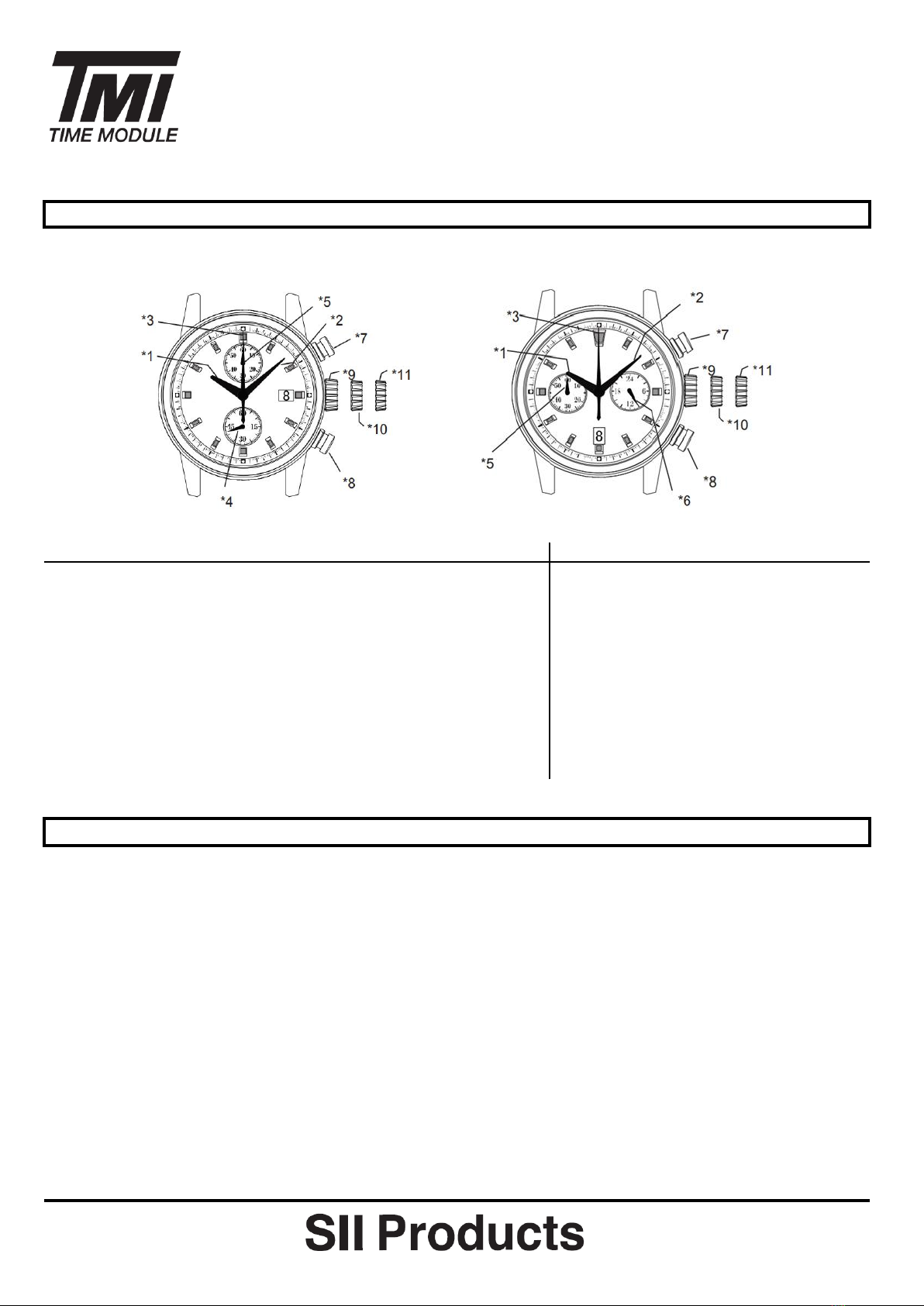
VK61 VK64
*1 : Hour hand O O
*2 : Minute hand O O
*3 : Center 1/5 chronograph second hand O O
*4 : Small second hand O (6H) X
*5 : Chronograph minute hand (60 minute) O (12H) O (9H)
*6 : 24 hour hand X O (3H)
*7 : Button A (START/ STOP) O O
*8 : Button B (RESET) O O
*9 : Crown at normal position O O
*10 : Crown at first position (Date setting) O O
*11 : Crown at second position (Time setting) O O
Set the time
1) Pull out the crown to the second click position.
2) Turn the crown to set hour and minute hand (Check that AM / PM is set correctly)
3) Push the crown back into the normal position.
* If the crown is pulled to the second position while the chronograph is started, the chronograph hands will
continue to move. This is not malfunction.
Set the date
1) Pull out the crown to the first click position.
2) Turn the crown clockwise for date setting
* Do not set the date between 9:00PM and 3:00AM, otherwise the day may not change properly. If it is
necessary to set the date during that time period, first change the time to any time outside it, set the date
and then reset the correct time.
3) Push the crown back into the normal position.
TIME SETTING
Operation Manual
VK61 / VK64
DISPLAY AND CROWN/ BUTTON OPERATION
[ VK61 ]
[ VK64 ]

English
Method 1
1) Set the crown to the normal position
2) Touch the AC terminal of circuit block and the switch spring with conductive
tweezers to reset the circuit.
3) The small second hand will move at two-second interval for 10 seconds as a
demonstration. (VK61 only)
Method 2
1) Pull out the crown to the second click position.
2) Press the button B for two seconds and release the button.
3) Push the crown back to the normal position.
4) The small second hand will move at two-second interval for 10 seconds as a demonstration (VK61 only)
* If the crown is operated within the 10 seconds, the two-second interval movement will not be activated
(VK61 only)
* It is not necessary to set the chronograph hands after the battery is exchanged. If the chronograph hand
positions are incorrect, follow below procedure all the chronograph hands will be reset to "0" position.
[ Standard measurement : e.g. 100m race ]
Press the buttons in the following order : A A B
*
The chronograph can measure up to 60 minutes and chronograph stops after a measurement for 60 minutes.
* After the maximum measurement time finished, to restart the chronograph function :
VK61 / VK64 : Press button A
*
During the chronograph operation, button B (reset) can be pushed. It will not cause any problem.
Operation Manual
VK61 / VK64
HOW TO RESET (AFTER BATTERY CHANGE)
Button A
Button A
Button B
(START)
(STOP)
(RESET)
HOW TO USE THE CHRONOGRAPH
START
STOP (Finish)
RESET
* Press button A to start the
chronograph. The
chronograph hands will start
moving.
(20 minutes 10 seconds)
* Press button B to reset the
chronograph. All the
chronograph hands will be
reset to "0" position.
* Press button A again to stop
the chronograph. The
chronograph hands stop to
indicate the elapsed time.

English
[ Accumulated elapsed time measurement : e.g. baseketball game ]
Press the buttons in the following order: A A/A… A B
START STOP / RESTART STOP RESET
* Restart and stop of the chronograph can be repeated as many times as necessary by pressing button A.
VK61 / VK64
(8 minute 40 seconds)
(20 minute 10 seconds)
Operation Manual

繁體中文
VK61 VK64
*1 : 時針 O O
*2 : 分針 O O
*3 : 中央秒錶1/5秒指針 O O
*4 : 小秒針 O (6H) X
*5 : 秒錶分針 (60分鐘) O (12H) O (9H)
*6 : 24小時指針 X O (3H)
*7 : 按鈕A (開始/停止秒錶) O O
*8 : 按鈕B (重設秒錶) O O
*9 : 錶冠於原位 O O
*10 : 錶冠於位置一(日曆設定) O O
*11 : 錶冠於位置二(時間設定) O O
設定時間
1) 拔出錶冠至位置二
2) 旋轉錶冠以設定時針和分針 (檢查是否正確設定上/下午時間)
3) 把錶冠推回原位
*當秒錶功能正運作時,把錶冠推出至位置二不會令秒錶指針停止運行,這並非機能失常
設定日期
1) 拔出錶冠至位置一
2) 順時針方向旋轉錶冠以調校日曆
*請勿在9:00PM 至3:00AM設定日期,否則,日曆轉換可能會出現異常。如須在該段時間設定日期,請先把時
間更改為上述時段以外的時間,再設定日期,然後重設正確時間
3) 把錶冠推回原位
時間設定
机芯操作手册
VK61 / VK64
時間顯示及錶冠/按鈕操作
[ VK61 ]
[ VK64 ]

繁體中文
方法一
1) 錶冠於原位
2) 以導電鑷子接觸電路板的"AC"端及按掣彈簧(即"正極片"),重設電路板
3) 小秒針會以每兩秒鐘走一格的方式運行十秒,表示重設完成 (VK61)
方法二
1) 拔出錶冠至位置二
2) 按下按鈕B兩秒, 然後釋放按鈕
3) 把錶冠推回原位
4) 小秒針會以每兩秒鐘走一格的方式運行十秒,表示重設完成 (VK61)
*在那十秒內操作錶冠的話,每兩秒鐘走一格的小秒針示範動作將不會被啟動 (VK61)
*更換電池後不用調校秒錶指針。如秒錶指針位置不正確,循以下步驟把它們重設回"0"位置
[ 一般計時記錄 : 例如100米賽跑 ]
循以下次序按下按鈕 : A A B
*秒錶的最大測時時限為60分鐘,時限過後秒錶停止運作
*在最大測時時限結束後,重新啟動秒錶功能:
VK61 / VK64 : 按下按鈕A
*在秒錶運作時,可以按下按鈕B(重設按鈕),這不會影響功能運作
机芯操作手册
VK61 / VK64
如何重設(更換電池後)
按鈕 A
按鈕 A
按鈕 B
(開始)
(停止)
(重設)
如何操作秒錶
開始
停止 (結束)
重設
* 按下按鈕A啟動秒錶功能。秒錶
指針會開始運作
(20 分 10 秒)
* 按下按鈕B,重設秒錶,所有秒
錶指針回歸"0"位置
* 再按下按鈕A,停止秒錶運作。
秒錶指針顯示結束時間

繁體中文
[ 累積時間記錄:例如籃球比賽 ]
循以下次序按下按鈕: AA/A… A B
開始 停止/重新開始 停止 重設
*可隨需要多次按下按鈕A以重新開始及停止秒錶功能
(8分40秒)
(20分10秒)
机芯操作手册
VK61 / VK64

简体中文
VK61 VK64
*1 : 时针 O O
*2 : 分针 O O
*3 : 中央秒表1/5秒指针 O O
*4 : 小秒针 O (6H) X
*5 : 秒表分针 (60分钟) O (12H) O (9H)
*6 : 24小时指针 X O (3H)
*7 : 按钮A (开始/停止秒表) O O
*8 : 按钮B (重设秒表) O O
*9 : 表冠于原位 O O
*10 : 表冠于位置一(日历设定) O O
*11 : 表冠于位置二(时间设定) O O
设定时间
1) 拔出表冠至位置二
2) 旋转表冠以设定时针和分针 (检查是否正确设定上/下午时间)
3) 把表冠推回原位
*当秒表功能正运作时,把表冠推出至位置二不会令秒表指针停止运行,这并非机能失常
设定日期
1) 拔出表冠至位置一
2) 顺时针方向旋转表冠以调校日历
*请勿在9:00PM 至3:00AM设定日期,否则,日历转换可能会出现异常。如须在该段时间设定日期,请先把时
间更改为上述时段以外的时间,再设定日期,然后重设正确时间
3) 把表冠推回原位
[ VK61 ]
[ VK64 ]
时间设定
机芯操作手册
VK61 / VK64
时间显示及表冠/按钮操作

简体中文
方法一
1) 表冠于原位
2) 以导电镊子接触电路板的"AC"端及按掣弹簧(即"正极片"),重设电路板
3) 小秒针会以每两秒钟走一格的方式运行十秒,表示重设完成 (VK61)
方法二
1) 拔出表冠至位置二
2) 按下按钮B两秒, 然后释放按钮
3) 把表冠推回原位
4) 小秒针会以每两秒钟走一格的方式运行十秒,表示重设完成 (VK61)
*在那十秒内操作表冠的话,每两秒钟走一格的小秒针示范动作将不会被启动 (VK61)
*更换电池后不用调校秒表指针。如秒表指针位置不正确,循以下步骤把它们重设回"0"位置
[ 一般计时记录 : 例如100米赛跑 ]
循以下次序按下按钮 : A A B
*秒表的最大测时时限为60分钟,时限过后秒表停止运作
*在最大测时时限结束后,重新启动秒表功能:
VK61 / VK64 : 按下按钮A
*在秒表运作时,可以按下按钮B(重设按钮),这不会影响功能运作
如何操作秒表
* 按下按钮A启动秒表功能。秒表
指针会开始运作
(20 分 10 秒)
* 按下按钮B,重设秒表,所有秒
表指针回归"0"位置
开始
停止 (结束)
重设
* 再按下按钮A,停止秒表运作。
秒表指针显示结束时间
机芯操作手册
VK61 / VK64
如何重设(更换电池后)
按钮 A
按钮 A
按钮 B
(开始)
(停止)
(重设)

简体中文
[ 累积时间记录:例如篮球比赛 ]
循以下次序按下按钮: AA/A… A B
开始 停止/重新开始 停止 重设
*可随需要多次按下按钮A以重新开始及停止秒表功能
(8分40秒)
(20分10秒)
机芯操作手册
VK61 / VK64
Spanish
VK61 VK64
*1 : Manecilla de las horas O O
*2 : Minutero O O
*3 : Segundero con Cronógrafo de 1/5 en el centro O O
*4 : Pequeño segundero O (6H) X
*5 : Minutero del Cronógrafo (60 minutos) O (12H) O (9H)
*6 : Manecilla de 24 horas X O (3H)
*7 : Botón A (INICIO/PARADA) O O
*8 : Botón B (REAJUSTE) O O
*9 : Corona en posición normal O O
*10 : Corona em primera posición (ajuste de Fecha) O O
*11 : Corona en segunda posición (Ajuste de la hora) O O
Ajuste de la Hora
1) Tire de la corona hasta oír un click en la segunda posición
2) Gire la corona para ajustar la hora y el minutero (Compruebe que tanto AM/PM estén ajustados
correctamente).
3) Vuelva a poner la corona a su posición normal.
*Si tira de la corona hacia la segunda posición mientras el cronógrafo está funcionando, las manecillas
del cronógrafo seguirán moviéndose. No significa que el aparato no funcione.
Ajuste la Fecha
1) Tire de la corona hasta oír un click en la primera posición
2) Gire la corona en sentido de las agujas del reloj para ajuste de la fecha
*No ajuste la fecha entre las 9:00PM y las 3:00AM ya que esto haría que el día no cambiara
correctamente. Si es necesario ajustar la fecha durante ese periodo, primero cambie la hora fuera de
este rango, ajuste la fecha y luego vuelva a poner la hora correcta.
3) Vuelva a poner la corona a su posición normal.
Ajuste de la Hora
INSTRUCCIONES DE OPERACIÓN
VK61 / VK64
Pantalla y Corona/Funcionamiento de los controles
[ VK61 ]
[ VK64 ]
Other manuals for vk61
3
This manual suits for next models
1
Table of contents
Languages:











