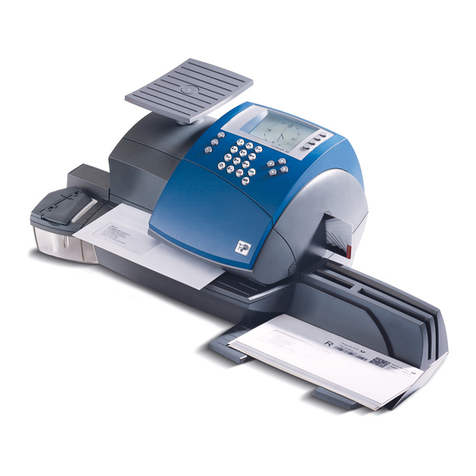
Thiele Streamfeeder EFS Pro User manual

Manual
EFS Pro

Part Number 904537
© 2016 Thiele Technologies, Inc. - Streamfeeder. All rights reserved.
No part of this publication may be reproduced, photocopied, stored on a retrieval system, or transmitted without the
express written consent of Thiele Technologies, Inc. - Streamfeeder.
Thiele Technologies, Inc. - Streamfeeder
315 27th Avenue NE
Minneapolis, MN 55418 USA
Tel:(763) 502-0000
Fax:(763) 502-0100
e-Mail: service@streamfeeder.com
Web: www.streamfeeder.com
Printed in the USA.

i
EFS Pro Manual
Contents
Before You Begin.................................................................................ii
Message Conventions ................................................................................................................................. ii
Safety ......................................................................................................................................................... iii
Specications .....................................................................................iv
Section 1: About the Machine .......................................................1
Section 2: Set Up ............................................................................3
Section 3: How to Operate ...........................................................10
Section 4: Troubleshooting .........................................................13
Section 5: Inspection and Care ...................................................15
Section 6: Mechanical Components ...........................................23
Section 7: Electrical Diagrams ....................................................43
Envelope Sealing System Parts Manual..........................................46

ii EFS Pro Manual
Message
Conventions
DANGER signies an action or specic equipment area that can result in
serious injury or death if proper precautions are not taken.
WARNING signies an action or specic equipment area that can result in
personal injury if proper precautions are not taken.
CAUTION signies an action or specic equipment area that can result in
equipment damage if proper precautions are not taken.
ELECTRICAL DANGER signies an action or specic equipment area that
can result in personal injury or death from an electrical hazard if proper pre-
cautions are not taken.
Before You Begin
TECHNICIAN
OPERATOR
TIP signies information that is provided to help minimize problems in the
installation or operation of the feeder.
NOTE provides useful additional information that the installer or operator
should be aware of to perform a certain task.
CHECK signies an action that should be reviewed by the operator before
proceeding.
IMPORTANT alerts the installer or operator to actions that can potentially
lead to problems or equipment damage if instructions are not followed prop-
erly.
TECHNICIAN indicates that a qualied technician should be alerted to the
corresponding tasks and information.
OPERATOR indicates that an operator should be alerted to the corresponding
tasks and information.
WARNING LABELS afxed to this product signify an action or specic
equipment area that can result in serious injury or death if proper precautions
are not taken.

iii
EFS Pro Manual
Make sure you thoroughly read this section to become familiar with
all the safety issues relating to the safe operation of this product.
Please read all of the warnings that follow to avoid possible injury.
Although Thiele-Streamfeeder has made every effort to incorporate
safety features in the design of this feeder, there are residual risks that
an installer or operator should be aware of to prevent personal injury.
Please read all of the cautions that follow to prevent damage to this
product. This product is built with the highest quality materials.
However, damage can occur if the system is not operated and cared for
within design guidelines as recommended by Thiele-Streamfeeder.
To insure proper machine operation make sure that all the safety de-
vices are installed properly and functioning. If the feeder has the me-
dia sensor on the side guides insure that these are properly installed.
Do not attempt to defeat a safety interlock or safety feature.
Equipment interior contains incoming 115 or 230VAC electrical
power. Bodily contact with these high voltages can cause electro-
cution, which can result in serious injury or death.
safetY
Danger
TECHNICIAN
OPERATOR

iv EFS Pro Manual
speCifiCations
Maximum Product Size: ............................. 10 in. W x 13 in. L (254 mm x 330 mm)*
Minimum Product Size: ............................. #9 envelope, 3-7/8 in. W x 8-7/8 in. L (98 mm x 225 mm)*
Min/Max Product Thickness: .................... .003 in. to .25 in. (.076 mm - 6.35 mm)
Belt Speed: ................................................... 1,800 in/min (46 m/min)
Utilities: ........................................................ 115vac, 50/60Hz, 3A
Weight: ......................................................... 90 lbs. (41 kg)
Warranty: .................................................... One year limited
*Short edge leading

v
EFS Pro Manual

1EFS Pro Manual
1About the Machine
Main Assemblies
Moistening
Device
Hold
Down
Counter
Back
Wedge Side
Guide
Separator
Table
Top
On/Off
Switch
Feed/Discharge
Carriages
Sealing
Roller
Assembly
Catch
Tray
Variable
Speed
Control
The EFS Pro is an automatic envelope ap sealer, reducing the time
and mess of manually sealing envelopes. From a #9 envelope to a
10x13, and with various aps, the EFS Pro will provide consistent
feeding and ap sealing quality. Convenient and easy to set-up, along
with quick changeover from one job to another.
Familiarizing yourself with names and locations of feeder parts and
adjustments will help to prepare you for initial setup.

2
EFS Pro Manual
Main Assemblies Feature Descriptions
Feature Description
Moistening Device Assembly is used to separate the ap from the envelope, allowing the ap
portion of the envelope to pass and to come in contact with moistening brush.
The assembly also can be manually adjusted with the use of a lever to allow
envelopes to bypass the opening mechanism.
Sealing Roller Assembly Final roller assembly (downstream from moistening device). Applies pressure
on moistened and sealed envelope, securing ap closure to envelope.
Counter Digital and resettable with the use of the reset button.
Variable Speed Control Adjustment of this potentiometer type control will change the feed speed of the
unit. Turning the knob counter-clockwise decreases speed; clockwise increas-
es speed.
On/Off Switch Rocker style switch toggles AC power On or Off.
Table Top One piece shell for mounting of all sub-assemblies and components.
Back Wedge Lifts the envelopes to keep them off the table top, reduces excessive contact
with the feed belts, and helps push the envelopes against the curvature of the
separator assembly.
Side Guide Allows lateral adjustment from side for different size envelopes.
Separator Single separator mounted above the carriage housing the feed belts. This
device provides a curvature to help preshingle stacked envelopes. When
properly adjusted, a clearance is created to help singulate and feed envelopes.
Non-Adjust Hold Down Provides the friction and motion necessary to pull envelopess away from the
separator assembly. Positioned above discharge belts. Assists in creating gap
between envelopes in discharge section.
Removable Feed/Discharge
Carriages
Houses the feed belts which provides the friction and motion necessary to pull
individual envelopes from the bottom of the stack and through the separator
assembly. Easy to remove for feed belt replacement.

3EFS Pro Manual
2Set Up
Prepare the machine for operation. To do so, set up the envelopes you
are going to be feeding. Do a test run with the envelopes to verify it is
set correctly before you begin cycling the feeder.
You will have to perform this procedure for envelopes you plan to feed.
When performing initial feeder adjustments
prior to operation, always make sure you turn
Off the main power switch and disconnect all
equipment from the electrical power source.
Failure to do so can expose you to a potential
start-up and moving parts which can cause
serious injury.
Do not attempt to make any adjustments while
the feeder and machine of application are
running. Failure to do so can expose you to
moving parts which can cause serious injury.
Do not wear loose clothing when operating the
feeder.
Avoid making adjustments with loose or
unsecured parts. This can potentially damage
parts.
STEP 1:
Separator Adjustment
Review
The separator assembly provides the curvature to help preshingle
envelopes and the proper gap to help the feed belts pull envelopes
through the separator assembly area — one at a time. The downward
pressure (or weight) of the stack in the hopper will provide the force to
help push the envelopes against the curvature of the separator assem-
bly, and help it contact the feed belts. This preshingling will allow the
separator assembly to efciently separate (and singulate) envelopes.
To achieve the optimum separation, you have to use the adjustment
knob to either increase (clockwise) or decrease (counterclockwise) the
gap between the separator assembly and the feed belts.
Objective
Adjust the separator assembly for minimum gap, with minimum
pressure on the envelopes. Your objective is to adjust the clearance so
that a single envelope passes without resistance. The optimum setting
should be a gap adjustment of 1.5 thickness of an envelope.
Keep in mind the separator assembly works with
the wedge to provide the proper lift, curvature of
the envelopes, and proper belt/envelopes contact
to separate and feed one piece at a time.
Hopper refers to the space where the envelope is
stacked (made up of the side guides).
Feeding problems will occur with either too
much envelopes in the hopper, or too large a
gap between the separator assembly and the
envelopes.
The adjustments you must make (in order) are as follows:
1: Separator adjustment
2: Side guide adjustment
3: Back wedge adjustment
4: Manual test to verify
5: Envelope Moistening Device Setup
Table of contents