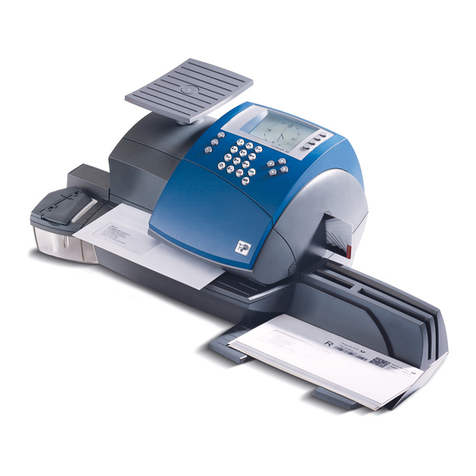
MSL JET PLUS 500 User manual

ORIG0382-1
4146675C/C
22/06/2010
1
WARNING!
Donotunderanycircumstancesattempttoremovethemachine
coversorattempttorepairtheMSLJetPlus400/500.Thereareno
operatorserviceablepartsthereunder.
TheMSLJETPLUS400/500productislicensedforuseunderthe
conditionsof theRoyal Mail.This licenseis issuedsubject tothe
product being secure at all times. Any removal of covers or dis-
assemblyoftheproductwillresultinthelicensebeingrevokedand
mayresultintheRoyalMailrequestingyoursuppliertoremovethe
productfromuse.
TheinkcartridgesystemusedwithintheMSLJETPLUS400/500
contains Royal Mail approved ink. This cartridge should not be
tampered with in any way or the use of non approved inks be
undertaken.ThiswillbreachanyRoyalMaillicenceagreementon
the product and may result in the Royal Mail requesting your
suppliertoremovetheproductfromuse.
EC DIRECTIVE 1999/5/EC
This Franking Machine is in compliance with the Essential
Requirements and other provisions of Directive 1999/5/EC. A full
copyofthisDeclarationmaybeobtainedbycontactingyoursupplier.
MODEM APPROVAL REQUIREMENTS
Thisequipmentcontainsamodemwhichhasbeenapproved
inaccordancewithCouncilDecision98/482/WC-CTR21for
pan-EuropeansingleterminalconnectiontothePublicSwitched
TelephoneNetwork(PSTN). However,duetodifferencesbetween
individual PSTNs provided in different countries, the approval
doesnot,ofitself,giveanunconditionalassuranceofsuccessful
operationoneveryPSTNnetworkterminationpoint.
Themodemisdesignedtoworkonanaloguetelephonelinesonly.
In the event of problems, you should contact your equipment
supplierinthefirstinstance.

2
ORIG0382-2
4146675C/C
22/06/2010
INSTALLATION
Themainsplugonthisequipmentisintendedtoserveasthedevice
forisolationofthemainssupply. Theequipmentshouldbeinstalled
incloseproximitytoeasilyaccessiblepowersupplyandtelephone
sockets.IntheUKthisplugisfittedwitha5Afuse,onlyreplacewith
afuseofthe samerating.
WARNING: FOR SAFETY THIS EQUIPMENT MUST BE
EARTHED
The MSL JET PLUS 400/500 Franking Machines have been
designedtomeetthesafetyrequirementsofIECEN60950. The
peripheralinterfacesmeettheSELVrequirementsofthatstan-
dard,thereforeinordertomaintainthelevelofsafetyprovidedby
the MSL JET PLUS 400/500, the interface of any equipment
connected to the MSL JET PLUS 400/500 interfaces must also
meet the SELV requirements of IEC EN 60950.

ORIG0382-3
4146675C/C
22/06/2010
3
INTRODUCTION
CongratulationsonchoosingtheMSLJETPLUS400/500franking
system.TheMSLJETPLUS400/500istheresultofexpertiseand
innovativecapabilitiesand,usinginkjettechnology,itwillintegrate
intoyourworking environmentto enhanceyour mailprocessing
operation.
The MSL JET PLUS 400/500 has many capabilities that will be
importanttoyourbusiness:
As well as being productive (up to 5700 items per hour), the
MSL JET PLUS 400/500 is designed to be a user friendly
machinethatcanfitintoanyworkingenvironmentwithitsinnovative
and attractive design, simple user settings and very low noise
level. The high volume capacity and sealed inker makes it easy
andsafetohandle,andtheuserinterfaceisparticularlyclearwith
agraphic interface and5 memories to storefavourite jobs.
TheMSLJETPLUS400/500isadaptableandassuchcanhandle
manydifferenttypesofmailupto10mmthick.Theoptionalfeeder
can be used to process, in a continuous cycle, items of sizes
rangingfromDLtoC5sizeandupto10mmthickness.Forthicker
mail items or packages, adhesive labels can be automatically
dispensed.
TheMSLJETPLUS400/500isconnectable.Itcanexchangedata
withscalesandRS232serialprintersinordertoprovideoptimal
mailprocessingandreporting.
Finally,theMSLJET PLUS400/500isa uniquecommunication
toolfor your company.Its high qualityprinting combinedwith its
integratedlibraryofmessage/slogans,minidiesandfreeformat
textwillaffordyouextratoolstoenhanceyourcompany’simage
andtheimpactofyourmail.

4
ORIG0382-4
4146675C/C
22/06/2010

ORIG0382-5
4146675C/C
22/06/2010
5
CONTENTS
1. FRANKING FACTS.................................................................9
2. GENERAL SPECIFICATIONS .............................................12
3. INSTALLATION.....................................................................13
3.1 Introduction............................................................. 13
3.2 Frankingmachine................................................... 13
3.2.1 AttachthePlatform Infillto theHand Feed
Platform ......................................................... 13
3.2.2 AttachthePlatformInfilltotheAutofeed(Option) 14
3.2.3 Attachthe MSL JETPLUS 400/500 tothe Hand
FeedPlatform orAutofeed ............................. 14
3.2.4 WeighPlatform .............................................. 15
3.2.5 MachineConnections .................................... 16
3.2.6 PositionReceivingTray.................................. 18
3.2.7 Fillthe Label Hopper...................................... 18
3.3 Enteringactivationcodes ....................................... 19
4. CONTROLS AND FEATURES.............................................25
4.1 Introduction............................................................. 25
4.2 Machine ................................................................. 26
4.2.1 DisplayPanel................................................. 28
2.2.2 FunctionKeys ................................................ 29
5. FRANKING YOUR MAIL ......................................................30
5.1 Introduction............................................................. 30
5.2 Gettingstarted........................................................ 31
5.2.1 Log On (Entering UserMode) ........................ 31
5.2.2 DepartmentalOperation................................. 32
5.2.3 How To Select a Postage Value ..................... 33
5.2.4 Low Credit ..................................................... 34
5.2.5 InsufficientCredit ........................................... 34
5.2.6 HighValue Selection...................................... 35
5.2.7 FrankinganEnvelope .................................... 36

6
ORIG0382-6
4146675C/C
22/06/2010
5.2.8 ToChange aDepartment ............................... 36
5.2.9 ToLog Off ...................................................... 37
6. FRANKING WITH AUTOFEED ............................................38
7. FRANKING LABELS ............................................................40
7.1 Filling the Label Dispenser ..................................... 40
7.2 Printing a Label ...................................................... 41
8. FRANKING WITH WEIGH PLATFORM...............................43
8.1 WeighPlatform Preparation ................................... 43
8.2 HowdoI calculatethe correct postageand rate? .... 44
8.3 Usingdifferentialweighing (optional) ...................... 47
9. PRINTING OPTIONS...........................................................49
9.1 WhatcanI print?..................................................... 49
9.2 Printmodeselection............................................... 50
9.3 Modifyingtheimprint .............................................. 51
9.3.1 Choosing a Slogan, Mini Die or Text............... 51
9.3.2 DateAdvance (for Pre Dated Mail)................. 52
10. MAINTAINING PRINT QUALITY..........................................54
10.1 Cleaningthe InkCartridge ...................................... 54
10.2 MakingaTest Print ................................................. 55
10.3 LowInk ................................................................... 56
10.4 NoInk..................................................................... 56
10.5 Replacingan Ink Cartridge ..................................... 57
11. METER REGISTERS...........................................................60
11.1 Selection ................................................................ 60
11.2 Printing aRegister.................................................. 61
11.3 PrintingwithExternal Printer ................................... 62
12. CLEARING MAIL PATH........................................................63
13. CREDIFON RECREDITING ................................................64
13.1 Remotecredit setting ............................................. 64
13.2 ‘INSPECTIONDUE -RECREDIT’ CallCredifon
Procedure .............................................................. 66

ORIG0382-7
4146675C/C
22/06/2010
7
13.3 Unusedor SpoiltImpressions ................................. 67
13.4 Application fora new CredifonPIN ......................... 67
13.5 Credifon Credit Controls......................................... 67
14. MEMORY FUNCTIONS .......................................................68
14.1 SavingaMemory Function ..................................... 68
14.2 RecallingaMemory Function.................................. 69
15. SUPERVISOR SETTINGS...................................................70
15.1 Introduction............................................................. 70
15.2 Entryto supervisormode ........................................ 71
15.3 Security & Dept ...................................................... 72
15.3.1 ChangingtheUserPIN ............................. 74
15.3.2 Settingthe UserStatus................................... 74
15.3.3 ToAssigna Department................................. 75
15.4 MSLJET PLUS400/500 machinesetup menu ....... 79
15.5 Texts....................................................................... 86
15.6 MemoryCards ....................................................... 88
15.6.1 How To Load Data Using a Memory Card ...... 88
15.6.2 How To Replace Data Using a Memory Card . 89
15.7 Reports .................................................................. 90
15.7.1 TypicalReports .............................................. 90
15.7.2 Printinga Report............................................ 90
15.7.3 Settingthe ReportDestination ....................... 92
15.7.4 PrintingwithExternal Printer........................... 92
16. TROUBLE SHOOTING .......................................................94
16.1 Clearing amail jamfrom the autofeeder ................. 96
16.2 Clearing error messages........................................ 96
17. QUICK REFERENCE GUIDE ..............................................97

8
ORIG0382-8
4146675C/C
22/06/2010

ORIG0382-9
4146675C/C
22/06/2010
9Frankingfacts
1. FRANKING FACTS
QUESTIONS AND ANSWERS
How does franking differ from stamps?
YourMSLJETPLUS400/500frankingmachinecontainsameter,
whichisasecurestoreofpostagecreditandretainsarecordofthe
postageyouuse,andaprintingmechanism. Themarkprintedon
theenvelopeorlabelrepresentstheamountofpostagerequired
fortheitem,thedateandtownofposting. Itmakesyourmaillook
professional,andcanincludeaneffectiveadvertorotherprinted
information.
Your franked mail should be banded according to service if
necessary and usually enclosed in a colour-coded mail pouch
obtainable free, from the Royal Mail Sales Centre on 08457
950950. Mailmustbepostedonthedateshownontheenvelope
orlabel.
Where can I post franked mail?
Youhaveseveralchoicesofplacestopostyourmail.
1.Inanybusinesspostbox. Thereareabout1000locatedallover
theUK,forthelocationofyournearestboxcalltheRoyalMailSales
Centre on 08457 950950.
2. In a normal posting box you have nominated to your local
collectingoffice.
Youmustencloseyourmailinalate-postingenvelope;thesecan
beorderedfromyoursupplier;
3.AtyourlocalPostOfficeCounter;or
4. At some local sorting offices;
5.ByRoyalMailcollection-theremaybeachargeforthis,contact
the Royal Mail Sales Centre on 08457 950950.

10
ORIG0382-10
4146675C/C
22/06/2010
Frankingfacts
What mail classes can be franked?
Youcanuseyourfrankingmachinetosendouteverytypeofinland
and international mail including add-on services and guaranteed
services(someguaranteedserviceswillrequireanextrastickeron
theenvelope,forexampleRecordedDelivery).
I have franked my mail with the wrong date, what can I
do?
YourMSLJETPLUS400/500automaticallychangesthedateeach
day, so the danger of franking with the wrong date should be
minimised. If, however, you have the wrong date on your mail,
simplysetthefrankingmachinetozerovalueandre-frankyourmail
onthereverseoftheenvelopewiththecorrectdate.
I have franked my mail with the wrong value, what can I
do?
1.Ifyouhaveputtoolittlevalueontheenvelope,setyourfranking
machinetoavaluerepresentingthedifferencebetweenyourfrank
andthecorrectpostagevalue. Frankthisvalueonalabelandaffix
adjacenttotheoriginalfrankedvalue.
2.Ifyouhavefrankedyourenvelopewithtoomuchpostage,don’t
worry. Startagainwithanewenvelope,butretaintheoldenvelope
withthefrankedimpressionclearlyvisible. ContacttheRoyalMail
SalesCentreon08457950950toarrangearefund. Providedthat
thefrankingislegible,thefacevalue(less5%)willberefunded.
This manual suits for next models
1
Table of contents
Other MSL Postal Equipment manuals