
Tersano iClean PRO User manual
IMPORTANT SAFETY INSTRUCTIONS.
READ THESE INSTRUCTIONS COMPLETELY.
SAVE THESE INSTRUCTIONS FOR FUTURE REFERENCE.
QUESTIONS OR CONCERNS
Contact Tersano at 800-727-8835 or +1 519 737 7588
with questions or concerns about your iClean PRO.
Product may vary slightly from illustrations enclosed in this use and care guide.
EPA Est. No.: 93508-CHN-1
PREPARATION
IMPORTANT:
Familiarize yourself
with your new
iClean PRO.
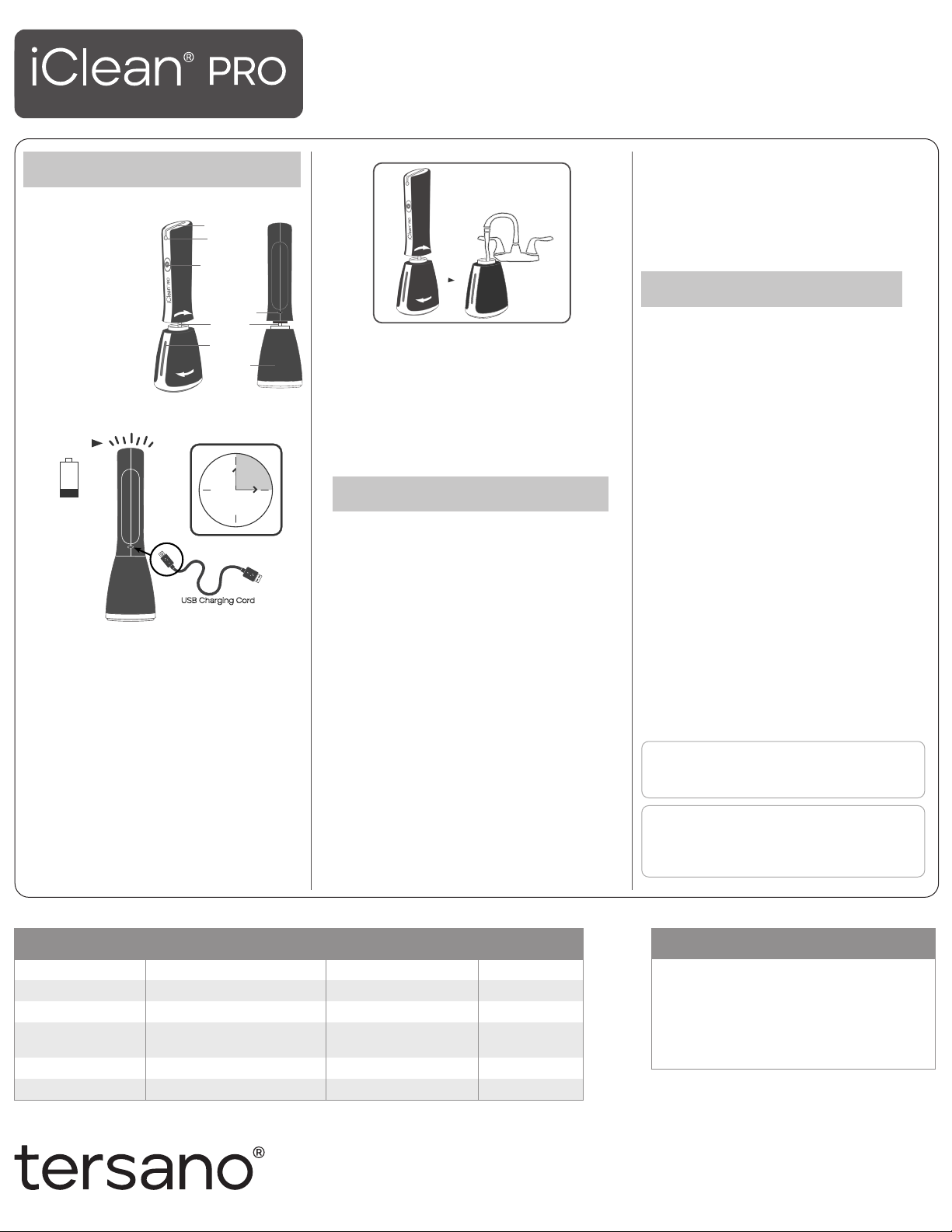
Your iClean PRO
kit includes:
iClean PRO
device
USB charging
cord
Instruction sheet
Gift box
CHARGE
The charging port is located on the back of the
iClean PRO.
Connect the USB charging cord to the device.
Plug the other end of the charging cord into a
USB outlet or through a USB power adapter (not
included) then into a standard electrical outlet.
A slowly flashing red light on top indicates
charging is taking place.
Charging is complete when a blue light on
top flashes.
Unplug the charging cord from the outlet
and disconnect the charger from the iClean.
Note: If iClean PRO does not operate when
activation button is pressed, the iClean PRO needs
to be recharged. iClean PRO will not operate during
the charging process.
FILL
Turn reservoir on base counter-clockwise and
remove from iClean PRO.
Fill reservoir with cold tap water ONLY.
Reattach reservoir to iClean PRO and turn
clockwise to fasten tightly.
Fill with tap water ONLY.
Do NOT add chemicals or soap.
Do not submerge under water.
USE
PREP
To prep the pump, press activation button on
front of iClean PRO and spray through 2-3 full
reservoirs until you see a steady stream flow.
INDICATORS
When activation button is pressed, a continuous
blue light on top indicates iClean PRO is
producing aqueous ozone.
A continuous red light on top indicates
reservoir is empty.
CLEAN
Press activation button on front of iClean PRO to
wet surface to be cleaned.
Wipe surface dry with a cotton, microfiber, or
paper textile.
Note: no need to wipe completely dry – residual
water will evaporate without streaking.
SANITIZE
Kill germs only on hard, non-porous surfaces.
Clean surface with the iClean PRO.
Press button and continuously spray surface
with aqueous ozone.
Wipe surface dry with any clean cloth.
CARE
RECHARGING
It is not necessary to drain battery completely
before recharging.
ONLY use charger supplied with iClean mini kit.
MAINTENANCE
To maintain consistent performance, follow these
care instructions.
When iClean PRO has not been used for more
than 5 days, fill reservoir completely, press
activation button, and spray until reservoir is
empty. Then refill reservoir and iClean PRO is
ready for use again.
Use only attachments and replacement parts
sold or recommended by manufacturer.
iClean PRO is NOT dishwasher safe.
iClean PRO is not a toy. Supervision required
when children present.
STORAGE
Empty water from reservoir. Contents of reservoir
are safe for drain disposal.
Store upright at room temperature.
Do not dispose of device or battery in household
trash. Dispose of properly. Contact Tersano with
questions.
Store upright and indoors above 40°.
RED
hours
3
USB Charging Cord
Charging takes up to
3 hours.
Indicator light
Spray nozzle
Activation button
Charging port
Waterpipe
Water tank
Water level
window
PRODUCT DESCRIPTION
iClean PRO Aqueous ozone Colour Dark blue
Model LQFC300 Water Quality Clean tap water
Battery 7.4V Li-ion Water Temperature 4-40°C
USB-C Charging Cable Connect to USB outlet/adapter
5VDC, ≥1A Net Weight 364g
Dimension 100 x 80 x 270mm Tank Capacity 350ml
Charging Time Up to 3 hours O3
Water Concentration up to 2.5 ppm
CAUTION
For first time usage, charge for 4 hours
and then spray at least one tank of water
to activate the unit in order to achieve the
normal concentration value of O water.
Do not spray directly into the eyes.
Avoid flushing the unit with water.
www.tersano.com
TROUBLESHOOTING TIP
Make sure to prep the pump by spraying through
2-3 full reservoirs.
REV. MAY 2021
WARRANTY
The Limited Warranty is valid for one year from the
date of your purchase of the Product as shown by
the sales receipt. Details on website: tersano.com
US and International Patents and Patent Pending.
SAO®, iClean®, and Tersano® are registered trademarks of Tersano Inc.
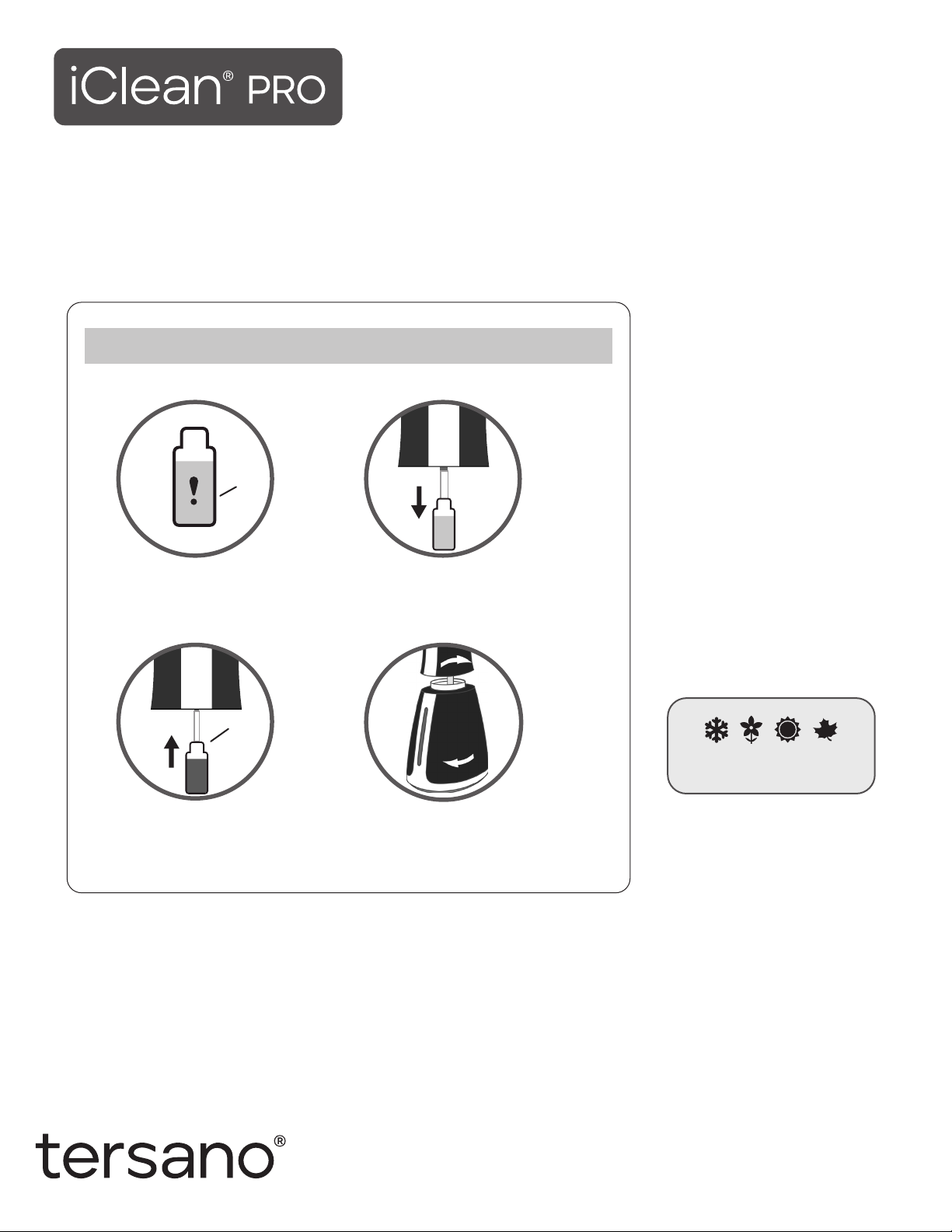
Replace cartridge every
3 months (seasonally).
REPLACEMENT SAO®CARTRIDGES
For optimum cleaning and sanitizing performance, change cartridge seasonally (no less than every three months).
One cartridge lasts over 1,000 sprays.
Product may vary slightly from illustrations enclosed in this use and care guide.
CHANGING YOUR ICLEAN®PRO CARTRIDGE
4. Replace reservoir.
3. Remove protective tube from
new replacement cartridge and
slide onto long hose attached
to notch in iClean PRO.
1. When cartridge window changes
orange to red or purple to amber,
time to replace.
2. Open reservoir, pull down old
cartridge to disengage.
Red or
amber
New
QUESTIONS OR CONCERNS
Contact Tersano at 800-727-8835 or +1 519 737 7588
with questions or concerns about your iClean PRO.
www.tersano.com
IMPORTANT SAFETY INSTRUCTIONS.
READ THESE INSTRUCTIONS COMPLETELY.
SAVE THESE INSTRUCTIONS FOR FUTURE REFERENCE.
This manual suits for next models
1


