
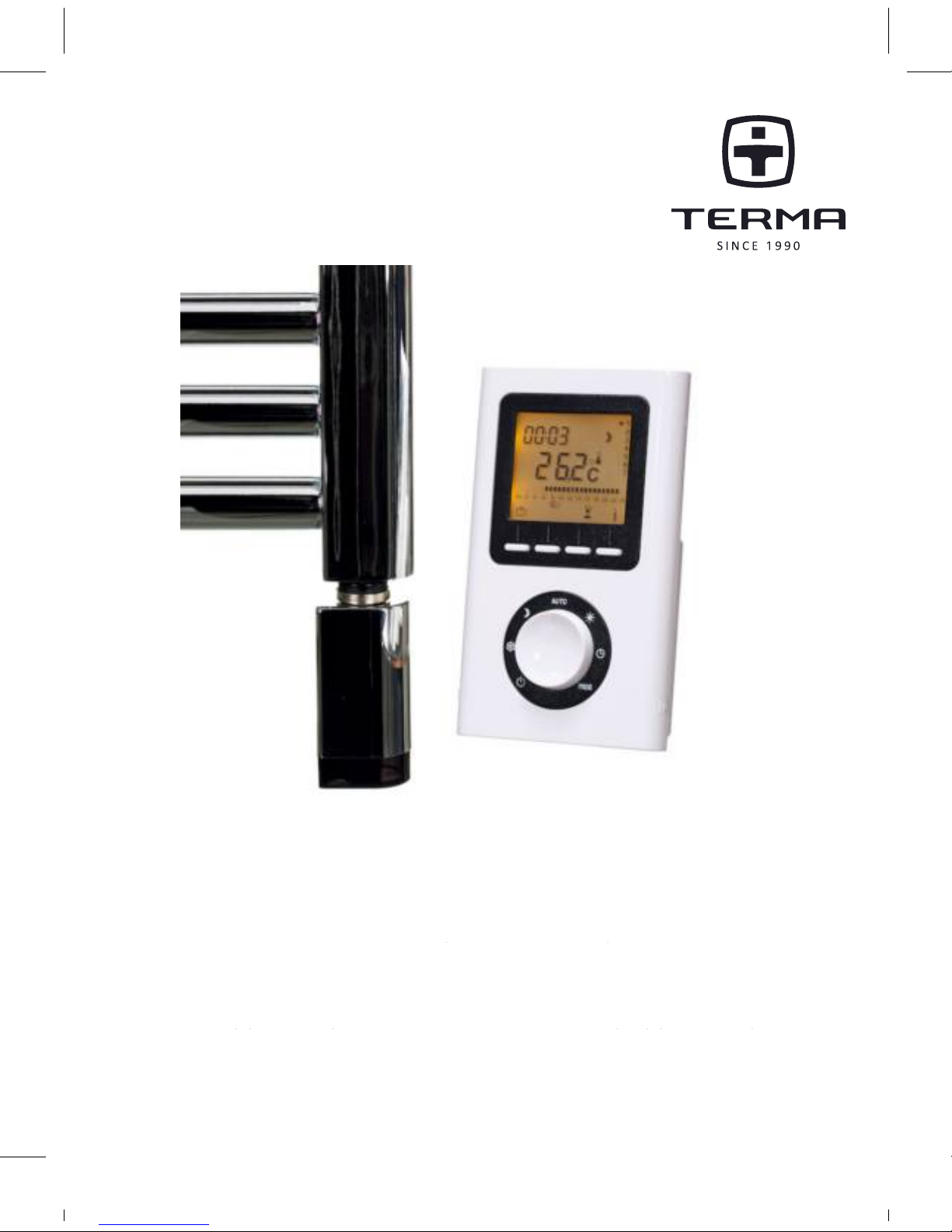
TERMA TT-IR User manual
FRENDE PL RU
DE: IR-FERNSTEUERUNG (WOCHENTIMER)
EN: INFRARED PROGRAMMABLE THERMOSTAT
FR: THERMOSTAT PROGRAMMABLE INFRA-ROUGE
PL: PROGRAMATOR ZDALNY (TYGODNIOWY)
RU: ДИСТАНЦИОННЫЙПРОГРАММАТОР(НЕДЕЛЬНЫЙ)
User Manual TT-IR
Programmable Towel Radiator Manual
Page 1
TT-IR Manual

21
Contents
Descripon.......................................................22
Locaon............................................................23
Mounngs........................................................ 24
Starngup........................................................25
Returntotheinialsengs ............................ 27
TimeSeng .....................................................28
Sengthetemperatures(set-points)............. 28
Programming ...................................................29
Automacmode ..............................................32
Absence mode .................................................33
Manual mode...................................................34
Shutdown mode...............................................35
Changingthebaeries.....................................36
12
Page 1
....................................2
.........................................3
......................................4
......................................5
.................6
....................................7
.....8
...................................9
..............................12
.................................13
...................................14
................................15
.........................16
Charachteristics
Contents
Description....................................................... 2
Location............................................................ 3
Mountings........................................................ 4
Starting up........................................................ 5
Return to the initial settings............................ 6
Time Setting..................................................... 7
Setting the temperatures (set-points)............. 8
Programming ................................................... 9
Automatic mode .............................................. 12
Absence mode ................................................. 13
Manual mode................................................... 14
Shutdown mode............................................... 15
Changing the batteries..................................... 16
Characteristic’s ................................................ 36
Description....................................................... 2
Location............................................................ 3
Mountings........................................................ 4
Starting up........................................................ 5
Return to the initial settings............................ 6
Time Setting..................................................... 7
Setting the temperatures (set-points)............. 8
Programming ................................................... 9
Automatic mode .............................................. 12
Absence mode ................................................. 13
Manual mode................................................... 14
Shutdown mode............................................... 15
Changing the batteries..................................... 16
Characteristic’s ................................................ 36
Contents
Description....................................................... 2
Location............................................................ 3
Mountings........................................................ 4
Starting up........................................................ 5
Return to the initial settings............................ 6
Time Setting..................................................... 7
Setting the temperatures (set-points)............. 8
Programming ................................................... 9
Automatic mode .............................................. 12
Absence mode ................................................. 13
Manual mode................................................... 14
Shutdown mode............................................... 15
Changing the batteries..................................... 16
Characteristic’s ................................................ 17
2
3
4
5
6
7
8
9
12
13
14
15
16
17
22
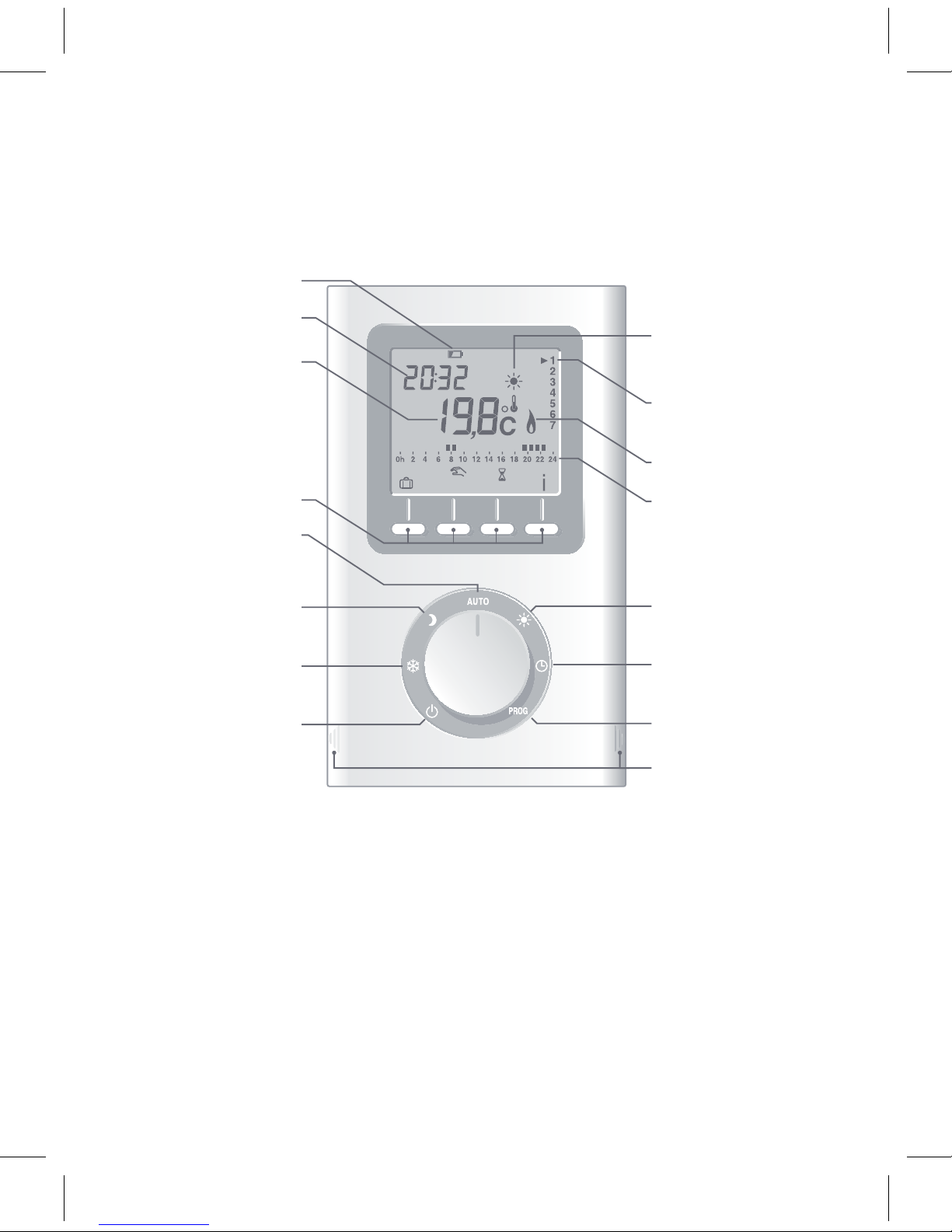
Descripon
Baery level
indicator
Current mode
(e.g. comfort)
Temperature
(set or
measured) Current day
Adjustment
buons
Heang demand
mode
Automac
mode
Program
prole
Economy Comfort
Frost Protecon Time
seng
Shutdown Programming
Cover
opening
marks
Time
Page 2
Page 2
23
Locaon
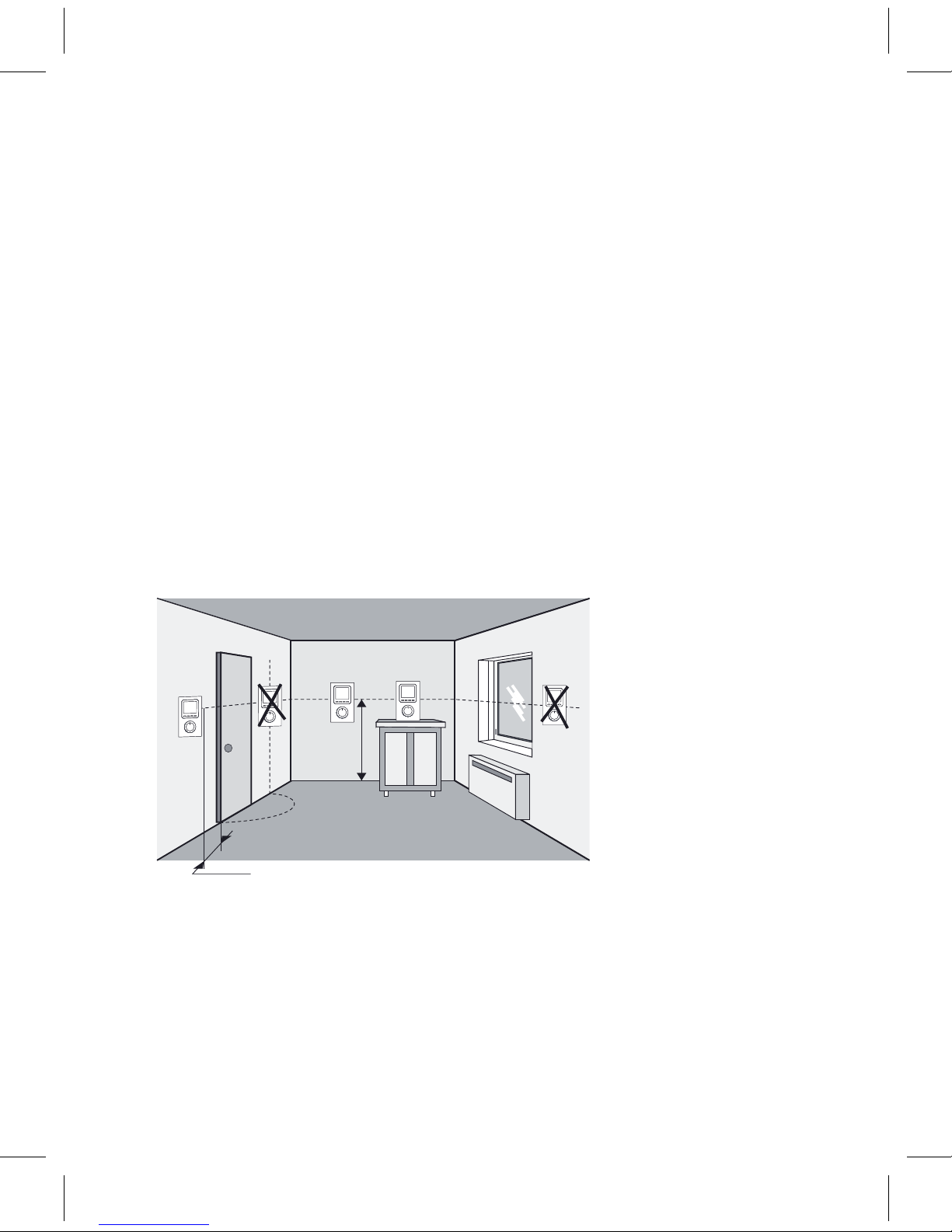
Tocontroltheheang,thethermostatmustmeasurethemostrepre-
sentaveroomtemperatureinyourhome.Asthetemperaturemeasure-
mentprobeisinthetransmierunit,youmustplacetheunit:
– wall-mounted or placed on a shelf or accessible furniture at a height of
1.50 m,
–awayfromheatsources(replaces,sunlight)anddraughts(windows,
doors),
Beforemounnginthenalposion,ensurenoobjectcanblockthe
transmissionbetweenthetransmierandtheradiator’sreceiver.
wall-mounted
approx.
height
1.50 m
placed on
furniture
min. 20 cm
IMPORTANT:
Do not install the
thermostat on
a wall in contact with
the outside or in an
unheated room
(e.g. garage, etc.).
Page 3
Page 3
24
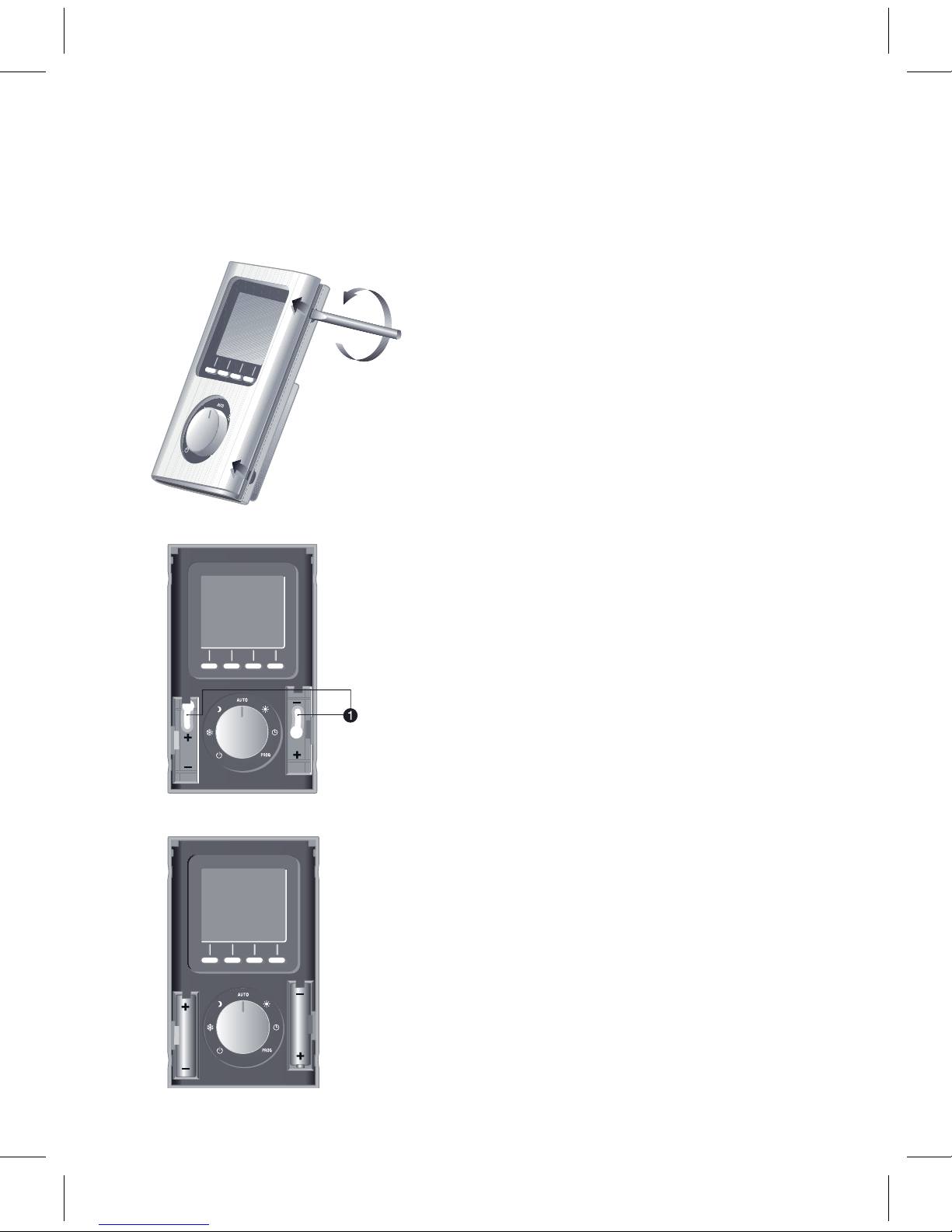
•WallmounngSecurethether-
mostat using the screws and pegs
ortontoaush-mountedbox
(❶,distancebetweencentres
60 mm).
•Liothecoverbyusing
ascrewdriver.Usethescrew-
drivertoremovethebaeries
supplied from the unit.
•Fitthebaeriesback,ensuring
thattheyarecorrectlyed.
•Placethecoverbackonthe
thermostat.
Mounngs
Page 4
Page 4
25
Starng up
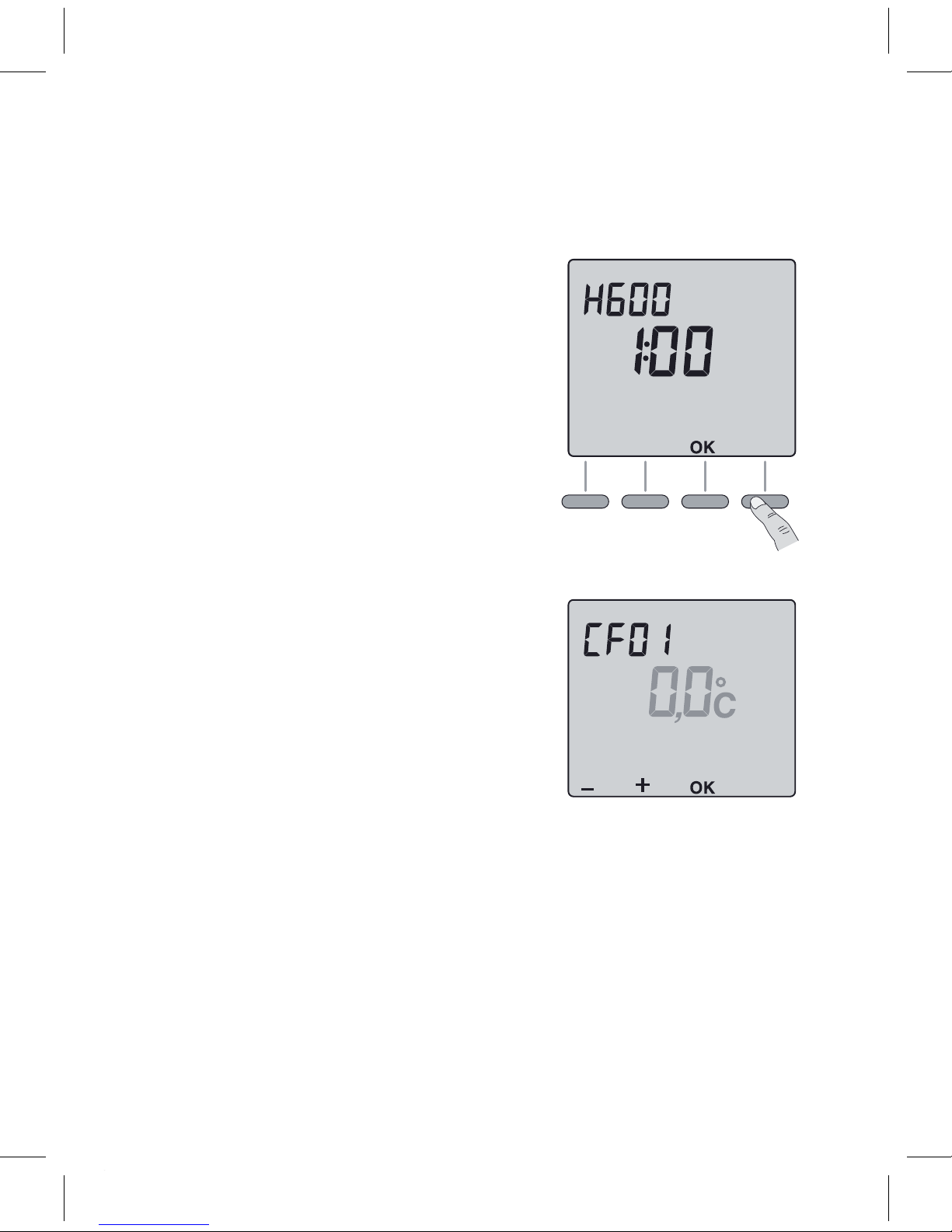
Turn the knob to Shutdown and press the
right-handbuonfor5secondsunlH601
(maintenancemenureservedforthe
installer).
Press OK.
The screen displays CF01.
CF01 – Correcon of room temperature
measurement.
Ifthereisadierencebetweenthetempera-
ture noted (thermometer) and the tempera-
ture measured and displayed by the unit, the
menu acts on the measurement of the probe
soastocompensateforthisdierence(from
-4° Cto+4° Cinstepsof0.1° C).
Press +or –to make your choice, OK to
conrmitandgotothenextmenu.
5 sec.
Page 5
Page 5
5
Page 5
26
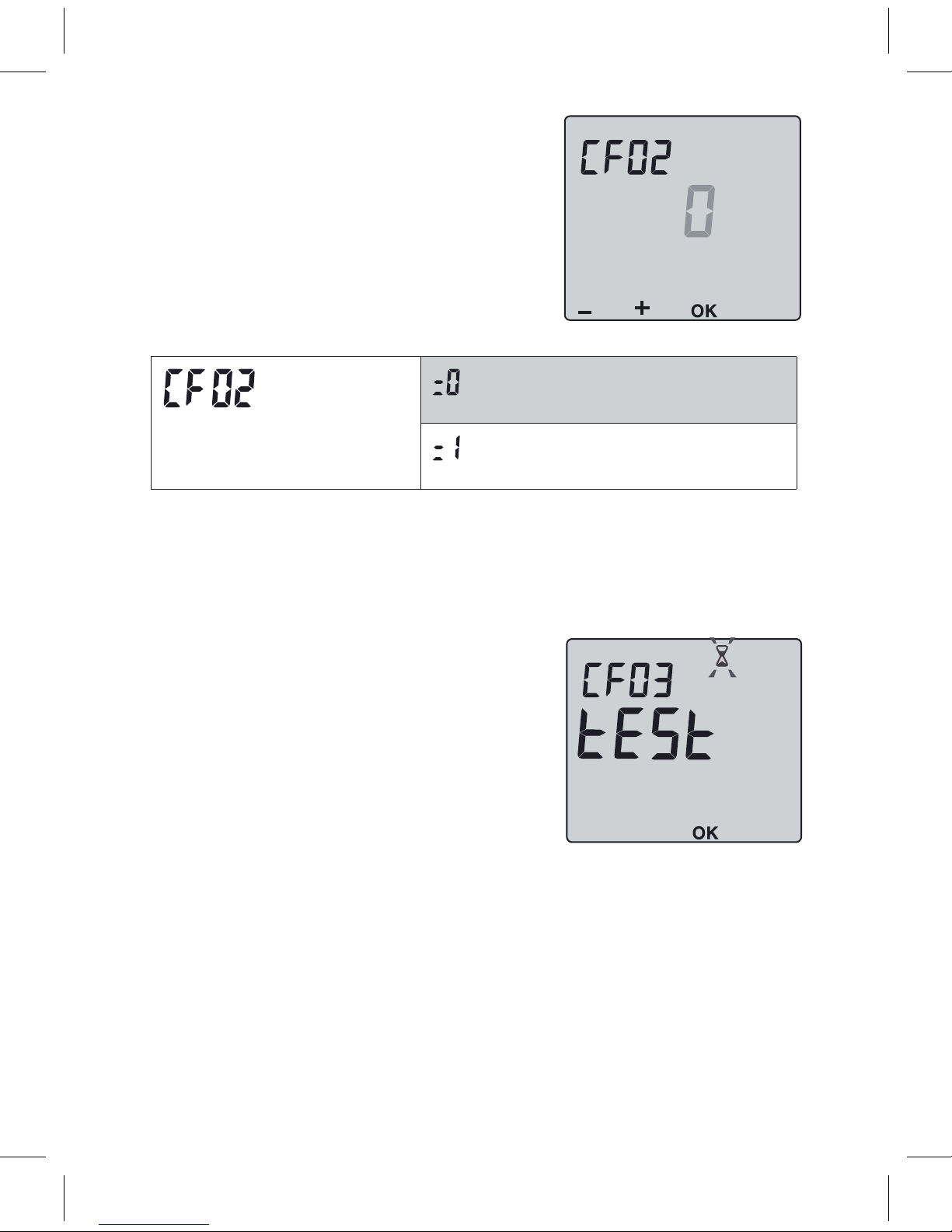
CF02 – AUTO mode temperature
display opon
Temperature displayed
Connuousroomtemperature
display
Connuousdisplayofthe
set-point
Press +or –tomakeyourchoice,OKtoconrmitand
go to the next menu.
CF03 – Infrared test (not applied in some
receivers)
Thetransmiersendsaframetothereceiver
every3seconds.CheckthatthereceiverLED
asheseachmeitreceivestheframes.
Turntheknobtoexittheconguraon
mode.
Page 6
Page 6
27
Return to the inial sengs
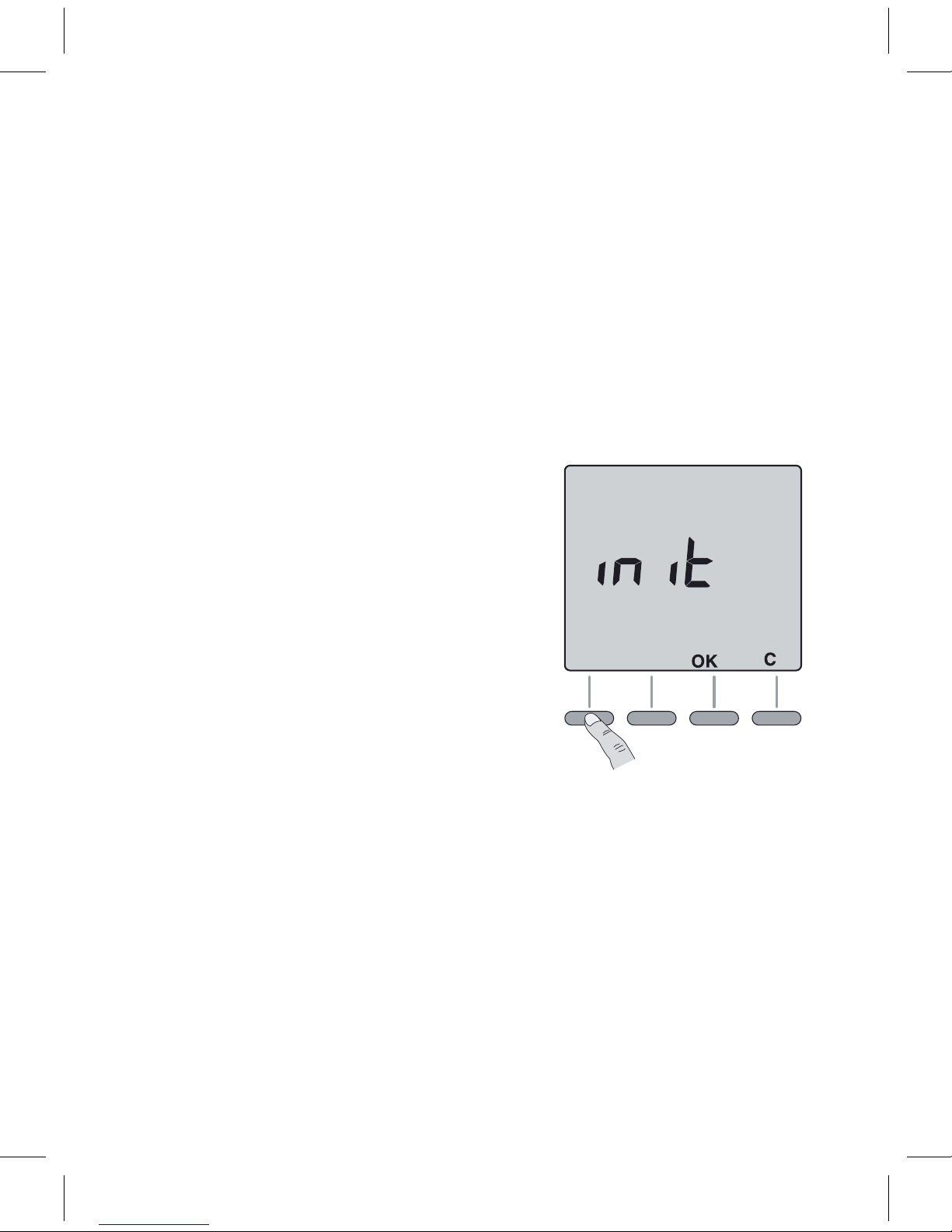
Youcancarryoutageneralresettoreturntothefactorysengs:
–theinstallersengs(grayedoutonthestartupmenus),
–themeandday,
– set-point temperatures,
– default program.
Turn the knob to Shutdown then press the
le-handbuonfor10secondsunlinit is
displayed.
Press OKtoconrmorCto cancel.
Return to the shutdown mode display.
10 sec.
Page 7
Page 7
28
Time Seng
Seng the temperatures (set-points)
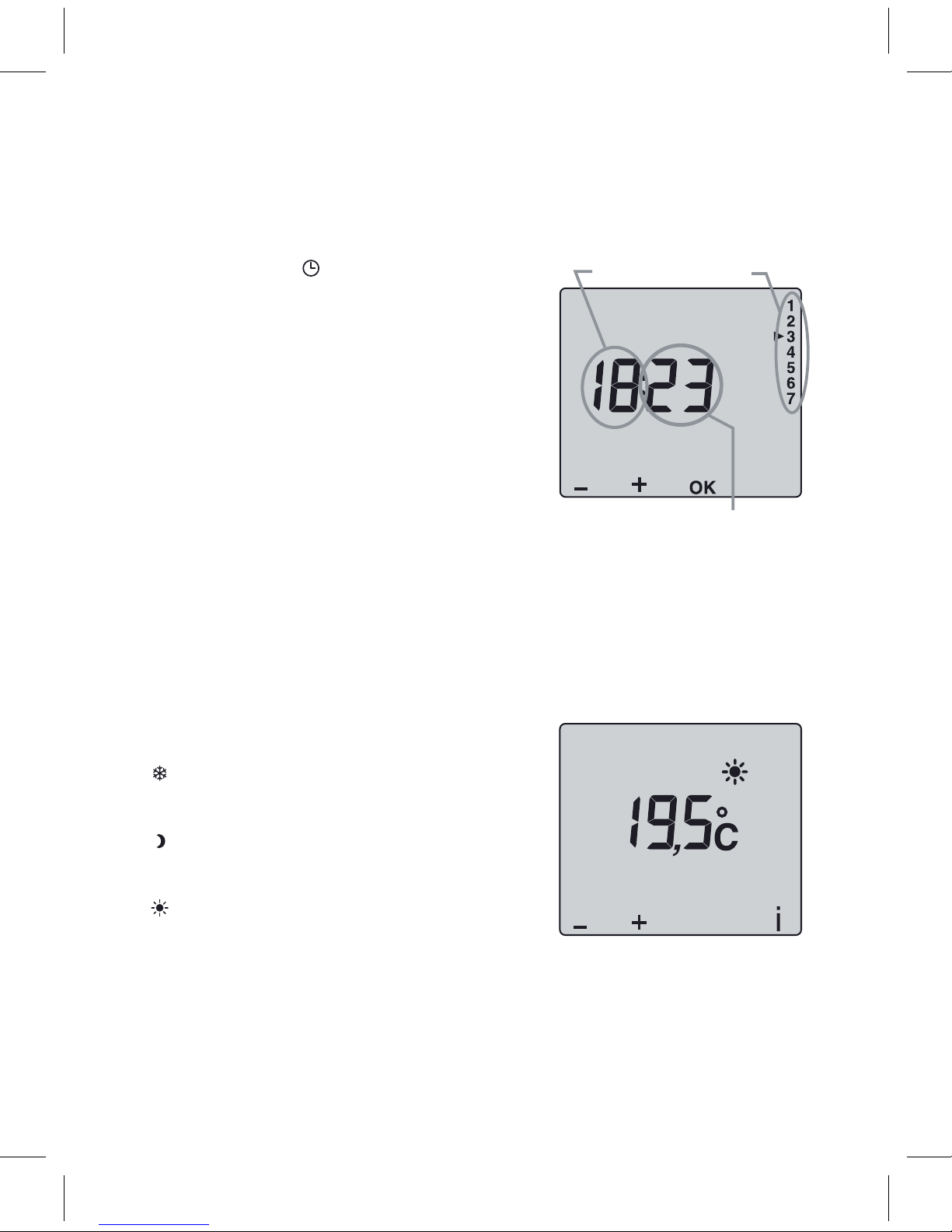
Turn the knob to .
Thedaysash.Press+or –to make your
choice,OKtoconrmitandgotothenext
seng.Repeattheoperaonstosetthe
hours and minutes.
Turntheknobtoexittheseng
mode.
Turn the knob to:
–tosetthefrostprotecontemperature
(5° Cto15° C,7° Cbydefault),
– to set the economy temperature
(10° Cto30° C,15° Cbydefault),
–tosetthecomforttemperature(10° C
to30° C,66.20°Fbydefault),Press+
or –to make your choice.
Turntheknobtoexitthesengmode.
Day
Hours
Minutes
Page 8
29
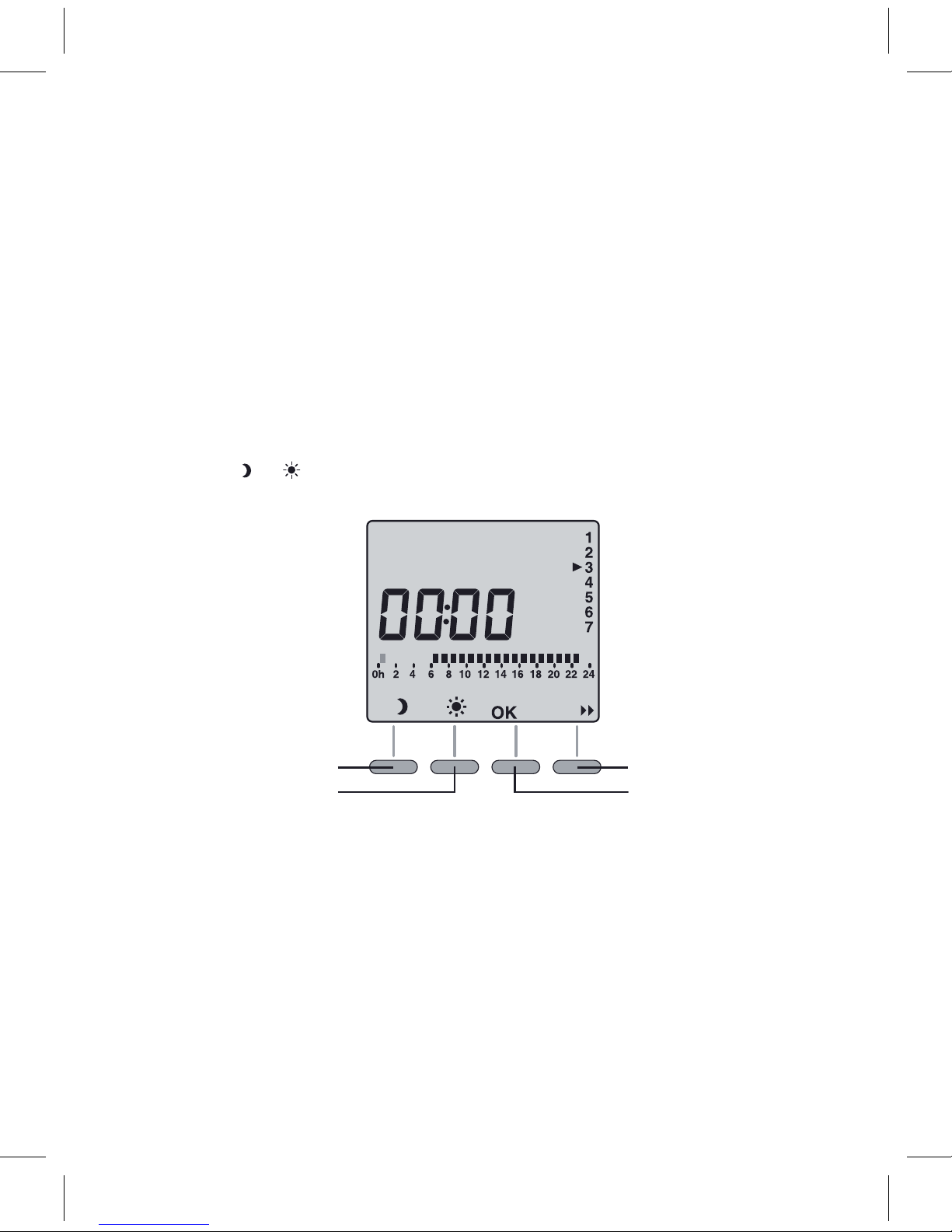
Programming
Whenstarngup,the“Comfortmodefrom6a.m.to11p.m.”programis
applied to all the days of the week. To change the programming, turn the
knob to PROG. The 1stmeslotashesonando.
1. Create your program
Programming starts on day 1 at midnight.
Press the or buonstocreatedierentEconomyorComfort
periods.
Economy mode
for 1 hour
Comfort for 1 hour
Go to the next
program change
Conrm and go to
the next day
2. Conrm and copy the program
Press and hold the OKbuonfor3secondstoconrmtheprogramyou
created and copy it to the next day.
Page 9
Other manuals for TT-IR
2
Other TERMA Thermostat manuals


Popular Thermostat manuals by other brands


Saswell
Saswell SAS920XWHB-7-S-RF User manual and warranty card

Aircalo
Aircalo TFP1-ET85P2 operating manual

Honeywell
Honeywell CM721 user manual

Carrier
Carrier DEBONAIR 33CS Installation and operating instructions

Lennox
Lennox iHarmony Zone Thermostat Installation and setup guide

Gemtech
Gemtech GT7000 Operation


