Teleste TEN-FWO1 User manual

ENLIGHTEN
INSTALLATION
GUIDE
FTTH Fibre Outlet - TEN-FWO1
Installaon Guide
Rev. 1.00/11.2019

2Opcal Fibre Outlet Series
Contents
Geng Started.....................................................................................................................................................................1
Introducon .........................................................................................................................................................................1
Package Contents.................................................................................................................................................................1
About the TEN-FWO1 Fibre Outlet ......................................................................................................................................2
Product Specicaon ...........................................................................................................................................................2
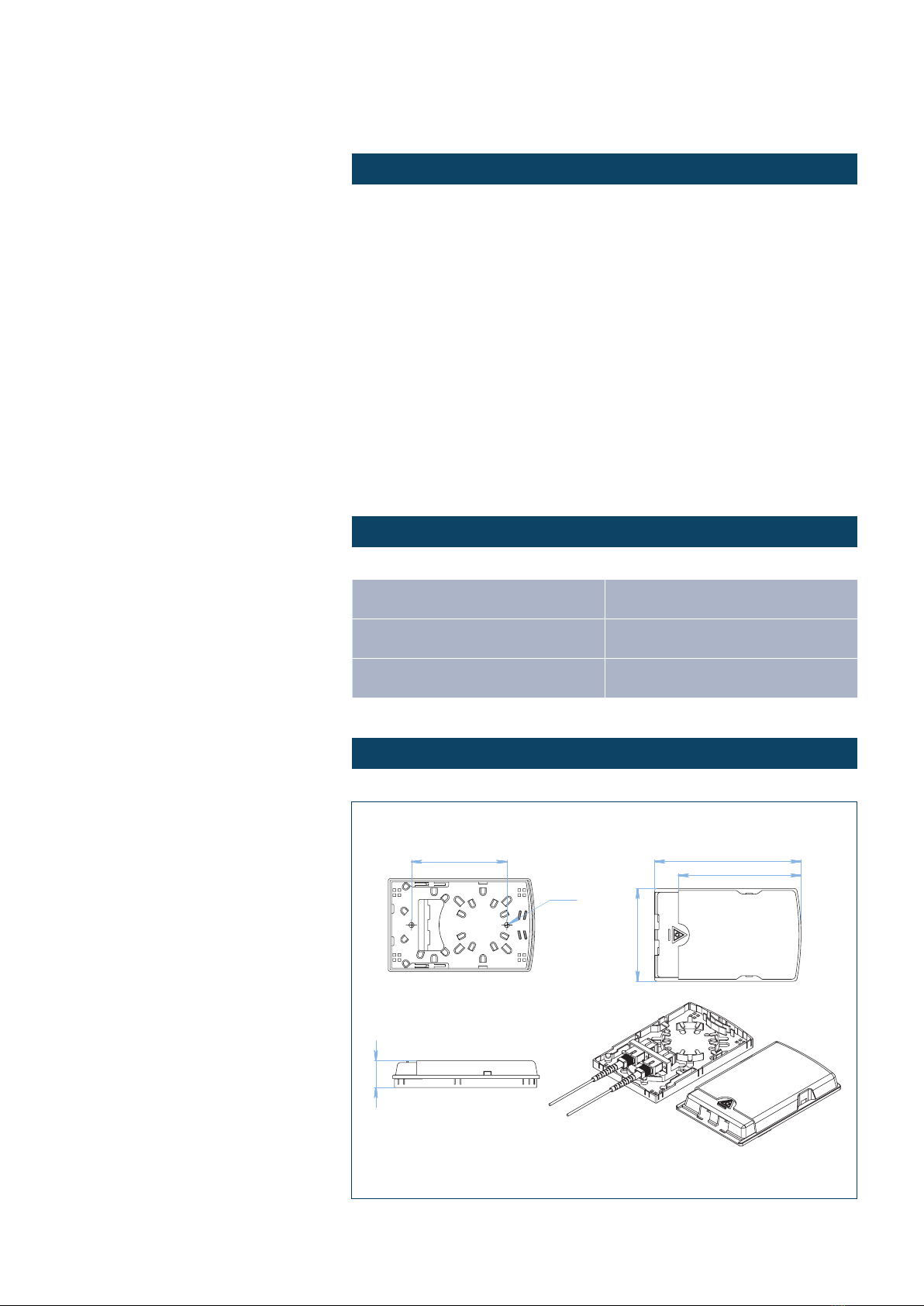
Mechanical Layout ...............................................................................................................................................................2
Installaon Instrucons .......................................................................................................................................................3
General Preparaons and Precauons ................................................................................................................................3
Preparaon of the Incoming Opcal Drop Cable.................................................................................................................3
Installaon Guidelines .........................................................................................................................................................3
Mounng Guidance .............................................................................................................................................................8
Legal Declaraons ................................................................................................................................................................9
ENLIGHTEN Opcal Passives TEN-FWO1 Installaon Guide Rev. 1.00/11.2019

1Opcal Fibre Outlet Series
ENLIGHTEN Opcal Passives TEN-FWO1 Installaon Guide Rev. 1.00/11.2019
Introducon
Thank you for purchasing this Teleste product. The TEN-FWO1 is a
modern and compact FTTH Fibre Outlet, designed for indoor mounng
in customer premises. The unit is designed for swi wall mount and easy
installaon, furthermore it comes with a security mechanism so that
patch cords cannot be removed by accident. This guide will take you
through all the steps necessary for a successful installaon.
Package Contents
Please unpack the TEN-FWO1 and verify that all items are at present, as
shown in Figure 1. If any items are missing then please do not hesitate to
contact your local seller for help.
1. Adapters (oponal)
2. Splice protectors
3. Wall xings
4. Fixing wall screws
5. Cable es
6. Back plate
7. Lid
Geng Started
1 2 3 4 5
6 7
Figure 1 - Package contents
TEN-FWO1 - Fibre Outlet
ENLIGHTEN Opcal Passives
2Opcal Fibre Outlet Series
ENLIGHTEN Opcal Passives TEN-FWO1 Installaon Guide Rev. 1.00/11.2019
About the TEN-FWO1 Fibre Outlet
The TEN-FWO1 has been designed primarily for applicaons such as
FTTH. The unit is very compact and easy to install along with convenient
maintenance, it may be delivered empty or with adapters and pigtails in
a suitable box according to customer needs.
• The outlet is designed having a clever connector protecon cover.
When the cover is in its outer posion, the patch cords cannot be
removed by accident.
•
Mulple cable entry points.
• Fixing hardware included.
• Accepts LC duplex or SC simplex adapters.
• Suitable for two adapters.
• Produced in high quality plascs.
Product Specicaon
Mechanical Layout
Dimension (LxWxH) 131 x 83 x 24 mm Weight 0.084 kg
Material ABS plasc Supported adaptors SC simplex, LC Duplex
Operang
temperature -40 - +85 °C Colour White (RAL9010)
85
Dia. 4.5
24
131
110
83
3Opcal Fibre Outlet Series
ENLIGHTEN Opcal Passives TEN-FWO1 Installaon Guide Rev. 1.00/11.2019
Thank you for purchasing this Teleste product. Please take a moment and
carefully read these instrucons through before installing the product.
General Preparaons and Precauons
1. Check the Fibre Outlet, cable items and all other components for
any damages before installaon.
2. Make sure to keep all components dry and clean for the
installaon.
3. Keep the working environment clean (dry and no dust) and at for
the installaon.
4. Standard instruments and tools should be used during the
installaon.
Preparaon of the Incoming Opcal Drop Cable
1. Determine the length of cung the drop cable.
2. Strip the drop cable as per details in the next secon.
Installaon Guidelines
1. Press on the front side of the box, open the cover.
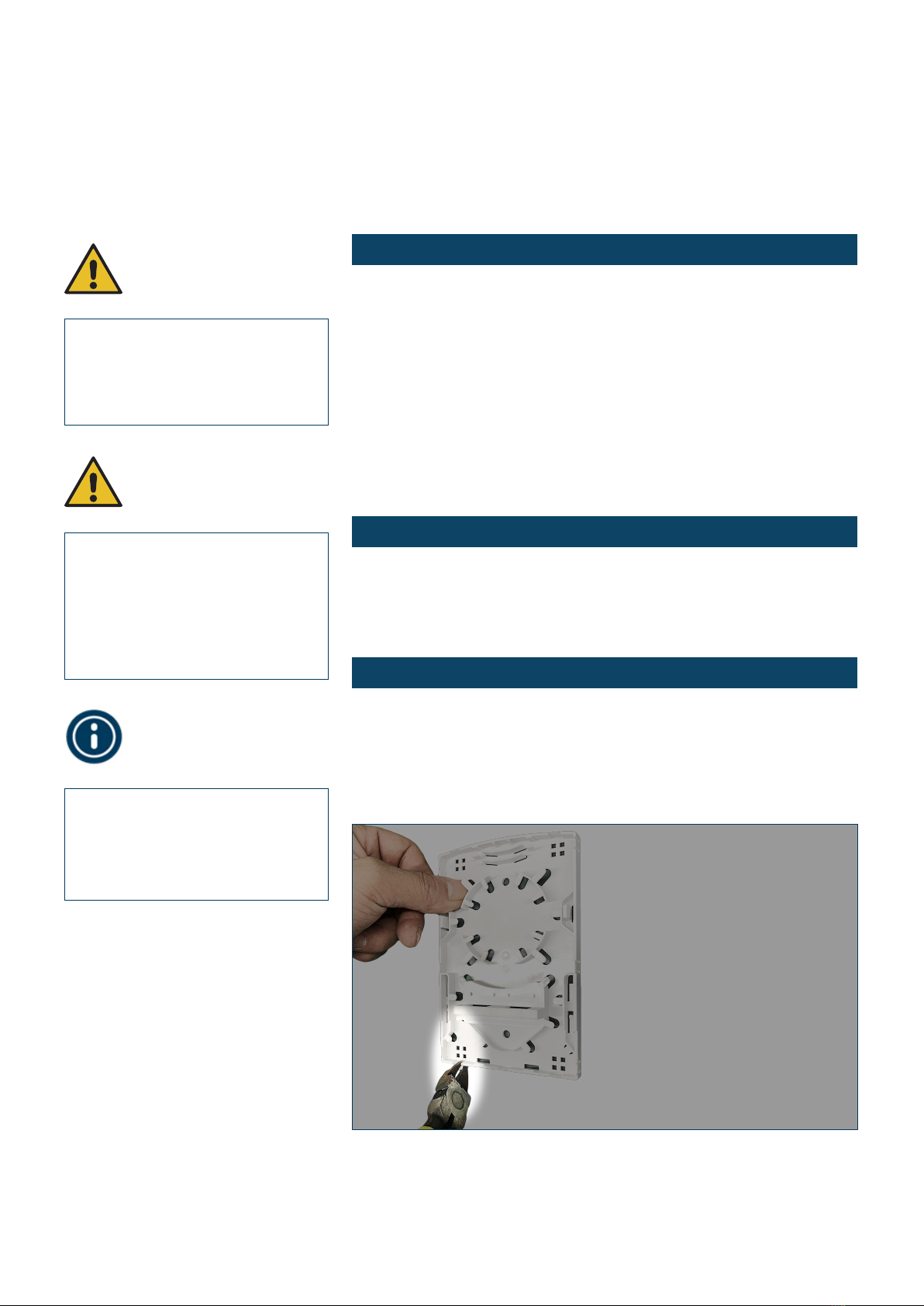
2. For boom cable entry remove the plasc clip covering the boom
side cable entry, see Picture 1.
Installaon
Instrucons
Note! Opcal bres should not be
damaged. Cut the damaged bre,
and re-strip the bre if an accident
occurs.
Picture 1
Warning! Never look directly into
the end of a bre or a bre connec-
tor that may be carrying laser light.
Laser light, visible or invisible, can
seriously injure eyes or even cause
blindness.
Warning! Ensure to follow basic
safety precauons to reduce risk of
re, electrical shock, and personal
injury.

4Opcal Fibre Outlet Series
ENLIGHTEN Opcal Passives TEN-FWO1 Installaon Guide Rev. 1.00/11.2019
3. For rear cable entry, bring the cable through the oval shaped hole
in the rear of the backplate and secure with cable es using the
small cable e studs saddles as needed.
4. Install the adapters onto the back plate.
5. Strip the incoming drop cable - about 12 cm, see picture 2.
6. Fix the incoming cable into the outlet using a cable e, see
Picture 3.
Picture 3
Picture 2
All necessary safety instrucons
must be followed during the
installaon and maintenance
operaons. The safety
requirements for class 1M lasers
are detailed in EN60825-1.
12 cm

5Opcal Fibre Outlet Series
ENLIGHTEN Opcal Passives TEN-FWO1 Installaon Guide Rev. 1.00/11.2019
7. Install the 0.9 mm pigtails into the adapters and route the pigtails
- from le to right - on the splice wheel, see Picture 4.
8. Fibre Splicing. Splice the drop cable bres directly with the installed
and prepared pigtails, see Picture 5.
9. Determine the installaon locaon. Drill two holes over the wall,
based on the size in the mechanical layout drawing on page 2, see
also Picture 6 and 7.
Picture 5
Picture 4

6Opcal Fibre Outlet Series
ENLIGHTEN Opcal Passives TEN-FWO1 Installaon Guide Rev. 1.00/11.2019
10. Remove the adapter protecon caps, see Picture 8.
Picture 7
Picture 6
Picture 8

7Opcal Fibre Outlet Series
ENLIGHTEN Opcal Passives TEN-FWO1 Installaon Guide Rev. 1.00/11.2019
11. Install the bre opcal patch cords. Insert the connector into the
adapter connector unl a click is heard, see Picture 9.
12. Complete the installaon by sliding the protecve cover forward.
Picture 9
Picture 10

8Opcal Fibre Outlet Series
ENLIGHTEN Opcal Passives TEN-FWO1 Installaon Guide Rev. 1.00/11.2019
Mounng Guidance
To carry out a wall mount installaon: Drill two holes over the wall
based on the size in mechanical layout drawing on page 2. Place the
expansion plugs, place the box to match up the holes and use bolts to
fasten.
TEN-FWO1 - Wall mounted.
Table of contents
Popular Network Hardware manuals by other brands
Matrix Switch Corporation
Matrix Switch Corporation MSC-HD161DEL product manual

B&B Electronics
B&B Electronics ZXT9-IO-222R2 product manual

Yudor
Yudor YDS-16 user manual

D-Link
D-Link ShareCenter DNS-320L datasheet

Samsung
Samsung ES1642dc Hardware user manual
Honeywell Home
Honeywell Home LTEM-PV Installation and setup guide