
Tascam US-100 User manual

US-100
USB Audio Interface
D01094020A
OWNER'S MANUAL
This device has a serial number located on
the bottom panel. Please record it and retain
it for your records.
Serial number:
___________________________________

2TASCAM US-100
1 Read these instructions.
2 Keep these instructions.
3 Heed all warnings.
4 Follow all instructions.
5 Do not use this apparatus near water.
6 Clean only with dry cloth.
7 Do not block any ventilation openings. Install in accordance with the
manufacturer's instructions.
8 Do not install near any heat sources such as radiators, heat registers,
stoves, or other apparatus (including amplifiers) that produce heat.
9 Do not defeat the safety purpose of the polarized or grounding-type
plug. A polarized plug has two blades with one wider than the other.
A grounding type plug has two blades and a third grounding prong.
The wide blade or the third prong are provided for your safety. If the
provided plug does not fit into your outlet, consult an electrician for
replacement of the obsolete outlet.
10 Protect the power cord from being walked on or pinched particularly at
plugs, convenience receptacles, and the point where they exit from the
apparatus.
11 Only use attachments/accessories specified by the manufacturer.
1 2 Use only with the cart, stand, tripod, bracket, or table specified by the
manufacturer, or sold with the apparatus. When a cart is used, use
caution when moving the cart/apparatus combination to avoid injury
from tip-over.
13 Unplug this apparatus during lightning storms or when unused for long
periods of time.
14 Refer all servicing to qualified service personnel. Servicing is required
when the apparatus has been damaged in any way, such as power-
supply cord or plug is damaged, liquid has been spilled or objects
have fallen into the apparatus, the apparatus has been exposed to rain
or moisture, does not operate normally, or has been dropped. Do not
expose this apparatus to drips or splashes.
Do not place any objects filled with liquids, such as vases, on the
•
apparatus.
Do not install this apparatus in a confined space such as a book case
•
or similar unit.
Caution should be taken when using earphones or headphones
•
with the product because excessive sound pressure (volume) from
earphones or headphones can cause hearing loss.
If you are experiencing problems with this product, contact TEAC for a
•
service referral. Do not use the product until it has been repaired.
Declaration of Conformity
Model Number : US-100
Trade Name : TASCAM
Responsible party : TEAC AMERICA, INC.
Address : 7733 Telegraph Road, Montebello, California, U.S. A.
Telephone number : 1-323-726-0303
This device complies with Part 15 of the FCC Rules. Operation
is subject to the following two conditions: (1) this device may
not cause harmful interference, and (2) this device must accept
any interference recieved, including interference that may cause
undesired operation.
IMPORTANT SAFETY INSTRUCTIONS

TASCAM US-100 3
FOR U.S.A.
TO THE USER
This equipment has been tested and found to comply with the limits
for a Class B digital device, pursuant to Part 15 of the FCC Rules.
These limits are designed to provide reasonable protection against
harmful interference in a residential installation. This equipment
generates, uses, and can radiate radio frequency energy and, if
not installed and used in accordance with the instruction manual,
may cause harmful interference to radio communications. However,
there is no guarantee that interference will not occur in a particular
installation. If this equipment does cause harmful interference to
radio or television reception, which can be determined by turning the
equipment off and on, the user is encouraged to try to correct the
interference by one or more of the following measures.
a) Reorient or relocate the receiving antenna.
b) Increase the separation between the equipment and receiver.
c) Connect the equipment into an outlet on a circuit different from
that to which the receiver is connected.
d) Consult the dealer or an experienced radio/TV technician for help.
CAUTION
Changes or modifications to this equipment not expressly approved
by TEAC CORPORATION for compliance could void the user's
authority to operate this equipment.
THIS CLASS B DIGITAL APPARATUS COMPLIES WITH CANADIAN ICES-003.
CET APPAREIL NUMÉRIQUE DE LA CLASSE B EST CONFORME À LA NORME NMB-003 DU CANADA.
IMPORTANT SAFETY PRECAUTIONS

4TASCAM US-100
Table of Contents
1 – Introduction .................................................................. 5
Features................................................................................. 5
Included items ...................................................................... 5
Conventions used in this manual....................................... 5
Trademarks............................................................................ 6
Precautions for placement.................................................. 6
Beware of condensation ..................................................... 6
Cleaning the unit.................................................................. 6
2 – Part Names and Functions .................................. 7
Front panel............................................................................ 7
Rear panel ............................................................................. 8
3 – Connections................................................................... 9
Connecting with a computer.............................................. 9
Connecting microphones .................................................... 9
Connecting guitars .............................................................. 9
Connecting electronic instruments and
CD/MD/cassette players ................................................... 10
Connecting analog record players................................... 10
Connecting monitor speakers .......................................... 11
Connecting headphones ................................................... 11
4 – Application Guide....................................................12
Windows XP........................................................................ 12
Windows Vista .................................................................. 14
Mac OS X and iTunes......................................................... 16
Audio application settings................................................ 18
5 – Troubleshooting....................................................... 19
6 – Specifications ............................................................. 21
Input and output ratings................................................... 21
Audio performance............................................................ 21
System requirements ......................................................... 22
General ................................................................................ 22
Dimensional drawings....................................................... 23

TASCAM US-100 5
Thank you for purchasing the TASCAM US-100 USB Audio
Interface.
Please read this manual carefully before you begin using the
unit so that you can use it correctly and enjoy using it for a
long time. After you have read this manual, keep it nearby for
reference when needed.
We accept no responsibility and can provide no compensation
for recovering any data loss in audio equipment, hard disks, or
other storage media that occurs in a system that includes this
product.
Features
USB audio interface with two inputs and two outputs
•
44.1/48 kHz, 16-bit
•
Balanced microphone input connectors (XLR and standard
•
TRS)
Unbalanced stereo line input connectors (RCA pin jacks)
•
Guitar input connector (standard TRS jack)
•
Direct connection of analog turntables
•
Unbalanced stereo line output connectors (RCA pin jacks)
•
Headphones output jack
•
Direct monitoring function allows latency-free input moni-
•
toring
Power supplied by USB connection
•
Operates using standard Windows XP, Windows Vista and
•
Mac OS X audio drivers
Included items
This product includes the items listed below.
Main unit
•............................................................................. 1
USB cable (1.5 m)
•............................................................... 1
CD-ROM (with Audacity software)
•.................................... 1
Warranty card
•...................................................................... 1
Owner’s Manual (this document)
•....................................... 1
Take care when opening the package not to damage the main
unit. Keep the packaging materials for transportation in the
future.
Please contact TASCAM if any of these items are missing or
have been damaged during transportation.
Conventions used in this manual
The following conventions are used in this manual:
Front and rear panel knobs, indicators and connectors are
•
presented in a gothic font.
Example: GUITAR IN
Text displayed on the computer is presented in quotes
•
Example: “Sound”
1 – Introduction

6TASCAM US-100
Additional information is introduced as needed in the
•
following categories.
TIP
This is a useful hint about ways to use the unit.
NOTE
A note provides additional explanations for special situations.
CAUTION
These instructions should be followed to avoid injury, damage
to equipment or loss of data.
Trademarks
TASCAM is a registered trademark of TEAC Corporation.•
Microsoft, Windows, and Windows Vista are either registered•
trademarks or trademarks of Microsoft Corporation in the
United States and/or other countries.
Apple, Macintosh, Mac OS and Mac OS X are trademarks of•
Apple Inc., registered in the U.S. and other countries.
Other company names, product names and logos in this•
document are the trademarks or registered trademarks of their
respective owners.
Precautions for placement
The environmental temperature operation range of this unit is
•
5–35° C (41–95° F).
Do not place anything on top of unit because it generates
•
much heat.
Do not put this unit on top of a power amplifier or other
•
equipment that generates heat.
Beware of condensation
Condensation could occur if the unit is moved from a cold place
to a warm place or used after a sudden temperature change, such
as after a cold room has been heated. If this occurs, let the unit
sit for one or two hours at the new room temperature before
turning the power on.
Cleaning the unit
To clean the unit, wipe it gently with a soft dry cloth. Do not use
benzene, paint thinner, ethyl alcohol or other chemical agents to
clean the unit as they could damage the surface or cause fading.
1 – Introduction
TASCAM US-100 7
2 – Part Names and Functions
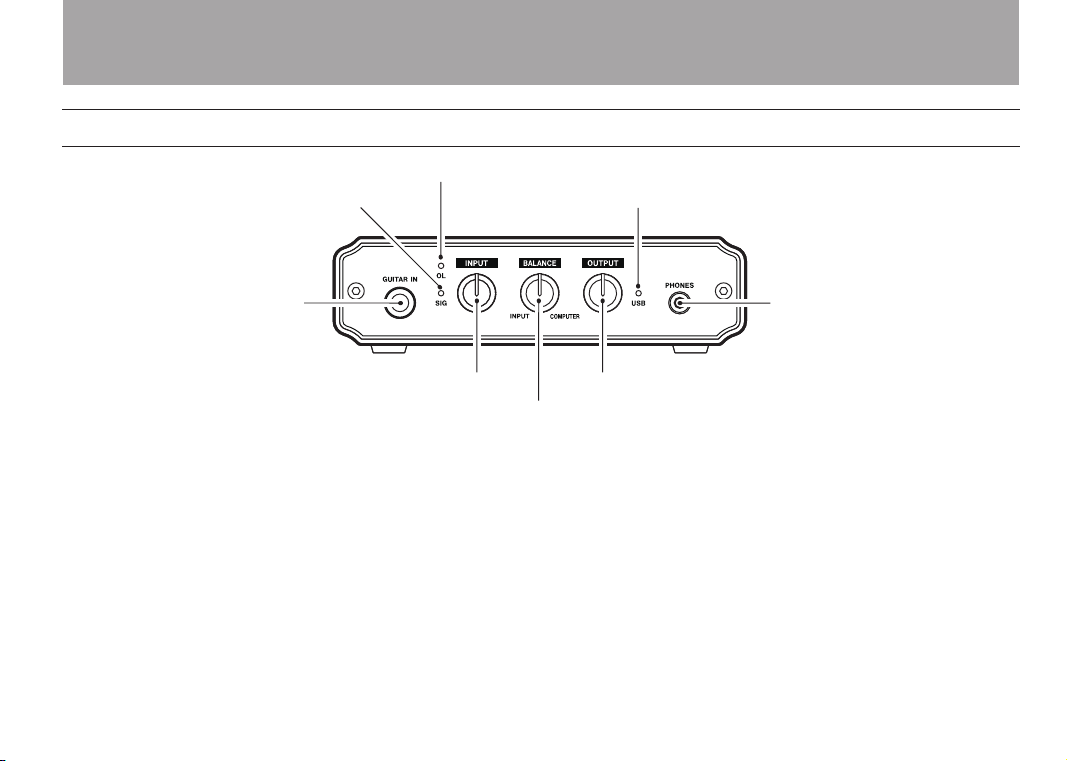
Front panel
Overload indicator
Signal indicator USB indicator
Headphones
connector
Output level adjustment knob
Monitoring balance adjustment knob
Input level adjustment knob
Guitar input
connector
Overload indicator (OL)•
This lights if the input level is too high.
Signal indicator (SIG)•
This lights when the input level is high enough to be
detected.
INPUT knob•
Use this to adjust the input level. Turn it right to increase the
sound volume. This functions as a gain knob, so turning it all
the way to the left (minimum) does not completely cut the
input sound.
BALANCE knob•
Use this to balance the mix of the sounds input into the unit
and the sound from the computer when monitoring. Turn it
all the way to the left to hear only the input sound or all the
way to the right to hear only the sound from the computer.
OUTPUT knob•
Use this to adjust the level output from the PHONES and
OUTPUT jacks. Turn right to increase the volume.
USB indicator•
This lights when the USB connection is working correctly.

8TASCAM US-100
Rear panel
USB connector
Line output
connectors
Line input connectors
Analog record
player signal
GND connectorInput switch
Microphone
input connector
(balanced , XLR)
Microphone
input connector
(balanced , TRS)
2 – Part Names and Functions

TASCAM US-100 9
Connecting with a computer
Use the included USB cable to connect the unit with a computer
as shown in the illustration.
USB
Computer
CAUTION
Some USB devices use the USB bus frequently. In order to
avoid dropouts in the audio signal, clicking noises and other
problems, we strongly recommend that you do not connect
any other USB devices besides mice and computer keyboards
to the same computer when using this unit.
Connecting microphones
Connect a microphone to one of the two microphone inputs
(MIC) on the rear panel. You can use either the XLR connector
or the standard TRS jack. If microphones are connected to
both inputs, the signal from the microphone connected to the
standard TRS jack receives priority and the signal from the
microphone connected to the XLR connector is cut.
To activate the microphone input, set the switch on the rear
panel to MIC. When using a MIC input, do not connect anything
to the GUITAR IN jack on the front panel.
Microphones
NOTE
This unit does not provide phantom power. To use a
condenser mic that requires power, use an external phantom
power source.
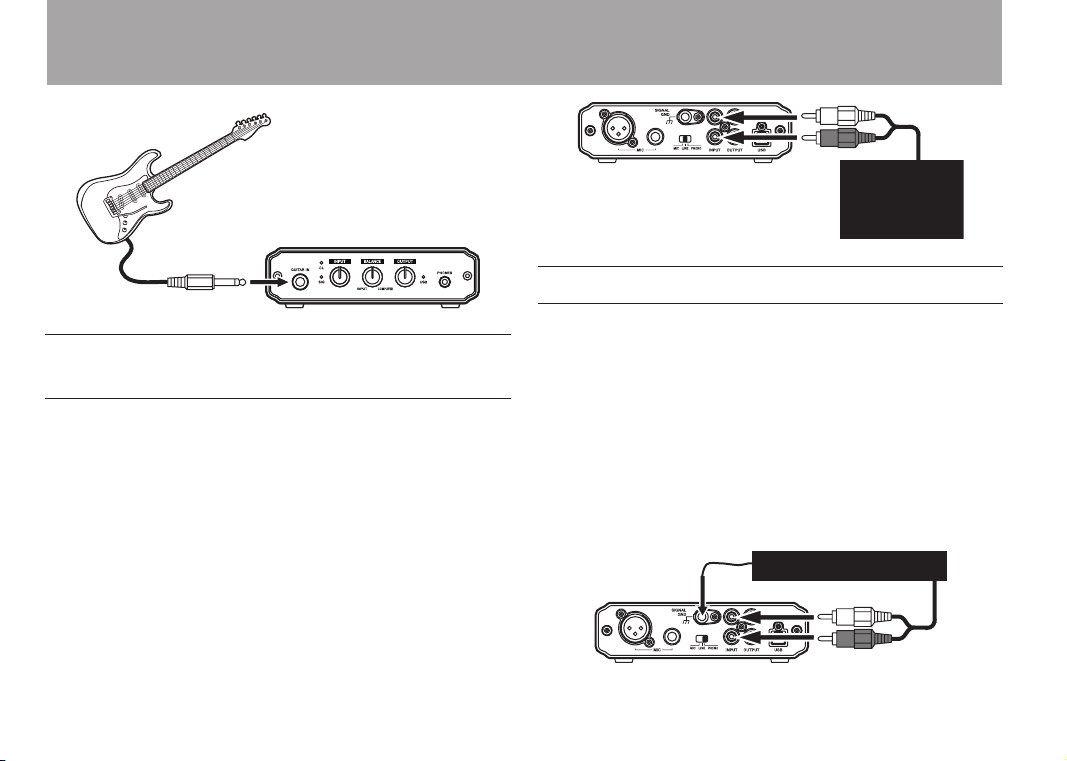
Connecting guitars
Connect a guitar or bass to the GUITAR IN jack on the front
panel.
The GUITAR IN jack receives priority when something is
plugged into it, and signals from other inputs are cut off
regardless of the input switch setting.
3 – Connections
10 TASCAM US-100
Guitar
Connecting electronic instruments and
CD/MD/cassette players
Connect the analog outputs of keyboards, drum machines and
CD/MD/cassette players to the line input (INPUT) jacks on the
rear panel.
To activate line input, set the input switch on the rear panel to
LINE. When using the line input (INPUT) jacks, do not connect
anything to the GUITAR IN jack on the front panel.
OUT
Keyboard/
drum machine/
cassette player/
MD/CD
Connecting analog record players
Thisunithasabuilt-inphonoamplier,allowingthedirect
connection of analog record players. Connect the analog record
player’s audio output to the line input (INPUT) connectors on
the rear panel. Connect the analog record player’s grounding
wire to this unit’s SIGNAL GND connector.
To activate the analog record input, set the input switch on the
rear panel to PHONO. When using the line input (INPUT) jacks,
do not connect anything to the GUITAR IN jack on the front
panel.
GND
OUT
Analog record player
3 – Connections
Table of contents
Other Tascam Accessories manuals

Tascam
Tascam FW-1884 Instruction Manual

Tascam
Tascam FW-1082 User manual

Tascam
Tascam iU2 User manual

Tascam
Tascam FW-1884 Quick start guide

Tascam
Tascam IF-AE8HR User manual

Tascam
Tascam us-2x2 User manual

Tascam
Tascam US-122L User manual

Tascam
Tascam FW-1804 User guide

Tascam
Tascam US-800 Instruction Manual

Tascam
Tascam FW-1884 User manual

Tascam
Tascam US-122 User manual

Tascam
Tascam US-1x2 User manual

Tascam
Tascam US-122MKII Instruction Manual

Tascam
Tascam iXR User manual

Tascam
Tascam FW-1884 User manual

Tascam
Tascam US-2000 User manual

Tascam
Tascam FW-1082 Instruction sheet

Tascam
Tascam US-224 Quick start guide

Tascam
Tascam IF-AE8 User manual

Tascam
Tascam iXZ User manual













