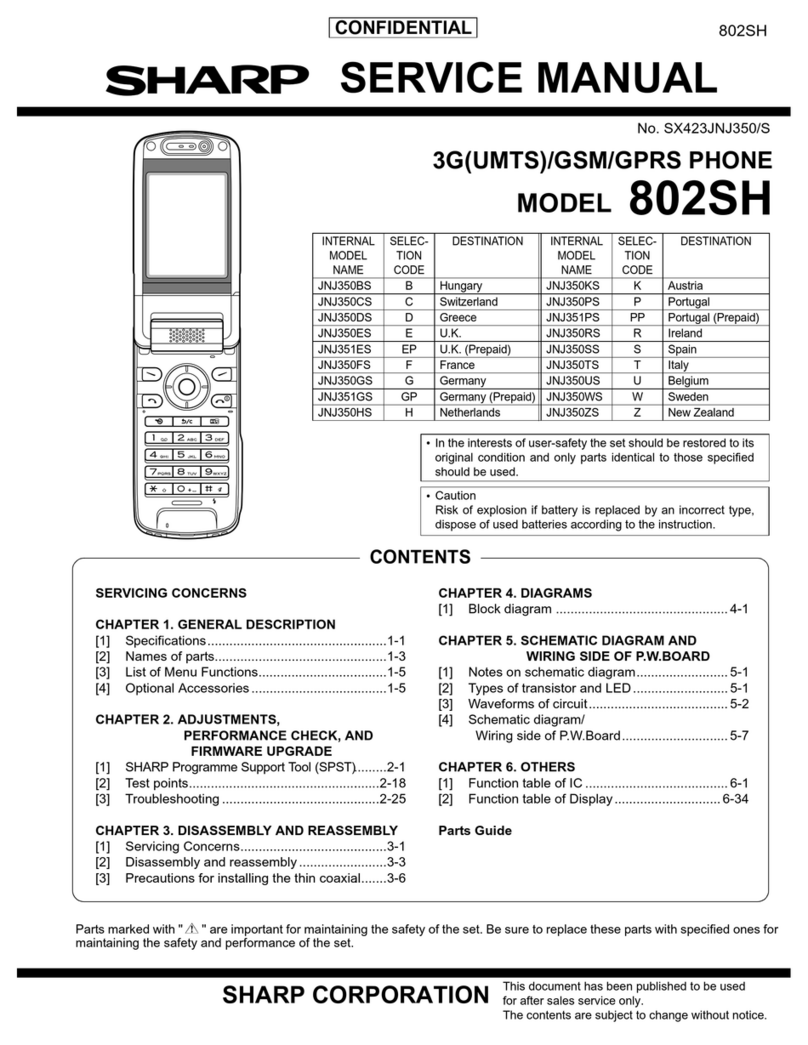
Sharp GX10 User manual

1 Introduction
Declaration of Conformity Introduction
Congratulations and thank you for choosing the GX10.
About This User Guide
This user guide is carefully designed to help you learn
about your phone’s features and operations quickly and
effectively.
NOTICE
• We strongly recommend that you keep separate
permanent written records of all important data. Data
may be lost or altered in virtually any electronic
memory product under certain circumstances.
Therefore, we assume no responsibility for data lost
or otherwise rendered unusable, whether as a result of
improper use, repairs, defects, battery replacement,
use after the specified battery life has expired or any
other cause.
• We assume no responsibility, directly or indirectly,
for financial losses or claims from third parties
resulting from the use of this product and any of its
functions, such as stolen credit card numbers, the loss
or alteration of stored data, etc.
• All company and/or product names are trademarks
and/or registered trademarks of their respective
holders.
Hereby, Sharp Telecommunications of Europe Ltd, declares
that this GX10 is in compliance with the essential require-
ments and other relevant provisions of Directive 1999/5/
EC.
A copy of the original declaration of conformity can be
found at the following Internet address:
http://www.sharp-mobile.com
Alternately contact:
Sharp Telecommunications of Europe Ltd
Azure House,
Bagshot Road,
Bracknell, Berks, RG12 7QY, U.K.

Introduction 2
• Screen layout illustrated in this user guide may differ
from the actual one.
The information described in this user guide is
subject to change without notice.
• All the functions described in this user guide may not
be supported in all networks.
• We assume no responsibility for downloaded
contents, information, etc. from network.
Copyright
According to copyright laws, the reproduction,
alteration and use of material which is protected by
copyright (music, pictures, etc.) is only permitted for
personal or private use. If the user is not in possession
of more extensive copyright or has not received the
explicit permission from the copyright owner to
reproduce, alter or use a copy which has been made or
modified in this way, this is considered to be a violation
of the copyright laws and gives the copyright owner the
right to claim for damages. For this reason, avoid the
illegal use of material which is protected by copyright.
Windows is a registered trademark of Microsoft
Corporation in the United States and/or other countries.
Powered by JBlend®, ©1997-2002 Aplix Corporation. All
rights reserved.
Java and all Java-based trademarks and logos are trade-
marks or registered trademarks of Sun Microsystems, Inc.
in the U.S. and other countries.
JBlend and all JBlend-based trademarks and logos are
trademarks or registered trademarks of Aplix Corporation in
Japan and other countries.
In this product, JBlend®is incorporated.
JBlend®is a Java execution environment
that Aplix developed for implementing
advanced performance and fast operation
on small-memory systems. JBlend and
JBlend logo are trademarks or registered
trademarks of Aplix Corporation in Japan
and other countries.
Powered by Mascot Capsule®/Micro3D EditionTM
Mascot Capsule®is a registered trademark of HI Corpora-
tion
©2002 HI Corporation. All Rights Reserved.
Licensed by Inter Digital Technology Corporation under one
or more of the following United States Patents and/or their
domestic or foreign counterparts and other patents pend-
ing, including U.S. Patents: 4,675,863: 4,779,262:
4,785,450 & 4,811,420.

3 Introduction
Useful functions and services of the
phone
Your phone offers you the following features:
• The built-in digital camera can take pictures.
• Create and read SMS.
• Multimedia Messaging Service (MMS) can
personalise your phone in various ways: you can send
and receive multimedia messages with graphical
images, photographs or sound attached.
• WAP browser helps you to access a variety of
information on the mobile internet.
• You can play with JavaTM applications. You can also
download various kinds of JavaTM applications from
Vodafone via the mobile Internet.
• The maindisplay of colour TFT-LCD makes the
screens clearer, more beautiful and easier to view.
• Sub-Screen allowing you to see who is calling and
new message indicators.
• You can create the various melodies for your original
ringing tones using up to 16 chords.
• Voice memo function allows you to record and play
back your vocal message.
Licensed under U.S. Patent 4,558,302 and foreign counter-
parts.
T9 Text Input is covered by the United Kingdom Pat.
No.2238414B, Euro. Pat. No. 0 842 463 (96927260.8) and
other patents pending.

Table of Contents 4
Table of Contents
Introduction ................................................. 1
Useful functions and services of the phone ..3
Table of Contents ........................................ 4
Your Phone .................................................. 7
Accessories ...................................................7
Getting Started ............................................ 8
Inserting the SIM Card and the Battery .....10
Charging the Battery ..................................13
Turning Your Phone On and Off ...............15
Display Indicators ......................................15
Sub-Screen .................................................17
Call Functions ........................................... 19
Making a Call .............................................19
Speed Dialling ............................................19
Redialling ...................................................20
Ending a Call ..............................................20
Answering a Call ........................................20
Incall Menus ...............................................21
Phonebook ................................................. 24
Entering Characters ....................................24
Creating a New Entry .................................25
Finding a Name and Number .................... 28
Editing Phonebook Entries ........................ 28
Deleting Phonebook Entries ...................... 29
Checking Your Own Numbers .................. 29
View Groups .............................................. 29
Memory Status ........................................... 30
Speed Dial List .......................................... 30
Sending Messages ..................................... 31
Using the Menu ..........................................32
List of Menu Functions ............................. 33
Camera ......................................................34
Using the Timer ......................................... 36
Sending Pictures ........................................ 37
Deleting Pictures ....................................... 37
My Phone ....................................................38
JavaTM ....................................................................... 38
My JavaTM Games ..................................... 39
My Pictures ................................................ 40
My Sounds ................................................. 43
My Bookmarks .......................................... 45
My Text Templates .................................... 46

5 Table of Contents
Memory Status ...........................................47
Fun & Games ............................................. 48
JavaTM Games ...........................................48
Other Games ..............................................51
Melody Editor ............................................52
Tone Editor ................................................59
Profiles ...................................................... 63
Activating a Profile ....................................63
Customising Profiles ..................................63
Resetting Profile Settings ...........................64
Ringer Volume ...........................................64
Ringer Type ...............................................64
Vibration ....................................................65
Keypad Tones ............................................65
Warning Tone ............................................66
Power On/Off Sound .................................66
Message Alert ............................................67
Low Battery Alert ......................................68
Any Key Answer .......................................68
Organiser ................................................... 69
Calculator ...................................................69
Calendar .....................................................70
Clock & Alarm ...........................................71
Voice Memo ...............................................75
Help List .....................................................76
Call Manager ..............................................77
Call Log ......................................................77
Call Timers .................................................78
Call Costs ...................................................79
Data Counter ..............................................81
Diverts ........................................................81
Settings .......................................................84
Phone Settings ............................................84
Call Settings ...............................................89
Network Settings ........................................93
Internet Settings .........................................94
Infrared .......................................................98
Security ......................................................99
Master Reset .............................................103
Vodafone live! ..........................................104
Viewing the WAP Browser ......................104
Navigating a WAP Page ...........................104
Messages ..................................................106
MMS (Multimedia Messaging Service) ...106
SMS (Short Message Service) .................113
Cell Broadcast ..........................................117

Table of Contents 6
Cell Information .......................................118
Data Transmission .................................. 119
System Requirements ...............................119
Software Installation and Setup ...............119
Using the Modem Setup ...........................119
Troubleshooting ...................................... 121
Safety Precautions and Conditions of
Use ............................................................ 123
CONDITIONS OF USE ...........................123
ENVIRONMENT ....................................125
PRECAUTIONS CONCERNING VEHICLE
USE ..........................................................126
Index ......................................................... 127
Quick Reference ...................................... 132

7 Your Phone
Your Phone
Please check the following carefully. Your phone
should come complete with:
• GSM 900/1800 GPRS phone
• Rechargeable Li-ion battery
• AC charger
• Hands free
•CD-ROM
• User guide
Accessories (option)
• Li-ion spare battery (XN-1BT11)
• Cigarette lighter charger (XN-1CL10)
• Car holder (XN-1CH11)
• Data cable (RS232C cable: XN-1DC10)
Some of the above accessories may not be offered by
region.
For details, please contact your dealer.

Getting Started 8
Getting Started

9 Getting Started
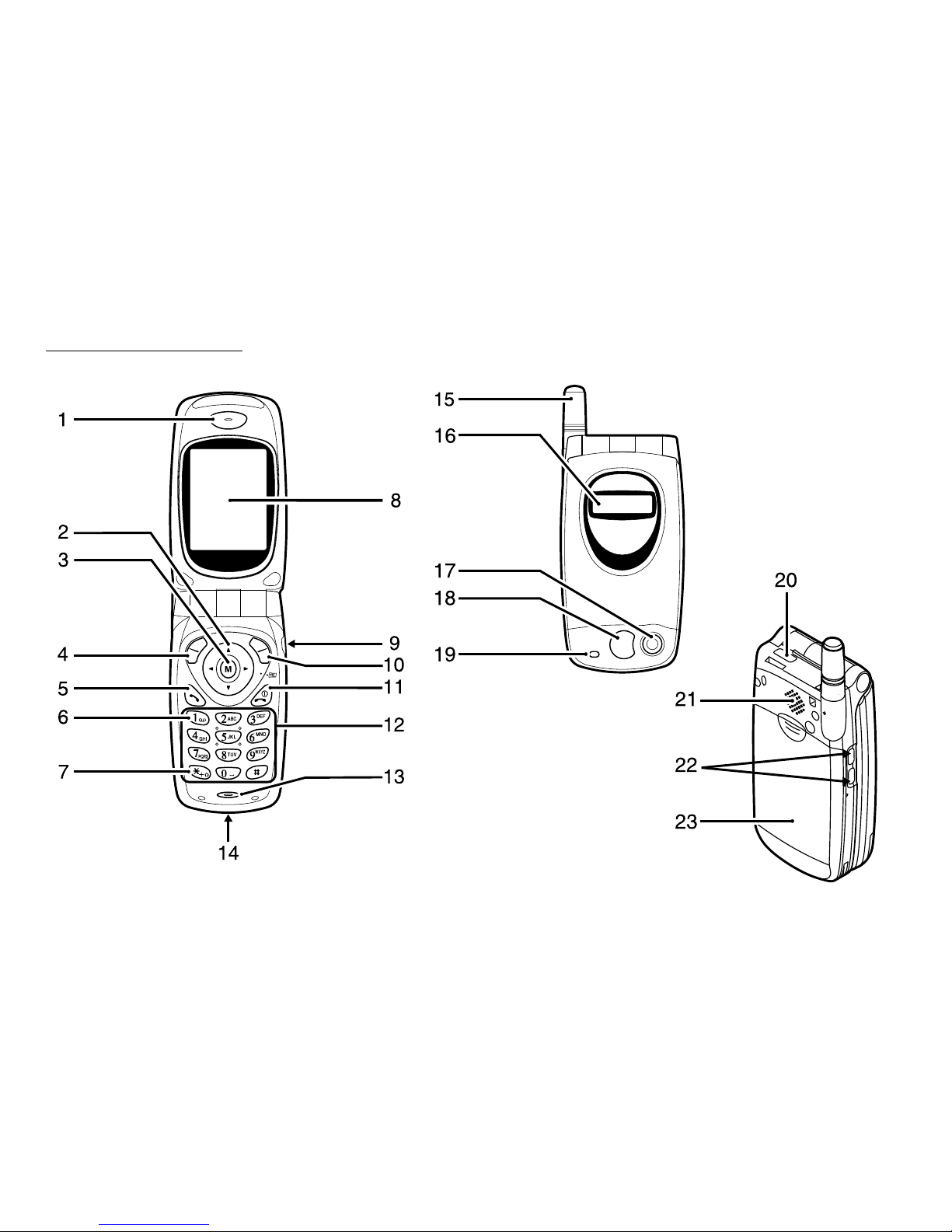
1. Earpiece
2. Navigation Keys (Arrow Keys):
Move the cursor to select
menu items, adjust the
earpiece volume, etc.
Up/Down arrow keys:
Searches the Phonebook
entries in stand-by mode.
Left arrow key: Adjusts the earpiece
volume in stand-by mode.
Right arrow key: Displays the Phonebook
menu in stand-by mode.
3. M Key: Displays the Main Menu
and executes the functions.
4. Left Soft Key: Executes the function at the
bottom left on the screen.
5. Send Key: Makes or accepts calls,
views the call in stand-by
mode.
6. Voice Mail Key:Used to connect to Voice
mail centre. (Depends on
the SIM card.)
7. * /Shift Key: Used to enter * or switch
the text mode.
8. Main-Screen Display
9. Hands free Connector
10. Right Soft Key: Executes the function at the
bottom right on the screen.
11. End/Power Key: Ends a call, turns power on/
off.
12. Keypad
13. Microphone
14.
External Connector
: Used to connect either the
charger or data cable.
15. Aerial
16.
Sub-Screen Display
17. Camera
18. Mirror: For self portraits.
19. LED Indicator
20. Infrared Port: Sends and receives data via
infrared.
21. Speaker
22. Side Keys
Up/Down keys: Move the cursor to select
menu items, etc.
23. Battery Cover

Getting Started 10
Inserting the SIM Card and the
Battery
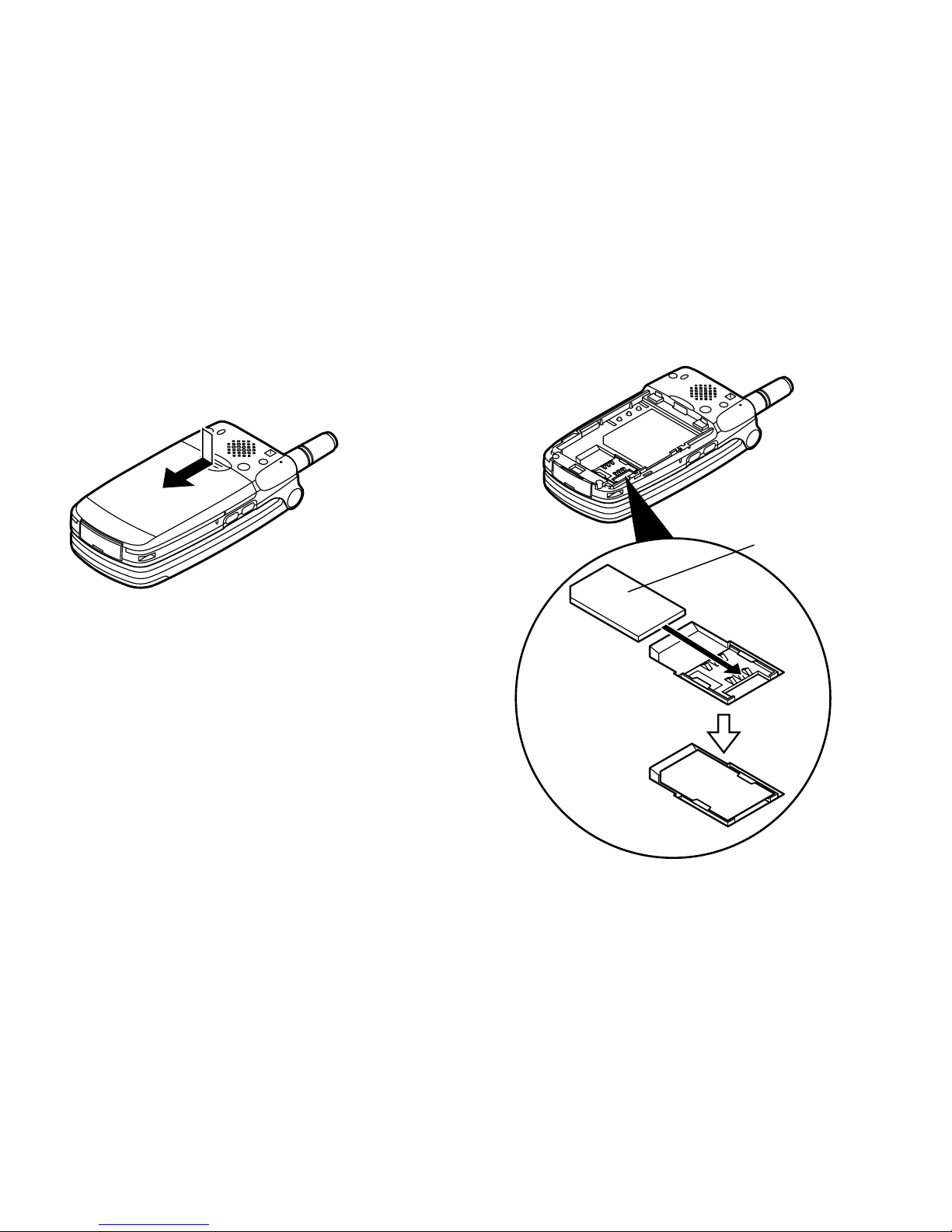
1. Slide off the battery cover.
2. Slide the SIM card into the SIM holder.
SIM card
Table of contents
Other Sharp Cell Phone manuals

Sharp
Sharp AQUOS Sense Service manual

Sharp
Sharp SHG01 Quick start guide

Sharp
Sharp AQUOS V User manual

Sharp
Sharp GX25C User manual

Sharp
Sharp GX17 User manual

Sharp
Sharp SHV43 Quick start guide

Sharp
Sharp NTT docomo Aquos Zeta User manual

Sharp
Sharp AQUOS SHL21 Service manual

Sharp
Sharp HRO00084 User manual

Sharp
Sharp GX20 User manual

Sharp
Sharp 550SH User manual

Sharp
Sharp STX-2 User manual

Sharp
Sharp GX-31 User manual

Sharp
Sharp Aquos D10 User manual

Sharp
Sharp SH837Wi User manual

Sharp
Sharp Aquos Xx3 mini User manual

Sharp
Sharp 703SHf User manual

Sharp
Sharp AQUOS Sense User manual

Sharp
Sharp AQUOS R User manual

Sharp
Sharp Aquos R3 User manual