
SeaBreaze 9H43YCX User manual

OPERATING INSTRUCTIONS FOR
MINI-SPLIT HEAT PUMP SYSTEM
MODEL
9H43YCX
12H43YCX
950-0038-revE 05-16-07
Copyright IRP 2006

TABLE OF CONTENTS
USER INSTRUCTIONS.......................................................................................................................................................................1
PARTS IDENTIFICATION....................................................................................................................................2
REMOTE CONTROL OPERATION AND INDICATORS....................................................................................................................3
MAINTENANCE.................................................................................................................................................................................9
TROUBLESHOOTING.......................................................................................................................................................................9
WARRANTY.......................................................................................................................................................................................10
TECHNICAL ASSISTANCE...............................................................................................................................................................10

In this manual, you will find safety information for installation and operation. For your safety and the safety of others, please read and understand
all cautions located throughout this manual.
WARNINGS AND CAUTIONS
WARNING
This symbol refers to a hazard or unsafe practice which can result in severe personal injury or death.
CAUTION
This symbol refers to a hazard or unsafe practice which can result in personal injury or property damage.
Please read the instruction manual prior to use to ensure proper operation of your unit.
INSTALLATION
These units are not designed to be installed in the following locations:
In areas where there is a possibility of combustible gases or fumes.
In damp or moist areas.
Always use proper size breaker or fuse. Failure to do so may cause fire.
OPERATION
Always turn the unit to the “OFF” mode with the remote control. Never use a circuit breaker or fuse as a means to turn the unit off and on
except in the case of an emergency.
Do not operate this unit if you are wet or have wet hands. Electric shock can occur.
Do not spray insecticides, paints, or other flammable sprays or liquids into or around the unit.
Do not put foreign objects into the unit.
Do not hang or place items on the unit.
Do not use harsh chemicals such as paint thinner, benzene, or polish to clean the unit.
During cooling operation, shades, blinds, and curtains should be used to shade the room from direct sunlight.
USER INSTRUCTIONS AND INFORMATION
-1-
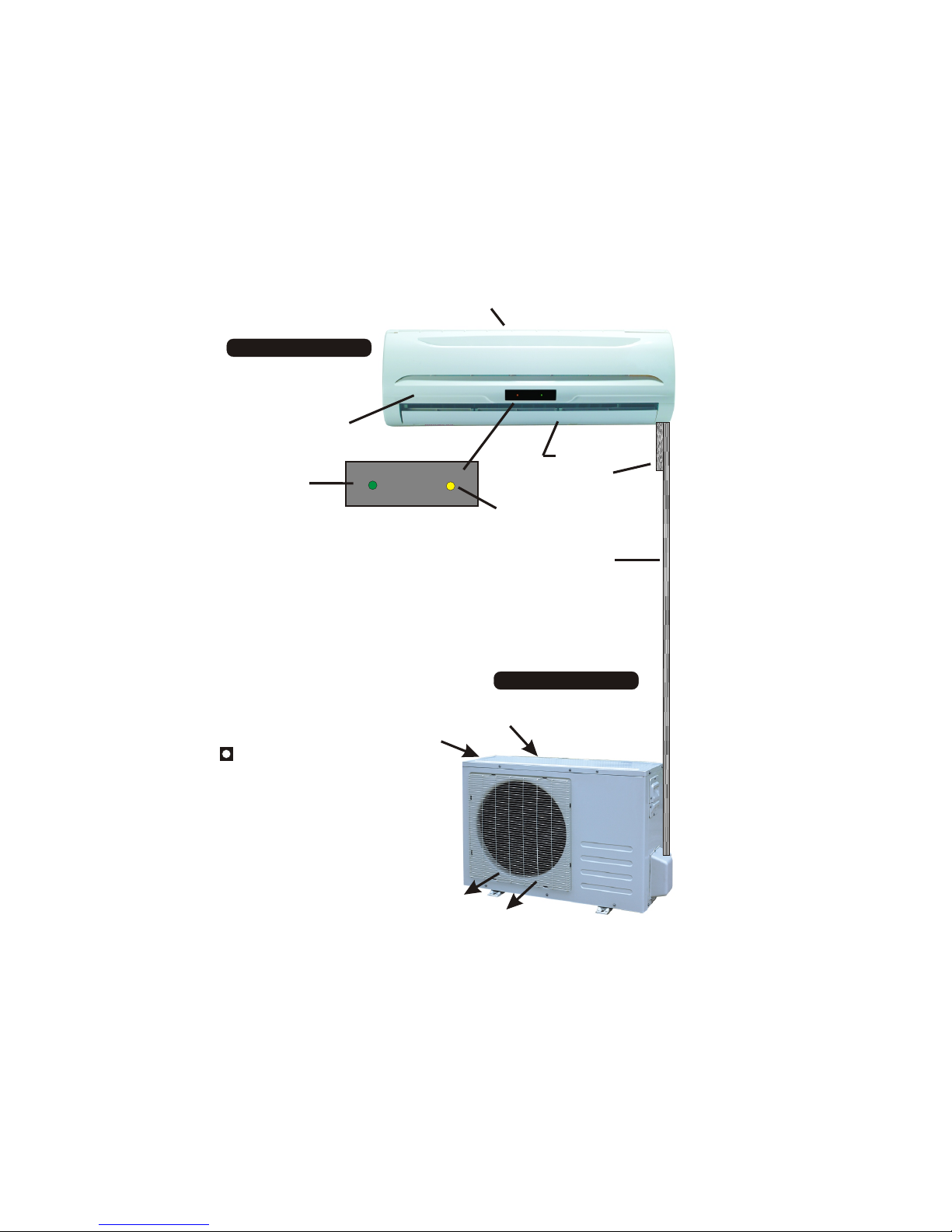
INDOOR UNIT
OUTDOOR UNIT
AIR RETURN
AIR FILTER
(UNDER COVER)
AIR OUTLET
TIMER ON
LIGHT
POWER ON
LIGHT
CONDENSATE
DRAIN
WHEN:
RUN light is on - Unit is operating in the set mode.
i.e. Cool, Dehumidify, Fan.
TIMER light is on - Unit is in AUTOSTART mode and will start
at the set time.
RUN AND TIMER light is on - Unit is
operating in AUTOSTOP mode and will stop
at the set time.
EMERGENCY OPERATION SWITCH
Is located under front cover of indoor
unit. PRESS ON
Unit will operate at last known function
and temperature.
PRESS OFF
Unit will stop until restarted by the
remote or by this switch.
Line-set and
cables
CONDENSER
AIR DISCHARGE
CONDENSER
AIR INLETS
(side and back)
-2-
PARTS IDENTIFICATION AND FUNCTIONS
TO OPEN FRONT COVER
Press inward on the sides of the cover near the bottom to release, then pull bottom of cover outwards
To close the cover, press the corners inward to latch. DO NOT OVEREXTEND THE FRONT COVER.
REMOTE CONTROL OPERATION
-3-
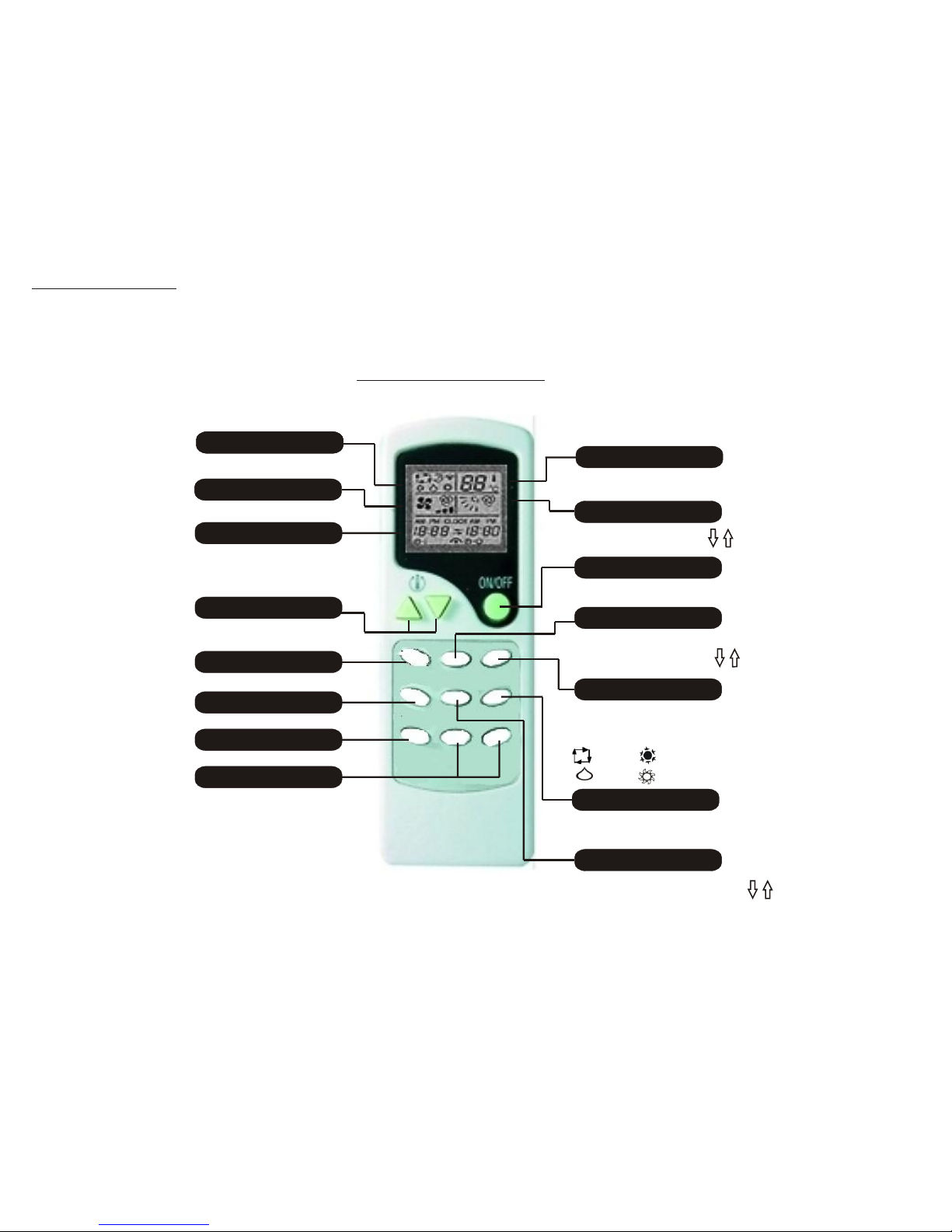
FAN SPEED Indicator
TIME Indicator
SET TEMPERATURE Buttons
SLEEP Button
AUTO START Button
OPERATION MODE IndicatorOPERATION MODE Indicator
AUTO STOP Button
Indicates selected operation mode.
Indicates the selected fan speed.
During TIMER operation display
indicates the set time.
During normal operation display
indicates current time.
SLEEP
AUTOSTART SWING FAN SPEED
AUTOSTOP HOUR MIN
These buttons adjust the room
temperature
Activates the SLEEP mode.
Starts timer operation
Stops timer operation
HOUR - MIN Buttons
These buttons are used for
setting present and auto
start/stop times.
OPERATION MODE Indicator
SWING Indicator
Indicates set temperature
(except in AUTO mode)
Indicates swing angle of
horizontal louvers
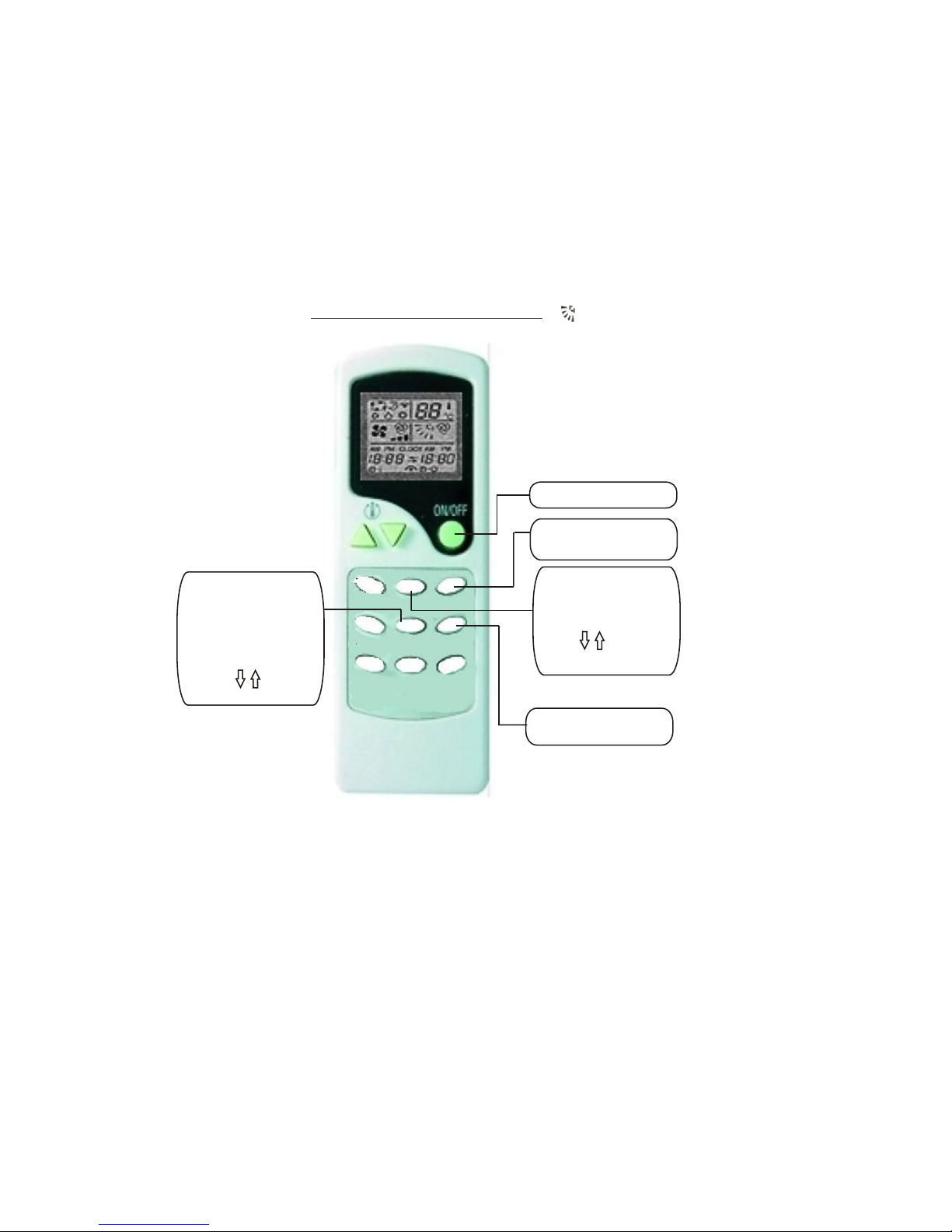
ON/OFF Button
Pressing this button turns the
unit On or OFF
VANE CONTROL Button
Pressing this button selects
1 of 5 fixed swing angles for
the horizontal louvers
MODE Button
Pressing this button changes
the operating mode in the
following order:
(AUTO) (COOL)
(DRY) (HEAT)
FAN SPEED Button
Pressing this button selects
between HI-MED-LOW or
AUTO fan speeds
SWING Button
PRESSING THIS BUTTON ACTIVATES
THE CONTINUOUS UP-DOWN SWINGING
ACTION OF THE HORIZONTAL LOUVERS
VANE CONTROL
MODE

SLEEP
AUTOSTART SWING FAN SPEED
AUTOSTOP HOUR MIN
1) Press the ON/OFF Button to
turn the unit ON
2) Press the MODE Button
and select the AUTO mode.
FAN SPEED Button
3) Press the ON/OFF Button
or select another mode to
stop the AUTO mode.
NOTE: When changing functions, please allow 3 - 4 minutes for the condensor unit to restart.
USE OF THE REMOTE CONTROL (AUTO SELECT MODE) USE OF THE REMOTE CONTROL (DEHUMIDIFIER MODE)
In the AUTOSELECT mode, the system
functions as described below:
When the room temperature is below
70° F, the system will function in the
HEAT mode.
When the room temperature is between
70° F and 79° F, the system will function
in the DEHUMIDIFY mode.
When the room temperature is above
79°F, the system will function in the
COOLING mode.
AUTOSTART SWING FAN SPEED
AUTOSTOP HOUR MIN
1) Press the ON/OFF Button to
turn the unit ON
2) Press the MODE Button
and select the DEHUMIDIFY
mode.
FAN SPEED Button
3) Press the FAN SPEED
Button to select the desired
fan speed
Temperature adjusting procedure during AUTO SELECT operation
4) Press the ON/OFF Button
or select another mode to
stop the DEHUMIDIFY mode.
During the de-humidification process, the
outdoor compressor and the inside
evaporator will turn on and off based on
the “sensed” indoor and outdoor
temperatures and is not a function of the
set temperature.
Temperature can not be adjusted
during de-humidification.
-4-
MODE
VANE CONTROL
SLEEP MODE
VANE CONTROL
USE OF THE REMOTE CONTROL (COOL MODE) USE OF THE REMOTE CONTROL (HEAT MODE)
AUTOSTART SWING FAN SPEED
AUTOSTOP HOUR MIN
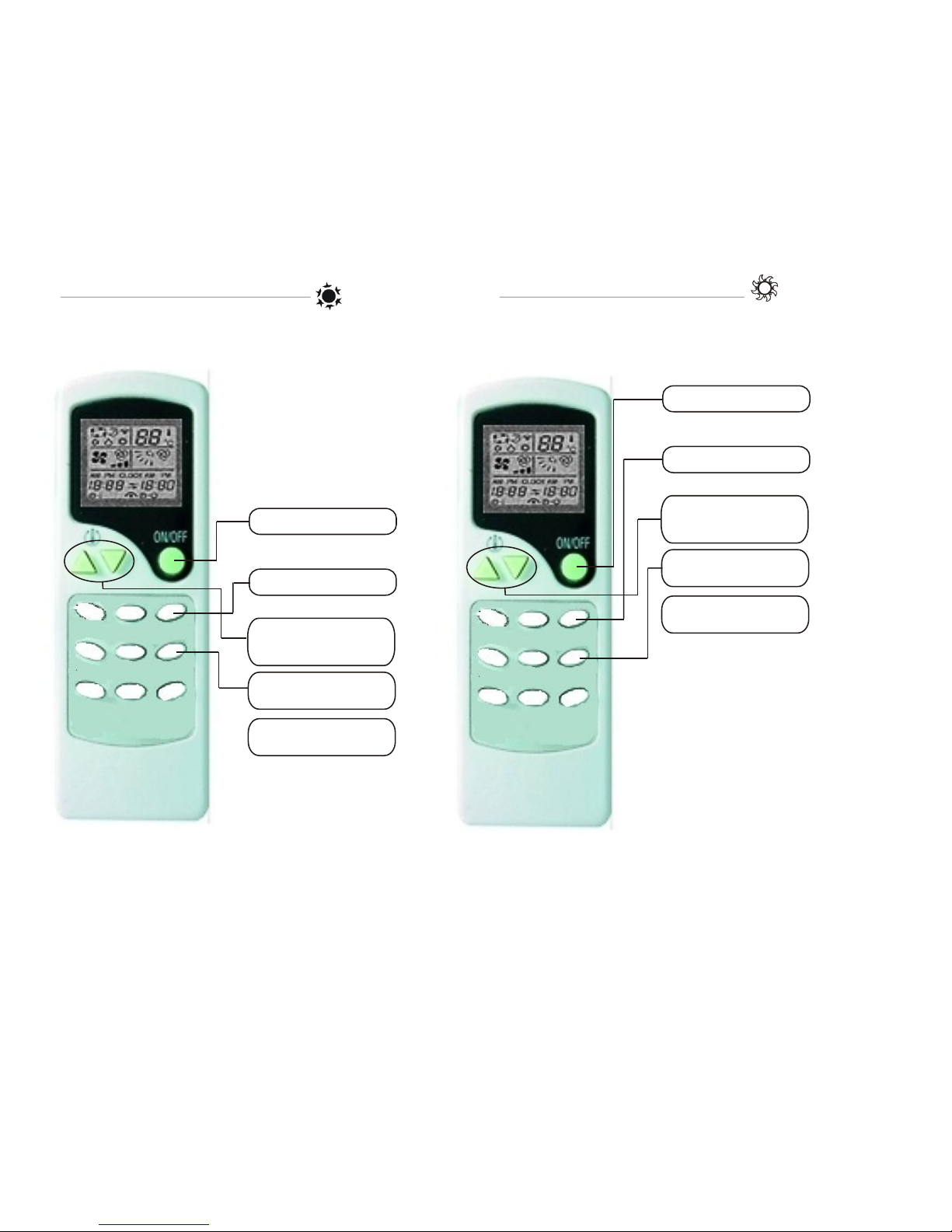
1) Press the ON/OFF Button to
turn the unit ON
2) Press the MODE Button
and select the COOL Mode
FAN SPEED Button
4) Press the FAN SPEED
Button to select the desired
fan speed
Temperature adjusting procedure during AUTO SELECT operation
5) Press the ON/OFF Button
or select another mode to
stop the COOL mode.
3) Press the + or - Buttons
to adjust the room temperature
Each press of the button will
change the temperature 1°
The COOL mode activates the
outdoor compressor as
necessary to satisfy the
selected room temperature.
-5-
AUTOSTART SWING FAN SPEED
AUTOSTOP HOUR MIN
1) Press the ON/OFF Button to
turn the unit ON
2) Press the MODE Button
and select the HEAT Mode
FAN SPEED Button
4) Press the FAN SPEED
Button to select the desired
fan speed
Temperature adjusting procedure during AUTO SELECT operation
5) Press the ON/OFF Button
or select another mode to
stop the HEAT mode.
3) Press the + or - Buttons
to adjust the room temperature
Each press of the button will
change the temperature 1°
NOTE: When the outside temperature is very
low and the humidity is very high, frosting will
occur on the heat exchanger of the outside
unit. When this happens, the auto-defrost will
turn on to to defrost the heat exchanger.
Heating will be suspended for 5 to 10 minutes
while the defrost cycle completes. At the end
of the defrost cycle, normal heating will resume.
During the defrost cycle, steam may be seen
coming from the outside heat exchanger. This
is normal and is of no concern.
The HEAT mode activates the
outdoor compressor as
necessary to satisfy the
selected room temperature.
SLEEP MODE
VANE CONTROL
SLEEP MODE
VANE CONTROL

AUTOSTART SWING FAN SPEED
AUTOSTOP HOUR MIN
USE OF THE REMOTE CONTROL (SLEEP MODE) USE OF THE REMOTE CONTROL (CLOCK SET - BATTERIES)
AUTOSTART SWING FAN SPEED
AUTOSTOP HOUR MIN
NOTE: Pressing the
FAN SPEED button during
SLEEP mode will cancel the
sleep mode.
Temperature adjusting procedure during AUTO SELECT operation
1) Press the SLEEP Button to
change to the sleep mode
(quiet operation)
2) Press the SLEEP Button
again to return to normal
operation.
In the SLEEP mode, the system
lowers the fan speed, and raises
the setpoint temperature slightly.
-6-
CLK Button
(to set clock)
1) Remove the battery
cover on the back
of the remote
2). Use a ball point
pen or similar
device, press this
button one time
3). Press the HOUR
button to set the hours
4). Press the MIN button
to set the minutes.
5.) Press the CLK button
again to lock in set time.
6). Replace the battery
cover by sliding it
back on
+
+
Replace batteries with 2 ea
AAA cells. Observe proper
Polarity.
SLEEP MODE
VANE CONTROL
SLEEP MODE
VANE CONTROL
AUTOSTART SWING FAN SPEED
AUTOSTOP HOUR MIN
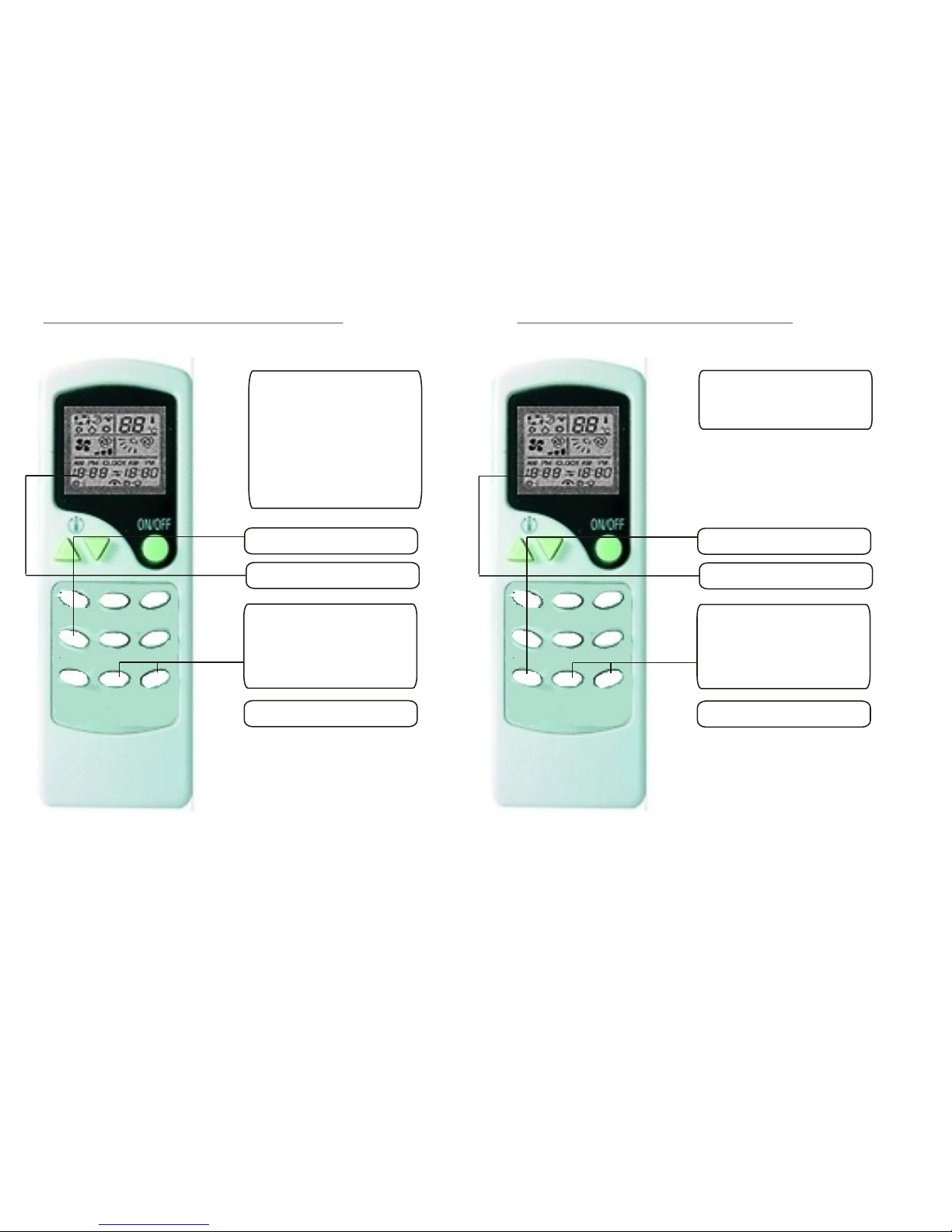
1). Press the AUTOSTART button
to set the TURN ON timer
2). The clock will display the turn
on time.
3). Press the HOUR and MIN buttons
to set the turn on time.
Each time the HOUR button is
pressed will increment the time by
1 hour. Each time the MIN button is
pressed will increment the time by
10 minutes.
4.) Press the AUTOSTART button
again will release the timer.
NOTE: The clock must be set in order
for the AUTOSTART mode to function
properly
AUTOSTART SWING FAN SPEED
AUTOSTOP HOUR MIN
1). Press the AUTOSTOP button
to set the TURN ON timer
2). The clock will display the turn
off time.
3). Press the HOUR and MIN buttons
to set the turn off time.
Each time the HOUR button is
pressed will increment the time by
1 hour. Each time the MIN button is
pressed will increment the time by
10 minutes.
4.) Press the AUTOSTOP button
again to release the timer.
NOTE: The clock must be set in
order for the AUTOSTOP function
to work properly.
The Autostart function will start the
unit in the last selected mode.
The Autostart function will turn the
unit ON when the selected time
is reached.
During the “ON” period, modes, fan
speeds, and temperatures may be
adjusted.
If the unit is “ON” when
AUTOSTART is selected, it will turn
OFF until the selected time is
reached.
The Autostart function will stop the
unit in the last selected mode.
The Autostart function will turn the
unit OFF when the selected time
is reached.
NOTE: The AUTOSTART and AUTOSTOP timers can be used in combination with each other.
For example, to have the unit come on and run for 3 hours beginning at 10:00 am set the AUTOSTART time to 10:00 am, and set the AUTOSTOP time to 1:00 pm.
At 10:00 am, the unit will turn on in the selected modes, and turn off at 1:00 pm.
The timer which is set to the earliest time will activate first. For example, if AUTOSTOP is set for 10:00 am and AUTOSTART is set for 11:00 am, the unit will turn off at 10:00 am and turn back on
at 11:00 am.
The time settings will remain in memory of the remote until changed, but AUTOSTART and/or AUTOSTOP are not recurring events, and must be activated again by pressing AUTOSTART or
AUTOSTOP again if desired.
Pressing the AUTOSTART button or the AUTOSTOP button during the set time period will cancel that operation.
When the unit is running, press the AUTOSTART to set the start time will make the unit turn off immediately and the unit will turn on at the time you just set. When the unit turns off, press the
AUTOSTOP to set the stop time will make the unit turn on immediately, and the unit will turn off at the time you just set.
USE OF THE REMOTE CONTROL (AUTOSTART MODE) USE OF THE REMOTE CONTROL (AUTOSTOP MODE)
-7-
SLEEP MODE
VANE CONTROL
SLEEP MODE
VANE CONTROL
AUTOSTART SWING FAN SPEED
AUTOSTOP HOUR MIN
1) Press the ON/OFF Button to
turn the unit ON
2) Press the MODE Button
and select the desired mode
(AUTO, COOL, DRY, or HEAT)
FAN SPEED Button
4) Press the FAN SPEED
Button to select the desired
fan speed
Temperature adjusting procedure during AUTO SELECT operation
3) Press the VANE CONTROL
Button to select the desired
angle of the outer horizontal
louvers. The horizontal
louvers control the vertical
air flow from the unit.
There are 5 stationary angles.
5) Press the SWING
button to over-ride the VANE
CONTROL button. When
pressed, The SWING button
makes the horizontal louvers
swing continuously up
and down
By operating the VANE CONTROL
and SWING buttons, you may direct
the airflow to maximize the cooling
effectiveness
NOTE: in the cooling operation with the VANE CONTROL blowing down (4th & 5th positions),
the outer horizontal louvers will return to the level (position 1) after 1 hour in order to
prevent condensate water from dripping.
LOUVER ADJUSTMENTS (Air Flow Direction)
-8-
SLEEP MODE
VANE CONTROL
This manual suits for next models
1
Popular Heat Pump manuals by other brands


Mitsubishi Electric
Mitsubishi Electric PUZ-SWM60VAA Service manual

Dimplex
Dimplex LI 16I-TUR Installation and operating instruction

Carrier
Carrier WSHP Open v3 Integration guide

TGM
TGM CTV14CN018A Technical manual

Carrier
Carrier 38MGQ Series installation instructions

Kokido
Kokido K2O K880BX/EU Owner's manual & installation guide

Viessmann
Viessmann VITOCAL 300-G PRO Type BW 2150 Installation and service instructions

Carrier
Carrier 48EZN installation instructions

Viessmann
Viessmann KWT Vitocal 350-G Pro Series Installation and service instructions for contractors

Ariston
Ariston NIMBUS user manual

Weishaupt
Weishaupt WWP L 7 Installation and operating instruction

GE
GE Zoneline AZ85H09EAC datasheet