
roadeyescams recNEO User manual

recNEO FULL HD
Vehicle Video Recorder
User Manual
2013 Oct V1.0

Vehicle Video Recorder
User Manual
i
Safety Precautions
Record and review some test footage to ensure the device records
correctly.
Please note that the manufacturer, its subsidiaries, affiliates and
distributors are not liable for damages arising from any malfunction of
the main device accessories, including the memory card, that fails
recording footage in a way that is not machine-readable.
Before using the product, please read the safety precautions outlined
below. Always make sure the product is used appropriately.
•Use only recommended power supplies.
•Do not attempt to disassemble, alter or apply heat to the product.
•DO NOT apply multi cigarette lighter adapters – doing so will cause
unstable power input that damages the device.
•Please always make sure all power connectors are fully secured.
•Avoid dropping or subjecting the product to severe impacts.
•To avoid the risk of injury, do not touch the interior of the product if it has
been dropped or otherwise damaged.
•Stop using the product immediately if it emits smoke, a strange smell, or
otherwise behaves abnormally.
•Do not use organic solvents such as alcohol, benzene, or thinner to clean
the product.
•Do not let the product come into contact with water (e.g. sea water) or other
liquids.
•Do not allow liquids or foreign objects to enter the VVR.
•Do not place the VVR near or in direct flame.
•Do not handle the power cord with wet hands.
•Do not use the equipment in a manner that exceeds the rated capacity of
the electrical outlet or wiring accessories.
•Do not use if the power cord or plug are damaged, or not fully plugged into
the outlet.
•Do not allow dirt or metal objects (such as pins or keys) to contact the
terminals or plug.
•Avoid using, placing or storing the product in the humid or dusty areas.

Vehicle Video Recorder
User Manual
ii
Index
A. Feature Description ....................................................................... 1
B. Specification .................................................................................. 2
C. Accessories ................................................................................... 2
D. Installation...................................................................................... 3
E. Control Panel/Function Board........................................................ 5
F. SD Card Installation....................................................................... 6
G. Function Panel............................................................................... 7
H. OSD Menu function .......................................................................9
I. VACRON Viewer Player .............................................................. 10
J. Record Time Estimation .............................................................. 19
K. Appendix: The Indication of Bright and Dark Spot of LCD...........20

Vehicle Video Recorder
User Manual
1
A. Feature Description
!Real-time recording in Full HD (H.264 compression technology).
!105° Wide-angle CMOS Lens.
!2.5” TFT LCD.
!GPS sensor.
!Record video and sound inside and outside the car.
!Compatible with SDHC Card up to 32GB.
!Continuous recording.
!Emergency recording - footage recorded with overwrite protection.
!Featuring a Gyroscopic sensor that automatically activates
emergency recording in case of an accident.
!Made in Taiwan with a 3-year warrantee.

Vehicle Video Recorder
User Manual
2
B. Specification
Item
Description
Sensor
CMOS
View Angle
105° Wide-angle
Resolution
Full-HD
NTSC 1080P/30 fps ; PAL 1080P/25 fps
V / A
DC5V±5% / 1A
Operating tmp.
-10º~ +60º
Display
2.5” TFT LCD
Storage
4GB SDHC Card or above (Recommend
『SanDisk』Class 10 or above)
Recording
Auto recording 30 seconds after power on.
Footages will be preserved after power off.
Recording
content
Date/Time/Image/Sound/G-Sensor data)
Storage Format
Special format, playing on LCD screen.
Or specific Player bundled.
Audio Input
Built-in microphone
Time setting
Built-in permanent calendar with adjustable
function through remote control or bundled
Player.
※CR1220 Battery can be replaced by users.
G-Sensor
Built-in 3D G-Sensor
C. Accessories
Adapter / Software CD / Bracket / Quick Start Guide / 8G Class10
SDHC Card
Vehicle Video Recorder
User Manual
3
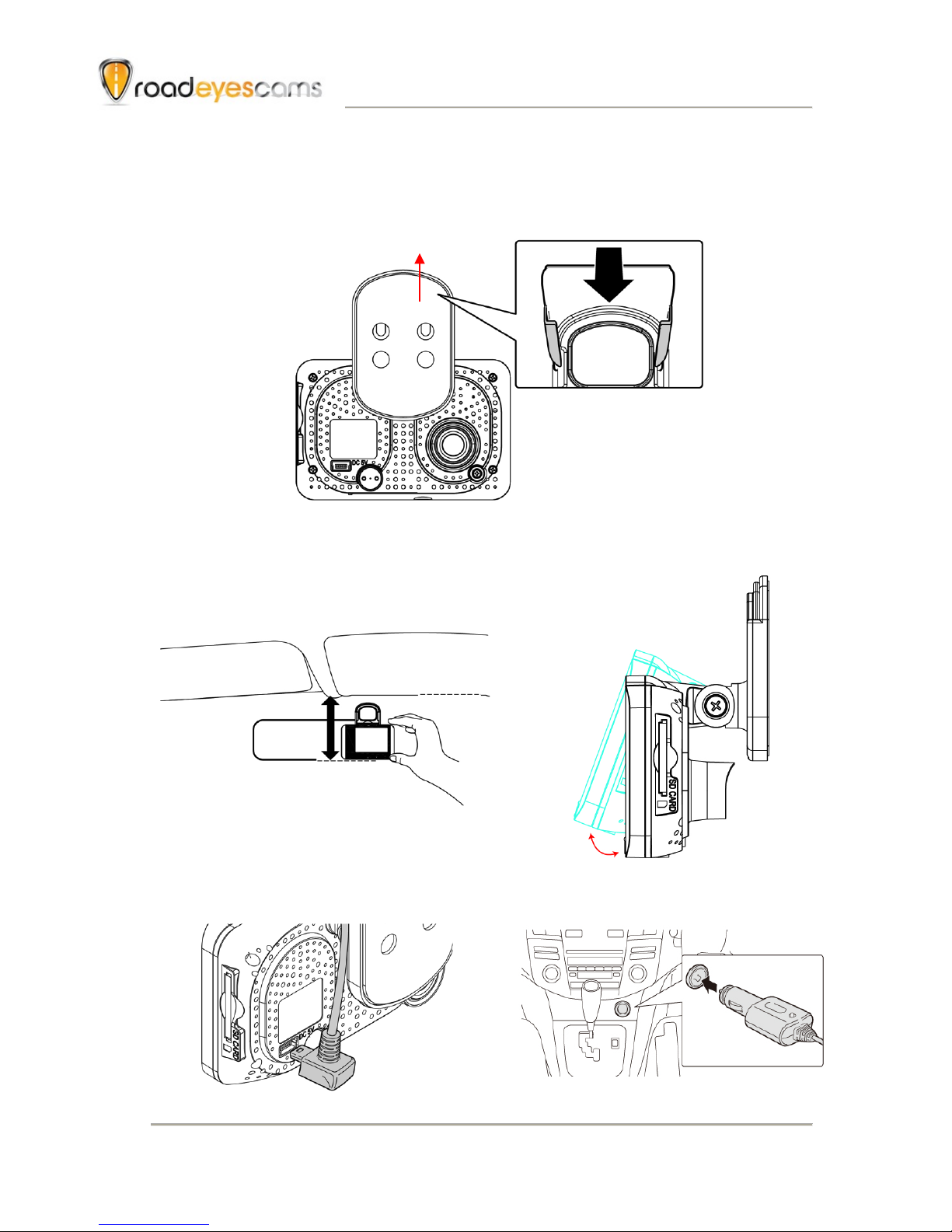
D. Installation.
1. Install the device on the windshield with 3M or suction cup mount
2. The best position to install
the device on the windshield
3. To adjust the recording angle
properly
4. Plug in DC5V Power Supply
5. Plug in the Cigarette Charger
Sticker Adhesive Spot

Vehicle Video Recorder
User Manual
4
6. VVR installation
Caution
(1). This device should be installed in the area where the
windshield will be able to be cleaned.
(2). Formatting SD card on the device before beginning to use.
(3). Set time zone and timing on OSD.
(4). NTSC or PAL setting through OSD.
Best location
Cigarette adapter

Vehicle Video Recorder
User Manual
5
E. Control Panel/Function Board
Dimension (mm)
SD card Slot
DC5V
Power input
Lens
Control Panel
Display

Vehicle Video Recorder
User Manual
6
F. SD Card Installation
(1). Format memory card; please refer to the other chapter
“Formatting memory card” for more detail.
Caution
(1). Recommend Memory Card “SanDisk” Class 10 or above.
(Minimum of 4GB)
(2). If the memory card is not formatted by our exclusive player,
the device will automatically erase all the data inside of the
memory card after inserting it, start recording at default
setting.
(3). Please don’t convert Micro SD to SD card to begin
recording, to avoid the damage during recording.
(4). Since memory cards have the writing endurance situation,
we recommend to inspect the memory card and use pc for
playback regularly, to ensure that the memory card can
read and write

Vehicle Video Recorder
User Manual
7
G. Function Panel
•To press force record any time under operation will trigger force
recording.
•LED indicators
Red: Under normal operation-recording
Fast Blinking Red: Force recording
Green:Low light indicator
Force Record
Manu/Switcher
Up
Down
Playback/Select
Table of contents
Other roadeyescams Dashcam manuals


