
Realme Watch S RMA207 User manual

Version: 1.0
realme Watch S
User Manual
Thank you for choosing realme Watch S. Please read this manual
carefully before using the product, and keep the manual for future
reference.
Illustrations of the product, accessories, and user interface in the
manual are for reference purposes only. As the product is being
updated and upgraded, there may be some dierences between
the actual product and the schematic. Please refer to the actual
product.

1. Overview
The new realme Watch S (hereinafter referred to as "the Watch") is
an ultra-thin and lightweight smart fitness watch with a long-lasting
battery life; it is capable of measuring your blood oxygen levels,
tracking your heart rate, sleep, and workout activities, as well as
serving as an information assistant and oering other smart tools.
With its lightweight, fashionable design and the ability to accurately
track your workout and health, the Watch is the perfect companion
for your daily fitness and leisure activities.
Featuring a color display and a soft, skin-friendly silicone strap, the
Watch feels nice to the touch and is extremely comfortable to wear.
After wearing the Watch on your wrist and pairing it with your
phone, you can enjoy thoughtful services such as healthy workout,
heart rate monitoring, sleep tracking, and instant notification.
Performance
Bluetooth LE
Full-screen touch
TFT color display
24-hour dynamic heart rate
monitoring
Blood oxygen measurement
Multiple workout modes
Sleep tracking
Meditation mode
Message notification
Music control

2. Product Information
Included in the box:
The charging base:
Main body of the Watch:
a. realme Watch S x1
c. Charger x1
b. User Manual x1
SpO sensor
Heart rate sensor
Charging contacts
Power button
TFT display
Shortcut button
3. Instructions for Use
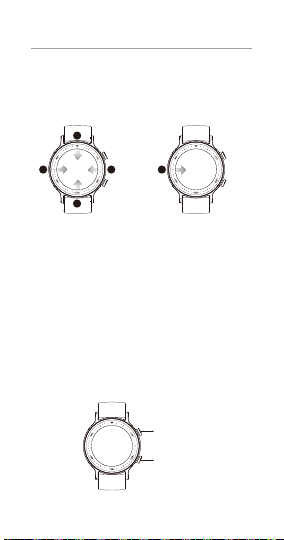
01. Screen Control
The Watch features a 1.3-inch TFT color display with a 360*360 pixel
resolution, and a full touch screen on which you can swipe (up,
down, left, right), tap, or touch and hold.
a. On the watch face, swipe down to open the message notification
list, and then swipe up to go back;
b. On the watch face, swipe up to open the function list, and then
swipe down to go back;
c. On the watch face, swipe right to go to shortcut settings, and
then swipe left to go back;
d. On the watch face, swipe left to switch to another top-level
interface, and then swipe left or right to switch between top-level
interfaces;
e. On a non-watch-face screen, swipe right to go back to the
previous screen;
f. On the watch face, touch and hold to switch to another watch
face.
02. Button Control
Power button
Shortcut button
a
b
cde

a. When the screen is o, briefly press it to wake it up;
b. Briefly press the watch face to enter the function list;
c. Briefly press a non-watch-face screen to go back to the watch
face;
d. When exercising, briefly press the screen to pause/continue your
workout;
e. Press and hold the watch face to enter the restart or power o
screen;
f. Whatever mode you are in, you can force restart the Watch by
pressing the button for at least 10 seconds.
Power button
realme.com/global/Link
a. When the screen is o, briefly press it to wake it up;
b. Press the watch face to enter the workout list;
c. When exercising, press the watch face to switch to the data
screen.
Shortcut button
a. Installing the APP
Press and hold the power button to power on the Watch, and then
use your phone to scan the QR code shown on the watch screen to
download and install the realme Link APP.
You can also scan the QR code below or go to the APP store to
download and install the .
03. Connecting to the APP
b. Binding and connecting
Go to the realme Link APP, tap "add device", and bind the Watch
according to the prompts.

Tips:
Before binding, make sure your phone has Bluetooth turned on,
and that your phone is properly connected to the Watch.
If you fail to find the Watch when trying to add it, or are unable to
connect to it when using it, try restoring the Watch to factory
settings, and then add it again in the APP.
Binding
successful
Binding
failed
04. Wearing
Wear the Watch about one finger away from your carpal bones,
and adjust the strap to ensure that the Watch is tight enough for
the heart rate sensor to properly collect data.
Tips:
Your heart rate monitoring data may be inaccurate if you wear the
Watch too loosely.
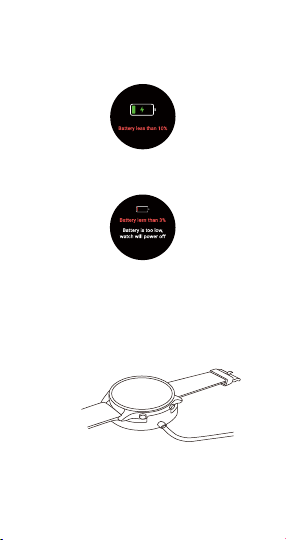
05. Battery Low
When the battery level drops to 10%, the Watch vibrates once and
shows a pop-up window saying "Battery less than 10%. Please charge
soon";
When the battery level drops to 3%, a pop-up window appears
saying "Battery is too low. Watch will power o".
06. Charging
a. Place the Watch on the charging base, and make sure the
charging contacts on the back of the Watch are properly aligned
and attached to the metal pins on the charging base;
b. Connect the charging base to a standard, certified USB charger
(output voltage: 5V, output current: 0.5A and above).
Tips:
When not used for a long time, the Watch may fail to power on.
In this case, you will need to charge the Watch for about 1 minute
before the charging icon appears on the screen.
Before charging, gently wipe the charging contacts clean and dry
to get rid of sweat and moisture.

5. Specifications
realme Watch S
RMA207
1.3-inch TFT Color Display
360*360
390mAh
Bluetooth 5.0 BLE
IP68
0°C ~ 40°C
-20°C ~ 60°C
Android 5.0 or higher
259.5x47.0x12.0mm
2402MHz - 2480MHz
0dBm
Product Name
Product Model
Screen
Resolution
Battery Capacity
Frequency Range
Bluetooth Transmission Power
Wireless Connection
Protection Level
Product Size
Operating Temperature
Storage Temperature
Pair with Phone
4. User Guide
01. For detailed instructions on how to use the realme Watch S, go
to the following path:
The realme Link APP Settings User Guide
02. How to view “Regulatory Information”on your watch?
You can go to Settings page System Regulatory Information
to view “Regulatory Information”

6. Warranty Policy
Thank you for choosing realme products. Within 24 months from the
date of purchase, you can enjoy the company's warranty services if
the product has a quality issue.
Important Notes:
- A valid proof of purchase must be issued by the seller at the time of
purchase.
- User must properly retain the warranty card and proof of purchase.
These will not be replaced if lost.
- If the product fails due to non-human factors, the user can go to
the realme customer service center with the warranty card and
proof of purchase for free repairs within the warranty period.
Warranty Exclusions:
- Warranty period has expired.
- Damage caused by failure to use in accordance with the
requirements in the manual or user guide.
- Damage caused by human factors.
- Failure caused by unauthorized disassembly, repair and
modification of the product.
- Damage caused by force majeure (such as floods, earthquakes
and lightning).
- No warranty card and invoice, or information on the warranty card
and invoice is inconsistent.
- Natural wear and tear of the product.
- Failure and damage caused by other non-product-related quality
issues.
Contact Information:
- Website: www.realme.com

7. Warranty Card (Stub Copy)
Dear user, thank you for using our company’s product. In order to
serve you better, please read and keep this warranty card properly
after purchasing the product.
User Information
Name:
Phone No:
Address:
E-mail:
Product Information
Model:
S/N:
Sales Information
Date of Purchase:
Invoice No.:
Selling unit’s Name:
Phone No:
Selling Address:
Table of contents
Languages:
Other Realme Watch manuals







