
QNAP TS-251D User manual

TS-251D
User Guide
Document Version: 2
03/07/2020

Contents
1. Preface
About This Guide.......................................................................................................................................... 3
Audience.......................................................................................................................................................3
Document Conventions................................................................................................................................ 3
2. Product Overview
About the TS-251D....................................................................................................................................... 4
Hardware Specifications............................................................................................................................... 4
Package Contents........................................................................................................................................ 6
Components................................................................................................................................................. 7
Front Panel...............................................................................................................................................7
Left Panel................................................................................................................................................. 8
Rear Panel................................................................................................................................................8
Drive Numbering.......................................................................................................................................9
Safety Information.........................................................................................................................................9
Installation Requirements........................................................................................................................... 10
Setting Up the NAS.....................................................................................................................................10
3. Installation and Configuration
Hardware Installation.................................................................................................................................. 12
Drive Installation.....................................................................................................................................12
Installing Expansion Cards.....................................................................................................................20
Replacing Memory Modules...................................................................................................................26
QTS Installation.......................................................................................................................................... 32
Installing QTS Using Qfinder Pro........................................................................................................... 32
Installing QTS Using the Cloud Key....................................................................................................... 33
Installing QTS Using an HDMI Connection............................................................................................ 35
4. Basic Operations
Power Button.............................................................................................................................................. 36
Reset Button............................................................................................................................................... 36
USB One Touch Copy Button..................................................................................................................... 36
LEDs........................................................................................................................................................... 37
Audio Alert.................................................................................................................................................. 38
5. Troubleshooting
Forcing Qfinder Pro or myQNAPcloud to Locate the NAS......................................................................... 39
Hot-Swapping Failed Drives....................................................................................................................... 39
Recovering Unintentionally Removed Healthy Drives................................................................................ 39
Support and Other Resources.................................................................................................................... 40
6. Glosssary
CloudKey.................................................................................................................................................... 41
myQNAPcloud Link.....................................................................................................................................41
myQNAPcloud............................................................................................................................................ 41
myQNAPcloud ID........................................................................................................................................41
Qfinder Pro................................................................................................................................................. 41
QTS.............................................................................................................................................................41
7. Notices
TS-251D User Guide
1

Limited Warranty.........................................................................................................................................42
Disclaimer................................................................................................................................................... 42
GNU Public License....................................................................................................................................42
CE Notice....................................................................................................................................................50
FCC Notice................................................................................................................................................. 50
VCCI Notice................................................................................................................................................ 51
BSMI Notice................................................................................................................................................51
SJ/T 11364-2006.........................................................................................................................................51
2

1. Preface
About This Guide
This guide provides information on the QNAP TS-251D NAS and step-by-step instructions on installing the
hardware. It also provides instructions on basic operations and troubleshooting information.
Audience
This document is intended for consumers and storage administrators. This guide assumes that the user has
a basic understanding of storage and backup concepts.
Document Conventions
Symbol Description
Notes provide default configuration settings and other supplementary
information.
Important notes provide information on required configuration settings and other
critical information.
Tips provide recommendations or alternative methods of performing tasks or
configuring settings.
Warnings provide information that, when ignored, may result in potential loss,
injury, or even death.
TS-251D User Guide
Preface 3

2. Product Overview
This chapter provides basic information about the QNAP TS-251D NAS.
About the TS-251D
The TS-251D is powered by an Intel® Celeron® J4005 dual-core 2.0 GHz processor with burst frequency up
to 2.7 GHz. The TS-251D supports up to 8 GB of DDR4 RAM and features USB One Touch Copy, a Gigabit
LAN port, and a PCIe slot. With Intel® AES-NI 256 hardware-accelerated encryption engine, the TS-251D
ensures the security of sensitive data and protects important information stored on the NAS.
Hardware Specifications
Warning
• If your QNAP product has hardware defects, return the product to QNAP or a QNAP-
authorized service center for maintenance or replacement. Any attempt to repair or
perform maintenance procedures on the product by you or an unauthorized third-party
invalidates the warranty.
• QNAP is not responsible for any damage or data loss caused by unauthorized
modifications and installation of unsupported third-party applications.
For details, see the QNAP Warranty Terms and Conditions.
Ordering P/N CPU Memory Power supply
TS-251D-2G Intel® Celeron® J4005 2 GB Single
TS-251D-4G Intel® Celeron® J4005 4 GB Single
Component TS-251D-2G TS-251D-4G
Processor
CPU Intel® Celeron® J4005
Frequency Dual-core/2-thread 2.0 GHz base/2.7 GHz burst
Architecture x86 64-bit
Encryption engine AES-NI
Memory
Pre-installed memory 2 GB RAM: 1 x 2 GB SODIMM
DDR4
4 GB RAM: 1 x 4 GB SODIMM
DDR4
Memory slots 2 x SODIMM DDR4
Important
• Use only QNAP memory modules to maintain
system performance and stability. For NAS devices
with more than one memory slot, use QNAP
modules with identical specifications.
• Using unsupported modules may degrade
performance, cause errors, or prevent the
operating system from starting.
Maximum memory 8 GB RAM: 2 x 4 GB
Flash memory 4 GB (Dual-boot OS protection)
TS-251D User Guide
Product Overview 4

Component TS-251D-2G TS-251D-4G
Storage
Drive bays 2 x 3.5-inch SATA 6 Gbps
Tip
The drive bays are backward compatible with 3.5-inch
SATA 3 Gbps drives.
Drive compatibility 3.5-inch bays:
• 3.5-inch SATA hard disk drives
• 2.5-inch SATA hard disk drives
• 2.5-inch SATA solid-state drives
SSD cache acceleration support 3.5-inch drive bays 1 to 2
Hot-swapping Supported
Network
Gigabit Ethernet ports 1 x GbE RJ45
External I/O Ports & Expansion Slots
PCIe slots 1 x PCIe 2.0 x4
Tip
For the list of compatible expansion cards, go to
https://www.qnap.com/compatibility.
USB ports Front:
1 x USB 3.0 Type-A
Note
This USB port supports One Touch Copy.
Rear:
• 3 x USB 2.0 Type-A
• 1 x USB 3.0 Type-A
HDMI ports 1 x HDMI 2.0 (up to 3840 x 2160 resolution at 60Hz)
Interface
IR sensor 1
Note
The QNAP RM-IR004 remote control is an optional
separate purchase.
Buttons • Power
• Reset
• USB One Touch Copy
Dimensions
Form factor Tower
Dimensions (H x W x D) 168 x 105 x 226 mm
(6.61 x 4.13 x 8.90 in)
TS-251D User Guide
Product Overview 5

Component TS-251D-2G TS-251D-4G
Net weight 1.48 kg (3.26 lbs)
Others
Power supply unit 65W, 100-240V AC, 50/60 Hz
Warning
To reduce the risk of fire or electric shock, ensure that
you only connect the power cord to a properly
grounded electrical outlet.
System battery CR2032 lithium battery (3V, 225 mAh)
Warning
To avoid potential battery explosion, causing injury or
damage to components, ensure that you replace the
existing battery with a battery of the same type.
Important
Dispose of used batteries according to local
regulations or the instructions of the battery
manufacturer.
Sound level 16.7 db(A)
Note
The sound level was tested at a bystander position,
which is within one meter of the NAS. The test NAS
operated at low speed with the maximum number of
drives installed.
Fans System: 1 x 70 mm, 12V DC fan
Warning
To avoid potential injury or damage to components, do
not touch the fans while the NAS is connected to a
power source.
Operating temperature 0˚C to 40˚C (32˚F to 104˚F)
Relative humidity • Non-condensing relative humidity: 5% to 95%
• Wet-bulb temperature: 27˚C (80.6˚F)
Tip
Model specifications are subject to change without prior notice. To see the latest
specifications, go to https://www.qnap.com.
Package Contents
Item Quantity
TS-251D 1
AC power adapter 1
TS-251D User Guide
Product Overview 6

Item Quantity
Power cord 1
Ethernet cable Cat5e cable: 1
Screws for 3.5-inch drives 8
Screws for 2.5-inch drives 6
Quick Installation Guide (QIG) 1
Components
Front Panel
No. Component No. Component
1 Power button 5 Drive 1 LED
2 Status LED 6 Drive 2 LED
3 LAN LED 7 USB 3.0 One Touch Copy Type-A port
4 USB One Touch Copy LED 8 USB One Touch Copy button
TS-251D User Guide
Product Overview 7

Left Panel
No. Component No. Component
1 PCIe 2.0 x4 slot 3 Memory slot 1
2 Memory slot 2 - -
Rear Panel
No. Component No. Component
1 Ethernet Port (RJ45) 6 USB 3.0 Type-A port
2 Gigabit Ethernet LEDs 7 HDMI 2.0 port
3 Kensington security slot 8 Reset button
TS-251D User Guide
Product Overview 8
No. Component No. Component
4 Power input 9 PCIe low-profile cover
5 USB 2.0 Type-A ports - -
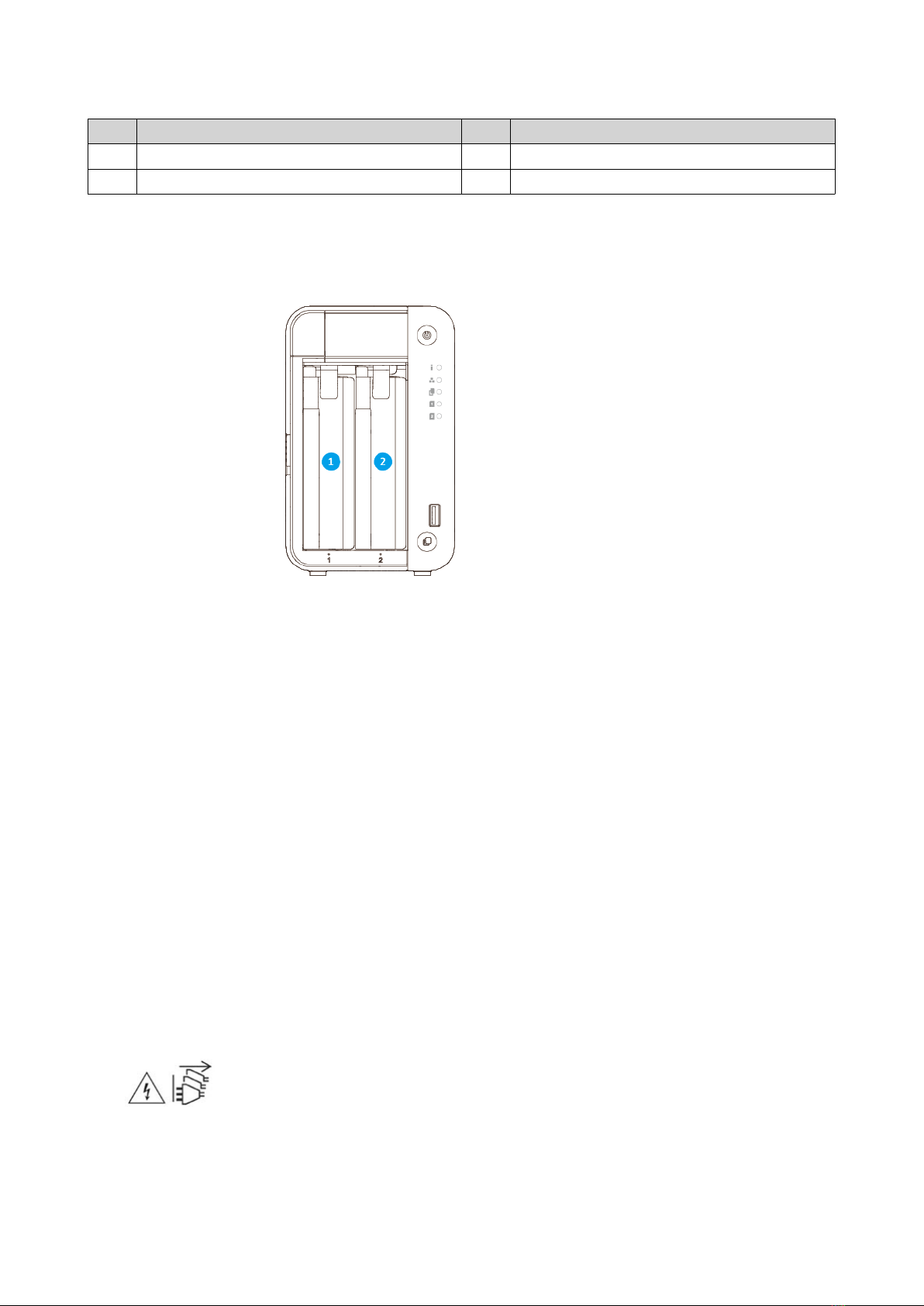
Drive Numbering
Safety Information
The following instructions help ensure personal safety and environmental safety. Read these instructions
carefully before performing any operations.
General Instructions
• The device should be stored in a secure location with restricted access, controlled through the use of a
tool, lock and key, or any means of security.
• Only qualified, skilled, and authorized persons with knowledge of all restrictions, safety precautions,
and installation and maintenance procedures should have physical access to the device.
• To avoid potential injury or damage to components, ensure that the drives and other internal system
components have cooled before touching them.
• Observe electrostatic discharge (ESD) procedures to avoid potential injury or damage to components.
Power
• To reduce the risk of fire or electric shock, ensure that you only connect the power cord to a properly
grounded electrical outlet.
•
Devices with redundant power supply may have one or more power supply unit (PSU) cords. To avoid
serious injuries, a trained service technician must disconnect all PSU cords from the device before
installing or replacing system components.
TS-251D User Guide
Product Overview 9
This manual suits for next models
3
Table of contents
Other QNAP Storage manuals

QNAP
QNAP TS-977XU User manual

QNAP
QNAP TS-2888X Series User manual

QNAP
QNAP TS-464 User manual

QNAP
QNAP TDS-h2489FU User manual

QNAP
QNAP TS-h1277XURP User manual

QNAP
QNAP TS-H686-D1602-8G User manual

QNAP
QNAP TS-h987XU-RP User manual

QNAP
QNAP TL-D800S User manual

QNAP
QNAP TS-1886XU-RP User manual

QNAP
QNAP TS-435XeU User manual

QNAP
QNAP ES NAS Series Specification sheet

QNAP
QNAP TVS-1282T3 User manual

QNAP
QNAP TVS-h 74 Series User manual

QNAP
QNAP TS-873U User manual

QNAP
QNAP TS-832X Series User manual

QNAP
QNAP TVS-73e Series User manual

QNAP
QNAP TS-hx77XU-RP User manual

QNAP
QNAP TS-932PX-4G-US User manual

QNAP
QNAP TS-410E-8G User manual

QNAP
QNAP TVS-1672XU-RP User manual









