
Pure Water PW90 User manual

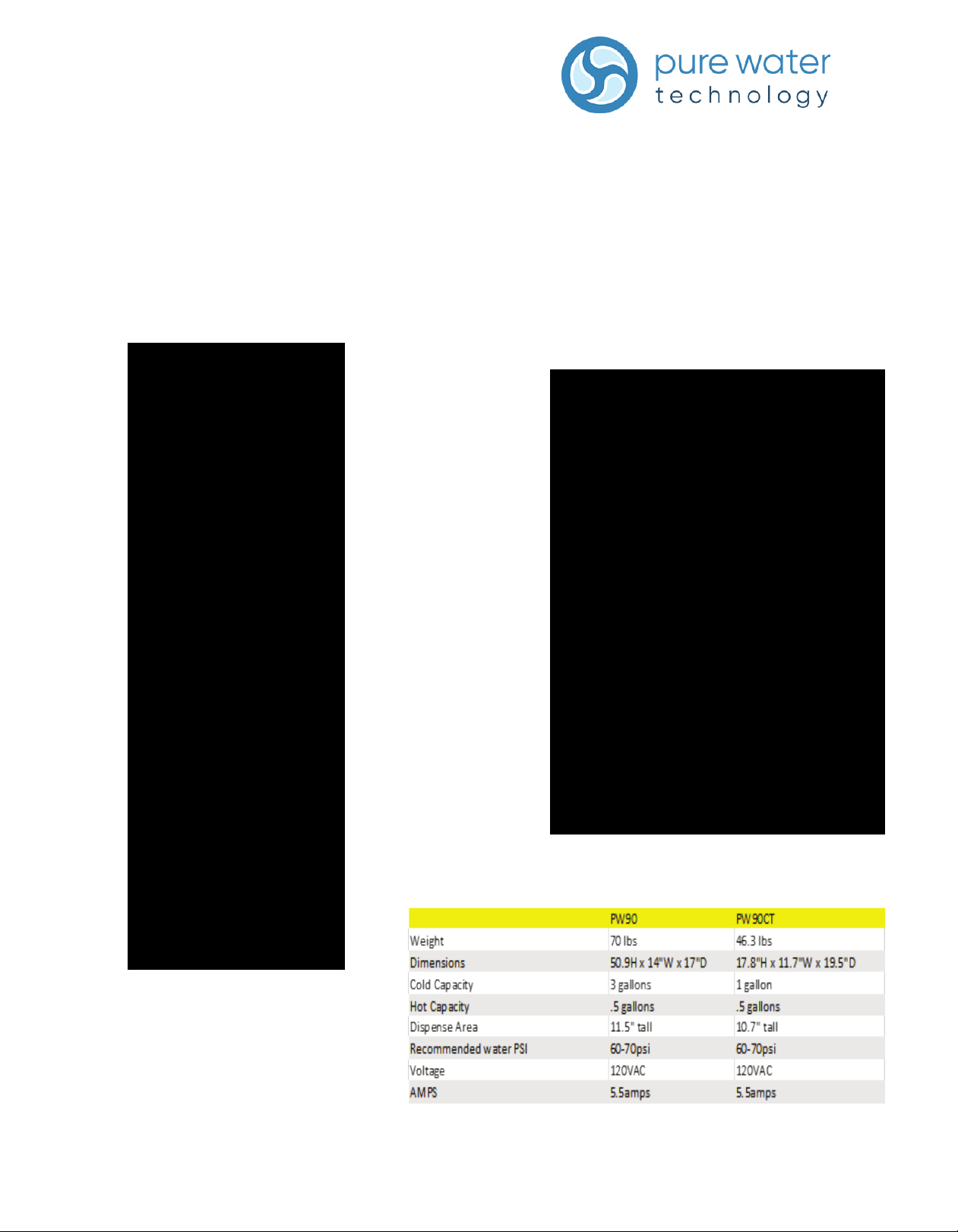
PW90 & PW90CT
Field Guide
How to Use
Front Panels and Controls
PW90
PW90 CT

03
Ozone Summary
The Ozone generator turns on 12 hours aer the last dispense and runs for 5 minutes every
day by default. The unit will let you know this by displaying a message, Acvated Oxygen on
and lighng up the Acvated Oxygen led during the sanizing process. This system is used to
sanize the water in the cold tank. There are four main components in this system:
1. Air pump- Provides air to the O-Zone generator. This is located next to the control board,
behind the right panel.
2. Air Filter- filters the air going to the O-Zone generator. This is located behind the cold tank on
the right side.
3. O-Zone generator- makes o-zone. This is located above the air filter.
4. Diffuser Stone- Diffuses o-zone into the water. This is located in the cold tank.
Diffuser Stone
Ozone Generator
Air Filter
Air Pump
Programing the Ozone
PW90
The unit comes pre-programed from the factory at 5 minutes and should not need to be programed. But
depending on your customer you may want to change programing to suit their needs. The PW90 Ozone sengs
can be adjusted with the PW90 app, or on the display panel on the unit itself. NOTE: If the Ozone sengs are too
high, it can affect the taste and odor of the water.
PW90 Display panel:
1. Enter program mode.
2. Wave hand over the Hot buon unl the cursor is resng on “Oxygen Injecon”
3. Wave hand over the Dispense buon to select “Oxygen injecon”
4. While in the “Oxygen injecon” mode wave hand over the Hot buon to scroll through opons and Dispense
buon to make changes.
5. For example, please review illustraon below: - To adjust the on me, wave hand over the Dispense buon while
the cursor is blinking over “On me” unl the desired me is selected
•To adjust the air purge me, wave hand over Hot buon unl “PAO me” is blinking, wave hand over
Dispense buon unl desired me is selected
•To adjust the interval/off me, wave your hand over Hot buon unl “off me” is blinking, wave hand over
dispense buon unl desired me is selected
•To adjust to acvate at me of dispense, wave hand over Hot buon unl “At dispense” is selected.
Wave hand over Dispense buon unl desired me is selected
PW90 APP:
1. Enter the PW90 APP.
2. Press the cleaning sengs tab
3. Turn “Daily Ozone Cycle” into the ON posion
4. Adjust desired sengs and press “set”
5. Unit dispense light will blink purple to indicate sengs have
been changed.
Daily Ozone Settings
Set Button

Programing the Ozone
PW90 CT
If changing the programing on the PW90CT is deemed necessary, it can be done Via Dip switch se�ngs on the
main board. Please see dip switch chart below.
NOTE: If the Ozone se�ngs are too high, it can affect the taste and odor of the water.

Installation
1. The water cooler must be installed indoors.
2. The water inlet is a ¼” quick connect water inlet located on the rear right bottom corner.
3. Place the cooler so that it is not in the way of traffic and leave two inches behind it so it has proper ventilation.
4. Coil the power cord and waterline behind the cooler.
5. This water cooler does not need a drain unless an RO system is being used for filtration. If a drip tray drain is needed,
part number “DrainKit” can be ordered. This is a drain designed to connect to the back side of the top front panel so the
drip tray can drain efficiently.
NOTE: please refer to local plumbing codes when connecting the Drip tray, or RO filters to a drain.
6. Filters need to be flushed at this point. Please see filter flushing instructions.
NOTE: leave the hot tank switch in the off position until the hot tank is full of water.
7. The filter settings should be pre-set from the factory, but if changes are needed, you can turn filters on or off, and
program filter life into unit.
PW90 Display Panel:
1. Enter the program mode.
2. Wave hand over the Hot button until the cursor is resting on “Filter life mode”
3. Wave hand over the dispense button to select “Filter life mode”
4. Wave hand over the dispense button until desired setting is selected
- Time sets filter alerts based on elapsed time
- Gallon sets filter alerts based on gallons consumed
- Both sets filter alerts based on time and gallons; the first to reach its limit will set off the filter alert in
program mode.
5. The cursor will first rest on enable/disable for the pre- sediment filter.
• To enable filter alarm alerts select enable, to turn off filter alarm alert select disable
• To change the filter alert wave hand over the dispense button while the cursor is over disable/
enable until the desired setting is selected.
• Wave hand over the hot button to move cursor to Life, time or both and set in order to change
the count down time until the filter alert is triggered.
• Usage will display total usage on the filter since the last time it was reset, this mode will reset
when the filter is reset.

PW90 APP
1. Enter the PW90 APP.
2. Press on the Filter Settings Tab.
3. Specify if you would like alerts to be set to time, gallons, or whichever comes first between time or gallons.
4. The time and gallons can be adjusted to desired amounts for each individual filter.
5. Alerts can also be turned on or off for all filters listed; those that do not apply to the system will be automatically turned
off.
PW90 CT
If changing the filter life sengs on the PW90CT is deemed necessary, it can be done Via Dip switch sengs on the
main board. Please see dip switch chart below.
Installation
Filter Name
Alert Settings
Alert On/Off Setting
Filter Life Settings

Preventative Maintenance
1. Remove the filter door, grab bottom and pull out, then inspect for leaks.
2. Drain the unit from the drain tube located under the hot tank switch in the back of the unit.
3. Remove the top cover and tank lid.
4. Spray 1 part hydrogen peroxide to 4 parts water solution into the cold tank, let stand for 5 minutes and wipe clean with a rag.
5. Replace the lid and flush the tank.
6. Filters should be replaced using this schedule:
• Sediment= 1 year
• • Pre Carbon= 1 year
• RO Membrane= 2-3 years
• Boost= 1 year
• Post carbon= 2-3 years
• Lead and Cyst= 1 year
7. Please see flushing instructions
8. Wipe down the outside of the unit and sanitize the water dispense area.
9. Reset the filters that were changed during the PM in the programing of the machine.
PW90 Display:
1. Enter the program mode
2. Wave hand over the hot button until the cursor is resting on “Filter life time set ”
3. Wave hand over the dispense button to select “Filter lifetime set”.
4. In this mode, the hot button will act as scroll and the dispense button as select.
5. The cursor will first rest on enable/disable for the pre- sediment filter.
6. To reset the filter, wave hand over the hot button until “Reset?” is blinking
7. Wave hand over the dispense button one time
8. Usage will change to 0 when complete
9. To select the next filter, wave hand over the hot button. Repeat above until all desired filters are adjusted

PW90 APP:
1. Enter the PW90 APP.
2. Press on the System Status Tab.
3. Click the circle next to any filters changed during the PM. The circle should change from white to blue.
4. Press the Reset buon and any selected filters should read 100% in the remaining life column.
PW90CT:
1. The filter life indicator triggers the Service light to illuminate. The indicator can be reset without opening the system, by
using a sequence of motions with the sensors.
2. To reset the filter life, Wave hand in front of hot for 5 seconds, wave hand in front of dispense for 5 seconds, audible chime
will sound after each step
Preventative Maintenance
Click here to select filter
Reset button
Other manuals for PW90
2
This manual suits for next models
1
Table of contents
Other Pure Water Dispenser manuals

Popular Dispenser manuals by other brands

Silver King
Silver King Majestic SK12MAJ Technical manual and replacement parts list

Franke
Franke F3Dn Twin Service manual
STIEBEL ELTRON
STIEBEL ELTRON UltraHot Plus Operation and installation instructions

DAN DRYER
DAN DRYER 282 installation guide

Essity
Essity Tork 473208 manual

CBS
CBS SD300BU-88 COMPONENT MAINTENANCE MANUAL WITH ILLUSTRATED PARTS LIST


