
POWEROLOGY PENCIL PRO User manual

Please carefully read this user manual before
using and keep it well for future reference
Model: PSMAPNWH
USER MANUAL
PENCIL PRO
2018-2022 IPAD MODELS

Hold for 3s
to switch on
and off
Indicator
Type-c
charging
port
Magnetic
charging
Built in battery
Note:The appearance is subject
to the physical object
Replaceable and
removable pen nib
SPECIFICATION

Indicator
Type-c
charging
port
Hold for 3s
to switch on
and off
USER GUIDE
1.Press and hold the key switch on the
top of the pen for 3s,the indicator light
will light up quickly,when you operate
again, the indicator light will go out.
When the machine is on, it will shut
down intelligently for 5 minutes.
2.Now you can tap, swipe and do other
operations on your iPad tablet with the
stylus instead of your fingers. You can
also use the pen to write, draw and
other functions in specific applications.
It is not compatible with models other
than those listed in the product
specifications.
3.Removable and easy to replace pen
head design,no need to worry about
the abrasive wear.(tighen the top of
the pen nib clockwise to complete the
installation.)

Click to return
to HOME
Double-click
Multitask
BLUETOOTH SHORTCUT
INDICATOR FUNCTION
1.iPad Open the Bluetooth panel,
search the Bluetooth name: STYLUS
PEN PRO, and click Pairing.
2.Product link Bluetooth. On the left of
the main interface, slide to the widget.
Real time power display.
3.Click to return to HOME, and
double-click multitask.

CHARGING MODE
1.Magnetic adsorption charging. After
connecting Bluetooth, it can be
adsorbed on the iPad for wireless
charging. When fully charged, the
green light will go on for 30 seconds
and then go off automatically. The
charging is completed (Only supported
models for adsorption iPad charging:
iPad Pro series, iPad mini 6, iPad air 5/4)
2.Type-c charging wire can be used for
charging. Connect one end of the
adapter wire to the Type-C interface
of the stylus, and plug the other end
into a 5V/0.1A DC current adapter for
charging.
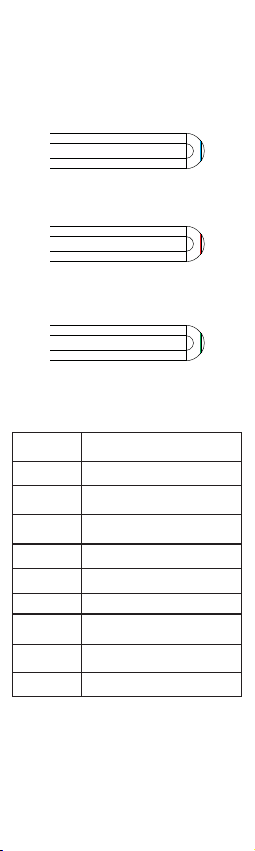
Blue light on during operation
Red light flashing during charging
Green light will turn on for 30S
then turn off automatically
INDICATOR
PRODUCT SPECIFICATION
Name
Function
Material
Size
Working Time
Colors
Battery
Charging way
Use Scenarios
Package
Magnetic iPad charging stylus pen
Drawing、Writing、Note、Tap
Plastic Pen body (POM plastic pen
head)
Pen head Φ1.5mm*
pen body Φ9.0mm
11 hours
Multi-colors
65430
Magnetic charging、Type-c charging
port
iPad and other capacitive
screen equipment
Package、Instruction

Faults
Broken
wire
elimination
1.Check whether the nib is
equipped in place, can be
tightened and tested again
2.Replace the spare nib and test
again
3.Whether the tempered film is
severely damaged or it too thick
4.Tablet device reboot
1.Check if it is on or not
2.Does the tablet device support
the stylus
3.Does APP support stylus
1.Check if the product is powered
2.Is the power on according to the
operation
4.Check if the original pen is
connected, if it’s connected please
Disconnect and use again
Troubleshooting methods
can't write
unable to
power up
Note: still can not use please contact
customer service for replacement processing
Note: Early iPad versions, iPhone, Android and
Microsoft devices are not supported. Please
confirm the above iPad models before purchasing.
APPLICABLE MODEL
COMMON FAULTS AND
TROUBLESHOOTING METHODS
Name/Size
iPad mini 8.3/6-inch(2021)
iPad mini 7.9/5-inch(2019)
iPad Pro 12.9/6-inch(2022)
iPad Pro 12.9/5-inch(2021)
iPad Pro 12.9/4-inch(2020)
iPad Pro 11/4-inch(2022)
iPad Pro 12.9/3-inch(2018)
iPad Pro 11/3-inch(2021)
iPad Pro 11/2-inch(2020)
iPad Pro 11/1-inch(2018)
iPad Air 10.9/5-inch(2022)
iPad Air 10.9/4-inch(2020)
iPad Air 10.5/ 3-inch(2019)
ipad 10.9/10-inch(2021)
iPad 10.2/9-inch(2021)
iPad 10.2/8-inch(2020)
iPad 10.2/7-inch(2019)
iPad 9.7/6-inch(2018
Model
A2567/A2568/A2569
A2133/A2124/A2126/A2125
A2436/A2437/A2764/A2766
A2378/A2461/A2379/A2462
A2229/A2233/A2069/A2232
A2759/A2435/A2761/A2762
A1876/A2014/A1895/A1983
A2377/A2459/A2301/A2460
A2228/A2231/A2068/A2030
A1980/A2013/A1934/A1979
A2588/A2589/A2591
A2316/A2324/A2325/A2072
A2152/A2123/A2153/A2154
A2696/A2757/A777
A2602/A2603/A2604/A2605
A2270/A2428/A2429/A2430
A2197/A2198/A2200
A1893/A1954

ماﺪﺨﺘﺳﻻا ﻞﺒﻗ ﺔﻳﺎﻨﻌﺑ ﻞﻴﻟﺪﻟا اﺬﻫ ةءاﺮﻗ ﻰﺟﺮﻳ
.ﻞﺒﻘﺘﺴﻤﻟا ﻲﻓ ﻪﻴﻟإ عﻮﺟﺮﻠﻟ ا ً
ﺪﻴﺟ ﻪﺑ ظﺎﻔﺘﺣﻻاو
Model: PSMAPNWH
ماﺪﺨﺘﺳﻻا ﻞﻴﻟد
وﺮﺑ ﻞﺴﻨﻴﺑ
٢٠٢٢-٢٠١٨ دﺎﺒﻳا ﻞﻳدﻮﻣ

.ﻲﻠﻌﻔﻟا ﻦﺋﺎﻜﻠﻟ ﺎ ًﻘﻓو ﺮﻬﻈﻤﻟا ﺪﻳﺪﺤﺗ ﻢﺘﻳ :ﺔﻇﻮﺤﻠﻣ
تﺎﻔﺻاﻮﻤﻟا
ﺮﺷﺆﻣ
ﻦﺤﺷ ﺬﻔﻨﻣ
ﻲﺳ-ﺐﻳﺎﺗ
ٍ
ناﻮﺛ ٣ ةﺪﻤﻟ ﻂﻐﺿا
ﻞﻴﻐﺸﺘﻟ
ﻞﻴﻐﺸﺘﻟا فﺎﻘﻳإو
ﻦﺤﺷ
ﻲﺴﻴﻃﺎﻨﻐﻣ
ﺔﻳرﺎﻄﺒﺑ ﺞﻣﺪﻣ
ﻞﺑﺎﻗ ﺔﺻﻮﺑ ﻢﻠﻗ
ﺔﻟازاو ﻞﻳﺪﺒﺘﻠﻟ

مﺪﺨﺘﺴﻤﻟا ﻞﻴﻟد
ﺮﺷﺆﻣ
ﻦﺤﺷ ﺬﻔﻨﻣ
ﻲﺳ-ﺐﻳﺎﺗ
ٍ
ناﻮﺛ ٣ ةﺪﻤﻟ ﻂﻐﺿا
ﻞﻴﻐﺸﺘﻟ
ﻞﻴﻐﺸﺘﻟا فﺎﻘﻳإو
ﻞﻴﻐﺸﺘﻟا حﺎﺘﻔﻣ ﻰﻠﻋ ﻂﻐﻀﻟا ﻲﻓ ﺮﻤﺘﺳاو ﻂﻐﺿا .١
ٍ
ناﻮﺛ ٣ ةﺪﻤﻟ ﻢﻠﻘﻟا ﻦﻣ يﻮﻠﻌﻟا ءﺰﺠﻟا ﻲﻓ دﻮﺟﻮﻤﻟا
ﻞﻤﻌﺗ ﺎﻣﺪﻨﻋو ، ﺔﻋﺮﺴﺑ ءﻮﻀﻟا ﺮﺷﺆﻣ ﻞﻌﺘﺸﺘﺳ ،
نﻮﻜﻳ ﺎﻣﺪﻨﻋ .ءﻮﻀﻟا ﺮﺷﺆﻣ ﺊﻔﻄﻨﻴﺳ ، ىﺮﺧأ ةﺮﻣ
ءﺎﻛﺬﺑ ﻪﻠﻴﻐﺸﺗ فﺎﻘﻳإ ﻢﺘﻴﺳ ، ﻞﻴﻐﺸﺘﻟا ﺪﻴﻗ زﺎﻬﺠﻟا
.ﻖﺋﺎﻗد ٥ ةﺪﻤﻟ
تﺎﻴﻠﻤﻌﺑ مﺎﻴﻘﻟاو ﺮﻳﺮﻤﺘﻟا ،ﻂﻐﻀﻟا ﻚﻨﻜﻤﻳ نµا.٢
ﻢﻠﻘﻟا ماﺪﺨﺘﺳﺎﺑ iPad ﻲﺣﻮﻠﻟا كزﺎﻬﺟ ﻰﻠﻋ ىﺮﺧأ
ماﺪﺨﺘﺳا ﺎ ً
ﻀﻳأ ﻚﻨﻜﻤﻳ .ﻚﻌﺑﺎﺻأ ماﺪﺨﺘﺳا ﻦﻣ ًﻻﺪﺑ
تﺎﻘﻴﺒﻄﺗ ﻲﻓ ىﺮﺧأ ﻒﺋﺎﻇوو ،ﻢﺳﺮﻟاو ،ﺔﺑﺎﺘﻜﻠﻟ ﻢﻠﻘﻟا
ﻚﻠﺗ ﺮﻴﻏ ىﺮﺧ»ا زﺮﻄﻟا ﻊﻣ ﻖﻓاﻮﺘﻣ ﺮﻴﻏ ﻪﻧإ .ةدﺪﺤﻣ
.ﺞﺘﻨﻤﻟا تﺎﻔﺻاﻮﻣ ﻲﻓ ﺔﺟرﺪﻤﻟا
لاﺪﺒﺘﺳﻻاو ﺔﻟاز¿ﻟ ﻞﺑﺎﻗ ﻢﻠﻘﻟا سأر ﻢﻴﻤﺼﺗ.٣
.ﻂﺷﺎﻜﻟا ءاﺮﺘﻫﻻا نﺄﺸﺑ ﻖﻠﻘﻠﻟ ﺔﺟﺎﺣ ﻻ ،ﺔﻟﻮﻬﺴﺑ
ﺔﻋﺎﺴﻟا برﺎﻘﻋ هﺎﺠﺗا ﻲﻓ ﻢﻠﻘﻟا ﻢﻠﻗ سأر ﻂﺑﺮﺑ ﻢﻗ)
(.ﺐﻴﻛﺮﺘﻟا لﺎﻤﻛÅ
This manual suits for next models
1
Table of contents











