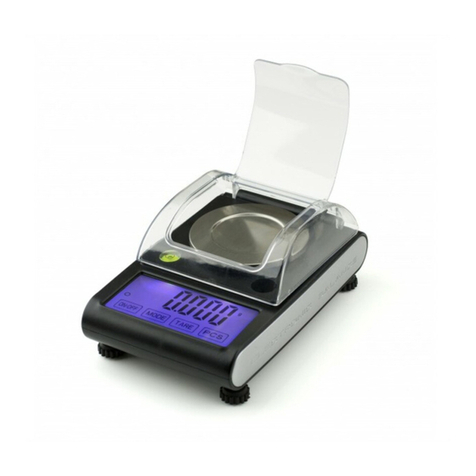
PESOLA PTS3000 User manual

I. Important information
Please carefully read the following instructions before use:
Handle your precision scale with care. Do not drop the scale and avoid
shocks and shaking. Gently place the load onto the middle of the platform.
Avoid overload. Do not leave heavy load on the platform for a long period of
time. Do not attempt to pull up the platform to open or to repair the scale.
You might risk to damage the load cell permanently. In order to get very
precise measuring results only operate the scale on horizontal and stable
surfaces and avoid dust, dirt, moisture, aggressive liquids, vibration, air
currents and vicinity to other electronic equipment (e.g. mobile phones). After
great temperature fluctuation allow the scale to acclimate for one hour –
particularly before calibration. This scale has been calibrated by the
manufacturer. However the fine accuracy may slightly be affected by
variations of gravity, shipment, handling and changes of temperature. A user
calibration is possible at any time and recommended in case of intense use.
Damages caused by the non-observation of the above rules will not be
repaired under warranty.
II. Power supply
If the scale displays [LO] change the batteries otherwise the weighing
result will be imprecise.
Only use high quality 1.5V AA alkaline batteries (4 pieces).
After 120 seconds of no change of load the scale will switch off
automatically in order to save energy.
Remove the batteries if the scale is not used for a long period of time.
III. Keyboard functions
On first use remove the protecting film from the panel.
ON/OFF: Turns the scale on or off
MODE : Selects the weighing unit and the reference counting lots
TARE : Tare weighing and calibration
PCS : Counting function
IV. Operation
1. Place the scale on a horizontal flat surface.
2. Press the ON/OFF. Wait until stability is achieved (point in circle on left
side of display) and [0:000] are displayed.
3. Gently place the load on the centre of the weighing platform.
4. If required change the weighing unit by pressing MODE.

5. If the scale displays [O_Ld] the load exceeds the maximum capacity.
Please reduce the weight immediately.
V. Tare
1. Press the ON/OFF button and place a bowl or any another container on
the platform. Its weight should not exceed the maximum capacity of the
scale.
2. Press TARE and wait until [0:000] is displayed.
3. Add the load and directly read its net weight.
VI. Counting Function
1. Press ON/OFF (possibly with an adequate tare bowl on the platform) and
wait until [0:000] is displayed or press TARE to get the [0:000] reading.
2. Press and hold the PCS key for 3 seconds. Any of the four possible
reference lots [25], [50], [100] or [200] e.g. [50] will be displayed.
3. If applicable press MODE to select another reference lot e.g. [100]. Info:
the higher the lot quantity the better the precision of the following count.
4. Place the selected reference lot (25, 50, 100 or 200 pcs) of the identical
items to be counted onto the platform or into the tared container.
5. Briefly press the PCS key to confirm the selected reference lot. [PCS] will
appear on the display to confirm the calibration of the counting function.
The scale is now in counting mode.
6. Add more identical items and their quantity will be displayed (not their
weight).
7. If required switch to weighing mode by pressing MODE and back to
counting mode by pressing PCS. Info: the last reference lot selected as
well as its weight will remain stored even if the scale is switched off.
VII. Professional 2 step calibration (only in gram unit)
1. Press ON/OFF and give the scale 30 seconds to warm up.
2. Wait until [0.0] is displayed. Press and hold the TARE key for 3 –5
seconds.
3. As soon as [CAL] is displayed, release the TARE key and the first required
calibration weight will be displayed with flashing [1000.0].
4. Gently add a 1000g calibration weight to the centre of the platform. The
display will change to flashing [2000.0] requiring the second step
calibration weight.
5. Add another 1000g calibration weight or remove the first one and gently
add a 2000g calibration weight. The display will switch to [PASS] and
return to normal weighing mode, still displaying [2000.0].

6. Remove the load(s) and [0.0] shall be displayed. Calibration is complete.
In case of inconsistency repeat the process.
Please check availability of calibration weights with specialized stores.
VIII. Elimination of problems and errors
Display
Eliminations of errors
None
Remove isolation strip in battery compartment. Check
polarity of batteries. If still no display replace batteries.
[OUt_2]
Start up and operate the scale on a stable horizontal
surface.
[LO]
Replace batteries. Pay attention to their polarity.
[O-Ld]
Attention overload! Reduce the weight immediately.
Wrong weight
indication
Check the weighing unit selected and change it with the
MODE key if applicable. For extremely precise weighing
results calibrate the scale regularly or after intense use.
VIIII. Specifications
Weighing units: kg-g / lb-oz
Maximum capacity: 3000g / 6.6 lb
Division (d): 0.1g / 0.01 oz
Resolution: 1 : 30000
Precision: ± 0.2g
Tare range: up to 100% of capacity (reduces weighing
range)
Auto switch off: after 120 seconds with no change of load
Operating Temperatures: 5° –35°C / 41° –95°F
Operating humidity: Max. 70% relative humidity
User calibration: Auto calibration with optional 2 x 1000g
weights or 1 x 1000g and 1 x 2000g weights
or 4 x 500g
Power supply: 4 x AA 1.5V alkaline batteries or
DC 6.0V jack (optional AC/DC adapter not
supplied by PESOLA)
Measures: 20.0 x 15.4 x 3.2 cm
Net weight with batteries: 672g / 23.7 oz
Manufacturer warranty: 2 years from date of purchase
Copyright 2015 - 2018

PTS3000 3000g · d = 0.1g
Professional Digital Platform Scale
with counting function
User Manual
Table of contents
Other PESOLA Scale manuals