Pepperl+Fuchs Ex-Cover 6 Pro D2 User guide

1
Smartphone for industrial
applications in hazardous
areas
Ex-Safety Manual
Manuel de sécurité Ex
Manual de seguridad contra explosiones
Ex-Cover 6 Pro D2
Class I, Div 2

2
English Page 3
Canadian/French Page 18
Español Página 33

3
Note:
The current Ex-Safety Manual, the User Manual and the Certicate of
Conformity can be requested directly from the manufacturer.
Content
1. Application ....................................................................................................... 4
2. Safety precautions........................................................................................... 4
3. Faults and damage.......................................................................................... 4
4. Ex-Data ............................................................................................................ 4
5. Applied standards............................................................................................ 5
6. Warnings.......................................................................................................... 5
7. Safety instructions........................................................................................... 5
8. Repair............................................................................................................... 6
9. Cleaning, maintenance and storage .............................................................. 6
10. Warranty and liability..................................................................................... 6
11. Quick start guide .......................................................................................... 6
12. Acknowledging Special Precautions and ISED (Innovation, Science ........ 15

4
1. Application
The Ex-Cover 6 Pro D2 *** is a nonincentive Class I Division 2 water-, dust- and
impact resistant smartphone for industrial application in hazardous areas with
gaseous atmospheres certied for use in the US and Canada.
2. Safety precautions
These safety instructions contain information and safety regulations which are
to be observed. Non-observance of this information and these instructions can
have serious consequences and may violate regulations. Please read these safe-
ty instructions carefully before using the device for the rst time! In the event of
conicting information the details specied in the safety instructions shall take
precedence. In case of any doubt (in the form of translation or printing errors)
the English text shall be applied.
3. Faults and damage
If there is any reason to suspect that the safety of the device has been impaired,
it must be withdrawn from use and removed immediately from the hazardous
area. Measures must be taken to prevent it from being used within the hazar-
dous area accidentally.
The safety of the device maybe compromised, if for example:
- There is visible damage on the housing.
- Malfunctions occur.
- The device has been improperly stored.
- Device markings or inscriptions are illegible.
- Permitted limit values have been exceeded.
4. Ex-Data
Certication details:
Ex-Marking: Class I, Division 2 Groups A, B, C, D, T4
Class I, Zone 2 Group IIC T4
800606
SGS Contract no.: 800606
Ex-Equivalent Zone marking: Zone 2 Group IIC T4
CoC no.: SGSNA/23/SUW/00036
Ambient temperature: -20°C ≤ Ta ≤ +55°
Certicate Project Number: SUW-CERT230400057

5
5. Applied standards
US: UL 62368-1, Ed. 3 dated December 13, 2019
UL 121201, 9th Ed., Rev. April 1, 2021
CAN: CAN/CSA C22.2 No. 62368-1:19
CAN/CSA C22.2 No. 213, 3rd Ed. April 2021
6. Warnings
WARNING – DO NOT USE IN HAZARDOUS/CLASSIFIED LOCATION IF THERE IS
ANY VISIBLE PERMANENT DAMAGE, INCLUDING CRACKED DISPLAY OR,
DAMAGED, OR MISSING Ex-Battery Cover 6 Pro D2
WARNING – USE ONLY BATTERY PACK TYPE SAMSUNG EB-BG736BBE*
WARNING – DO NOT OPEN THE DEVICE IN A HAZARDOUS/CLASSIFIED LOCATION
WARNING – DO NOT CHARGE OR REPLACE THE BATTERY IN A HAZARDOUS/
CLASSIFIED LOCATION
WARNING – NO ELECTRICAL CONNECTIONS ALLOWED TO ANY PORT OR POGO
PINS IN A HAZARDOUS/CLASSIFIED LOCATION
WARNING – Ex-Battery Cover 6 Pro D2 TO BE USED WITH Ex-Cover 6 Pro D2
ONLY.
7. Safety instructions
•
The Ex-Battery Cover 6 Pro D2 must be correctly tted before
entering the hazardous/classied location.
•
Battery pack or SD/SIM-Card replacement is only allowed in ordinary
(non-hazardous) locations.
•
Charging (wired or wireless), wired connections to 3.5mm headphone jack,
wired data connection via USB and charging via POGO port is only allowed in
ordinary (non-hazardous) locations.
•
The device may only be charged in a temperature range of 0°C – 45 °C.
•
The Ex-Battery Cover 6 Pro D2 may be removed and the battery cover on the
back of the device may be removed to gain access to the battery and SIM card
locations in the device, in ordinary locations only. Otherwise, the device shall
not be repaired or dismantled by anyone other than a Pepperl+Fuchs authori-
zed repair center.
8. Repair
Repairs are to be conducted by a Pepperl+Fuchs authorized service center.

6
9. Cleaning, maintenance and storage
• Only use a suitable cloth or sponge to clean the smartphone.
• Do not use any solvents or abrasive cleaning agents when cleaning.
• Do not exceed the permissible storage temperature range of -20 °C to +55 °C
10. Warranty and liability
The warranty of this product follows the General Conditions of Delivery and
Payment of Pepperl+Fuchs, which are available at www.pepperl-fuchs.com, or
alternatively they can be requested directly from the manufacturer.
11. Quick start guide
Package contents
• Device
• USB cable
• Battery
• Documentation
The items supplied with the device and their images may vary by region.

7
Device layout
To turn on the device, press and hold the Side key for a few seconds.
The charger should remain close to the electric socket and easily accessible
while charging.
Headset
jack
Front
camera
Volume
keys
Side key/
Fingerprint
scanner
USB charger
/Accessory
port
Top key
Rear camera
XCover key
Speaker
Microphone

8
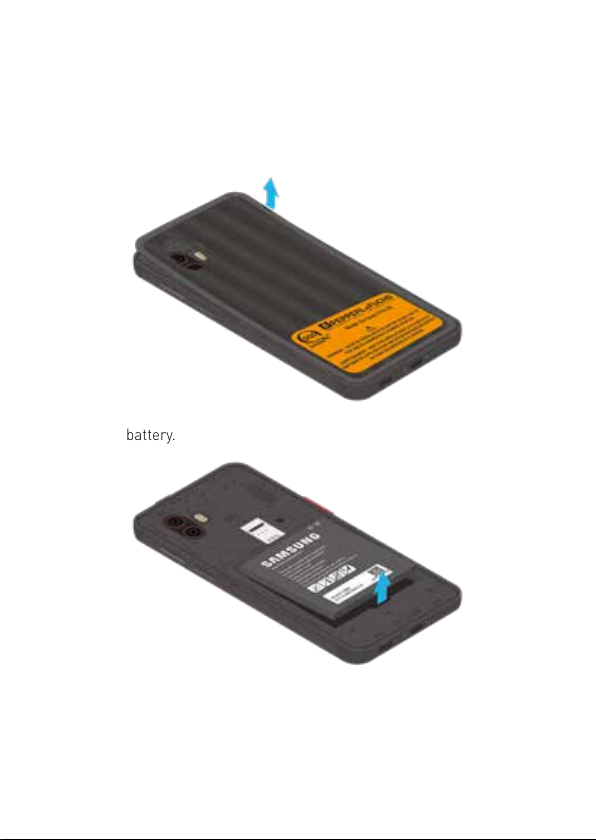
Install cards and the battery
The SIM card, optional microSD card, and battery are installed in the back of the
device.
1. The Ex-Battery Cover 6 Pro D2 needs to be removed rst then lift the cover up
and to the left of the device.
2. Remove the battery.

9
3. Carefully slide the SIM card into the SIM card slot.
Make sure that the card’s gold contacts face down into the device.
4. Slide the microSD card into the slot with the gold contacts facing down.
5. Insert the battery into the opening on the back of the device, making sure the
connectors align. Gently press down to secure the battery.

10
6. Place the back cover onto the back of the device and press down.
Press along the edge of the back cover all around until you have a secure seal.
Ensure that the back cover is closed tightly to prevent water and dust from ent-
ering the device. Open or loose back cover may allow water and dust to enter the
device and cause damage.
7. Place the Ex-Battery Cover 6 Pro D2 onto the back of the device, then slightly
pressing the upper side of the device into the Ex-Battery Cover 6 Pro D2.
Table of contents
Languages:
Other Pepperl+Fuchs Cell Phone manuals