
Oregon Scientific WR108 User manual

EN
1
Portable Public Alert Radio
Model: WR108
USER MANUAL
CONTENTS
Introduction 2
About the National Weather Radio System 2
Consumer Electronics Association (CEA) 2
Product Overview 3
Front View ............................................................... 3
Back View ........................................................... 4
Recharging Cradle and AC / DC Adapter ............ 4
Belt Clip ................................................................... 4
Neck Strap ..........................................................
Getting Started 5
Batteries ..................................................................
Turn the Radio ON / OFF ......................................... 6
Display Modes ...................................................... 6
Change Settings ................................................. 7
Reception Signal Status ....................................... 7
NOAA Alert Messages 7
Message Codes Used By the NWR .................... 7
Set Up Radio to Receive NOAA Alert Messages
................. 7
Finding Local Channels & SAME Codes ............ 8
Channels 8
About Radio Channels ..................................... 8
Setting the Radio Channel ............................... 9
Locations 9
Setting the Location ......................................... 9
Activate / Deactivate Location ........................ 10
SAME Code – What Each Digit Means .......... 10
Home / Travel Mode 11
Interpreting NOAA Alert Messages 11
Clock & Calendar 15
Alarm 15
Radio Volume 15
External Speaker Jack 15
Backlight 16
Reset System 16
Warnings 16
Specifications 16
About Oregon Scientific 17
FCC Statement 17
Declaration of Conformity ................................18
WR108 MANUAL EN_V5.P65 2005.5.13, 16:001

EN
2
INTRODUCTION
Thank you for selecting the Oregon ScientificTM Portable
Public Alert Radio (WR108). This device operates on
the same radio frequencies used by the National
Weather Radio (NWR) and can send you NOAA alert
messages to warn you about weather and other
environmental dangers. This lightweight, splashproof
radio is constructed of durable materials and has a
reception range of up to 0 miles (64 km). It is also
equipped with a digital clock and daily alarm.
Keep this manual handy as you use your new product.
It contains practical step-by-step instructions, as well
as technical specifications and warnings you should
know.
ABOUT THE NATIONAL WEATHER RADIO SYSTEMM
The National Weather Service (NWS) is an agency within
the National Oceanic & Atmospheric Administration
(NOAA) that operates a nationwide network of radio
stations known as the NOAA Weather Radio (NWR).
The NWR radio system broadcasts warning information
for all types of hazards, both natural and technological.
Working in conjunction with the Emergency Alert System
(EAS), NWR is an all-in-one hazards radio network and
is considered to be the single source of all
comprehensive weather and emergency information.
A nationwide network, the NWR consists of more than
800 stations in the United States, Puerto Rico, the US
Virgin Islands and US Pacific Territories. Broadcasts are
designed to meet local needs. Routine programming is
repeated every few minutes and consists of local
forecast, regional conditions and marine forecasts.
Additional information, including river stages and climatic
data, is also provided. During emergencies, these routine
broadcasts are interrupted to report specific warnings.
CONSUMER ELECTRONICS ASSOC (CEA)
This product complies with the Consumer Electronics
Association (CEA) testing standards.
WR108 MANUAL EN_V5.P65 2005.5.13, 16:002
EN
3
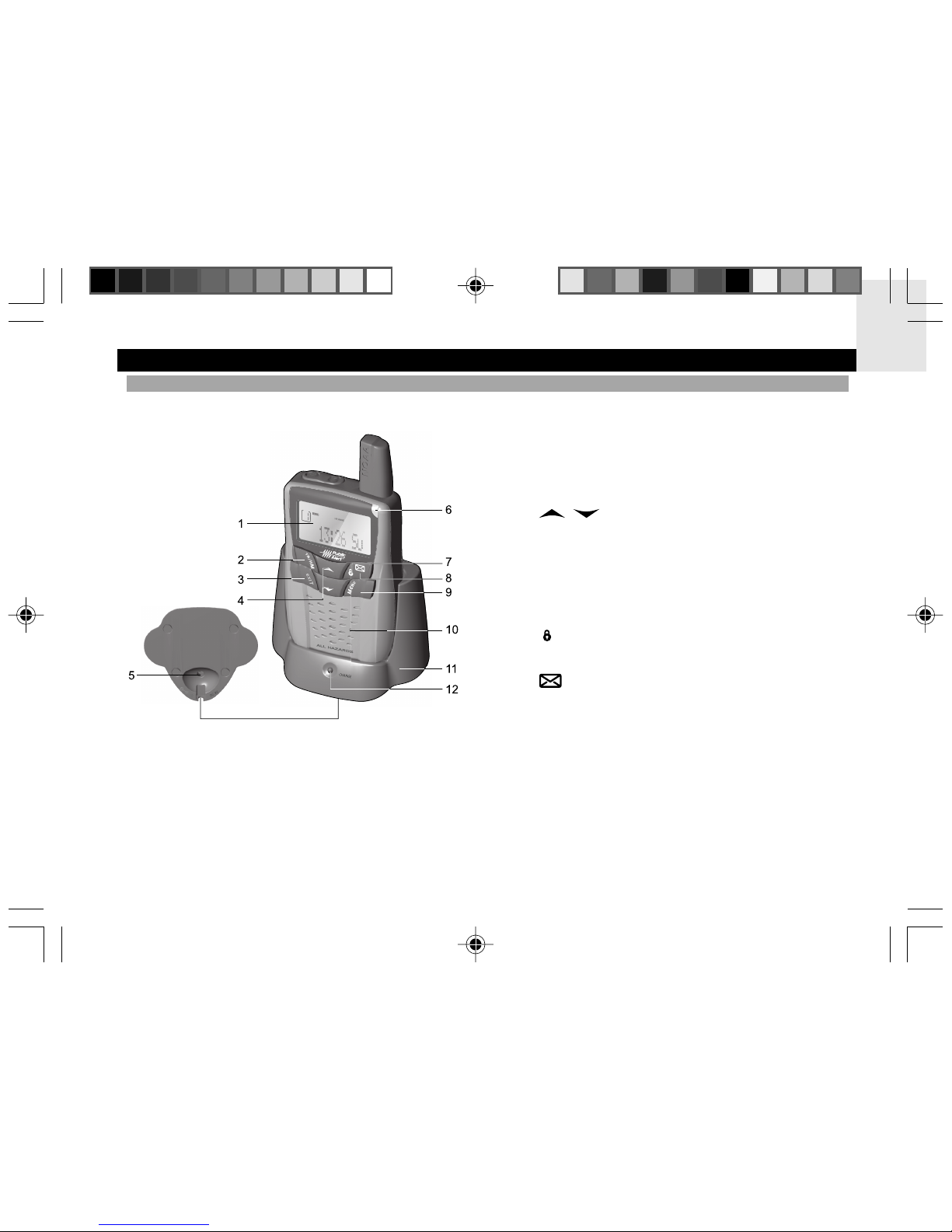
1. LCD
2. TR / HM: Press and hold to select travel or home
mode
3. EXIT: Press to exit any display or setting (clock is
default setting)
4. / : Increase / decrease settings;
increase / decrease volume; enable / disable alarm
1 or 2; scroll up or down to select county code
. 9V AC / DC adapter
6. LED indicator: Red / green LED indicates radio
ON / OFF and alert status
7. : Press and hold to activate / deactivate keypad
lock
8. : Press to toggle between NOAA alert
messages
9. MENU: Press to switch between clock, calendar,
alarm 1 and 2 displays; press and hold to enter
setting mode
10. Radio speaker
11. Recharging cradle
12. LED indicator: Red LED indicates the main unit is
charging
PRODUCT OVERVIEW
FRONT VIEW
WR108 MANUAL EN_V5.P65 2005.5.13, 16:003

EN
4
BACK VIEW
1. Antenna
2. Neck strap: Insertion point for neck strap
3. : Press to activate 8-minute snooze and / or
backlight for seconds
4. : Press and hold to turn power ON / OFF; press
to switch between NOAA ON / Standby / Mute /
OFF modes
. External speaker jack
6. RESET hole
7. Battery compartment
RECHARGING CRADLE AND AC / DC ADAPTER
BELT CLIP
WR108 MANUAL EN_V5.P65 2005.5.13, 16:004

EN
NECK STRAP GETTING STARTED
BATTERIES
Rechargeable batteries are included and must be used
if you want to use the recharging cradle. However, the
unit can use 3 x UM-3 (AA) 1. V batteries.
Insert the rechargeable battery by putting the piece at
the end of the wire into the indentation at the bottom
right of the battery compartment:
Insert batteries before first use, matching the polarity (+
and -) as shown in the battery compartment. Press
RESET after each battery change.
shows when batteries are low.
WR108 MANUAL EN_V5.P65 2005.5.13, 16:005

EN
6
TURN THE RADIO ON / OFF
To turn the radio ON / OFF, press and hold .
When the unit is first connected to the battery pack or
reset, it will immediately enter the clock / language setting
mode (see Change Settings section). It is advisable to
set your preferred language English (E), French (F) or
Spanish (S) at this time, so you can read the NOAA
alert messages.
DISPLAY MODES
There are 2 display modes:
1. Clock mode
2. Radio status mode
To switch between the clock mode displays, press MENU.
To switch between the radio status mode displays, press .
NOTE Leaving the radio in NOAA ON mode will consume
substantially more power. To save power, set the unit to
NOAA Standby when you are not listening to radio
broadcasts.
WR108 MANUAL EN_V5.P65 2005.5.13, 16:006

EN
7
To change clock, alarm, channel and location settings:
1. Press and hold MENU for 2 seconds to enter setting
mode.
2. Press or to scroll through the setting
options (Set Alarm / Set Clock / Set Channel / Set
Location) and press MENU to select the desired
one.
3. Use or to change a setting, then press
MENU to confirm and move onto the next one.
4. Press EXIT to leave the setting mode at any time.
NOTE To reach a number quickly, press and hold
or .
RECEPTION SIGNAL STATUS
To check the status of the reception signal, look at the
reception icon on the display.
ICON DESCRIPTION
Current selected channel signal is strong
Current selected channel signal is weak
No NOAA alert message has been received for
10 days. Current selected channel signal is weak
No NOAA alert message has been received for
10 days. Current selected channel signal is strong
NOTE When the radio is set to NOAA ON, Standby or
Mute, it will continually search for a NOAA signal.
CHANGE SETTINGS NOAA ALERT MESSAGES
MESSAGE CODES USED BY THE NWR
When the NWR airs urgent warnings, a digital code
known as Specific Area Message Encoding (SAME) is
included as part of the message. This coding system
contains specific information including the localized
geographical area affected and the expiration time of
the message. The WR108 retrieves and interprets SAME
code messages and alerts the user. When SAME codes
for a specific region have been entered into the unit, the
unit alerts the user to relevant warning information for
the specified region. Once alerted, a voice broadcast
can be heard.
SET UP RADIO TO RECEIVE NOAA ALERT MESSAGES
To receive a NOAA alert message, press to set the
radio to one of the following options:
• Radio ON [ ]: The radio is ON and voice
messages can be heard continuously.
• Radio Standby [ ]: The radio is in Standby and
will switch to ON when a NOAA alert message is received.
• Radio Mute [ ]: The radio is in Standby with the
sound turned OFF. NOAA alert messages can be viewed
but not heard. Switch the radio ON to hear messages.
• Radio OFF: The radio is turned OFF and will not
respond to NOAA alert messages.
Turning the radio off by setting it to Standby, Mute or
OFF will help to save power.
WR108 MANUAL EN_V5.P65 2005.5.13, 16:007
EN
8
NOTE Many counties have been subdivided into as
many as 9 smaller subsections. The numbers 1-9 in the
far left column of the SAME code identifies specific
subsections of a county. If a county has not been
subdivided, the first digit of the SAME code will be 0.
CHANNELS
ABOUT RADIO CHANNELS
The NWR radio channels work in the same way as a
regular radio channel. All of the NWR transmission
stations operate on 1 of 7 frequencies.
CHANNEL CORRESPONDING RADIO FREQUENCY
1 162.400 MHz
2 162.42 MHz
3 162.4 0 MHz
4 162.47 MHz
162. 00 MHz
6 162. 2 MHz
7 162. 0 MHz
A Auto – the unit will tune to the strongest
RF signal available
COUNTY
Beaverhead
Beaverhead
Big Hom
Blaine
Blaine
Broadwater
Carbon
SAME#
030001
030001
030003
03000
03000
030007
030009
NWR
TRANSMITTER
Butte, MT
Dillon, MT
Billings, MT
Havre, MT
Billingd MT
Helena, MT
Billings MT
FREQ MHZ
162. 0
162.47
162. 0
162.400
162.47
162.400
162. 0
CALL
WXL79
WNG638
WXL27
WXL 3
WWG8
WXK66
WXL27
WATTS
100
1 0
300
300
100
1000
300
RE-
MARKS
Carter
Cascade
Chouteau
030011
030013
03001
Baker, MT
Great Falls
MT
Miles Hill,
MT
162. 0
162. 0
162. 00
WXK 7
WXJ43
WWG84
300
300
300
N
FINDING LOCAL CHANNELS & SAME CODES
The codes are subject to change. Therefore, to ensure
successful operation you must obtain the most
appropriate, up-to-date NWR radio channels and SAME
codes for a specific county or region, from the contact
details listed below.
To contact the NWS by telephone:
1. Phone 1-888-NWR-SAME (1-888-697-7263).
2. Follow prompts through a simple voice menu.
To obtain NWS radio channels and SAME codes on
the internet:
1. Locate www.nws.noaa.gov/nwr/indexnw.htm
2. Click the State for which information is needed.
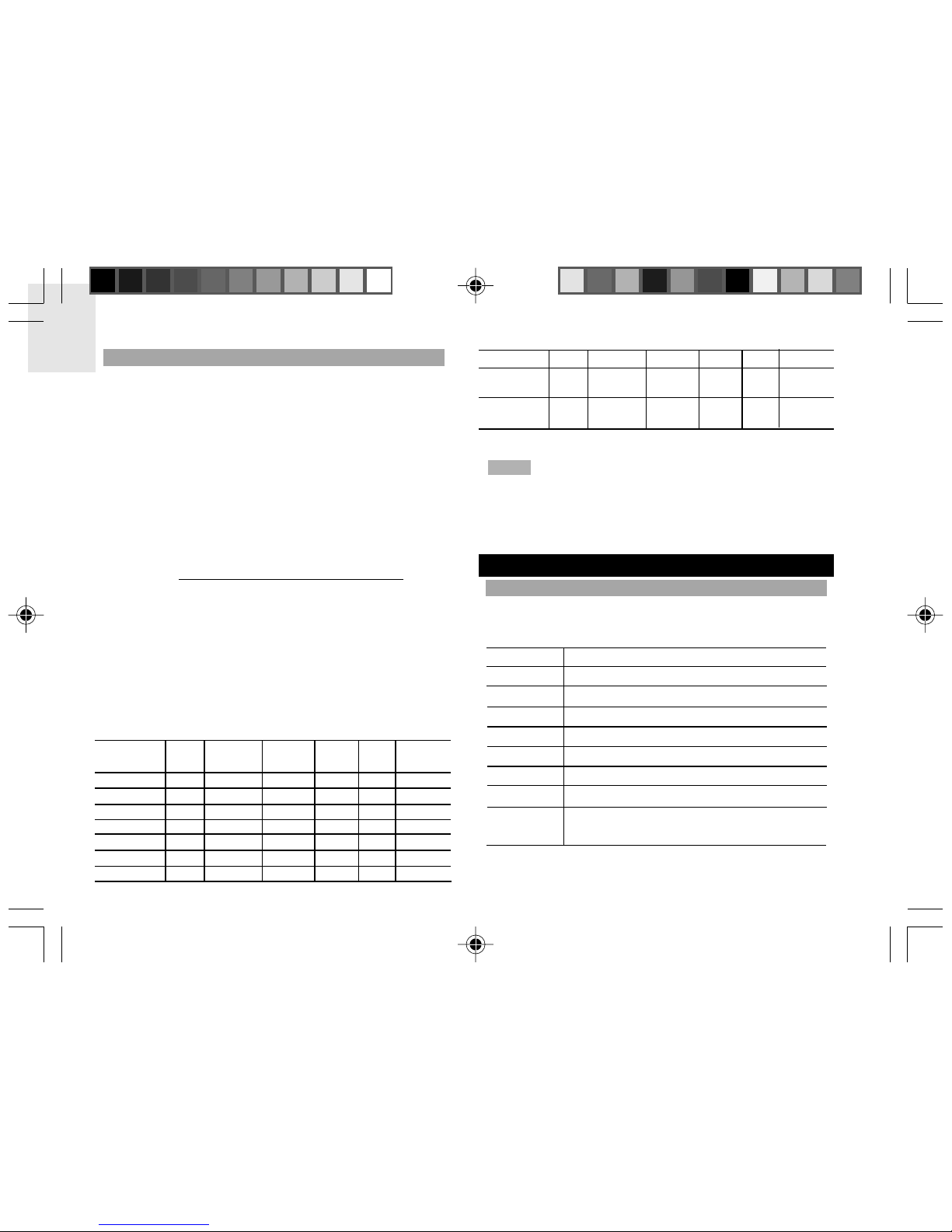
For example, clicking on “Montana” will give a list of
information relevant to the State of Montana including
the names of counties, SAME codes, NWR transmitter
locations, the frequency of the transmitter, the strength
of the signal in WATTS, and any remarks as applicable.
Example of the first 10 county radio channels and SAME
codes for Montana.
WR108 MANUAL EN_V5.P65 2005.5.13, 16:008

EN
9
The unit labels each frequency as a channel (1-7 or
Auto). Once the radio frequency for a region has been
selected the unit will receive voice and code information
from that station.
The channel number in use can be viewed on the top
left-hand corner of the LCD.
SETTING THE RADIO CHANNEL
To change the radio channel, navigate to “Set Channel”
setting mode and select the desired Channel, as shown
in the Changing Settings section.
LOCATIONS
SETTING THE LOCATION
You need to set the location so that you can receive
weather and environmental information for an area that
is relevant to you.
You can choose the location by either the state and
county name, or FIPS code. Up to 9 locations (1-9) can
be stored.
NOTE If you do not set a location, the radio will use the
default setting “CO:All” for all counties.
To set the location:
1. Navigate to “Set Location” setting mode as shown
in the Changing Settings section.
2. Select where you want to store the location e.g. C1.
3. Select the 6-digit number e.g. “000000”. (“----“ means
the location is disabled.)
4. Select “Name” or “FIPS”.
• If you select “Name” you can select first the State
and then the County of your chosen location, then
press EXIT. (If you wish to receive State-wide NOAA
messages, press EXIT once you have selected the
State.)
• If you select “FIPS” you need to enter the 6-digit
SAME code of your chosen location and then press
EXIT (see Finding Local Channels & SAME Codes
section for how to obtain a SAME code).
NOTE If at step 2 you select “C0:All” you will receive all
warnings within the unit’s reception range. This may
result in giving you information for regions that are not
relevant. The regions can be as large as ,000 square
miles (13 sq km). If you select “CO:----” you will disable
the ALL option and will only receive warnings from
specified local areas.
NOTE Once the location name is selected, the
corresponding FIPS code will be set into the memory.
You cannot convert the code back to the location name.
(FIPS is the Federal Information Processing System
WR108 MANUAL EN_V5.P65 2005.5.13, 16:009

EN
10
number assigned to each State, or open waters in or
around the US. The SAME code comprises of numbers
generated by the FIPS system.)
ACTIVATE / DEACTIVATE LOCATION
You can activate / deactivate 1, some, or all of your stored
locations.
When a location is activated,
the 6-digit SAME code can
be viewed in your stored
locations display.
When a location is
deactivated, “----” can be
viewed in your stored
locations display.
To switch between activated or deactivated location
status:
1. Navigate to “Set Location” setting mode as shown
in the Changing Settings section.
2. Select a stored location e.g. C4 and press MENU.
Then when “000000” or “----” is blinking, press
or to activate or deactivate it and press EXIT
to confirm the setting.
SAME CODE – WHAT EACH DIGIT MEANS
A SAME code is broken into 6 fields of numbers.
3 04 003
Code for Cochise County
Code for Arizona
Code for northeast sub-section of Cochise County
Code for northeast sub-section of Cochise County
State-county coding:
The 3 digits on the far right refer to the state county
coding. Each county within a state will have an
independent 3-digit code.
NOTE To receive all of the alerts for a given state, insert
000 into the county section.
State codes:
Moving towards the left, the next 2 digits are for state
coding. Each of the 0 U.S. States has their own 2-digit
code.
County sub-section code:
The last digit on the extreme left is the county sub-
section. A county may be subdivided into nine sub-
section; each number between (1-9) represents a
specific county sub-section.
NOTE If the county sub-section code is stated as 0, then
that county is not sub-divided and all alerts for that
WR108 MANUAL EN_V5.P65 2005.5.13, 16:0010
Other manuals for WR108
1
Other Oregon Scientific Radio manuals





