
omnicharge Omni Ultimate User manual

Quick Start Guide
120V AC or 230V AC
Omni Ultimate
www.omnicharge.co

2
POWER YOUR NEXT ADVENTURE
For more information visit our support page at www.omnicharge.co

3
BEFORE USING CALIBRATE THE BATTERY
To make sure the battery percentage reading is correct, please calibrate Omnicharge’s
battery when you first receive the product and periodically in the future.
.............................................................................................................................................................................................................................
................................................................................................................................................................
45.00 W
0.00 W
20.3 °C
100%
0.00 W
Max output power: 150W
US/JP EU
AC OUTLET
1. Quick press AC Outlet Button to turn the AC outlet on/off
2. The AC icon should appear on the screen
3. Power any device.
0.00 W
20.3 °C
100%
2.07 W
AC
0.00 W
Laptop TV Drone DSLR Projector And more
AC 120V/230V AC output
.............................................................................................................................................................................................................................
.............................................................................................................................................................................................................................
1. Fully discharge the Omnicharge until the Omnicharge shuts
itself off. Press the power button, and you should see an empty
battery icon on the screen.
It's easy to do. Follow these steps:
2. Fully charge your Omnicharge to 100% to finish the calibration.

4
5V - 60V with 0.1V/A Accuracy, up to 8A (70W max)
DC OUTPUT
1. Find the correct voltage for your laptop from its power adaptor.
2. Set the voltage and amperage through the menu
(You may also click DC Outlet Button to jump to Step 2)
DC OUT
SCREEN OFF
AUTO SHUT DOWN
USB
.............................................................................................................................................................................................................................
.............................................................................................................................................................................................................................
.............................................................................................................................................................................................................................
3. DC icon will appear on the screen
DC Adjustable DC output
4. Power your device through DC port & DC
Output Cable (MR30-5521F).
You can purchase additional cables from our
website. For more information about available
accessories, please visit www.omnicharge.co.
Step 1
20.0V ⎓ 7.5A
16.5V ⎓ 8.0A
15.0V ⎓ 8.0A
12.0V ⎓ 8.0A
OUT 59.3V ⎓ 2.5A?
Incorrect setting
may harm your device.
Yes No
Step 2 Step 3
Note: Omnicharge keeps four preset voltages.
Press and hold the power button while hovering over a preset to change the voltage.
Note: For more information visit our support page at www.omnicharge.co
0.00 W
28.2 °C
100%
3.05 W
USB DC
59.03 W
5
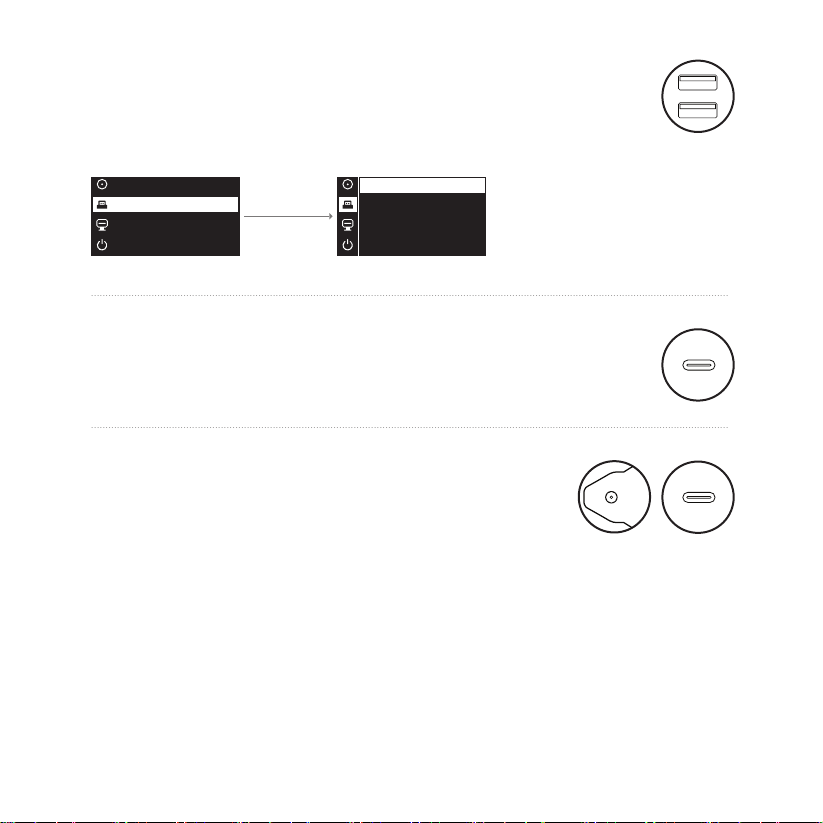
USB-A PORTS
1. Choose whether the USB output is on or off when you turn on your Omnicharge
DEFAULT ON
DEFAULT OFF
.............................................................................................................................................................................................................................
5V/3A, 9V/2A, 12V/1.5A QC3.0 compatible
5V, 9V, 12V, 15V, 20V, up to 3A 60W max
USB-C INPUT/OUTPUT PORT
.............................................................................................................................................................................................................................
Charging from the Wall
Use the included AC wall charger, or other power adapters like your laptop charger to
recharge your Omnicharge.
Note: Make sure the output voltage of your adapter falls within 5V - 32V range.
Use our brand-specific DC input tip. Omnicharge can accept 5.5 x 2.1 mm barrel plugs.
THE OMNICHARGE MAY BE
RECHARGED IN A VARIETY OF WAYS
DC Input 5-32V, 4.5A max, 90W max
USB-C Input 5V/3A, 9V/3A, 12V/3A, 15V/3A, 20V/3A, 60W max
DC OUT
SCREEN OFF
AUTO SHUT DOWN
USB
DC OUT
SCREEN OFF
AUTO SHUT DOWN
USB

PORTS AND BUTTONS
1. Power and Menu Button
2. AC Outlet Button/Move Up
3. DC Outlet Button/ Move Down
4. AC Outlet
5. DC Input Port
6. USB-A Ports
7. USB-C Input / Output Port
8. DC Output Port
.............................................................................................................................................................................................................................
.............................................................................................................................................................................................................................
........................
3
1
2
4
5
6
7
8
6

BUTTON FUNCTIONS
SCREEN
OLED screen with real time metrics
MAIN CONTROLS
MENU CONTROLS
• Long press to power on
• Quick press to turn screen display on/off
• On/Off AC outlet
• DC out settings
• Double press to enter the menu
• Quick press to select
• Move Up
• Move Down
.............................................................................................................................................................................................................................
.............................................................................................................................................................................................................................
24.3°C
100%
0.93 W
0.00 W
5
6
12
3
4
0.00 W
1. Battery Temperature
2. Total Output Wattage from the Battery
3. Total Input Wattage
4. Status Icons
5. Battery Percentage Remaining
6. Battery DC Output Voltage
7

MENU NAVIGATION
Turn on DC output and set the voltage
DC OUT
.............................................................................................................................................................................................................................
Choose whether the USB output is On or Off when you turn on your Omnicharge.
Set the OLED screen auto turn-off time here. The default setting is 1 min.
Choose whether or not your Omnicharge will automatically shut off.
USB
SCREEN OFF
AUTO SHUT OFF
.............................................................................................................................................................................................................................
.............................................................................................................................................................................................................................
.............................................................................................................................................................................................................................
.............................................................................................................................................................................................................................
Choose Fahrenheit or Celsius here.
Find the Model Name, Capacity, Firmware Version Number and Serial Number here.
TEMPERATURE
ABOUT
8

SCREEN ICON
AC 120V/230V AC OUTPUT
120V/230V AC outlet is activated.
.............................................................................................................................................................................................................................
DC ADJUSTABLE DC OUTPUT
Adjustable 1V-24V DC is activated.
.............................................................................................................................................................................................................................
.............................................................................................................................................................................................................................
USB OUTPUT
USB ports are turned on.
CHARGING INPUT
OPTIMAL CHARGING
SOLAR CHARGING
Your Omnicharge is being charged.
Omnicharge is being charged at maximum power.
Omnicharge is being charged from solar power.
.............................................................................................................................................................................................................................
.............................................................................................................................................................................................................................
9

LOW TEMPERATURE PROTECTION
OVERPOWER PROTECTION
OVERHEATING PROTECTION
Battery's temperature is too low and the charging circuit is shut off.
Your device is drawing too much power.
Omnicharge will limit or cut off its output power.
Battery or circuit boards' temperature is too high.
Omnicharge will limit or cut off its input and output power.
.............................................................................................................................................................................................................................
.............................................................................................................................................................................................................................
.............................................................................................................................................................................................................................
OVERVOLTAGE PROTECTION
POWER PROTECTION
Input voltage at the barrel port exceeds its 36V limit.
Input charging circuit is shut off.
Low power protection is on.
.............................................................................................................................................................................................................................
.............................................................................................................................................................................................................................
.............................................................................................................................................................................................................................
OMNI ULTIMATE,
GREETING CARD
DC OUTPUT CABLE (MR30-5521F),
AC POWER ADAPTER, AC CABLE
OPTIONAL:
PROTECTIVE CASE, DJI CABLE, DC OUTPUT CABLE (MR30-5525),
MAGSAFE CABLE, SURFACE CABLE, USB-C POWER CABLE
You can purchase additional cables from our website. For more information about
available accessories, please visit www.omnicharge.co.
WHAT’S IN THE BOX
10
Other manuals for Omni Ultimate
2
Table of contents
Other omnicharge Accessories manuals

omnicharge
omnicharge Omni Ultimate User manual

omnicharge
omnicharge Omni 13 User manual

omnicharge
omnicharge Omni 20c+ User manual

omnicharge
omnicharge Omni 20 User manual

omnicharge
omnicharge Omni 20 Operating and maintenance instructions

omnicharge
omnicharge Omni 20+ User manual

omnicharge
omnicharge Omni 13+ User manual

omnicharge
omnicharge Omni 20+ User manual

omnicharge
omnicharge Omni Mobile 12,800 PRO User manual

omnicharge
omnicharge Omni 20 User manual











