
Omcan DI-CN-0099 User manual
Revised - 06/25/2021
Toll Free: 1-800-465-0234
Fax: 905-607-0234
Email: [email protected]
www.omcan.com
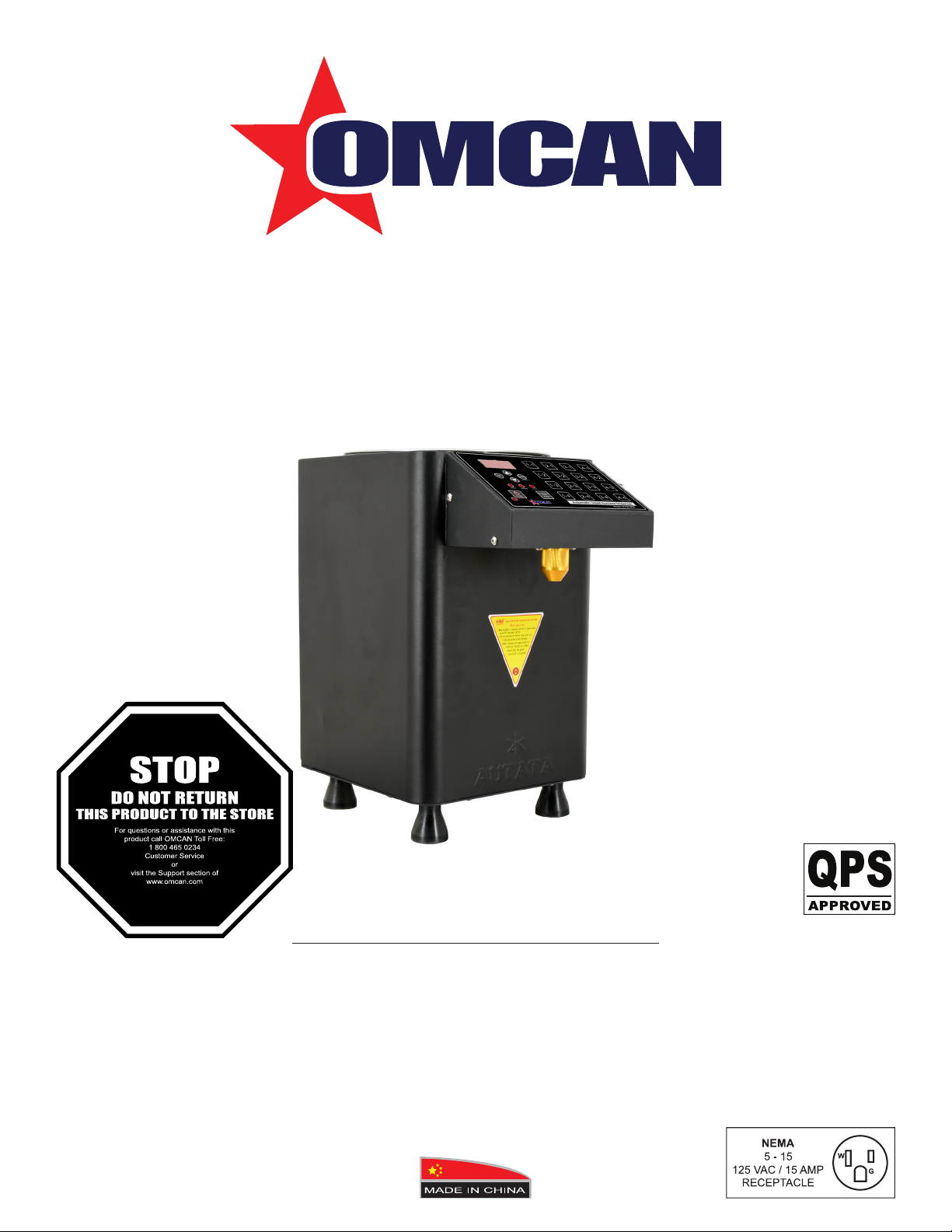
Fructose Dispenser
Model DI-CN-0099
Item 44645
Instruction Manual

2
Page
--------------------------------------------------------------------------- 3 - 4
--------------------------------------------------------------------------- 4 - 5
-------------------------------------------------------------------------- 5
----------------------------------------------------------------------------------------- 6 - 8
------------------------------------------------------------------------------------- 8
----------------------------------------------------------------------------- 9 - 10
---------------------------------------------------------------------------- 11
------------------------------------------------------------------------------------------- 12 - 14
---------------------------------------------------------------------------- 15
Table of Contents
Section
General Information
Safety and Warranty
Technical Specications
Operation
Troubleshooting
Parts Breakdown
Electrical Schematics
Notes
Warranty Registration
Model DI-CN-0099

3
General Information
Omcan Manufacturing and Distributing Company Inc., Food Machinery of America, Inc. dba Omcan
and Omcan Inc. are not responsible for any harm or injury caused due to any person’s improper or
negligent use of this equipment. The product shall only be operated by someone over the age of 18, of
sound mind, and not under the inuence of any drugs or alcohol, who has been trained in the correct
operation of this machine, and is wearing authorized, proper safety clothing. Any modication to the
machine voids any warranty, and may cause harm to individuals using the machine or in the vicinity of
the machine while in operation.
CHECK PACKAGE UPON ARRIVAL
Upon receipt of an Omcan shipment please inspect for external damage. If no damage is evident on the
external packaging, open carton to ensure all ordered items are within the box, and there is no concealed
damage to the machine. If the package has suered rough handling, bumps or damage (visible or concealed),
please note it on the bill of lading before accepting the delivery and contact Omcan within 24 hours, so we may
initiate a claim with the carrier. A detailed report on the extent of the damage caused to the machine must be
lled out within three days, from the delivery date shown in the shipping documents. Omcan has no recourse
for damaged products that were shipped collect or third party.
Before operating any equipment, always read and familiarize yourself with all operation and safety
instructions.
Omcan would like to thank you for purchasing this machine. It’s of the utmost importance to save
these instructions for future reference. Also save the original box and packaging for shipping the
equipment if servicing or returning of the machine is required.
---------------------------------------------------------------------------------------------------------------------------------------------------
Omcan Fabrication et distribution Companie Limité et Food Machinery d’Amerique, dba Omcan et
Omcan Inc. ne sont pas responsables de tout dommage ou blessure causé du fait que toute personne
ait utilisé cet équipement de façon irrégulière. Le produit ne doit être exploité que par quelqu’un de
plus de 18 ans, saine d’esprit, et pas sous l’inuence d’une drogue ou d’acohol, qui a été formé pour
utiliser cette machine correctement, et est vêtu de vêtements de sécurité approprié. Toute modication
de la machine annule toute garantie, et peut causer un préjudice à des personnes utilisant la machine
ou des personnes à proximité de la machine pendant son fonctionnement.
VÉRIFIEZ LE COLIS DÈS RÉCEPTION
Dès réception d’une expédition d’Omcan veuillez inspecter pour dommages externes. Si aucun dommage
n’est visible sur l’emballage externe, ouvrez le carton an de s’assurer que tous les éléments commandés
sont dans la boîte, et il n’y a aucun dommage dissimulé à la machine. Si le colis n’a subi aucune mauvaises
manipulations, de bosses ou de dommages (visible ou cachée), notez-le sur le bond de livraison avant
d’accepter la livraison et contactez Omcan dans les 24 heures qui suivent, pour que nous puissions engager
une réclamation auprès du transporteur. Un rapport détaillé sur l’étendue des dommages causés à la machine
doit être rempli dans un délai de trois jours, à compter de la date de livraison indiquée dans les documents
d’expédition. Omcan n’a aucun droit de recours pour les produits endommagés qui ont été expédiées ou cueilli
par un tiers transporteur.

4
Safety and Warranty
General Information
RESIDENTIAL USERS: Vendor assumes no liability for parts or labor coverage for component failure
or other damages resulting from installation in non-commercial or residential applications. The right
is reserved to deny shipment for residential usage; if this occurs, you will be notied as soon as
possible.
1 YEAR PART AND LABOUR BENCH WARRANTY
Avant d’utiliser n’importe quel équipement, toujours lire et vous familiariser avec toutes les opérations
et les consignes de sécurité.
Omcan voudrais vous remercier d’avoir choisi cette machine. Il est primordial de conserver ces
instructions pour une référence ultérieure. Également conservez la boîte originale et l’emballage pour
l’expédition de l’équipement si l’entretien ou le retour de la machine est nécessaire.
---------------------------------------------------------------------------------------------------------------------------------------------------
Omcan Empresa De Fabricacion Y Distribucion Inc. Y Maquinaria De Alimentos De America, Inc. dba
Omcan y Omcan Inc. no son responsables de ningun daño o perjuicío causado por cualquier persona
inadecuada o el uso descuidado de este equipo. El producto solo podra ser operado por una persona
mayor de 18 años, en su sano juicio y no bajo alguna inuencia de droga o alcohol, y que este ha sido
entrenado en el correcto funcionamiento de esta máquina, y ésta usando ropa apropiada y autorizada.
Cualquier modicación a la máquina anúla la garantía y puede causar daños a las personas usando la
máquina mientras esta en el funcionamiento.
REVISE EL PAQUETE A SU LLEGADA
Tras la recepcion de un envio Omcan favor inspeccionar daños externos. Si no hay daños evidentes en el
empaque exterior, Habra el carton para asegurararse que todos los articulos solicitados ésten dentro de la
caja y no encuentre daños ocultos en la máquina. Si el paquete ha sufrido un manejo de poco cuidado, golpes
o daños (visible o oculto) por favor anote en la factura antes de aceptar la entrega y contacte Omcan dentro
de las 24 horas, de modo que podamos iniciar una reclamación con la compañia. Un informe detallado sobre
los daños causados a la máquina debe ser llenado en el plazo de tres días, desde la fecha de entrega que se
muestra en los documentos de envío. Omcan no tiene ningun recurso por productos dañados que se enviaron
a recoger por terceros.
Antes de utilizar cualquier equipo, siempre lea y familiarizarse con todas las instrucciones de
funcionamiento y seguridad.
Omcan le gustaría darle las gracias por la compra de esta máquina. Es de la mayor importancia para
salvar estas instrucciones para futuras consultas. Además, guarda la caja original y el embalaje para el
envío del equipo si servicio técnico o devolución de la máquina que se requiere.

5
Safety and Warranty
Within the warranty period, contact Omcan Inc. at 1-800-465-0234 to schedule a drop o to either
an Omcan authorized service depot in the area, or to an Omcan Service warehouse to repair the
equipment.
Unauthorized maintenance will void the warranty. Warranty covers electrical and part failures, not
improper use.
Please see https://omcan.com/disclaimer for complete info.
WARNING:
The packaging components (cardboard, polyethylene, and others) are classied as normal solid urban waste
and can therefore be disposed of without diculty.
In any case, for suitable recycling, we suggest disposing of the products separately (dierentiated
waste) according to the current norms.
DO NOT DISCARD ANY PACKAGING MATERIALS IN THE ENVIRONMENT!
Technical Specications
Model DI-CN-0099
Capacity 10 L / 10.6 QT
Electrical 110V / 60Hz / 1
Power 150 W
Precision/cc ± 1cc
Number of Keys 16
Auto Cleaning Yes
Output Port Material Aluminum Alloy
Default Temperature for Barrel 25°C / 77°F
Dimensions 9.8” x 9.8” x 16.1” / 250 x 250 x 410mm
Weight 28.7 lbs. / 13 kgs.
Item Number 44645
6
Operation
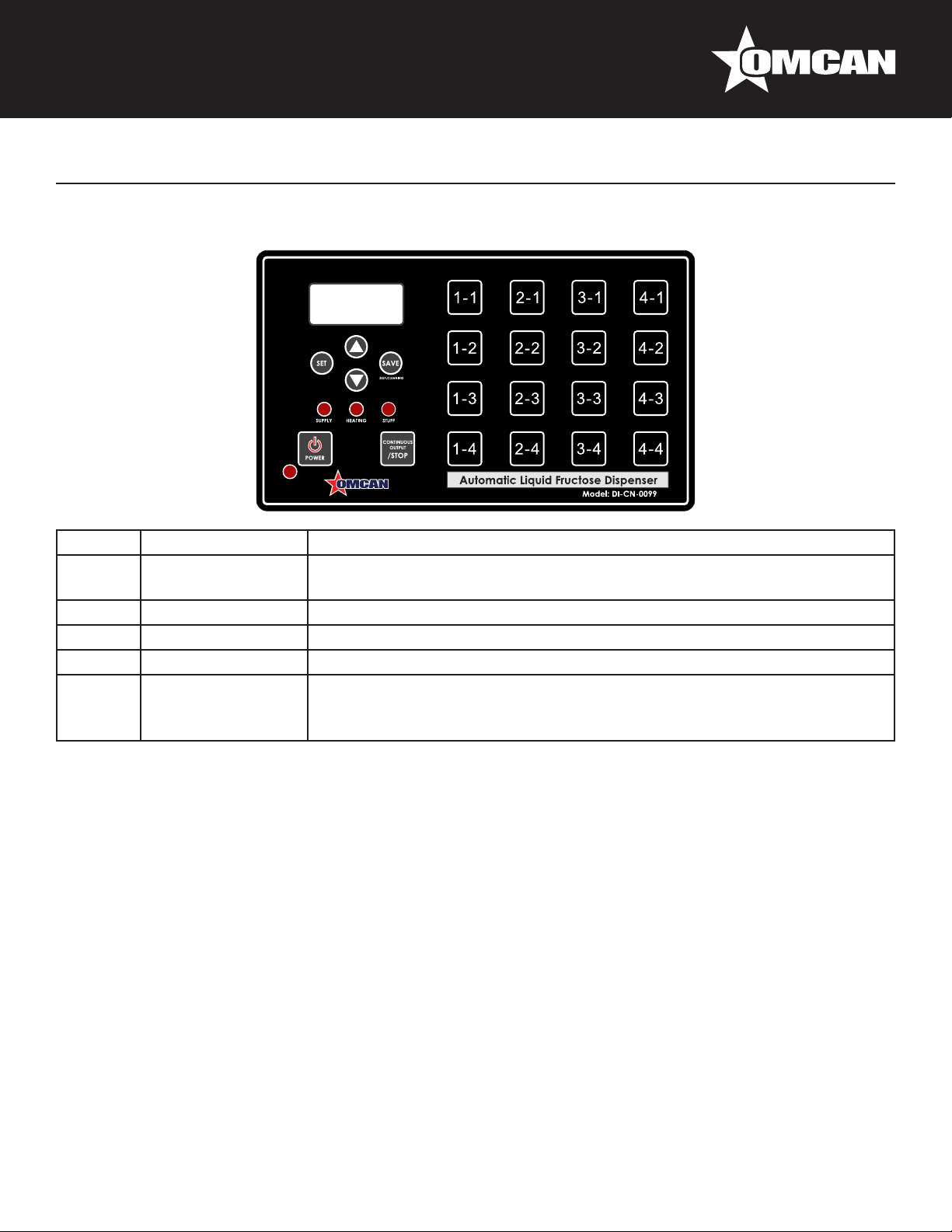
DISPLAY PANEL
Number Name Function
1Heating Light When the temperature of the liquid in bucket is below 25°C, the heating
light will be on. The machine will begin to heat.
2 Feed Light When the liquid is below the caution line, the feed light will be on and beep.
3 Filling Light While the liquid output operation is going, the lling light is on.
4 Power Button Powers the machine.
5Continuous Output/
Stop
When the machine is in the standby state, press this button to go into the
continuous output state. When the machine is in the output state, press this
button to stop the output.
OPERATION
1. Turn on/o the machine.
- Connect the power switch to power the machine.
- Press the power button for more than 1 second. The LED will display “AUTT” with 2 beeps. The machine
will be in standby mode.
Attention: It is suggested that the machine should be cleaned before it’s rst use or after idling for
an extended period of time.
2. Sugar output.
- When the machine is in the standby state, press any of the numbered buttons (ex: 4-1) to enter the output
state.
- Press the continuous output/stop button to exhaust up air before other setting or operating during daily
use.
- Press the continuous output/stop button to stop output and return to the standby state.
3. Alarm for low liquid.
- When the liquid is below the position of the level sensor, an alarm will sound (5 seconds of beeps). The
feed light will be on and the LED display will show “LL”.
7
Operation
4. Measurement type.
- By setting the “FP” value to choose between weight (g) or volume (cc).
5. Sugar outlet auxiliary heating function.
- Turn on the sugar outlet “heating switch” to heat the sugar outlet. This operation can avoid clogging of the
outlet if the temperature is too cold or the sugar is viscid. This switch can be turned o if the temperature is
above 15°C.
6. Auto washing function.
- Before cleaning the machine, open the sugar outlet, load some war water (below 60°C) and put a
container under the outlet. Long press the “save” button for 3 seconds to go into the auto washing state.
Meanwhile the water will ow out from the outlet. This operation will last 3 minutes. It is suggested to wash
the machine after daily operations to keep cleared.
SETTINGS
In the standby state, press the setting button to go into the setting state, “F---”, then press the up or down key
to page up or page down.
“FL--” Check or set output values.
“FP--” Set precision setting.
“FH--” Set bucket temperature.
Press the setting button again to conrm the setting. If there is no operation, the machine will leave the setting
state.
LIQUID OUTPUT QUANTITY (FL--)
The output quantity can be changed from the default outputs by following the below steps:
1. Press the setting button, the LED will display “FL--”.
2. Press the setting button again to go into the setting state.
3. Press the numbered button you desire to change (ex: pressing the 1-1 button will display “1-1” and “L6”).
4. Press the up or down buttons to change the output quantity for that button (ex: changing L6 to L10).
5. Press save to save and quit or stop to cancel and quit.
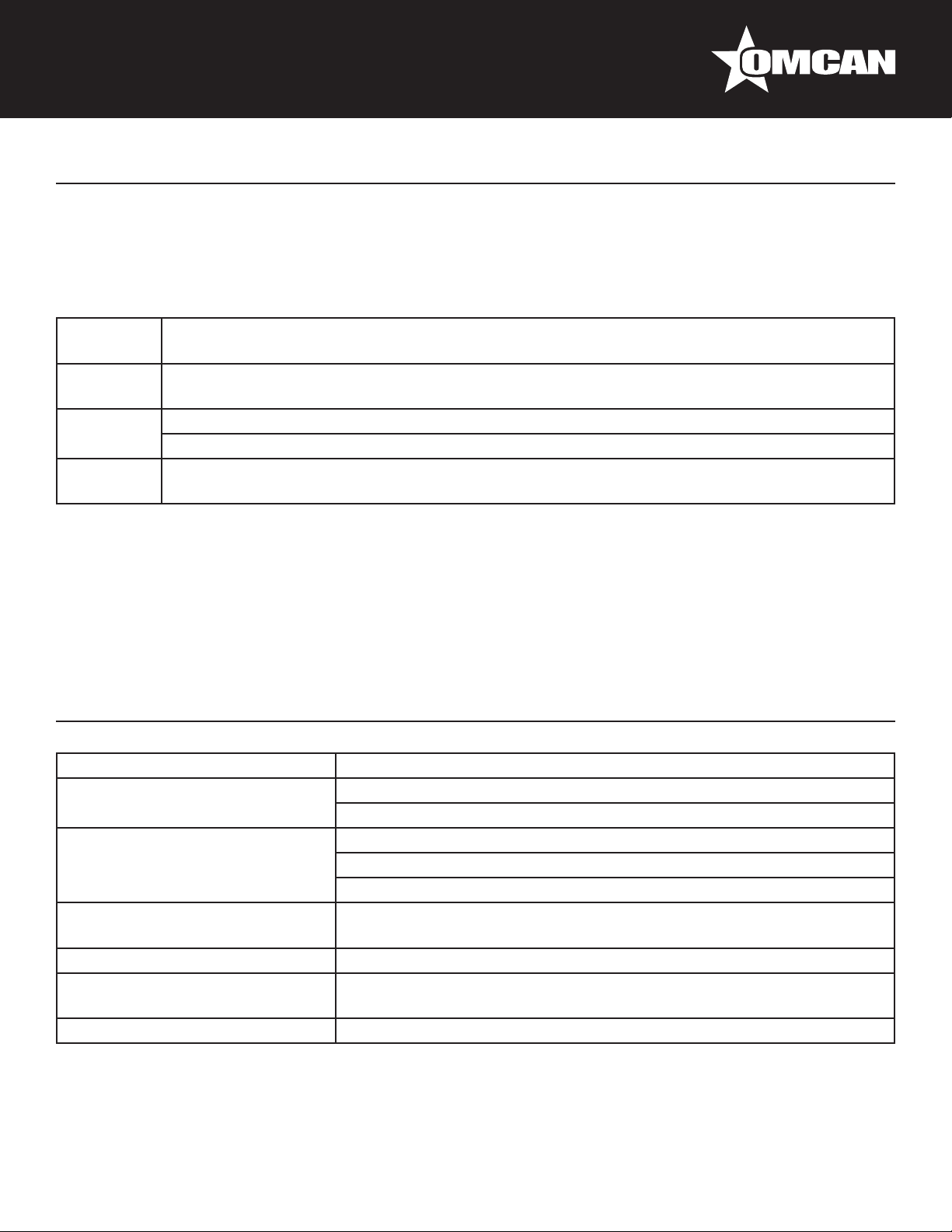
DEFAULT VALUES
Button Output
Quantity Button Output
Quantity Button Output
Quantity Button Output
Quantity
1-1 6 2-1 14 3-1 22 4-1 30
1-2 8 2-2 16 3-2 24 4-2 35
1-3 10 2-3 18 3-3 26 4-3 40
1-4 12 2-4 20 3-4 28 4-4 45
8
Operation
Troubleshooting
OUTPUT PRECISION SETTING (FP--)
Calibration is necessary before the rst time operation or when not in use for extended periods of time. Please
set the following steps to set “FP--”:
Step 1 Press the setting button, the LED will display “FL--”.
Press the up or down keys to turn to “FP--”.
Step 2 Press the setting button again to go into the setting state. The LED displays “F390” (The default
value is “P390”).
Step 3 Press up or down to increase or decrease the output quantity.
The actual output quantity may be dierent from the normal quantity by a small margin.
Step 4 Press save to save and quit.
Press top to cancel and quit.
Note: Just the maximum and minimum quantity should be set.
TEMPERATURE PARAMETER SETTING (FH--)
During the “FH--” state, while displaying “=25C”, press up or down to set the temperature.
Attention: “=0C” will turn o the heating function and the unit will enter the heat preservation state.
Cause Troubleshooting
Outlet sugar leaks. The outlet is incorrectly installed.
The rubber ring is worn out.
Sugar liquid cannot ow out. The sugar is frozen. Try using the auxiliary heating switch.
If the sugar liquid is too thin, change the heating temperature.
Press the continuous output/stop button to exhaust up air.
Problem with heating system. Reset to default temperature 25°C, if the liquid is boiling, that means the
PCB has failed.
The ow does not stop naturally. The controller PCB has failed.
The machine cannot be powered
on.
The fuse broke and must be replaced.
The error is too large. Adjust the FP, or check whether the sugar is empty.
9
Parts Breakdown
Model DI-CN-0099 44645

10
Model DI-CN-0099 44645
Parts Breakdown
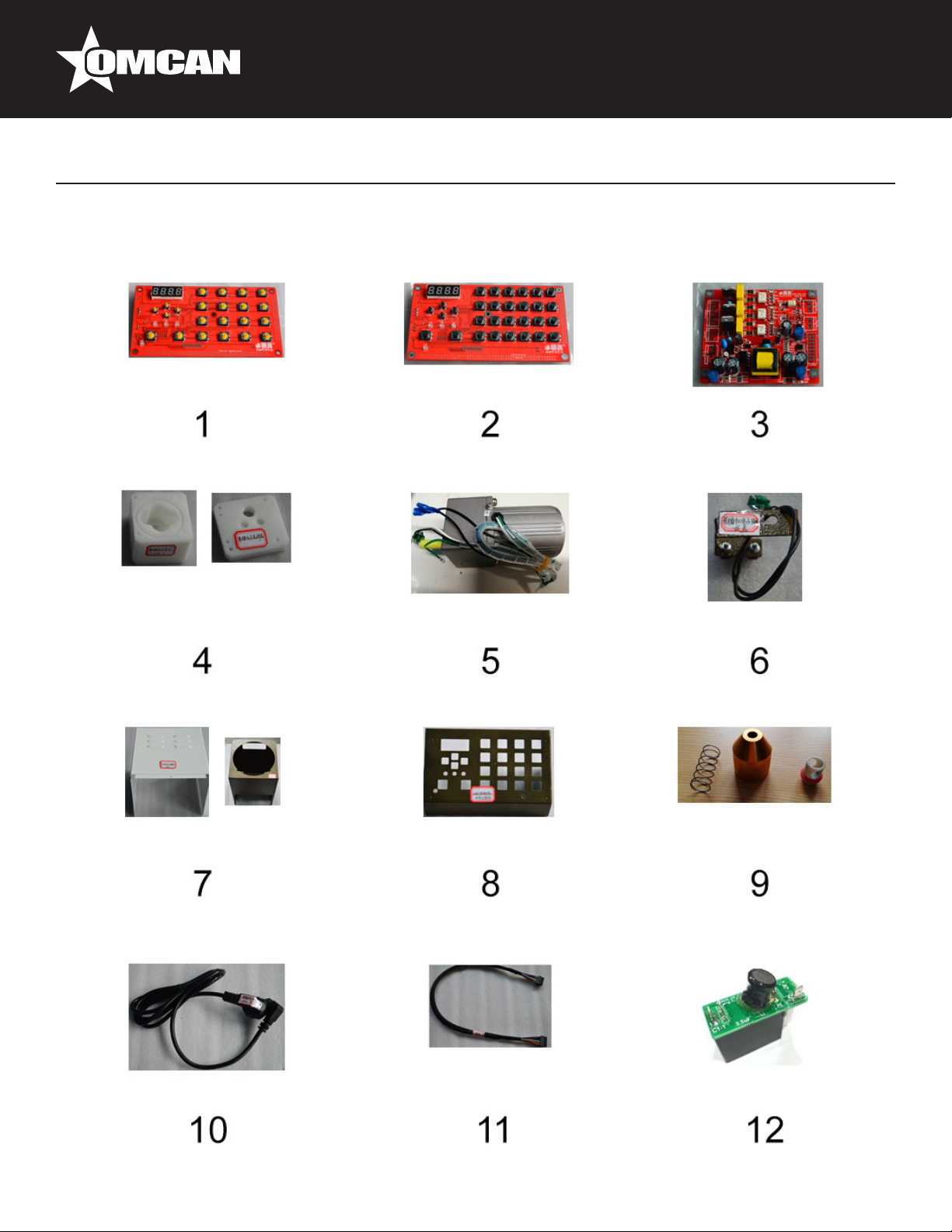
Item No. Description Position Item No. Description Position Item No. Description Position
AG576 Outside Panel 16 for 44645 1 AG580 Motor for 44645 5 AG584 Output Port Assembly for 44645 9
AG577 Outside Panel 24 for 44645 2 AG581 Electronic Eye Assembly for 44645 6 AG585 Power Cable for 44645 10
AG578 Inside Panel (PCB) for 44645 3 AG582 Body Shell for 44645 7 AG586 Cable for 44645 11
AG579 Pump Assembly for 44645 4 AG583 Key Shell for 44645 8 AG587 PCB Caps (Green Small for Motor) for
44645 12
This manual suits for next models
1
Table of contents
Popular Dispenser manuals by other brands

Silver King
Silver King Majestic SK12MAJ Technical manual and replacement parts list

Franke
Franke F3Dn Twin Service manual
STIEBEL ELTRON
STIEBEL ELTRON UltraHot Plus Operation and installation instructions

DAN DRYER
DAN DRYER 282 installation guide

Essity
Essity Tork 473208 manual

CBS
CBS SD300BU-88 COMPONENT MAINTENANCE MANUAL WITH ILLUSTRATED PARTS LIST


