Nokia SU-2 - Image Viewer - Digital AV Player User manual

User’s Guide for SU-2 Image Viewer
9355895
Issue 1

DECLARATION OF CONFORMITY
We, NOKIA CORPORATION, declare under our sole responsibility that the product
SU-2 is in conformity with the provisions of the following Council Directive: 1999/5/EC.
A copy of the Declaration of Conformity can be found at
http://www.nokia.com/phones/declaration_of_conformity/.
Copyright © 2003 Nokia. All rights reserved.
Reproduction, transfer, distribution or storage of part or all of the contents in this document in any form
without the prior written permission of Nokia is prohibited.
Nokia and Nokia Connecting People are registered trademarks of Nokia Corporation. Other product and
company names mentioned herein may be trademarks or tradenames of their respective owners.
Nokia operates a policy of continuous development. Nokia reserves the right to make changes and
improvements to any of the products described in this document without prior notice.
Under no circumstances shall Nokia be responsible for any loss of data or income or any special,
incidental, consequential or indirect damages howsoever caused.
The contents of this document are provided "as is". Except as required by applicable law, no warranties of
any kind, either express or implied, including, but not limited to, the implied warranties of
merchantability and fitness for a particular purpose, are made in relation to the accuracy, reliability or
contents of this document. Nokia reserves the right to revise this document or withdraw it at any time
without prior notice
The availability of particular products may vary by region. Please check with the Nokia dealer nearest to
you.

Contents
3
Copyright © 2003 Nokia. All rights reserved.
Contents
Introduction...........................................................................................................4
Bluetooth wireless technology ................................................................................................................ 4
Chargers and batteries............................................................................................................................... 5
Power supply for the SU-2 Image Viewer......................................................................................... 6
Installing the batteries ........................................................................................................................... 6
Technical data .............................................................................................................................................. 7
Overview......................................................................................................................................................... 8
Using the SU-2 Image Viewer for the first time ............................................................................... 9
1. Using the SU-2 Image Viewer ........................................................................11
Before using the SU-2 Image Viewer ..................................................................................................11
SU-2 Image Viewer memory and picture formats ...........................................................................12
Viewing images with the SU-2 Image Viewer ...............................................................................12
Using the SU-2 Image Viewer with several paired phones........................................................13
SU-2 Image Viewer modes..................................................................................................................14
SU-2 Image Viewer icons ....................................................................................................................15
List of countries using the SECAM TV standard ...............................................................................16
2. Battery information.........................................................................................17
Charging and Discharging.......................................................................................................................17
Care and maintenance ........................................................................................19

Copyright © 2003 Nokia. All rights reserved. 4
Introduction
The SU-2 Image Viewer can be connected to compatible phones that support
Bluetooth wireless technology. You can view a single picture or a set of pictures
that you have taken with the phone camera on a TV screen or compatible video
projector.
Read this user’s guide carefully before using the SU-2 Image Viewer. More
detailed information about phone features is provided in the user’s guide of your
phone. Check your phone’s guide for important safety and maintenance
information. In addition, consult your TV’s instructions on connecting external
devices.
■Bluetooth wireless technology
Since Bluetooth devices communicate using radio waves, your Bluetooth phone
and the SU-2 Image Viewer do not need to be in line of sight. The two devices
need to be within a maximum of 10 meters of each other, although the
connection can be subject to interference from obstructions, such as walls, or
from other electronic devices.
The SU-2 Image Viewer is specially designed for compatible Nokia phones that
support Bluetooth wireless technology. However, the SU-2 Image Viewer can be
used with any compatible Bluetooth devices that support the Object Push Profile
(OPP) or Basic Imaging Profile (BIP). A Bluetooth profile is a set of commands that
your phone uses for controlling the SU-2 Image Viewer.

Introduction
5
Copyright © 2003 Nokia. All rights reserved.
Note that the devices need to support Bluetooth wireless technology. The SU-2
Image Viewer is compliant with and adopts Bluetooth Specification 1.1. However,
interoperability between the SU-2 Image Viewer and other Bluetooth enabled
products is not guaranteed and depends on compatibility. For more information
on the compatibility between the SU-2 Image Viewer with other Bluetooth
enabled products, please check with the product manufacturer.
In some countries, there may be restrictions on using Bluetooth devices. Check
with your local authorities.
■Chargers and batteries
Check the model number of any charger before use with this device. The SU-2 Image Viewer
is intended for use with the following chargers: ACP-7, ACP-8 and ACP-12.
Warning! Use only batteries and chargers approved by the manufacturer for use
with this particular enhancement. The use of any other types will invalidate any
approval or warranty applying to the enhancement, and may be dangerous.
For availability of approved batteries and chargers, please check with your dealer.
When you disconnect the power cord of any enhancement, grasp and pull the plug, not the
cord.
Copyright © 2003 Nokia. All rights reserved. 6
Power supply for the SU-2 Image Viewer
The SU-2 Image viewer uses either the provided AAA batteries or a compatible
charger as a source of power. When connected to a charger, the SU 2- Image
Viewer does not use the batteries. Therefore, the batteries can be left in the
device, even if they are rechargeable.
When using batteries as a power source, the SU-2 Image Viewer automatically
enters sleep mode after 10 minutes, if it is switched on, but not connected to a
Bluetooth device. When the batteries are running out of power, a low battery icon
is displayed on the TV screen and the SU-2 Image Viewer switches off after 3
minutes.
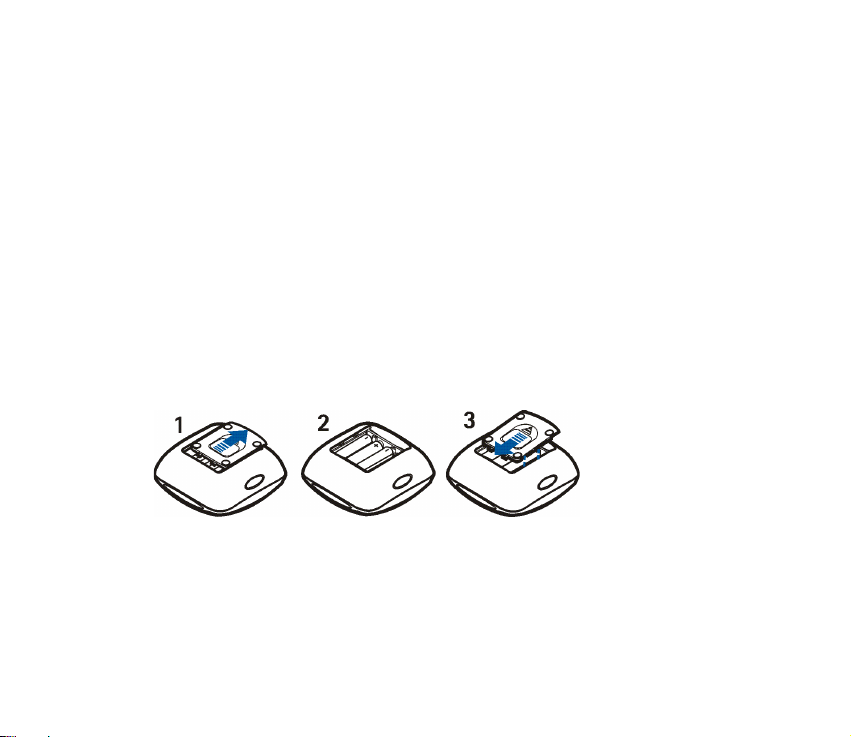
Installing the batteries
Install the batteries as shown in the picture below.
Note: Always switch the power off and disconnect the device from the charger or
any other enhancement before removing the cover.

Introduction
7
Copyright © 2003 Nokia. All rights reserved.
■Technical data
• Weight: 105 g
• Length: 98 mm
• Width: 98 mm
• Thickness: 42 mm
• Operating time up to 90 - 255 min (depending on battery level)
• Operating temperature: 5oC to 55oC (indoor use only)
• Compatibility: The SU-2 Image Viewer is compatible with PAL and NTSC
standards. SECAM TV sets require a special adapter that is not supplied in the
sales package. The SECAM adapter can be bought in hardware shop. You can
also connect the SU-2 Image Viewer to a compatible video projector through
an AV connector.
• Power supply: 4 AAA batteries or Nokia chargers: ACP-7, ACP-8, ACP-12
• Connection: RCA connector for TV, Bluetooth (version 1.1) for the phone.
Copyright © 2003 Nokia. All rights reserved. 8
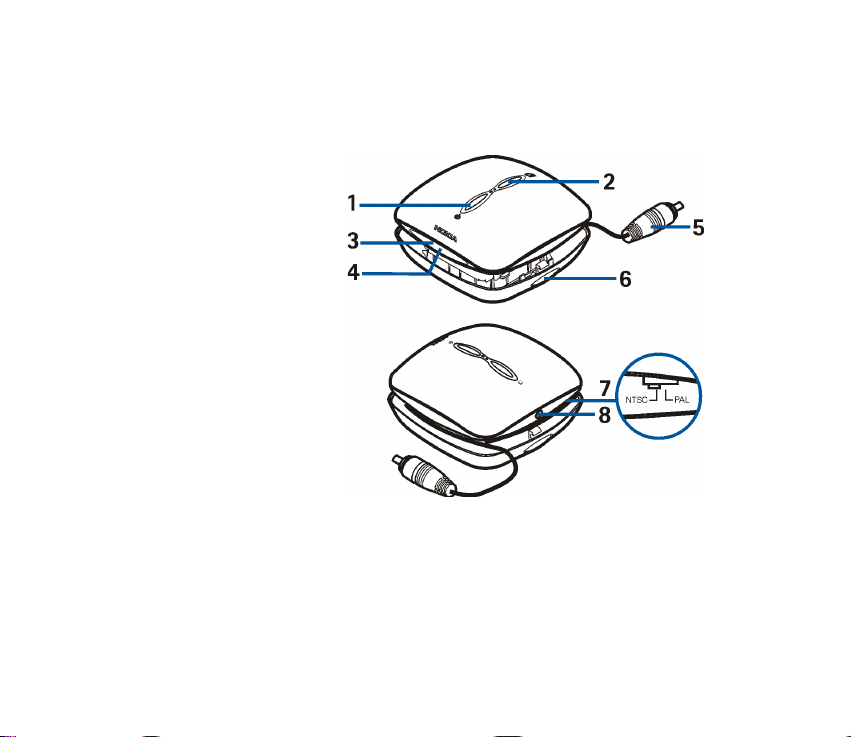
■Overview
The SU-2 Image Viewer has the following parts:
1. Power on/off/rotate
button, see page 12 for
use
2. Pause/continue button,
see page 13 for use.
3. Power/Bluetooth
status indicator light
(blue)
4. Charger indicator light
(green)
5. RCA connector and
cable
6. Release buttons on
both sides, see Using
the SU-2 Image Viewer
for the first time on
page 9.
7. NTSC/PAL switch
8. Charger connector
Introduction
9
Copyright © 2003 Nokia. All rights reserved.
■Using the SU-2 Image Viewer for the first time
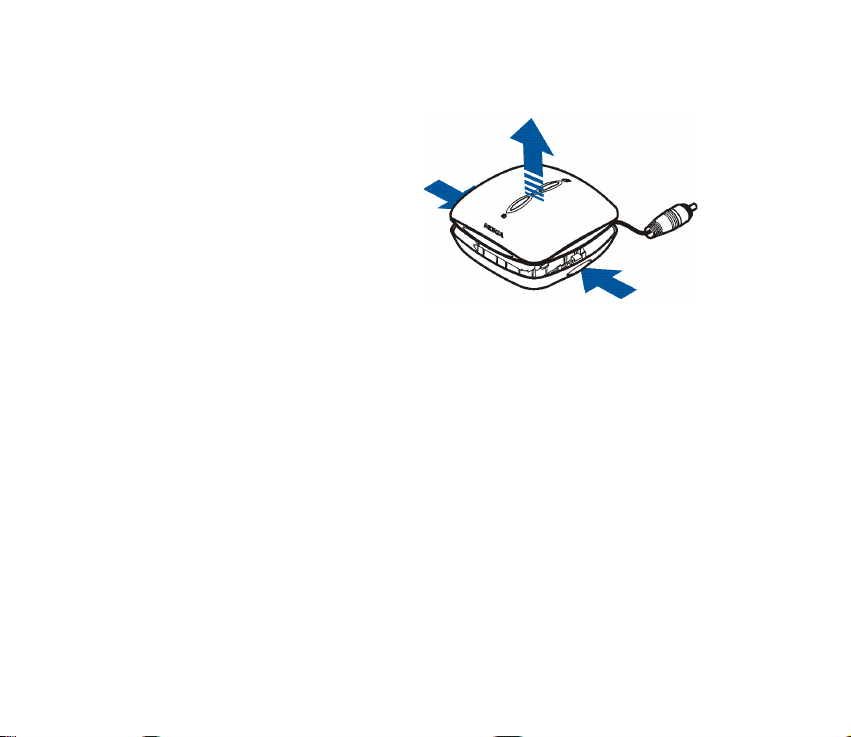
1. Press the release buttons on both
sides of the SU-2 Image Viewer to
lift the cover up.
Check that the NTSC/PAL switch
is in the correct position and that
it corresponds to the TV standard
used in your country.
2. Connect the SU-2 Image Viewer
to the RCA connector on your TV.
If your TV does not have a RCA
connector, you need a RCA/SCART adapter, which you can obtain from a
hardware shop.
3. Switch on the SU-2 Image Viewer. The Nokia logo appears on your TV screen.
4. Make sure that your phone is switched on. Then, enter your phone’s Bluetooth
menu and activate the Bluetooth connection.
5. Enter the submenu where you can set the phone to search for Bluetooth
devices, and start the search. The phone searches for all Bluetooth devices
within about 10 meters and shows them in a list.
6. Select SU-2 from the list.

Copyright © 2003 Nokia. All rights reserved. 10
7. Key in the four digit verification code ("pair") to your phone. The code is shown
on your TV screen in the top right corner.
Once you have keyed in the verification code, your phone sends it to the SU-2
Image Viewer. See Using the SU-2 Image Viewer with several paired phones on
page 13.
The blue indicator light shows that the Bluetooth connection is active. The SU-
2 Image Viewer appears in the phone menu where you can view the Bluetooth
devices that are currently paired with your phone.
8. Start using the SU-2 Image Viewer.
Other manuals for SU-2 - Image Viewer - Digital AV Player
1
Table of contents
Other Nokia Media Player manuals