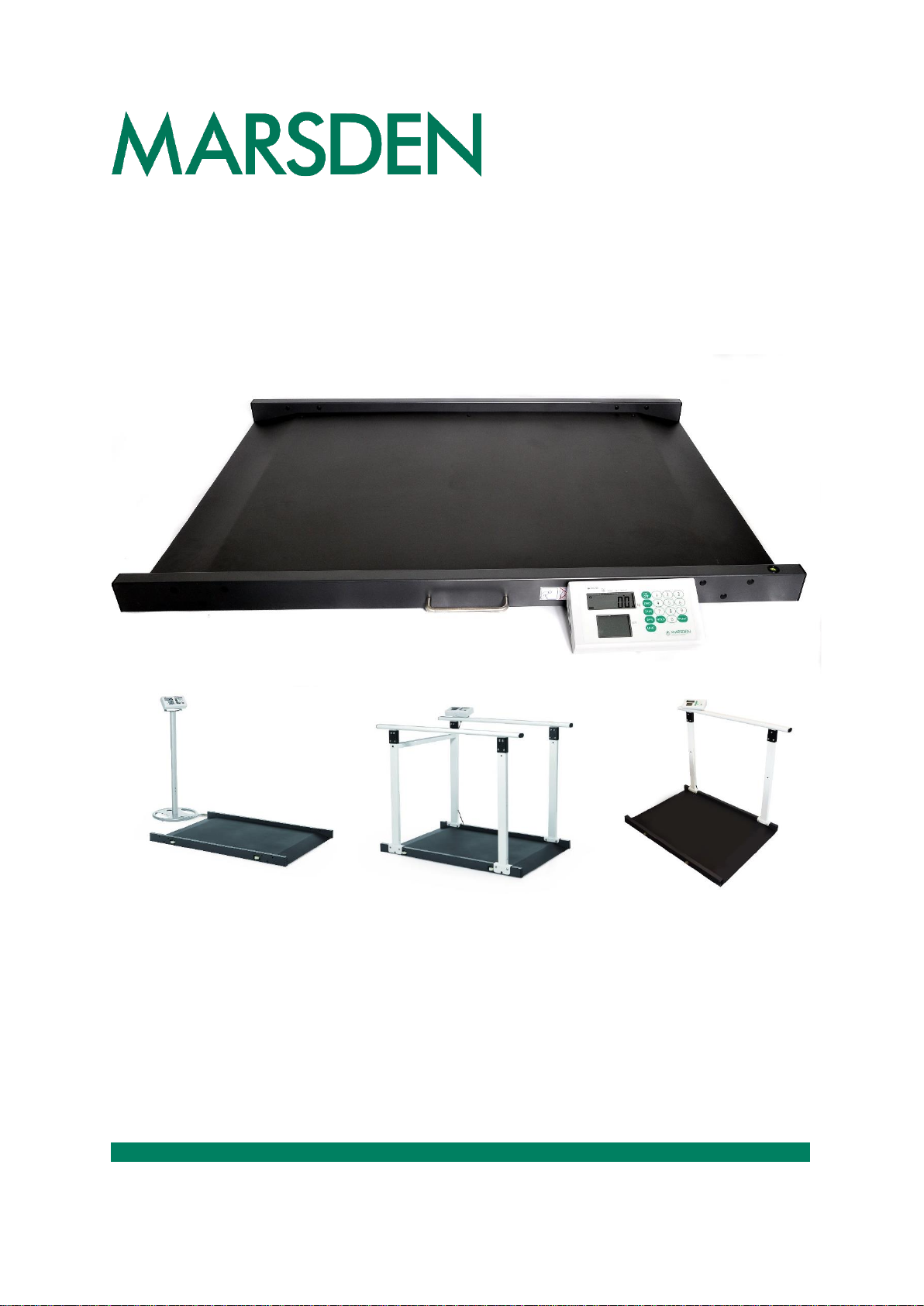
marsden M-65 Series User manual

Marsden M-65x User Manual
Please take time to read these instructions before starting to use the scale.

Page 2 of 24
Contents
Safety Instructions ..........................................................................................................................................................................3
Cleaning..........................................................................................................................................................................................3
Maintenance ...................................................................................................................................................................................3
Disposing of the Scale ....................................................................................................................................................................3
Intended Use...................................................................................................................................................................................3
Explanation of Graphic Symbols.....................................................................................................................................................4
Power Supply and Low Battery.......................................................................................................................................................5
Installing and Replacing the Battery Pack ......................................................................................................................................5
Switching on the Scale....................................................................................................................................................................6
Switching off the Scale....................................................................................................................................................................6
Setting the Scale to Zero ................................................................................................................................................................7
Hold Function..................................................................................................................................................................................7
Setting Auto Hold Function (Optional).............................................................................................................................................8
Body Mass Index (BMI) Function....................................................................................................................................................8
Tare and Pre-Set Tare Functions ....................................................................................................................................................9
Setting the Date ............................................................................................................................................................................10
Using the Scale with a Printer....................................................................................................................................................... 11
Connecting the TP-2100 Thermal Printer ..................................................................................................................................... 11
Using the Scale with Wi-Fi/Bluetooth............................................................................................................................................12
Bluetooth Connection....................................................................................................................................................................12
Wi-Fi Connection ..........................................................................................................................................................................12
Assembling the indicator column (M-651 only) .............................................................................................................................13
Assembly: Handrails (M-652/M-653 Only) ....................................................................................................................................14
EMC Guidance and Manufacturer’s Declaration...........................................................................................................................19
Error Messages.............................................................................................................................................................................21
Introduction
Thank you for purchasing a Marsden professional medical scale. This is a precision Class III weighing instrument and
considerate use will result in many years of accurate weighing. The scale has a maximum load capacity of 300kg which must
not be exceeded.
Product Specification

Model
M-65x
Accuracy Class
Class III
Capacity
300kg x 100 g
Weight of Scale
Approximately 28.8kg
Units of Measure
kg
Function Keys
ON/OFF, HOLD, TARE, BMI, UNIT, PRINT, 0-9
Stabilization Time
1-2 Seconds
Operating Temperature
0 to 40˚C
Power Supply
Rechargeable battery pack
6 x AA batteries*
12V 1A AC Adaptor
Indicator Display
1” LCD display with 5 active digits
Dimensions
1150 x 800 x 66mm
Warranty Duration
8 years
*Cannot be powered by six AA batteries as standard. Please contact Marsden for further information.

Page 3 of 24
Safety Instructions
Before putting the device into use, please read with care the information given in this user manual, which contains important
instructions for proper installation, use and maintenance of the device.
Marsden and/or the manufacturer shall not be liable for damages arising from failure to heed the following instructions:
•When using electrical components under increased safety requirements, always comply with appropriate regulations.
•Inappropriate installation/use will render the warranty null and void.
•Ensure the voltage marked on the power supply unit matches your mains supply.
•This device is designed for use indoors only.
•Observe the permissible ambient temperatures for use.
•The device meets the requirements for electromagnetic compatibility. Do not exceed the maximum values specified
in the applicable standards.
•Batteries should be kept away from small children. If swallowed, promptly seek urgent medical assistance.
If you have any problems with this scale, please contact Marsden/your local dealer/your service partner.
If a serious incident occurs in relation to this device, it should be reported to the manufacturer and the competent authority of
the Member State in which the user and/or patient is established.
Cleaning
•We recommend using alcohol-based wipes or similar when cleaning the scale.
•Please do not use corrosive liquids, large amounts of water or high-pressure washers.
•Always disconnect the scale from the mains power supply before cleaning.
Maintenance
•The scale does not require any routine maintenance. However, we recommend checking the scale’s accuracy at
regular intervals. If any inaccuracies occur, please contact your local dealer or service partner.
•If you are in the UK, service contracts are available from Marsden to keep your scale accurate and reliable for longer.
Call 01709 364296 for more information.
Disposing of the Scale
•This product should not be treated as regular household waste but should be handed in to an electrical/electronic
equipment recycling centre.
•You can obtain further details from your local council, your municipal waste disposal company or from where you
purchased the product.
•Alternatively, you can return this product to Marsden –we will recycle this free of charge,
Intended Use
•This scale is intended for use to determine the weight of patients, supported by professional personnel and in rooms
intended for carrying out healthcare. The weighing value can be read after a stable weighing value has been
obtained. Before use, the scale must be checked by an authorised person to ensure it's in a suitable condition.
•Device is intended to measure one subject at a time.

Page 4 of 24
Explanation of Graphic Symbols
Caution, consult
accompanying
documents before use
Separate collection for
waste of electrical and
electronic equipment,
in accordance with
Directive 2002/96/EC
Manufacturer of medical
device
Manufacturing year of
medical device
Carefully read user
manual before
installation and usage,
and follow instructions
for use.
Medical electrical
equipment with Type B
applied part
Device catalogue
number
Authorized
representative in the
European Community
Manufacturer's batch or
lot number
Device is a medical
device
Serial number
Unique Device
Identifier
Device conforms to 93/42/EEC as amended by 2007/47/EC Medical
Device Directive. Four digit number refers to Notified Body.
Device complies with International Organization of Legal Metrology
(Class III) requirements (verified models only)
Device complies with EC directives (verified models only)
M: Conformity label in compliance with Directive 2014/31/EU for non-
automatic weighing instruments
19: Year in which conformity verification was performed and the CE
label was applied. (ex: 19=2019)
0122: Refers to Notified Body for metrology
Device complies with UK Regulation.
M: Non-Automatic Weighing Instruments Regulations 2016.
21: Year in which conformity verification was performed and the CE
label was applied. (ex: 21=2021)
0120: Refers to the Approved Body for metrology

Page 5 of 24
Power Supply and Low Battery
The indicator uses a rechargeable battery pack, a non-rechargeable battery pack, or can be powered from the mains via the AC
adaptor.
Make sure the battery pack is installed in the battery box of the indicator. Alternatively, plug the AC adaptor (12V 2A) into the
port on the side of the indicator.
Installing and Replacing the Battery Pack
1. Take out the battery housing.
2. The rechargeable battery pack will slide into, or out of, the housing.
3. Check that the housing pin is connecting to the right point inside the indicator.
4. Place the housing back in the back of the indicator and close the battery housing cover.

Page 6 of 24
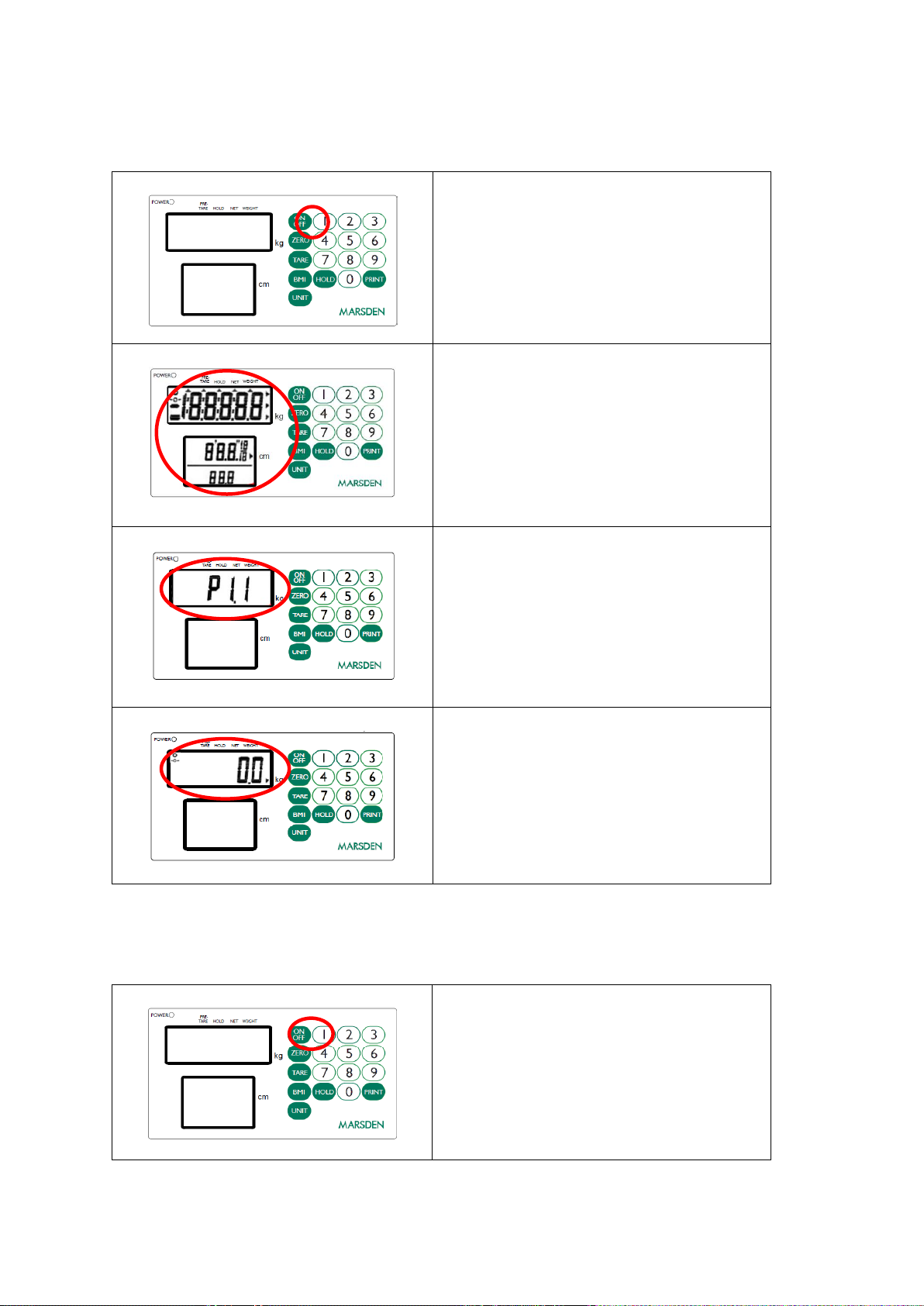
Switching on the Scale
Press the ON/OFF button firmly.
The scale will first test all of the display segments.
The scale will now show its current software version
number.
The scale will now go into weighing mode and should
show 0.0kg on the display.
Switching off the Scale
Press the ON/OFF button when the scale is turned on. The
scale will now power down.

Page 7 of 24
Setting the Scale to Zero
If for any reason the scale shows a reading other than 0.0kg it
can be reset to zero.
Press the ZERO key once.
The scale will return to 0.0kg.
Hold Function
Press the HOLD button once.
Allow the patient to be wheeled onto the scale.
After a few seconds the scale will lock on the
person’s weight. When the patient leaves the
scale, the weight will remain on the display.
Press HOLD again to disable the Hold function

and return the scale to 0.0kg.

Page 8 of 24
Setting Auto Hold Function (Optional)
The display will have a flashing triangle mark under the HOLD
button once the scale is turned on.
Allow the patient to be wheeled onto the scale. The scale will
automatically lock on the patient’s weight to complete the hold
function. The triangle mark remains on the display during this
period.
When the patient leaves the scale and the scale returns to
0.0kg., the triangle mark will begin to flash again.
Body Mass Index (BMI) Function
In normal mode, press the BMI key to enter into BMI mode.
The display will show the last height entered and the extreme left digit
will flash. Enter the height by using the numeric keys. Press the ZERO
key to confirm the height. (NB: There will always be an active flashing
digit in the height display, unless HOLD is pressed).
Weigh the patient as normal. The display will show the weight, height
and BMI value. At this time, the weight and height can be freely
changed, and the BMI value will be automatically calculated according
to the changed weight and height.
Press the BMI key to return to normal weighing mode.

Page 9 of 24
Tare and Pre-Set Tare Functions
Press the TARE key for three seconds to enter Preset Tare setting
mode.
The display will show the last preset tare entered and the extreme left
digit will flash.
Enter the preset tare value by using the numeric keys, then press the
TARE key again to confirm the value.
Press the ZERO key to return to normal weighing mode.
To use the Tare function, add the item you wish to tare off to the scale,
and press the TARE key. The display will show zero, and then a minus
number when the item is removed from the scale.

Page 10 of 24
Setting the Date
Press HOLD for three seconds to access the time setting mode. The time period digit that is flashing can be changed by using
the numeric keys. The time period to be edited is selected by pressing HOLD.
E.g., To input 25 December 2008, 8:00 a.m.:
Enter the year. Press HOLD to confirm and access the date
editing field.
Enter the date. E.g. “12.25” for December 25th. Press HOLD
to confirm and access the time clock editing field.
Enter the time (24 hour clock only).
Press HOLD and the display shows: YYYY→MM.DD→HH:SS
Press HOLD to return to normal weighing mode.
This manual suits for next models
4
Table of contents
Other marsden Scale manuals

marsden
marsden M-510 User manual

marsden
marsden BFA-220P User manual

marsden
marsden V-100 User manual

marsden
marsden M-615 User manual

marsden
marsden B-800 User manual

marsden
marsden MSS-I-400 User manual

marsden
marsden V-110 User manual

marsden
marsden M-225 User manual

marsden
marsden BAS-200 User manual

marsden
marsden MHS-2500I User manual

marsden
marsden V-22 User manual

marsden
marsden V-23 User manual

marsden
marsden M-999 User manual

marsden
marsden M-160 User manual

marsden
marsden M-200 User manual

marsden
marsden IP 2101 User manual

marsden
marsden VT-250 User manual

marsden
marsden Boxer MPS 30 User manual

marsden
marsden M-925 User manual

marsden
marsden M-900 User manual