LRS TX-9561EZ User manual

Long Range System ...................................................................................................................................2Keypad Operation .....................................................................................................................................2Setting Operation Mode ......................................................................................................................... 2Paging Your Pager .....................................................................................................................................3Pager Modes and Pager Messages ...........................................................................................................3Pager Programming ..................................................................................................................................5Group Paging and Programming ...........................................................................................................6System ID ......................................................................................................................................7Range Test ....................................................................................................................................7Low Battery Alert .........................................................................................................................7Factory Reset ................................................................................................................................7Cleaning & Charging Instructions for LRS Paging Equipment ...........................................................7Troubleshooting ........................................................................................................................................8Transmitter Unit ..........................................................................................................................8Service Questions and Answers ...........................................................................................................10Warranty .................................................................................................................................................11Terms & Condtions ...............................................................................................................................12Table Of Contents1

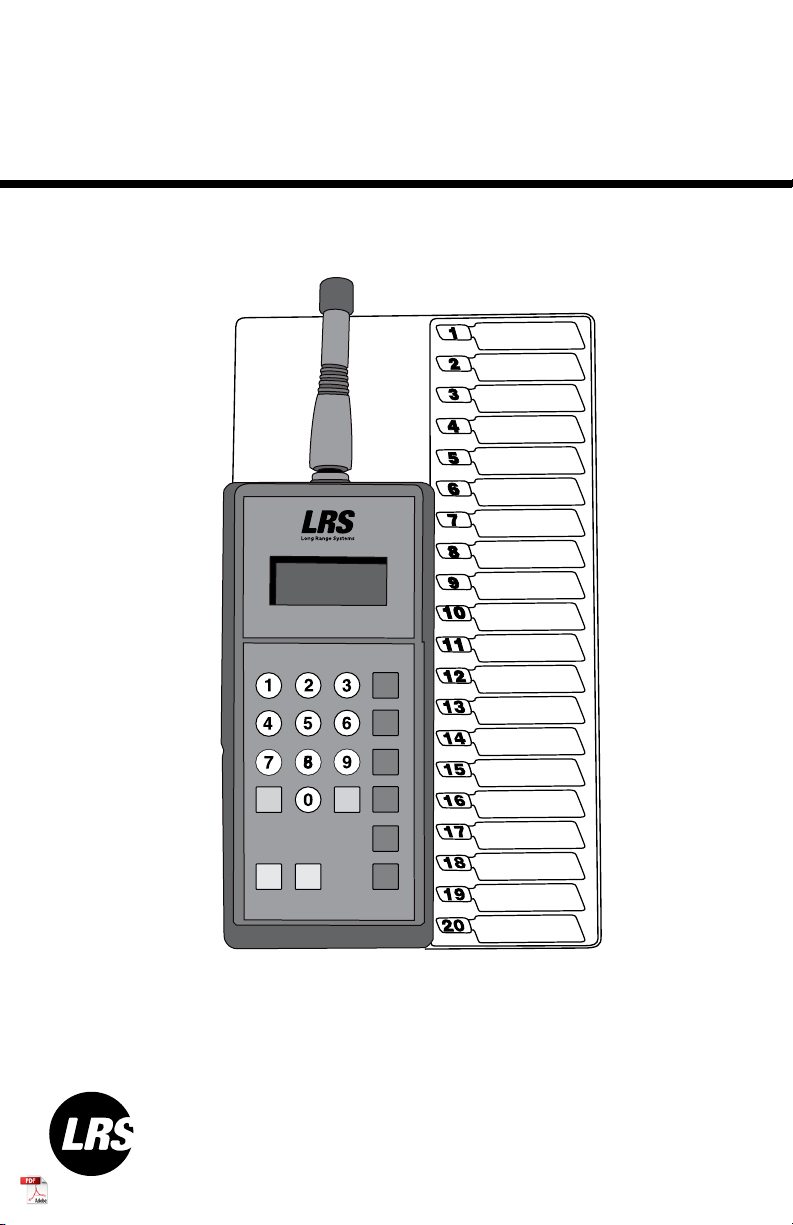
The TX-9561EZ has 3 operational modes to work with different LRS Pager types: •LRS Guest - non-text pagers including Coasters and Paddle Pagers•Alphanumeric (POCSAG) Staff - text pagers (these pagers use replaceable batteries)•SP4 Staff - non-text pagersPlease note that when a mode of operation is selected, only pagers of that type can be paged from the transmitter. If LRS Guest Mode is turned on, only LRS Coasters and Pad-dle Pagers can be paged; SP4’s and Alpha Pagers cannot be paged. As well, if Alphanu-meric (POCSAG) Staff s enabled, SP4’s and Guest Pagers cannot be paged.To turn on LRS Guest, press PROG-9-9-6-EnterNumber Keys 1-20 – Press the number of the corresponding pager you wish to notify Number 10 Key is used for “0” in the Pager and PROG menusClear – Clear Key – Delete the previous typed entryEnter – Sends the numeric entryPROG – Program ButtonPGR – Pager Key – Used for entering pager numbers higher 20Long Range SolutionsSETTING OPERATION MODEKEYPAD OPERATIONThank you for choosing Long Range Solutions to provide your on-premise paging solu-tion. We provide cutting edge products and first-rate service to satisfy your needs for years to come. Please familiarize yourself and your staff with the contents of this in-struction in order to properly operate and maintain your system. For help operating your system or for any service problems, please call:(800) 437-4996NOTE: Please keep this instruction in a safe place that is available to managers and key staff.2

The TX-9561EZ uses a preset message and paging mode when paging or sending a message to a pager.To change the message, press PROG-8-x-x-ENTER (with x x being the message slot from 00 to 10)Note: This command only applies to Alphanumeric PagersThe Alphanumeric Staff message can be edited and changed to a user defined set of messages. (Please refer to LRS Programmer instructions for changing messages.)The pager vibration/beep mode can be changed based on the following selections:Example: To change POCSAG Pagers to Vibe Twice, press PROG-9-5-2-Enter. 9-5-0 - No vibration message.Alphanumeric (POCSAG) PAGERThe TX-9561EZ will page single pagers numbered from 1-799.To page a pager from 1-20, simply press the pager number on the keypad. Example: To page pager #12, press 12.To page a pager number from 21 to 799, press the PGR button, followed by the pager number.Example: To page pager #22, press PGR-2-2-Enter, or PGR-2-2 (this will send page, but with a delay)To use the All Page, press PGR-9-1-1.This will immediately send a page to all pagers.PAGING YOUR PAGERPAGING MODES AND PAGER MESSAGES3To turn on Alphanumeric (POCSAG) Sta, press PROG-9-9-7-Enter To turn on SP4 Sta, press PROG-9-9-9-Enter

4950 – Vibe 1 time (send message)951 – Vibe 2 times (send message)952 – Vibe 3 times (send message)953 – Vibe/Beep 1 time (send message) 954 – Vibe/Beep 2 times (send message) 955 – Vibe/Beep 3 times (send message)LRS Guest980 – Flash/Vibe 1 sec981 – Flash/Vibe 30 sec982 – Flash/Vibe 5 minutes983 – Flash/Beep/Vibe 5 minutesSP4 Staff970 – Vibe 1 time (send message 1)971 – Vibe 2 times (send message 2) 972 – Vibe 3 times (send message 3) 973 – Vibe/Beep 1 time (send message 1) 974 – Vibe/Beep 2 times (send message 2) 975 – Vibe/Beep 3 times (send message 3)

The TX-9561EZ can program any LRS Pager type. The transmitter’s current mode of operation must match the desired pager type to program. (Example: To program an SP4, the transmitter must be set to the SP4 Staff Mode.)To program an SP4, coaster, or paddle pager:1. Remove the pager from the charging base2. Allow the pager to complete the vibration and flashing sequence3. Press PROG then a number from 1-799 and press Enter (Example: For Pager #200, press PROG-2-0-0-Enter)4. The red LED in the top right corner of the transmitter will light up once5. The pager will glow once cycle to indicate it received the programmingTo program and Alpha Pager:1. Remove the battery from the pager2. Re-insert the battery into the pager3. On the keypad, press a number from 1-799 then press Prog Prog. (Example: For Pager #200, press 2-0-0-Prog-Prog)4. The red LED on the top right corner of the transmitter will light up three times.5. The pager will beep three times to indicate it received programming.PAGER MODES AND PAGER MESSAGES5

The TX-9561EZ has the ability to program groups into the LRS Alphanumeric Staff only. Up to 5 groups can be programmed into the transmitter and pager.Please note that when the Groups Setting is enabled, Groups are numbered 1-9, and paged using 001 through 009.Any Alphanumeric Staff Pager with a programmed pager number 1-9 matching a specific de-fined group number, will be programmed higher than 100 for that pager’s number.Example: If Group 1 is defined and a pager is programmed as Pager #1, the pager will display Pager #101 for the individual pager number and 1 for Group Number.To turn ON Group Paging, press PROG-9-9-1-Enter.To turn OFF Group Paging, press PROG-9-9-0-Enter.When Group Paging is enabled, select up to 5 Group Numbers to set and define in the transmit-ter. Please follow these steps to setup Groups:Turn ON Group Paging, press 9-9-1-Prog-ProgTo set Group Number, press G-0-0-#-Prog-Prog (# is a number from 1 to 9)Program each individual pager that will belong to this Group (see Pager Programming section)a. While the pager is programmed, the red LED on the transmitter will blink one additional time for each group to programb. The pager will beep an additional time for each group programmed. (Exam-ple: If 3 groups are set, the red LED will blink 6 times on the TX-9561EZ, and the pager will beep 6 times.)Turn OFF Group Paging, press 9-9-0-Prog-ProgRepeat Steps 1-4 for each Group to be setup (be sure to turn Group Paging ON for each Group and then OFF after each Group is setup and individual pagers are programmed for that Group) When all Groups are setup and programmed, be sure that Group Paging is turned OFFTo Page a group, press the 3 digit group number. Example: To Page Group 2, press PGR-0-0-2-Enter. System IDSystem IDTo change the system ID, press PROG-9-0-x-ENTER (x = sys ID from 0 to 49)GROUP PAGING AND PROGRAMMING6

Range TestThe Range Test feature is used to broadcast a continuous signal. This will allow for testing within your location regarding range for your pagers to receive a page from the TX-9561EZ.To turn ON the Range Test, press PROG-9-9-2-ENTER or PGR-9-9-2-ENTER When the range test is active, the LCD will display an 8 moving across screen. Then the red LED will transmit once every 10 seconds. To turn OFF the Range Test, press CLEARLow Battery AlertWhen the transmitter’s battery is low, the LCD will display “LoBat”.Factory ResetTo reset the transmitter factory defaults, press PROG 0 0 0 EnterCleaning:LRS pagers are made from industrial-strength, polycarbonate material. However, this ma-terial is susceptible to hairline cracking if non-approved cleaners are used. When cleaning LRS pagers, we recommend only using ISOPROPYL ALCOHOL-BASED CLEANERS.To clean the equipment:1. Take a clean rag and an isopropyl-alcohol based cleaner2. Soak the clean rag with the isopropyl alcohol cleaner3. Wipe down the pagers or equipmentCleaning equipment with any other non-approved cleaners can weaken plastic and cause hairline cracks. Pagers and equipment that are cleaned with unapproved cleaners and suffer cracking will not be covered under warranty.Do not submerge any LRS paging equipment in any type of liquid as this will also damage the equipment and is not covered under the standard warranty.CLEANING & CHARGING LRS PAGING EQUIPMENT7

Transmitter UnitTransmitter Display does not light when a key is pressed• The proper power supply for this transmitter is 12VDC 4.0A• Ensuring that the proper power supply is in use, plug the TX-9561EZ into that power supply and allow it to charge for 30 minutes• If the unit still is blank and has no power, substitute the power supply being used with the power supply used for the pager charging base (this is meant as a test only and not as a permanent replacement)• If substituting with another power supply results in a TX-9561EZ that is working properly, please call LRS to purchase a new power supply.Transmitter display is okay, but the pager does not receive the page Check whether this affects all pagers or just one pager If only one pager is affected:• Ensure that the pager is properly charged and initiates a vibrate/flash se-quence when removed from the charging base• If the pager does not vibrate and flash when removed from the charging base, please charge it overnight before troubleshooting further• If the pager initiates the vibrate/flash sequence when removed from the charging base, please continue with the next stepsIf ALL pagers are affected and none of them will page:• Check the Restaurant ID on the TX-9561EZ to ensure that it matches the Restau-Charging:Place rechargeable pagers on the charger and let them charge for 8 hours prior to first use.Rechargeable pagers should be kept on charge even during extremely long periods of inactivity.Should you have any questions, please contact the LRS Customer Service Department at 800.437.4996.TROUBLESHOOTING8

rant ID for the pagers (please call LRS if you do not have this information on file)• If the Restaurant ID is correct, all pagers are appropriately charged yet none of the pagers page, please contact LRSPager(s) not chargingWhen placed in the charging base, do all pagers have a single red charge light lit up?If no pagers have a charge light, this may be an issue with the power supply (please contact LRS)If only some pagers have a charge light that is lit, please do the following:• Remove the main power supply and all jumper wires (all pagers will go off t once and this is ok)• Insert the power supply into each individual row (or base for Coasters) to see if the pagers on that row/Coaster base all light up• If all pagers on that row or Coaster base light up, please test the next row/base with the power supply until you have tested each one• If some of the pagers do not light up but those specific agers light up on other rows/bases, please call LRS to have this row/base replacedIf all pagers have the charge light lit up as you test the individual rows/bases, you may have a jumper wire that is not connecting properly or causing a short. Please contact LRS to purchase additional jumper wires to replace ones that are not working as they should.Note Regarding Pagers: Please be sure that all pagers are plugged in and charging when not in use. Please also note that a maximum of 30 Coasters or 25 Pagers can be on one 10V power sup-ply. If you are exceeding any of these limits, it may have long term eects on your pagers’ ability to charge prop-erly. Please contact LRS to purchase additional charging bases to supplement your entire inventory.9
Table of contents
Other LRS Transmitter manuals


Popular Transmitter manuals by other brands


Dejero
Dejero EnGo 3x manual

Rosemount
Rosemount 4600 Reference manual

Speaka Professional
Speaka Professional 2342740 operating instructions

trubomat
trubomat GAB 1000 instruction manual

Teledyne Analytical Instruments
Teledyne Analytical Instruments LXT-380 instructions

Rondish
Rondish UT-11 quick start guide