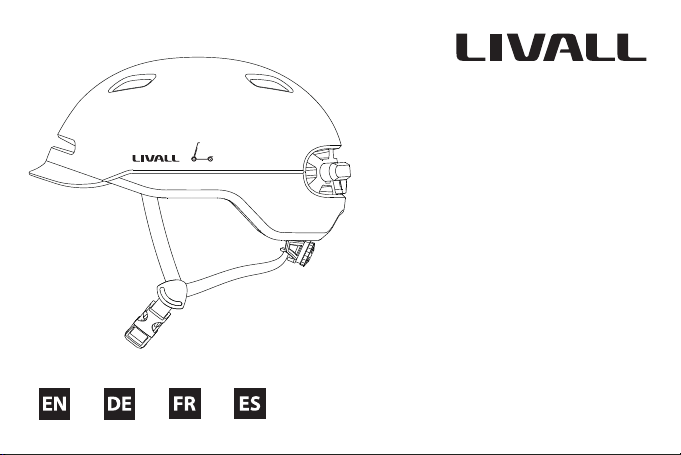
Livall C20 User manual
www.livall.com
Smart Commuter Helmet C20
Quick Start Guide
& Warranty Information
1
I.Introduction
Welcome to the User Guide for LIVALL smart commuter helmets. Avoid crowds and ride free with the new C20
commuter helmet. Smart features include built-in SOS fall detection, LED lighting, and sleek, waterproof design.
This Guide will help you better use this product. With continuous improvements of our products, this Guide will be
updated from time to time.You can access the latest version and learn more about the helmet on www.livall.com.
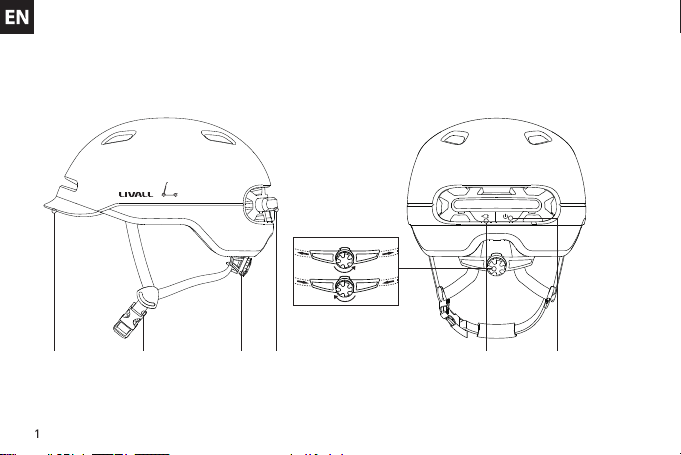
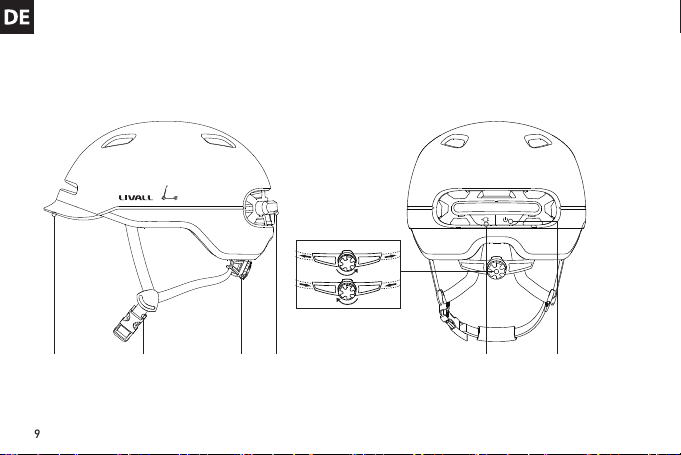
Visor
Note: The picture is for reference only. If the actual product appears dierent from the picture, the real product shall prevail.
Chinstrap Tension adjuster Taillight Magnetic USB charging port Power Switch
II. Packing List
Helmet x 1 Quick Start Guide & Warranty Information x 1 Magnetic USB charging cable x 1
2
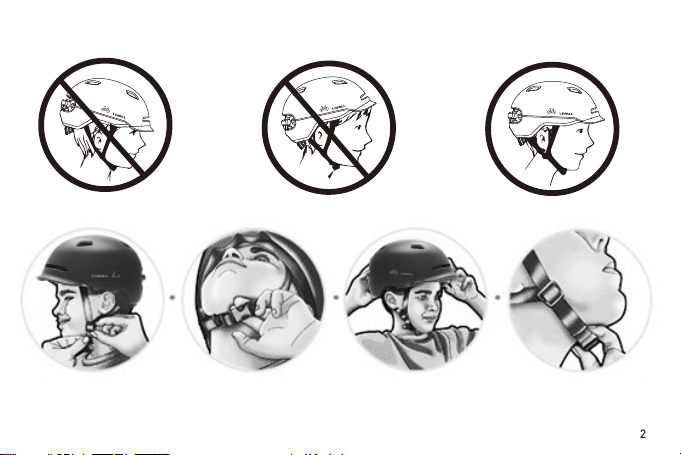
III. Wearing Instructions
IncorrectIncorrect Correct
Adjust the length of
the chinstrap Leave a gap as thick
as one nger Correctly position
the helmet Check whether the
buckle is properly
fastened
3
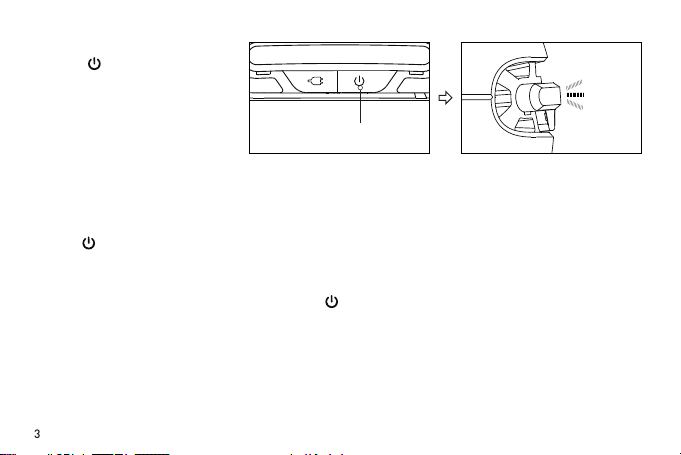
Power on
Power o
Lighting Mode
Adaptive Warning Lighting
Hold the button at the back
of the helmet for 2 seconds,
then the LED taillight will blink
for 10 seconds after the helmet
is powered on, which means
the helmet automatically enters
adaptive warning light mode.
Hold the button at the back of the helmet for 2 seconds until all the LED taillight turns o.
lighting mode: After the helmet is power on, press the button for a second to switch the three lighting modes in
order. 1.adaptive warning mode A;2.adaptive warning mode B;3.keep warning light always on.
2 seconds after power on, press the button (less than 1 second), the helmet will enter the adaptive warning
lighting mode. In daytime or in a bright environment, only the central LED will keep ashing, other LED will turn
o automatically. While at night or in a dark environment, the whole taillight will keep ashing automatically.
Hold 2 seconds
Remark: When powering on, you could check the remaining battery level of the helmet by the number of tail lights,
all the 7 lights on indicates full power.

4
Charging
Lighting Always on Mode
In daytime or in a bright environment, the whole taillight will keep ashing.
Brake warning light
When the helmet detects a clear deceleration, the whole taillight will light up for 1-2 seconds to warn the vehicles
behind.
Comment: When the helmet shakes too heavy, the built-in sensor detects obvious deceleration to trigger the warning light
always on, which is normal.
Auto Power-o
When the helmet keeps stationary for 20 minutes, it will automatically power o.
Auto Power-on
When the battery of the helmet is charged, shake the helmet a few times. It will power on automatically. (This
function is o in the factory default setting, you can activate the function in the settings of LIVALL Riding App)
When the soft rubber lid with “ ”
image is opened, the Magnetic charging
port will be seen. Insert a USB cable
into the USB Charging cable interface
of the helmet. Charging starts when the
central LED blinks. During charging,
when the central LED stops blinking
and turns o, charging is completed.
Open the soft rubber

5
NO Function
1Quick Flashing Light, Tidal Light
2Adaptering light
3Brake warning light
4Auto-power o
5Auto-power on
6SOS Alert
Connect to the phone (Tip: Once connected, to ensure the stability of the connection, please try to position your mobile
phone in front of you.)
Helmet Headset
"Click to
connect"
"□" function
button
Turn on the helmet.
Only if the helmet is successfully connected to LIVALL Riding App, SOS alert feature can work.
LIVALL Riding AppSwith on the Bluetooth on your
phone and click to connect the
"Smart Helmet" device.

6
IV. Technical Specications
Performance standards:
USA: CPSC1203:1998, FCC Part 15 Rules
Europe: EN 55014-1:2017 EN 55014-2:2015
V. Considerations
1. The helmet contains electronic parts inside. Please do not take a long ride in the rain although the helmet can
prevent the rain from splashing.
2. After the helmet gets wet in the rain, the water droplets might occur in the chimney of tail LED lights. The water
droplets will disappear when you put the helmet under the ventilation environment for 1-2 days.
3. The helmet contains the battery of 3.7V/455mAh. The battery capacity varies with temperature change. The
battery life can decay when the helmet is used at low temperatures or below Zero degrees Celsius.
4. Trying to clean the golden colour contacts of the charging plug sheet with metal or hard tools such as blades or
tweezers is strictly forbidden. Please use cotton swabs with clean water or alcohol in case of cleaning. Please make
sure the charging plug is clean and try while charging the helmet.
5. If the electronic functions do not work, please charge the helmet for 3 hours and then check if it works normally.
Notes: The above data is measured by LIVALL in a controlled environment, with room temperature at 25°C and
specic light patterns. The actual data might be dierent according to the environment.
Model:SH50
Charging port : Magnetic USB
Battery : 3.7V/455mAh
Waterproof class : IPX4
Temperature: Storage Temperature: -20°C ~45°C. Temperature for use: 0°C~40°C. Temperature while charging:
0°C~40°C.
Electricity parameter : DC 5V/1A
Charging time : 3-4 hours
Battery life : about. 26-36hrs for lighting all the time

7
VI. Instructions for Use and Care
1. That the helmet can only protect if it ts well and that the buyer should try dierent sizes and choose the size
which feels secure and comfortable on the head.
2. That the helmet should be adjusted to t the user e.g. the straps positioned so that they do not cover the ears, the
buckle positioned away from the jawbone and the straps and buckle adjusted to be both comfortable and rm.
3. How the helmet should be position on the head to ensure the intended protection is provided (e.g. that it should
be placed so as to protect the forehead and not be pushed too far over the back of the head.
4. That a helmet cannot always protect against injury.
5. That a helmet subjected to a severe impact should be discarded and destroyed.
6. A statement of the danger of modifying or removing any of the original component parts of the helmet other
than as recommended by the manufacturer, and that helmets should not be adapted for the purpose of tting
accessories in a way not recommended by the manufacturer.
Note:
1. Problems such as network anomalies, may result in the failure to successfully send or receive SOS messages.
2. To maintain ecient battery life, it is recommended that the helmet be fully charged before any long-term
storage (six months to one year).
6. The built-in battery is forbidden to be disassembled, squeezed, heated or burned. It is also forbidden to use
screwdrivers and other sharp devices breaking down or prying apart the battery. The above operations may make
the battery caught re.
7. Please do not place the helmet with sharp objects, avoiding to damage the helmet.
8. The helmet contains impact detection devices. Only if you connect your helmet with LIVALL Riding App,
start ride mode on the App and your helmet suers from the heavy impact, SOS alert feature can be triggered. Your
emergency contacts set on LIVALL Riding App can accordingly receive your SOS messages.

8
7. This device complies with part 15 of the FCC Rules. Operation is subject to the following two conditions:(1) This
device may not cause harmful interference, and (2) this device must accept any interference received, including
interference that may cause undesired operation.
During the usage, if the following troubles occur, please charge the product according to quick guide of the
model(the helmet can be reset during the charging). If the problems still can not be solved, please contact the after-
Faults:
1. Can not be charged or turn-o normally;
2. The helmet is turn on, but the lights, micphone, speakers etc can not work normally;
3. After power on, it turns o automatically in a short time.
Note: Please refer to the quick guide of the specic model for function details.
VII. Electronic functions troubleshooting
LIVALL Tech Co., Ltd. declare that the full Declaration of Conformity is available on the Internet at http://
www.smart4u.ai/serverdetailen
9
I.Einführung
Willkommen zum Benutzerhandbuch für die intelligenten Pendlerhelme von LIVALL. Vermeiden Sie Menschenmassen und fahren Sie frei
mit dem neuen Pendlerhelm C20. Zu den intelligenten Funktionen gehören die integrierte SOS-Sturzerkennung, die LED-Beleuchtung
und das elegante, wasserdichte Design. Dieses Handbuch wird Ihnen helfen, dieses Produkt besser zu nutzen. Da unsere Produkte ständig
verbessert werden, wird dieser Leitfaden von Zeit zu Zeit aktualisiert. Sie können auf die neueste Version zugreifen und mehr über den
Helm unter www.livall.com erfahren.
Visier
Hinweis: Das Bild dient nur als Referenz. Wenn das tatsächliche Produkt von der Abbildung abweicht, hat das tatsächliche Produkt Vorrang.
Kinnriemen Spannungseinsteller Rücklicht magnetischer USB-Ladeanschluss Netzschalter
II. Packliste
Helm x 1 Schnellstartanleitung & Garantieinformationen x 1 magnetisches USB-Ladekabel x 1
Other manuals for C20
1
Table of contents
Languages:
Other Livall Bicycle Accessories manuals