
LG LG-K600 User manual

www.lg.com
MFL00000000 (1.0)
ENGLISH
LG-K600USER GUIDE
This model is not intended for sale in the USA


User Guide
t
4PNFDPOUFOUTBOEJMMVTUSBUJPOTNBZEJGGFSGSPNZPVSEFWJDFEFQFOEJOHPOUIFSFHJPOTFSWJDFQSPWJEFSTPGUXBSFWFSTJPOPS04WFSTJPOBOEBSFTVCKFDUUPDIBOHFXJUIPVUQSJPSOPUJDFt"MXBZTVTFHFOVJOF-(BDDFTTPSJFT5IFTVQQMJFEJUFNTBSFEFTJHOFEPOMZGPSUIJTEFWJDFBOENBZOPUCFDPNQBUJCMFXJUIPUIFSEFWJDFTt5IJTEFWJDFJTOPUTVJUBCMFGPSQFPQMFXIPIBWFBWJTVBMJNQBJSNFOUEVFUPUIFUPVDITDSFFOLFZCPBSEt$PQZSJHIUª-(&MFDUSPOJDT*OD"MMSJHIUTSFTFSWFE-(BOEUIF-(MPHPBSFSFHJTUFSFEUSBEFNBSLTPG-((SPVQBOEJUTSFMBUFEFOUJUJFT"MMPUIFSUSBEFNBSLTBSFUIFQSPQFSUZPGUIFJSSFTQFDUJWFPXOFSTt(PPHMF(PPHMF.BQT(NBJM:PV5VCF)BOHPVUTBOE1MBZ4UPSFBSFUSBEFNBSLTPG(PPHMF*ODENGLISH

Table of contents
Guidelines for safe and efficient use .......4
Important notice .....................................18
Getting to know your phone...................21
Phone layout..........................................21
Installing the SIM or USIM card and
battery...................................................23
Charging the battery..............................25
Inserting a memory card........................26
Removing the memory card...................27
Locking and unlocking the device..........27
Your Home screen...................................29
Touch screen tips ..................................29
Home screen .........................................30
Customizing the Home screen ...............31
Returning to recently-used
applications...........................................32
Notifications panel.................................33
On-screen keyboard ..............................36
Special Features .....................................37
Gesture shot..........................................37
Glance View...........................................39
KnockON ...............................................39
Knock Code ...........................................40
Dual window..........................................41
QuickMemo+.........................................42
Google account setup.............................45
Creating your Google account ................45
Signing into your Google account...........45
Connecting to Networks and Devices....47
Wi-Fi .....................................................47
Bluetooth...............................................48
Wi-Fi Direct ...........................................49
Transferring data between a PC and
the device..............................................50
Calls ........................................................51
Making a call.........................................51
Calling your contacts .............................51
Answering and rejecting a call...............51
Making a second call.............................52
Viewing your call logs ............................52
Call settings...........................................52
Contacts..................................................53
Searching for a contact..........................53
Favourites contacts................................53
Creating a group....................................54
Messaging...............................................55
Sending a message ...............................55
Conversation view .................................56
Changing your messaging settings ........56
E-mail......................................................57
Managing email accounts......................57
Working with account folders.................57
Table of contents

3
Table of contents
Composing and sending email...............58
Camera and Video...................................59
Camera options on the viewfinder..........59
Using the advanced settings ..................60
Manual mode on the viewfinder.............61
Once you have taken a photo.................62
Recording a video..................................64
After recording a video...........................64
Gallery...................................................66
Multimedia..............................................70
Music ....................................................70
Utilities ....................................................72
Clock.....................................................72
Calculator..............................................73
Calendar................................................73
Voice Recorder ......................................74
Voice Search..........................................74
Downloads ............................................74
FM Radio...............................................75
LG Health ..............................................75
Web Browser...........................................76
Internet..................................................76
Chrome .................................................78
Settings...................................................79
Networks...............................................79
Sound & notification ..............................82
Display ..................................................83
General..................................................85
Phone software update ..........................92
Phone software update..........................92
About this user guide .............................94
About this user guide.............................94
Trademarks ...........................................95
Accessories.............................................96
Troubleshooting ......................................97
FAQ ........................................................100

4Guidelines for safe and efficient use
Symbol Description
3FBEUIFTFJOTUSVDUJPOTGPSTBGFVTFPGUIJTXJSFMFTTEFWJDF:PVNVTUBMXBZTFYFSDJTFFYUSFNFDBVUJPOXIFOESJWJOHJOPSEFSUPSFEVDFUIFSJTLPGBDDJEFOUT%POPUVTFZPVSXJSFMFTTEFWJDFXIJMFESJWJOH%POPUMFBWFUIFEFWJDFPSJUTBDDFTTPSJFTXJUIJOUIFSFBDIPGDIJMESFOBOEEPOPUBMMPXUPQMBZXJUI5IFEFWJDFDPOUBJOTTNBMMQBSUTXJUITIBSQFEHFTUIBUNBZDBVTFJOKVSZPSCSFBLPGGBOEHJWFSJTFUPEBOHFSPGTVGGPDBUJPO5IJTEFWJDFNBZQSPEVDFBMPVETPVOE4XJUDIPGGZPVSQIPOFXIFOQSPNQUFEUPEPTPJOIPTQJUBMTDMJOJDTPSIFBMUIDBSFGBDJMJUJFT5IFTFSFRVFTUTBSFEFTJHOFEUPQSFWFOUQPTTJCMFJOUFSGFSFODFXJUITFOTJUJWFNFEJDBMEFWJDFT
Guidelines for safe and efficient use
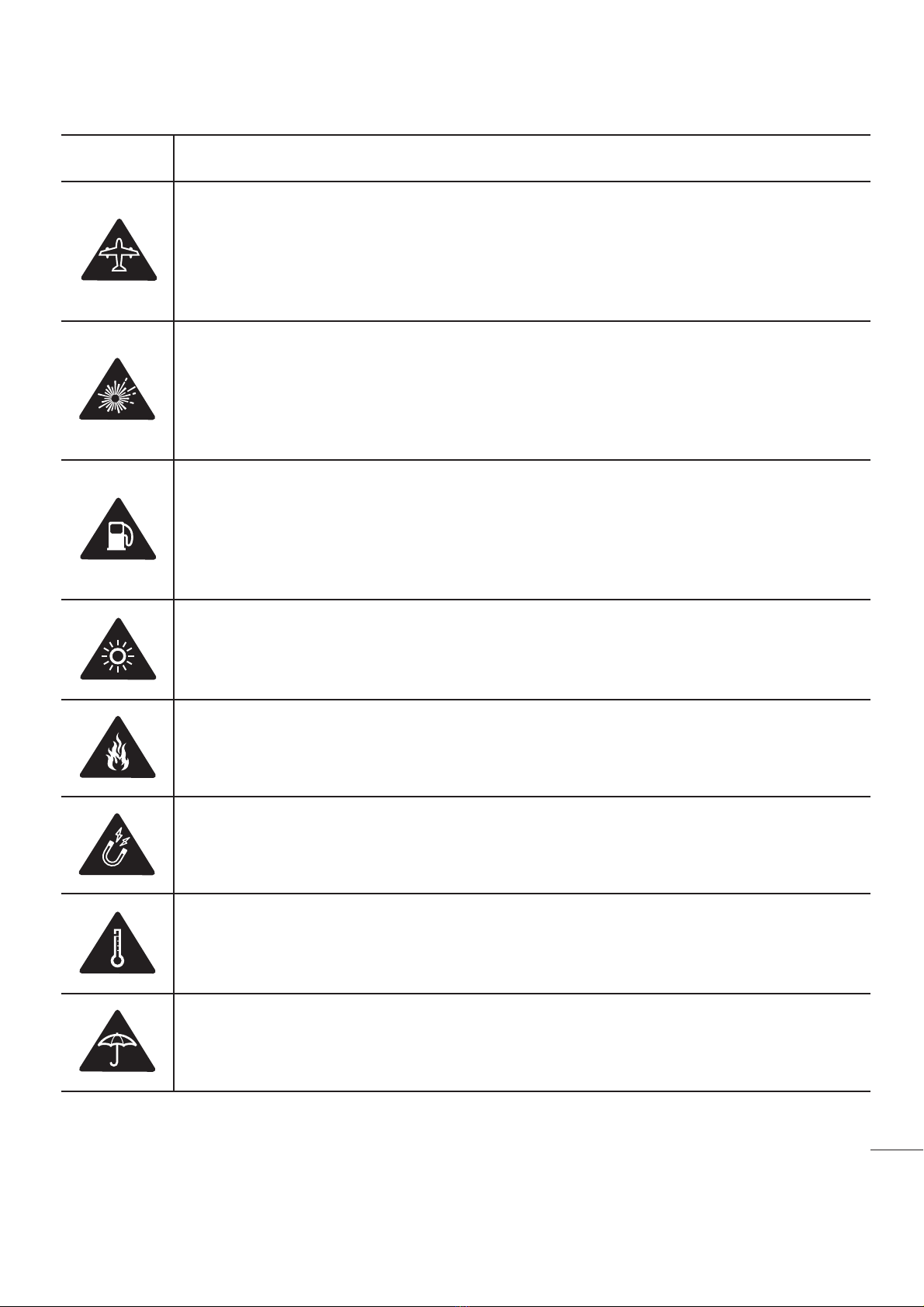
Guidelines for safe and efficient use
Symbol Description
5VSOPGGZPVSXJSFMFTTEFWJDFXIFOQSPNQUFEUPEPTPCZBJSQPSUQFSTPOOFMPSBJSDSBGU'PSJOGPSNBUJPOPOUIFVTFPGXJSFMFTTEFWJDFTPOCPBSEBJSDSBGUDPOUBDUUIFDSFX*GUIFEFWJDFIBTBGMJHIUNPEFUIJTNVTUCFBDUJWBUFECFGPSFCPBSEJOHBOBJSDSBGU5VSOPGGUIFEFWJDFPSXJSFMFTTEFWJDFXIFOJOBOZBSFBJOXIJDIUIFZPDDVSFYQMPTJPOTPSBSFBTXIFSFUIFSFBSFSFQPSUTUIBUJOEJDBUFUPUVSOPGGUXPXBZSBEJPPSFMFDUSPOJDEFWJDFTUPBWPJEJOUFSGFSJOHXJUIUIFPQFSBUJPOPGUSJHHFSFYQMPTJPOT"NPOHUIFBSFBTXJUIQPUFOUJBMMZFYQMPTJWFBUNPTQIFSFTJODMVEFGVFMJOHBSFBTBSFUIFIPMETPGTIJQTGBDJMJUJFTGPSUIFUSBOTQPSUBUJPOPSTUPSBHFPGGVFMBOEDIFNJDBMTBSFBTXIFSFUIFBJSDPOUBJOTDIFNJDBMTPSQBSUJDMFTTVDIBTHSBJOEVTUPSNFUBMQPXEFST5IJTEFWJDFNBZQSPEVDFBCSJHIUPSGMBTIJOHMJHIU%POPUFYQPTFZPVSEFWJDFPSJUTBDDFTTPSJFTUPPQFOGMBNFT%POPUFYQPTFZPVSEFWJDFPSJUTBDDFTTPSJFTUPNBHOFUJDNFEJBGMPQQZEJTLTDSFEJUDBSETFUD%POPUFYQPTFZPVSEFWJDFPSJUTBDDFTTPSJFTUPFYUSFNFUFNQFSBUVSFT%POPUFYQPTFZPVSEFWJDFPSJUTBDDFTTPSJFTUPMJRVJEPSNPJTUVSF

6Guidelines for safe and efficient use
Symbol Description
/PUHSPQFEUPEJTBTTFNCMFUIFEFWJDFPSJUTBDDFTTPSJFTPOMZBVUIPSJ[FEQFSTPOOFMDBOEPJU5IJTEFWJDFMJLFBOZXJSFMFTTEFWJDFPQFSBUFTVTJOHSBEJPTJHOBMTXIJDICZUIFJSOBUVSFBSFOPUBCMFUPHVBSBOUFFDPOOFDUJPOJOBMMDPOEJUJPOT5IFSFGPSFGPSFNFSHFODZDPNNVOJDBUJPOTOFWFSSFMZTPMFMZVQPOBOZXJSFMFTTEFWJDF0OMZVTFBQQSPWFEBDDFTTPSJFT1MFBTFSFBEUIFTFTJNQMFHVJEFMJOFT/PUGPMMPXJOHUIFTFHVJEFMJOFTNBZCFEBOHFSPVTPSJMMFHBM4IPVMEBGBVMUPDDVSBTPGUXBSFUPPMJTCVJMUJOUPZPVSEFWJDFUIBUXJMMHBUIFSBGBVMUMPH5IJTUPPMHBUIFSTPOMZEBUBTQFDJGJDUPUIFGBVMUTVDIBTTJHOBMTUSFOHUIDFMM*%QPTJUJPOJOTVEEFODBMMESPQBOEBQQMJDBUJPOTMPBEFE5IFMPHJTVTFEPOMZUPIFMQEFUFSNJOFUIFDBVTFPGUIFGBVMU5IFTFMPHTBSFFODSZQUFEBOEDBOPOMZCFBDDFTTFECZBOBVUIPSJ[FE-(3FQBJSDFOUSFTIPVMEZPVOFFEUPSFUVSOZPVSEFWJDFGPSSFQBJS

7
Guidelines for safe and efficient use
nforation about the eposure fro CC
n August 199, the Federal Communications Commission (FCC) of the nited tates, with its action in Report and rder FCC 9-3, adopted an updated safety standard for human exposure to radio frequency (RF) electromagnetic energy emitted by FCC regulated transmitters. Those guidelines are consistent with the safety standard previously set by both international and .. standards.The design of this phone complies with FCC guidelines and these international standards.
art . stateent
5IJTEFWJDFDPNQMJFTXJUIQBSUPGUIF'$$3VMFT0QFSBUJPOJTTVCKFDUUPUIFGPMMPXJOHUXPDPOEJUJPOT5IJTEFWJDFNBZOPUDBVTFIBSNGVMJOUFSGFSFODFBOEUIJTEFWJDFNVTUBDDFQUBOZJOUFSGFSFODFSFDFJWFEJODMVEJOHJOUFSGFSFODFUIBUNBy
art . Stateent Changes or modifications not expressly approved by the manufacturer could void the user’s authority to operate the equipment.Body-worn OperationThis device was tested for typical bodyworn operations with the back of the phone kept 0.39 inches (1cm) between the user’s body and the back of the phone. To comply with FCC RF exposure requirements, a minimum separation distance of 0.39 inches (1cm) must bemaintained between the user’s body and the back of the phone.Any beltclips, holsters, and similar accessories containing metallic components may not be used. Body-worn accessories that cannot maintain 0.39 inches (1cm) separation distance between the user's body and the back of the phone, and have not been tested for typical body-worn operations may not comply with FCC RF exposure limits and should be avoided.
DBVTFVOEFTJSFEPQFSBUJPO

8Guidelines for safe and efficient use
art .0 Stateent This equipment has been tested and found to comply with the limits for a class B digital device, pursuant to art 1 of the FCC Rules. These limits are designed to provide reasonable protection against harmful interference in a residential installation. This equipment generates uses and can radiate radio frequency energy and, if not installed and used in accordance with the instructions, may cause harmful interference to radio communications. owever, there is no guarantee that interference will not occur in a particular installation. f this equipment does cause harmful interference or television reception, which can be determined by turning the equipment off and on, the user is encouraged to try to correct the interference by one or more of the following measures- Reorient or relocate the receiving antenna. - ncrease the separation between the equipment and receiver. - Connect the equipment into an outlet on a circuit different from that to which the receiver is connected.- Consult the dealer or an experienced radioT technician for help.Regulatory information (FCC ID number, etc)For regulatory details, go to Settings > About phone > Regulatory and safety on your phone.
Table of contents
Other LG Cell Phone manuals


Popular Cell Phone manuals by other brands


Blackbe;rry
Blackbe;rry Q10 user guide

Blackbe;rry
Blackbe;rry Bold 9900 user guide

Blackbe;rry
Blackbe;rry STORM 9500 - VERSION 5.0 user guide

ISAFE MOBILE
ISAFE MOBILE IS655.2 operating manual

Blackbe;rry
Blackbe;rry CURVE 8300 - SMARTPHONE Getting started guide

Blackbe;rry
Blackbe;rry 8707 - VERSION 4.1 user guide