
LG L-01K User manual

L-01K
INSTRUCTION
MANUAL
’17.X

Introduction
Thank you for purchasing L-01K.
Before or while using, read this manual thoroughly to ensure you use correctly.
References to the Operation
Download the latest information of this manual from Website. Also you can check the latest
information from this cell phone.
■ "クイックスタートガイド (Quick Start Guide)" (Accessories, in Japanese only)
Parts names and functions are explained.
■ "Instruction Manual" (An application installed in this cell phone, in Japanese only)
Details about functions and operations are explained.
From the Home screen, tap "Apps" u "Instruction Manual".
* For installing "Instruction Manual" application if you uninstalled it, from the Home screen,
search "L-01K 取扱説明書 (Instruction Manual)" in "Play Store" and download ""Instruction Instruction Instruction
Manual" application.
■ "INSTRUCTION MANUAL" (PDF le)
Details about functions and operations are explained.
Download from Website.

How to Use This Manual
• Unauthorized copying of parts of or this entire
manual is prohibited.
• This manual is subject to change without
prior notice.
• Please note that "this cell phone" indicates
"L-01K" in this manual. Please be
forewarned.
Explanation of operations
The following table describes how to select the
icons and items displayed on the touch screen.
Description Operation description
From the
Home
screen, tap
"Apps"
Tap displayed on the Home
screen.
• The icons on the Home
screen are explained below.
: "Apps"
: "Phone"
: "mail"
: "Camera"
: "Gallery"
Description Operation description
From the
Home
screen, tap
"Apps" u
"Settings" u
"Display"
Tap displayed on the Home
screen, and tap "Settings",
"Display".
Touch and
hold
Touch and hold displayed
on the screen (for 1 to 2
seconds).
Note
• In this manual, the operations are
described when the Home Selector
is set to "Home" and when the Home
screen is set to the default settings. If
the contents of the Home screen are
changed, the operation description such
as how to open an application may dier.
• Images used in this manual may differ
from the real ones displayed on this cell
phone.
1
Contents/Precautions

Supplied Accessories
■ L-01K
(with warranty)
■ クイックスタートガ
イド (Quick Start
Guide) (In Japanese
only)/ ご利用にあたっ
ての注意事項 (Safety
Precautions) (In
Japanese only)
クイック
スタート
ガイド ご利用に
あたっての
注意事項
■ Welcome Card
■ TV Antenna Cable
L01
■ SIM Eject Tool
(Sample)
■ Disney Original Cover L01
For optional accessories compatible with the
cell phone (optional), refer to website.
2
Contents/Precautions

Contents
How to Use This Manual ………………………… 1
Supplied Accessories …………………………… 2
Before Using This Cell Phone ………………… 5
Safety Precautions (ALWAYS FOLLOW THESE
PRECAUTIONS) …………………………………… 7
Handling and Care ………………………………… 24
Waterproofness/Dustproofness ……………… 34
Conrmation and Settings before
Using ……………………………………… 40
Part Names and Functions ……………………… 40
nano UIM card ……………………………………… 42
Charging ……………………………………………… 45
Power On/O ……………………………………… 48
Disney Original Cover …………………………… 50
Basic Operations ………………………………… 51
Character Entry …………………………………… 57
Initial Settings ……………………………………… 64
Notication LED …………………………………… 65
Screen Display/Icons …………………………… 66
Home Screen………………………………………… 72
Apps Screen ………………………………………… 75
Task Manager ……………………………………… 83
Switching Home Application …………………… 83
Calling ……………………………………… 84
Making a Call ……………………………………… 84
Receiving a Call …………………………………… 89
Operations during a Call ………………………… 91
Call Logs ……………………………………………… 94
Answering Memo ………………………………… 95
Call Settings ………………………………………… 96
Phonebook ……………………………………… 100
Mail/Web Browser …………………… 105
mail ………………………………………………… 105
SMS ………………………………………………… 106
Email ………………………………………………… 109
Gmail ………………………………………………… 114
Early Warning "Area Mail" …………………… 115
Browser …………………………………………… 117
Apps ……………………………………… 120
Disney Market …………………………………… 120
Play Store ………………………………………… 121
Osaifu-Keitai ……………………………………… 124
ToruCa ……………………………………………… 128
TV (1Seg) ………………………………………… 129
Camera …………………………………………… 139
Gallery ……………………………………………… 144
GPS/Navigation ………………………………… 145
Clock ……………………………………………… 149
Calendar …………………………………………… 151
QMemo+ ………………………………………… 153
3
Contents/Precautions

Calculator ………………………………………… 154
Settings ………………………………… 155
Settings Menu …………………………………… 155
WIRELESS NETWORKS ……………………… 155
DEVICE ……………………………………………… 170
PERSONAL ………………………………………… 180
SYSTEM …………………………………………… 189
File management ……………………… 195
Storage Structure ……………………………… 195
File Operations ………………………………… 198
Data Communication ………………… 200
Bluetooth® Communication ………………… 200
NFC Communication …………………………… 204
External Device Connection ……… 206
Connecting with a PC ………………………… 206
Connecting with Printer ……………………… 208
Connecting with Other Devices …………… 209
Using Overseas ……………………… 211
Outline of International Roaming (WORLD WING)
…………………………………………………………… 211
Available Service Overseas…………………… 212
Before Using Overseas ………………………… 212
How to Make and Receive Calls at Your
Location …………………………………………… 215
Setting International Roaming ……………… 217
After Returning to Japan ……………………… 220
Appendix/Index ……………………… 221
Troubleshooting (FAQs) ……………………… 221
Warranty and After-Sales Service ………… 234
Software Update ……………………………… 237
App Updates ……………………………………… 241
Main Specications …………………………… 242
Radio Frequency (RF) Signals ……………… 248
Regulatory information (FCC ID number, etc.)
………………………………………………………… 250
FCC Statement for the USA ………………… 250
Important Safety Information ………………… 253
Export Administration Regulations ………… 254
Intellectual Property Right …………………… 255
Unlocking SIM …………………………………… 258
Index ………………………………………………… 259
4
Contents/Precautions

Before Using This Cell
Phone
• This cell phone supports LTE, GSM/GPRS,
and Wireless LAN Systems.
• Since this cell phone uses wireless signal,
it may not be able to use in a location
with no signal reception such as a tunnel,
underground, a building, an outdoor location
with weak or poor signal reception, or a
location outside of the XXX service areas.
Also this cell phone may not be able to
use on upper oors of high-rise apartments
or buildings, even if you can see no
obstructions around you. Please note that on
occasion, data communication may become
disconnected even when you are in a strong-
signal area with 4 signal bars displayed while
you are not moving.
• Since this cell phone uses wireless signal,
there are possibilities that a third party
may intercept your telephone call. However,
LTE and GSM/GPRS systems support the
privacy function covering all telephone calls
automatically. Therefore, even a third party
intercepts your telephone call, the third party
can hear nothing but the noise.
• Because this cell phone conducts wireless
communication by transforming sound into
digital signal, the received sound may dier
from the actual one if the transmitted digital
signal cannot properly be restored according
to conditions such as moving into a poor
signal area.
• Regularly take a memo of the information you
registered in this cell phone or store it in the
external memories such as microSD card or
PC. XXX assumes no responsibility for any
loss of your data caused by malfunction,
repair, change to a new model or any other
reasons.
• Even though the display on this cell phone
applies advanced technique, part of the dots
may not light up as well as those always-on
light. Please note that this is a feature of the
display. It is not a malfunction.
• When free space is not enough in microSD
card or in this cell phone, the performance
of the activated applications may become
improper. In that case, delete the saved data.
• XXX does not guarantee any performances
of the optional accessories you purchase at
stores.
5
Contents/Precautions

• The same as a PC, when you install an
application, this cell phone's performance may
become unstable, or your location information
and personal information registered on
this cell phone might be sent to outside
via Internet and therefore cause fraudulent
use. To avoid this, make sure to conrm the
source and the operating conditions of the
application before installation.
• This cell phone uses only nano UIM card.
Bring your nano UIM card, miniUIM card, or
XXX card to a Shop to exchange it.
• This cell phone does not respond to xxx
website (programs) access or xxx, etc.
• This cell phone automatically performs
communication for some functions, for
example, to synchronize data, check the
latest software or maintain connection with
the server. Additionally, when you download
applications or watch video etc, a large
amount of packet communication charges are
executed. Therefore, it is highly recommended
to use packet pack or packet at-rate service.
• Depending on the applications or service you
use, packet communication charge may be
applied even in Wi-Fi® communication.
• This cell phone does not support public mode
(drive mode).
• In this cell phone, sounds other than ringtone
and notication sounds (video playback
sound, music playback sound, shutter sound,
etc.) cannot be muted even when it is set to
Manner Mode (Vibrate only, Silent).
• You can conrm your own phone number as
follows.
From the Home screen, tap "Apps" u
"Settings" u "About phone" u "Status".
• You can conrm the software version of this
cell phone as follows.
From the Home screen, tap "Apps" u
"Settings" u "About phone" u "Softare info".
• You can update to the latest software for
this cell phone. For details, refer to "Software
Update" (P237).
• In this cell phone, functions may be added
or operation steps may be changed due to
upgrading Operating System (OS). For latest
information of additional function or operation
steps, refer to website.
• When OS is upgraded, some applications
used for former OS may not work or
unintended failure may occur.
• The applications and services are subject to
change without prior notice.
6
Contents/Precautions
• Please read the terms of service of Google
Inc. regarding Google services. Also, read
each terms of services for other web
services.
• When terms of use appear, follow the on-
screen instructions.
• In case of loss of the cell phone, set the
screen to ensure the security of the cell
phone. For details, refer to "Lock Screen"
(P173).
• If you lose your cell phone, change password
of online service accounts from PC so that
Google Services such as Gmail, Google Play,
and service such as SNS, etc. should not be
used by others.
• This cell phone does not support service
providers other than sp-mode, mopera U or
Business mopera Internet.
• When using tethering, subscribing to a
packet pack or packet at-rate service is
highly recommended.
• For details such as usage charge, refer to
website.
Safety Precautions
(ALWAYS FOLLOW
THESE PRECAUTIONS)
■ Before using this cell phone, read these
"Safety Precautions" carefully so that you
can use it properly.
■ These precautions are intended to protect
you and others around you. Read and follow
them carefully to avoid injury, damage to the
product or damage to property.
■ The signs below indicate the levels of danger
or damage that may occur if the particular
precautions are not observed.
DANGER
This sign indicates that
incorrect handling has a
high possibility of causing
death or serious injury※1.
WARNING
This sign indicates that
incorrect handling poses
a risk of causing death or
serious injury※1.
CAUTION
This sign indicates that
incorrect handling poses
a risk of causing slight
injury※2 or damage※3 to
the product or property.
7
Contents/Precautions
*1 Serious injury: This refers to loss of sight,
injury, burns (high- and low-temperature),
electric shock, broken bones, injuries with
residual aftereffects from poisoning, etc.,
and injuries requiring hospital admission for
treatment or long term hospital attendance
as an outpatient.
*2 Minor injury: This refers to injuries, burns
(high- and low-temperature), electric shock,
etc. that do not require hospital admission
for treatment or long-term hospital
attendance as an outpatient.
*3 Physical damage: This refers to extended
damage to buildings, furniture, livestock,
pets, etc.
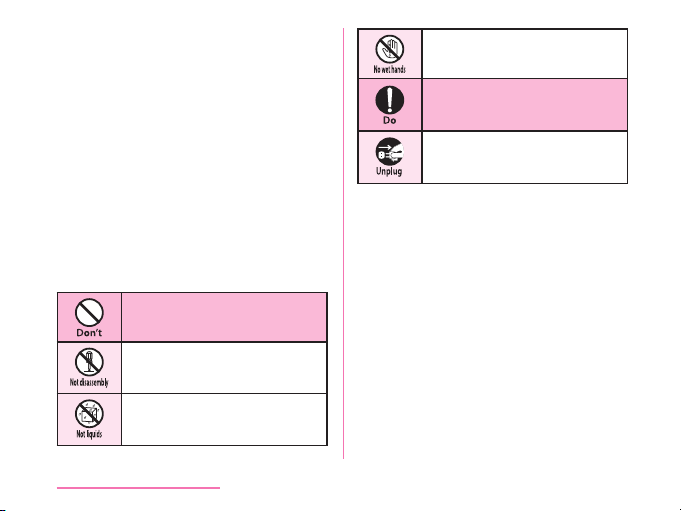
■ The following symbols indicate special
warnings regarding product usage.
Denotes things not to do
(prohibition).
Denotes not to disassemble.
Denotes not to use where it
could get wet.
Denotes not to use with wet
hands.
Denotes mandatory
instructions (matters that must
be complied with).
Denotes that the equipment
should be unplugged.
■ "Safety Precautions" are explained in the
following sections.
Handling the Cell Phone, Adapter, TV
Antenna Cable, Disney Original Cover, and
Nano UIM card (Common) …………………… P9
Precautions for This cell phone ………… P12
Precautions for Adapter …………………… P18
Precautions for Disney Original Cover … P21
Precautions for Nano UIM card
…………………………………………………… P21
Precautions for Using near Electronic
Medical Equipment ………………………… P21
Material List…………………………………… P22
Precautions for Sample (SIM Eject Tool)
…………………………………………………… P23
8
Contents/Precautions
Table of contents
Other LG Cell Phone manuals


Popular Cell Phone manuals by other brands


Blackbe;rry
Blackbe;rry Q10 user guide

Blackbe;rry
Blackbe;rry Bold 9900 user guide

Blackbe;rry
Blackbe;rry STORM 9500 - VERSION 5.0 user guide

ISAFE MOBILE
ISAFE MOBILE IS655.2 operating manual

Blackbe;rry
Blackbe;rry CURVE 8300 - SMARTPHONE Getting started guide

Blackbe;rry
Blackbe;rry 8707 - VERSION 4.1 user guide