LG LDF900UN User manual

OWNER’S MANUAL
CAR DVD Receiver
Please read this manual carefully before operating
your set and retain it for future reference.
MODEL
LDF900UN
P/NO : MFL63284950
ENGLISH
www.lg.com.mx

2Safety Information
Safety Information
1
CAUTION
RISK OF ELECTRIC SHOCK
DO NOT OPEN
CAUTION: TO REDUCE THE RISK OF ELECTRIC
SHOCK DO NOT REMOVE COVER (OR BACK) NO
USER-SERVICEABLE PARTS INSIDE REFER SERVICING
TO QUALIFIED SERVICE PERSONNEL.
This lightning ash with arrowhead
symbol within an equilateral
triangle is intended to alert the
user to the presence of uninsulated
dangerous voltage within the
product’s enclosure that may be of
sucient magnitude to constitute
a risk of electric shock to persons.
The exclamation point within an
equilateral triangle is intended
to alert the user to the presence
of important operating and
maintenance (servicing)
instructions in the literature
accompanying the product.
Always operate the vehicle in a safe
manner. Do not become distracted by
the vehicle while driving, and always
be fully aware of all driving condition.
Do not change settings, or any functions. Pull over
in a safe and legal manner before attempting such
operations.
Do not use for many hours at
extremely low or high temperature.
(-10 °C to 60 °C)
To reduce the risk of electric shock, do
not remove the cover or back of this
product. There are no user-serviceable
parts inside. Refer servicing to qualied
service personnel.
To reduce the risk of re or electric
shock, do not expose this product to
dripping or splashing water, rain, or
moisture.
The temperature of unit’s outside can
be extremely high, please use the unit
after proper installation in your vehicle.
This unit cannot play 8 cm disc (use 12
cm disc only).
While driving, keep the sound volume
at a proper level.
Do not drop it and avoid heavy
impacts at anytime.
The driver must not watch the monitor
while driving. If the driver watches the
monitor while driving, it may lead to
carelessness and cause an accident.
This unit is for vehicles with a 12-
volt battery and negative grounding.
Before installing it in a recreational
vehicle, lorry or bus, check the battery
voltage. To avoid shorts in the electrical system,
be sure to disconnect the E battery cable before
beginning the installation.
1
Safety Information
8 cm


Safety Information
3Safety Information
1
CAUTION: This product employs a Laser System.
To ensure proper use of this product, please read
this owner’s manual carefully and retain it for future
reference. Shall the unit require maintenance,
contact an authorized service centre.
Use of controls, adjustments or the performance of
procedures other than those specied herein may
result in hazardous radiation exposure.
To prevent direct exposure to laser beam, do not try
to open the enclosure. Visible laser radiation when
open. DO NOT STARE INTO BEAM.
“This device is equipped with a portable battery or
accumulator.
Safe way to remove the battery or the battery
from the equipment:
Remove the old battery or battery pack, follow the
steps in reverse order than the assembly. To prevent
contamination of the environment and bring on
possible threat to human and animal health, the
old battery or the battery put it in the appropriate
container at designated collection points. Do not
dispose of batteries or battery together with other
waste. It is recommended that you use local, free
reimbursement systems batteries and accumulators.”
The battery shall not be exposed to excessive heat
such as sunshine, re or the like.
You have to set the disc format option to [Mastered]
in order to make the discs compatible with the LG
players when formatting rewritable discs. When
setting the option to Live File System, you cannot
use it on LG players.
(Mastered/Live File System : Disc format system for
Windows Vista)
For ensuring safe driving
• To avoid the risk of accident and the potential
violation of applicable laws, this unit is not for use
with a video screen that is visible to the driver.
• This unit detects whether your car’s parking
brake is engaged or not, and prevents you from
watching a DVD,VCD, PHOTO or movie le on the
display connected to FRONT VIDEO OUTPUT while
driving. When you attempt to watch a DVD,VCD,
PHOTO or movie le the screen will turn black.
When you park your car in a safe place and apply
the parking brake, the picture appears on the
screen.

4Contents
Contents
1
Safety Information
2 Safety Information
2
Preparation
6 Introduction
9 Front panel
10 Remote control
3
Installation
11 About detachable control panel
11 Attaching the control panel
12 Detaching the control panel
13 Basic Installation
13 Removing the existing
receiver unit
14 ISO-DIN Installation
14 Remote Control Battery Installation
15 Connection
15 Connecting to a car
16 Connecting to optional
equipment
17 Adjusting the general settings
17 The buttons for setting
MENU
17 MENU item overview
18 XDSS+/EQ
18 Sound
19 Display
19 Light
20 Setup

5Contents
1
2
3
4
5
6
7
4
Operation
21 Basic Operations
22 Other Operations
22 To display file information
22 To slow down the playing
speed
22 To play frame-by-frame
23 Quick search
23 Using the Func menu
24 Using the time search bar
24 Resume playback
25 Viewing a photo
25 Listening to the radio
26 Storing desired frequencies
manually
26 Listening to a preset station
26 Adjusting Tuner settings
27 Enjoying music or movie by
connecting an external device
27 Preventing radical changes
in volume as switching
sources
28 Recording to USB from Disc or FM
tuner
5
Maintenance
29 Notes on Discs
29 Handling the Unit
6
Troubleshooting
30 Troubleshooting
7
Appendix
31 Area Code List
32 Specifications
33 Trademarks and Licences

6Preparation
Preparation
2
2
Preparation
Introduction
About the
Symbol Display
“
”may appear on your monitor display
during operation and indicates that the
function explained in this owner’s manual is
not available on that disc.
Symbol Used in this Manual
DVD
DVD-Video, DVD±R/RW in
Video mode or VR mode
and nalized
ACD
Audio CDs
MOVIE
Video les
MUSIC
Audio les
PHOTO
Photo les
Reseting the unit
You can reset the unit when it does not
operate properly.
1. Press to open the control panel.
Refer to the page 12 for detaching the
control panel.
2. Prick the reset hole with a sharp object.

7Preparation
2
Preparation
Playable USB device
Requirement
• Do not extract the USB device during
operation (play, etc.).
• An USB device which requires additional
programme installation when you
have connected it to a computer, is not
supported.
• USB device: USB device that support USB
1.1 and USB 2.0 Full Speed.
• Movie, music and photo les can be played.
For details of operations on each le, refer
to relevant pages.
• Regular back up is recommended to
prevent data loss.
• If you use a USB extension cable, USB HUB,
USB Multi-reader, or external HDD, the USB
device may not be recognized.
• When you connect a partitioned USB
device into the unit, only the rst partition
is recognized on it.
• Some USB device may not work with this
unit.
• Digital camera and mobile phone are not
supported.
• USB Port of the unit cannot be connected
to PC. The unit cannot be used as a storage
device.
File compatibility
Audio files
• Sampling frequency : within 8 kHz to 48 kHz
(MP3), below 48 kHz (WMA)
• Bit rate : within 8 kbps to 320 kbps (MP3),
below 320 kbps (WMA)
• File extensions: “.mp3”, “.wma”, “.wav”, “.ogg”,
“.aac(less than 16 kHz)”
• Maximum les : Under 3000.
• CD-ROM le format : ISO9660/ JOLIET.
• We recommend that you use Easy-CD
Creator, which creates an ISO 9660 le
system.
Photo files
• Max pixel in width : 4000 x 4000 pixel.
• Maximum les : Under 3000.
• Some discs may not operate due to a
dierent recording format or the condition
of disc.
• File extensions: “.jpg”, “.jpeg”, “.png”, “.gif”, “.ti”,
“.bmp”
• CD-ROM le format : ISO9660/ JOLIET.
Video files
• Available resolution size: 720 x 576 (W x H)
pixels
• Frame rate: 30 FPS
• Playable codec format: “MPEG1”, “MPEG2”,
“MPEG4”, “MP4V3S”, “3IVX”“MSVC”, “3IV0”,
“3IV1”, “3IV2”.
• This player supports only 1 warp point of Global
Motion Compensation (GMC).

8Preparation
Preparation
2
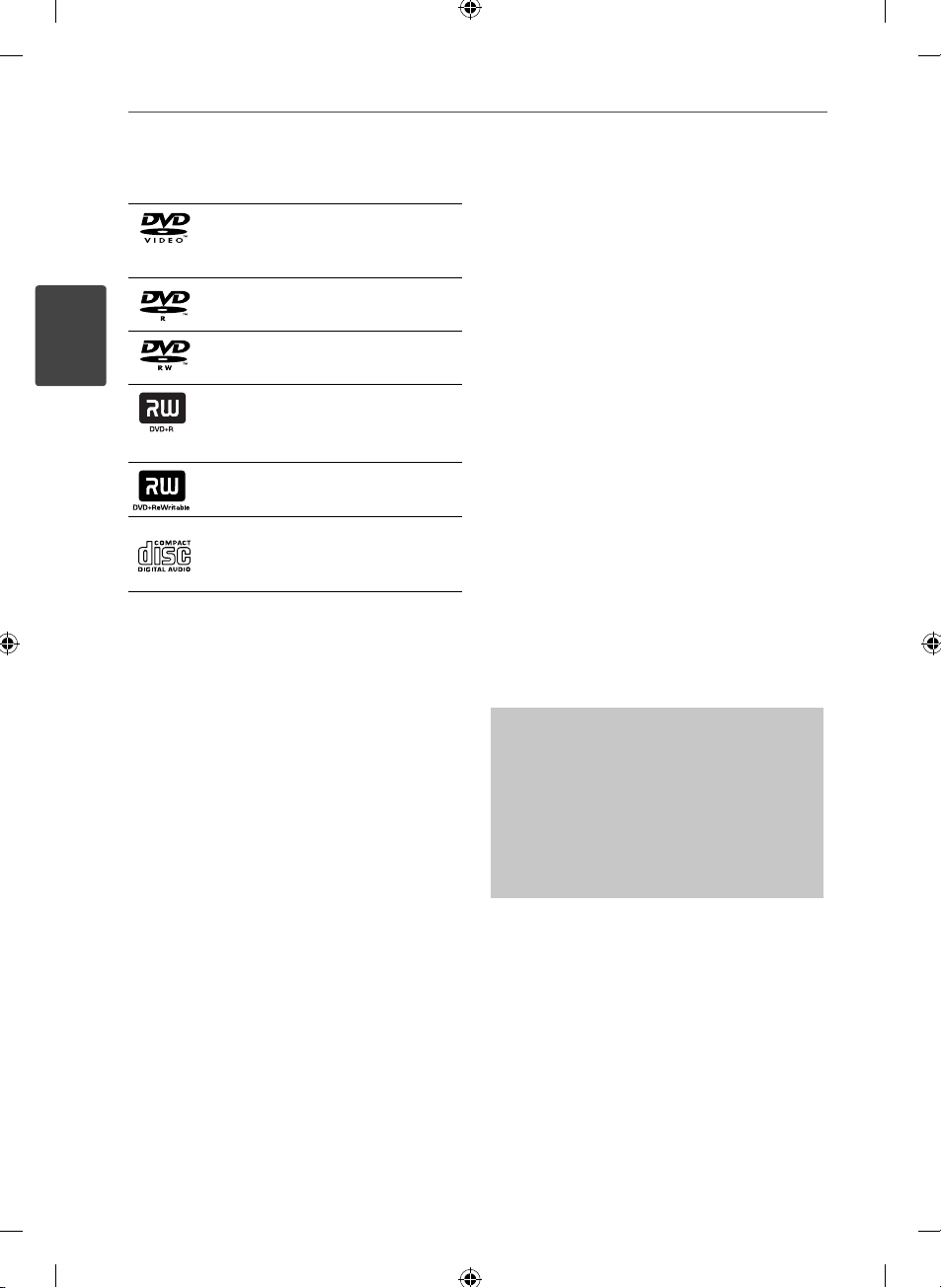
Playable Discs
DVD-VIDEO (12 cm disc)
Discs such as movies that can be
purchased or rented.
DVD-R (12 cm disc)
DVD-RW (12 cm disc)
DVD+R (12 cm disc)
Supports the double layer disc
also.
DVD+RW (12 cm disc)
Audio CD: Music CDs or CD-R/CD-
RW in music CD format that can
be purchased.
Some DVD±RW/DVD±R or CD-RW/CD-R cannot
be played on this unit due to the recording
quality or physical condition of the disc, or the
characteristics of the recording device and
authoring software.
Regional Codes
This unit has a regional code printed on the top
of the unit. This unit can play only DVD discs
labeled same as the top of the unit or “ALL”.
Copyrights
It is forbidden by law to copy, broadcast, show,
broadcast via cable, play in public, or rent copyrighted
material without permission. This product features the
copy protection function developed by Rovi. Copy
protection signals are recorded on some discs. When
recording and playing the pictures of these discs
picture noise will appear. This product incorporates
copyright protection technology that is protected
by U.S. patents and other intellectual property
rights. Use of this copyright protection technology
must be authorized by Rovi, and is intended for
home and other limited viewing uses only unless
otherwise authorized by Rovi. Reverse engineering or
disassembly is prohibited.
CONSUMERS SHOULD NOTE THAT NOT ALL HIGH
DEFINITION TELEVISION SETS ARE FULLY COMPATIBLE
WITH THIS PRODUCT AND MAY CAUSE ARTIFACTS
TO BE DISPLAYED IN THE PICTURE. IN CASE OF 525
OR 625 PROGRESSIVE SCAN PICTURE PROBLEMS,
IT IS RECOMMENDED THAT THE USER SWITCH THE
CONNECTION TO THE ‘STANDARD DEFINITION’
OUTPUT. IF THERE ARE QUESTIONS REGARDING
OUR TV SET COMPATIBILITY WITH THIS MODEL 525p
AND 625p UNIT, PLEASE CONTACT OUR CUSTOMER
SERVICE CENTER.
The making of unauthorized copies of
copy-protected material, including computer
programmes, les, broadcasts and sound
recordings, may be an infringement of copyrights
and constitute a criminal oense.
This equipment should not be used
for such purposes.
Be responsible
Respect copyrights

9Preparation
2
Preparation
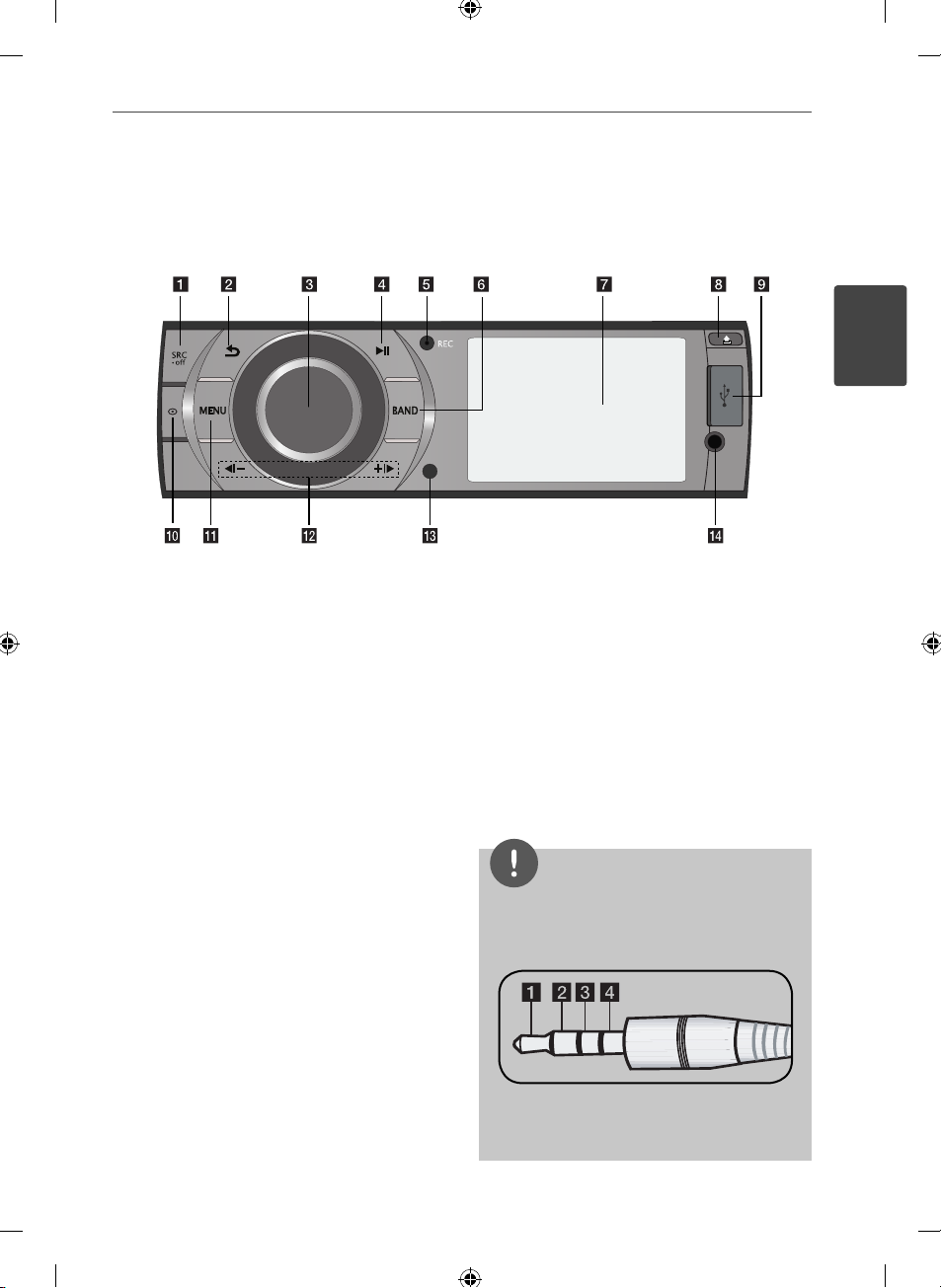
aSRC/• OFF
• When pressed, selects function sources.
• When pressed and held, powers unit on or
o.
bReturns to the previous step.
cVolume knob
• Adjusts volume level.
• Conrms the settings.
• Checks tracks or les.
d
NX Plays and pauses playback.
eREC Recording to USB
fBAND
• Selects a band in Tuner mode.
• Selects a category menu during playback of
a disc or USB containing with music, movie,
and photo les together.
gDisplay window
h
Opens the front panel.
iUSB port
jDisplays le or disc information.
kMENU
Activates or deactivates a setting menu.
lb[-/+[B
Skip / Search / Seek / Tune
m
Remote Sensor
n
AUX
If connected to other portable player, you
can enjoy music or movie on the unit.
NOTE
For video playback from an external device, you
should connect it with a 3.5 mm (4-pole) jack as
below.
a Audio L b Audio R
c GND d Video
Front panel

10 Preparation
Preparation
2
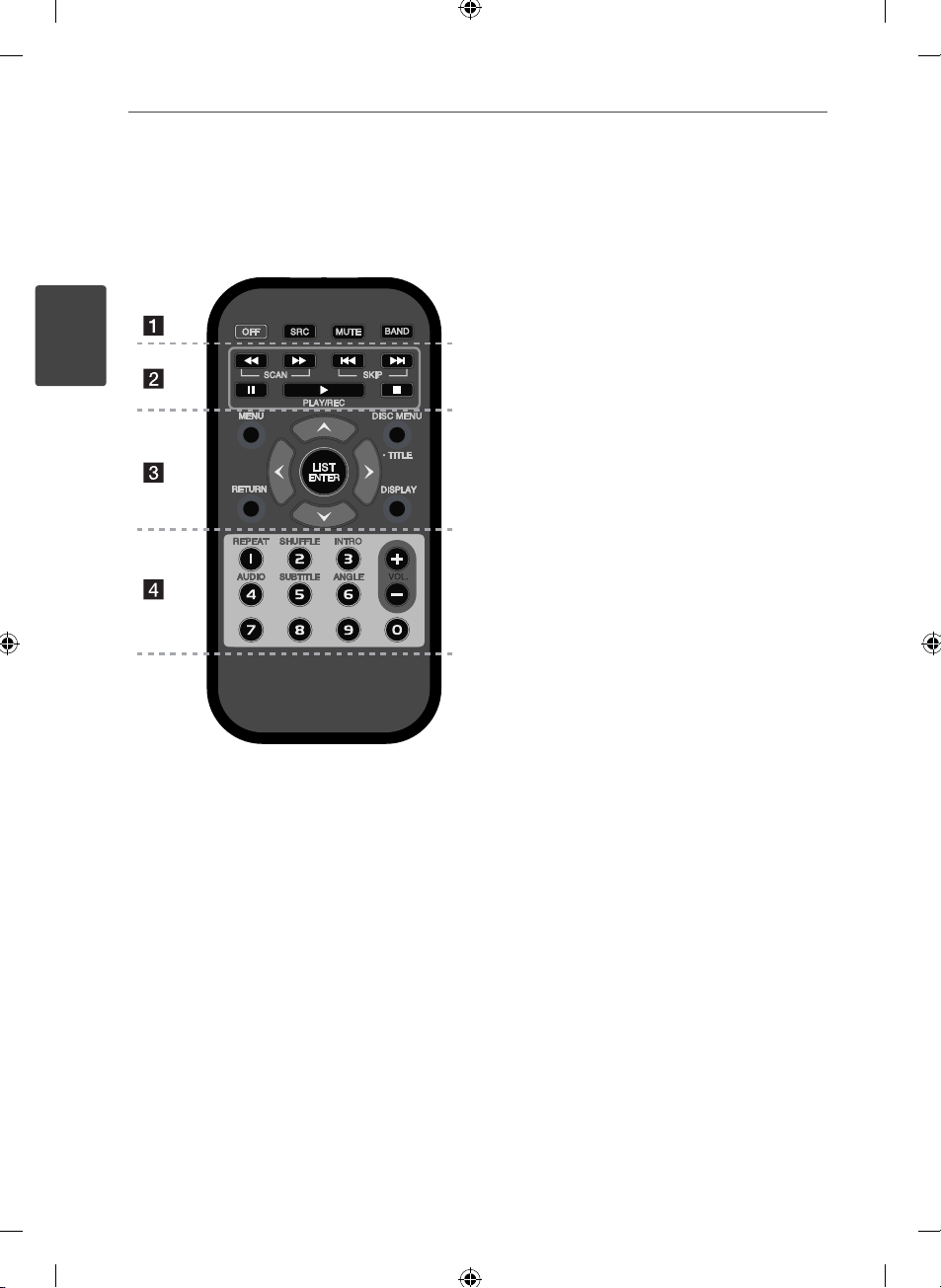
• • • • • • • • • a• • • • • • • •
OFF: Powers o the unit.
SRC: Selects function sources.
MUTE: Temporarily stops the sound.
BAND :
• Selects a band in Tuner mode.
• Selects a category menu during playback of
a disc or USB containing with music, movie,
and photo les together.
• • • • • • • • • b• • • • • • • • •
m/MSCAN: Searches backward or
forward.
./>SKIP: Goes to the next or previous
chapter / track / le.
X: Pauses playback.
N: Starts playback or recording.
x:Stops playback.
• • • • • • • • • c• • • • • • • • •
MENU: Activates or deactivates setting menu.
RETURN: Returns to the previous step.
Direction buttons: Selects an option in the
menu.
LIST/ ENTER :
• Checks tracks or les in Disc mode or preset
stations in Tuner mode.
• Conrms the settings.
DISPLAY: Displays or exits On-Screen Display.
DISC MENU/• TITLE:
• When pressed, it accesses menu on a disc.
• When pressed and held, it displays the DVD
title menu, if available.
• • • • • • • • • d• • • • • • • •
Numeric buttons (1 - 6)
Selects a numbered preset station in Tuner or a
chapter when a DVD disc is inserted.
VOL. +/- : Adjusts volume level.
REPEAT : Repeat playback
SHUFFLE : Random playback
INTRO: Intro scan
AUDIO: Selects audio language or channel.
SUBTITLE: Selects a desired subtitle language.
ANGLE: Selects a DVD camera angle if
available.
Remote control
Table of contents
Other LG Car Receiver manuals