LENCO DVP-743 User manual
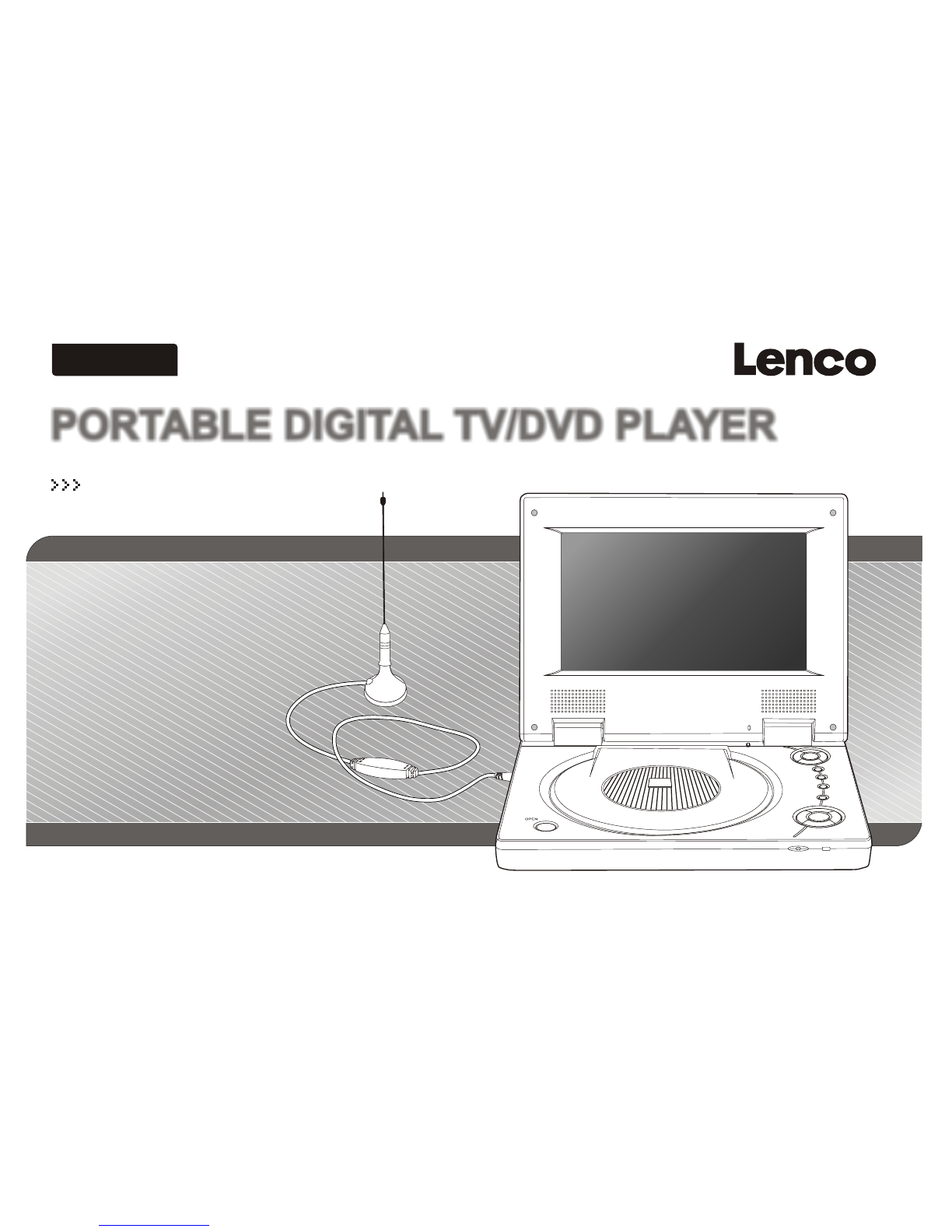
PORTABLE DIGITAL TV/DVD PLAYERPORTABLE DIGITAL TV/DVD PLAYER
ENGLISH
Please read this manual before operating
OWNER`S MANUAL
OWNER`S MANUALOWNER`S MANUAL
MODEL NO:DVP-743


Table of Contents
~ 1 ~
Table of Contents...................................................................................................................................................................1
Safety Information.................................................................................................................................................................2
Remote Control..................................................................................................................................................................3-4
Description...........................................................................................................................................................................5
Using the Remote Control......................................................................................................................................................6
Connecting Earphones (Optional Accessory)..........................................................................................................................7
Connecting DIGITAL-TV Antenna...........................................................................................................................................8
Connecting to a TV................................................................................................................................................................9
Using USB Port...................................................................................................................................................................10
Using the AC Adaptor...........................................................................................................................................................11
Using the Battery Pack.........................................................................................................................................................12
Cautions in Using Battery Pack.............................................................................................................................................13
Installing Carrying Bag/Car Harness Kit(Optional Accessory)..................................................................................................14
Watching DIGITAL TV......................................................................................................................................................15-16
Listening to Digital Radio......................................................................................................................................................17
Setting Up Favorite Program List, Changing Program Order, Deleting Program ........................................................................18
Scanning and Setting TV Channel.........................................................................................................................................19
Setting Channel Lock,Parental Control, Changing Password...................................................................................................20
Setting Country, Language, GMT , Time Zone, Program Scheduling....................................................................................21-22
Playing a Disc.................................................................................................................................................................23-25
Playing MP3 and Regular Audio CD.......................................................................................................................................26
Playing Picture CD...............................................................................................................................................................27
Displaying and Sorting Files.................................................................................................................................................28
Setting Language for Menu, Audio, Subtitle............................................................................................................................29
Setting Audio for Downmix....................................................................................................................................................30
Setting Parental Control, Change Password, Camera Angle....................................................................................................31
Setting Language for OSD...................................................................................................................................................32
Setting Display for TV System, Display Type..........................................................................................................................33
Setting Display for Default....................................................................................................................................................34
Playing Games for Mine, Tetris, Rush Hour............................................................................................................................35
Display Calendar.................................................................................................................................................................36
Adjusting LCD Screen.........................................................................................................................................................37
Troubleshooting.............................................................................................................................................................38-39
Specifications.....................................................................................................................................................................40

~ 2 ~~ 2 ~
Safety Information
CLASS 1 LASERPRODUCT / KLASSE 1 LASER PRODUKT / LUOKAN 1 LASER LAITE / KLASS 1 LASERAPPARAT / PRODUCTO
LASER CLASE.
INVISIBLE LASER RADIATION WHEN OPEN AND INTERLOCKS DEFEATED. AVOID EXPOSURE TO BEAM.
1. Toprevent fire orelectrical shock, donot expose thisPlayer to rain or moisture.
2. Toavoid electrical shock, do not open the cabinet, nouser-serviceable parts inside, refer servicing to qualified personnel only.
3. Certain countries mayregulate the disposal of the battery used to power this product. Please consult with yourlocal authority.
4. Listening with earphones for many hours at maximum volume may damage yourhearing.
5. The Player shouldbe connected to a power supply only of thetype described in the operating instructions or as markedon the Player.
Please read allof the safety and operating instructionsbefore operating this Player, follow all warnings placedon the Player
and in theuser's manual. These safety and operatinginstructions should be retained for future reference.
WARNING
SAFETY WARNING
Safety Information
Do not exposethe system to excessive moisture, rain, sand, or heatsources.
Place the DVDPlayer on a firm, flat surface.
Keep the DVDPlayer away from domestic heating equipment and direct sunlight.
When placing theDVD Player in a cabinet, allow about one inch of space allaround the DVD Player for ventilation.
Attention:
Remove the protectioncard inside the disc compartment before using this Player.
~ 3 ~
Remote Control
2
3
4
5
6
7
8
9
10
11
12
19
20
21
22
23
24
25
26
27
28
18
13
29
1
14
30
15
31
16
32
17
33
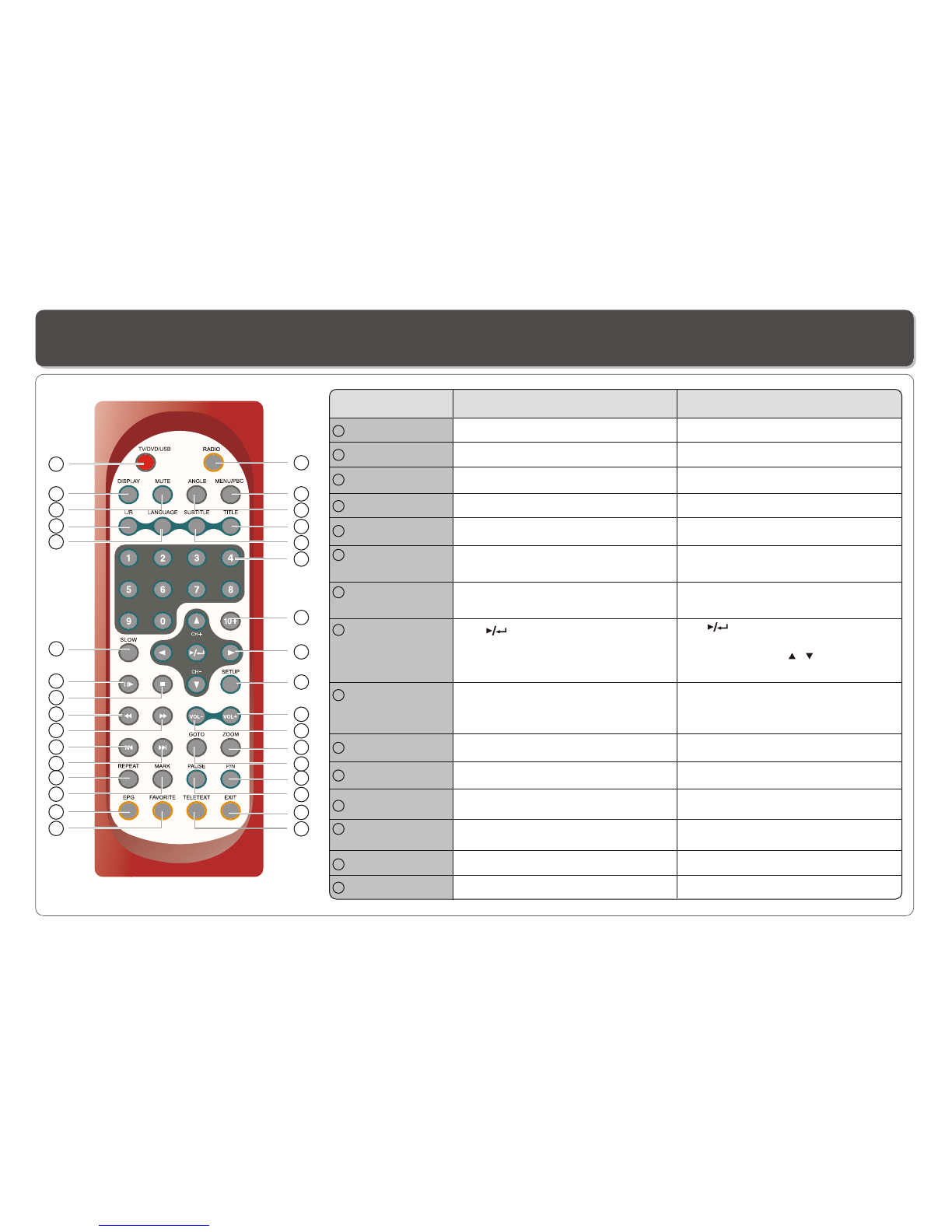
RADIO Button
Name
No function.
1
In DVD /USB Mode In TV Mode
2
ANGLE Button Use to accessvarious camera angles
on a DVD.
3
TITLE Button Display title menuif it exists in the disc.
4
SUBTITLE Button Selects the subtitle's language.
5
Number Buttons
(0,1,...,9)
Selects or enterstitle, charter or track
number.
6
10+ Button Uses to input10 to 999 (combining this
button and otherdigit number buttons).
7
(PLAY/ENTER)/
DIRECTION
Buttons
Use to startplay or to activate (or
change) a particularitem.
Use direction buttonto selects different
options.
8
SETUP Button Brings up theMain Menu to set upthe
system's language, audio,display,
password etc.
9
VOL+ Button Use to increase the speaker's volume.
10
VOL- Button Use to decreasethe speaker's volume.
11
ZOOM Button Zoom in andout of videos and photos.
12
GOTO Button Use to enterthe specific time to
playback.
13
Changes channel ( , ) orselects
different options.
P/N Button Selects PAL/NTSC/AUTO TV systems.
14
PAUSE Button Use to pause.
15
No function.
Enters numbers forprogram, date,
time, etc.
Brings up theMain Menu for editing
program, setting upsystem, OSD/audio
language etc.
Use to freezethe screen display.
Switche to radiomode.
No function.
MENU/PBC Button Brings up thedisc menu. No function.
Use to increase the speaker's volume.
Use to decreasethe speaker's volume.
No function.
Selects PAL/NTSC/AUTO TV systems
No function.
No function.
Selects the subtitle'slanguage.
Use to activate (orchange) a
particular item.
~ 4 ~
Remote Control
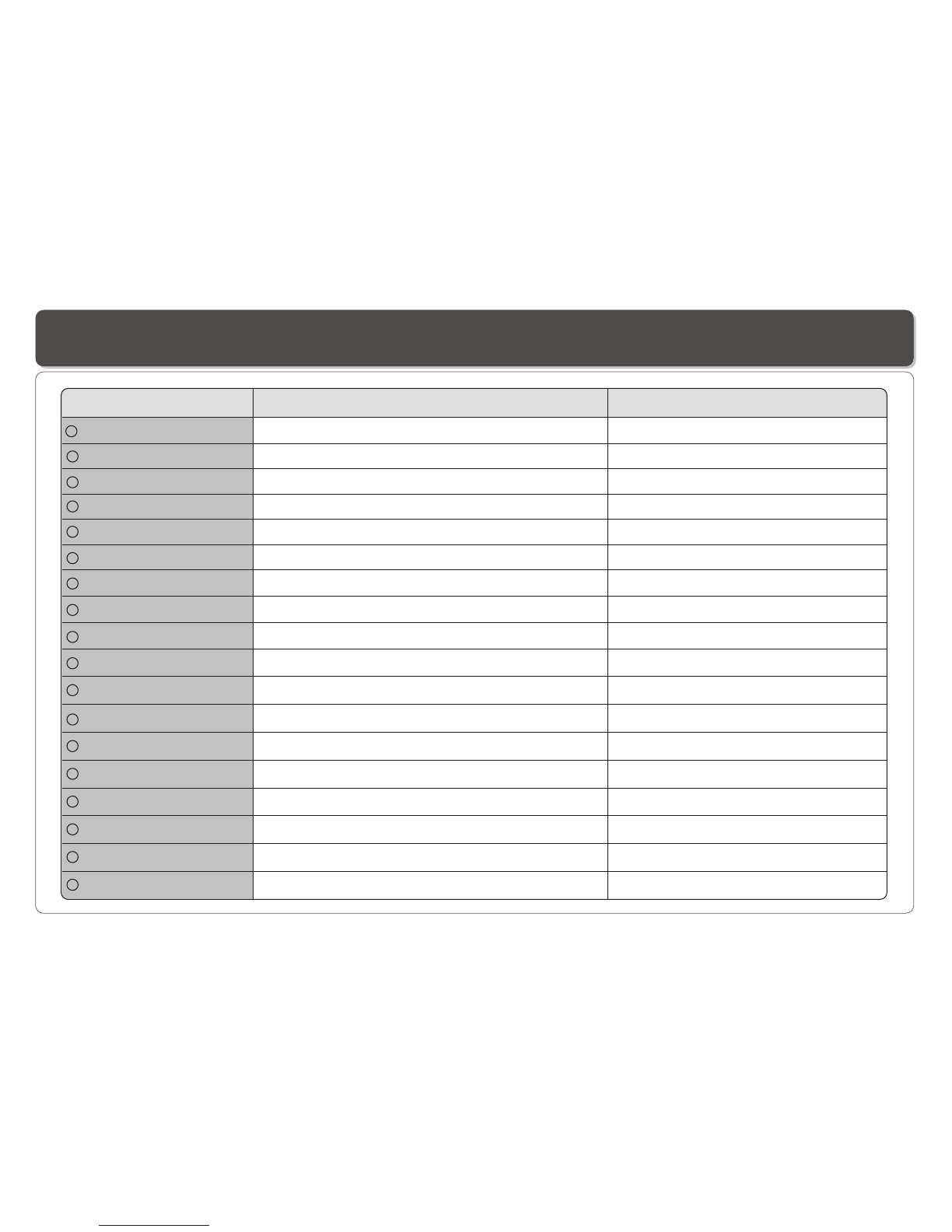
TELETEXT Button No function.
17
EXIT Button No function.
16
TV/DVD/USB Button Switches between TV, DVD orUSB mode.
18
DISPLAYButton
19
MUTE Button Silences the sound.
20
L/R button Selects left andright speaker output.
21
LANGUAGE Button
22
SLOW Button
23
STEP Button Plays frame-by-frame.
24
STOP Button
25
Accesses teletext function.
Exit the setup
Switches between TV, DVD orUSB mode.
Silences the sound.
Selects left andright audio channel of a program.
Name In DVD /USB Mode In TV Mode
Displays the currentdisc playback information. Displays the currentprogram information.
Selects the voicelanguage in a DVD. Selects OSD language.
Plays the videoat lower speeds. No function.
No function.
Stops the playback. No function.
26
27
REPEAT Button
MARK Button
EPG Button
FAVORITEButton
28
29
30
31
32
33
Allows you torepeat play a title, chapter, track, or disc.
Use to marka point where the playback starts each time when
the MARK buttonis pressed later on.
No function.
No function. Accesses favorite TV/radiostation.
Displays Electronic ProgramGuide.
FAST REVERSEButton Plays backward atvarious fast speeds. No function.
FAST FORWARD Button Plays at variousfast speeds. No function.
SKIP FORWARD Button Use to skipto next title, chapter or track.
SKIP BACKWARDButton Use to skipto previous title,chapter or track.
No function.
No function.
No function.
No function.
STOP
TV/
DVD/
USB
SETUP/
LCDad .
MENU/PBC
WOL+
WOL-
j
~ 5 ~
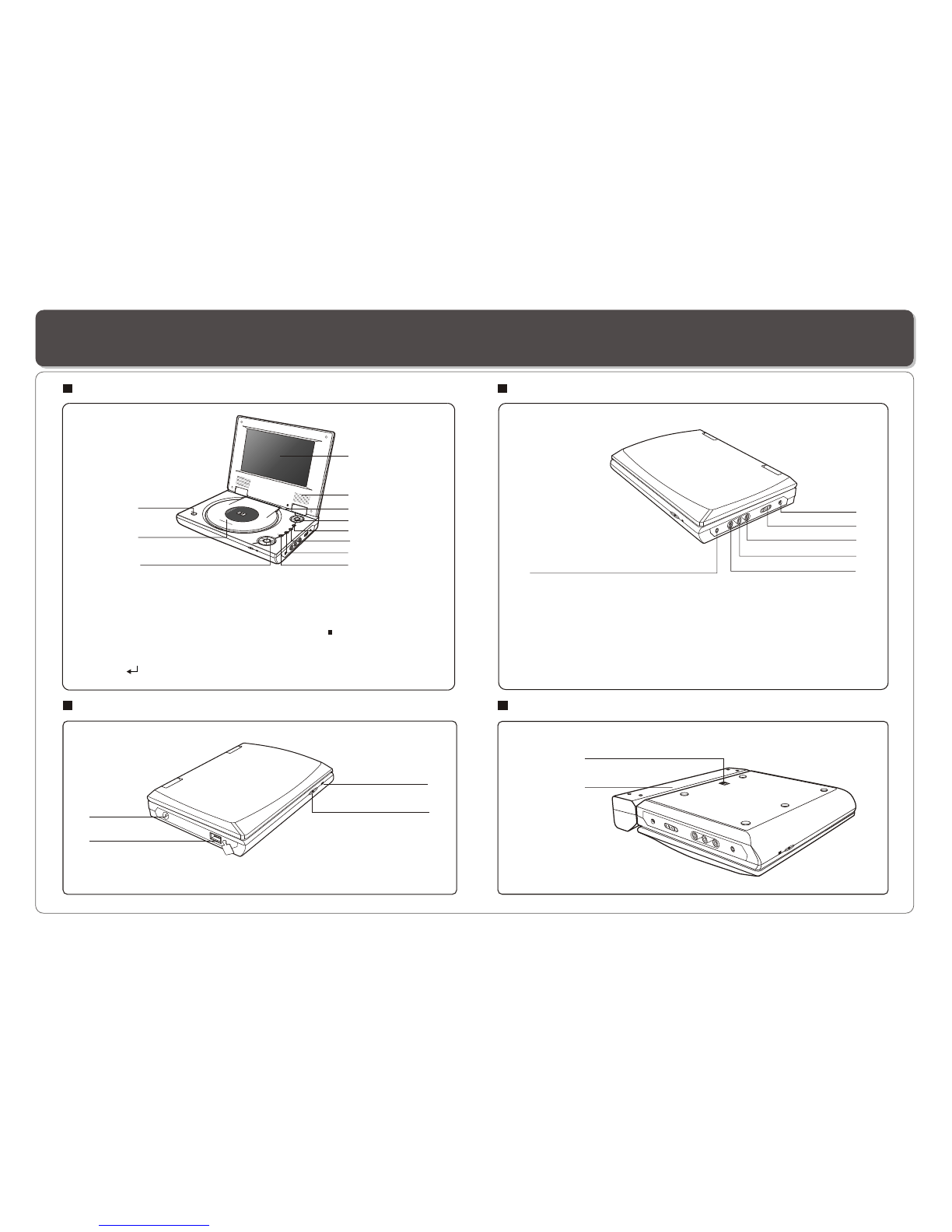
1
2
2. REMOTE CONTROLSENSOR
3. TV AntennaSocket
4. USB Slot
1. LED LIGHT
Description
1
2
3
4
6
7
8
11 10
52
3
5
16
2
9
3
1. RELEASE LATCH(Battery
pack separation switch)
2. BATTERY PACK
1
4
4
1. OPEN
2. DISC COVER
3. LCD
4. SPEAKER
7. MENU/PBC
9. TV/DVD/USB
8. SETUP/LCD adj.
11. PLAYBACK BUTTONS
FAST REVERSE/SKIP-PREVIOUS
FAST FORWARD/SKIP-FORWARD
VOL+
VOL-
5. LCD on/offswitch
6. CURSOR(UP/DOWN/LEFT/RIGHT),
ENTER( )
10. STOP
1. EARPHONE JACK
3. POWER ON/OFF
4. VIDEO OUTPUT
5. AUDIO OUTPUT(RIGHT)
6. AUDIO OUTPUT(LEFT)
2. DC IN 12V
Front View
Right View
Bottom View
Left View
MENU/PBC
SETUP/
LCDad .
TV/
DVD/
USB
STOP
j
~ 6 ~
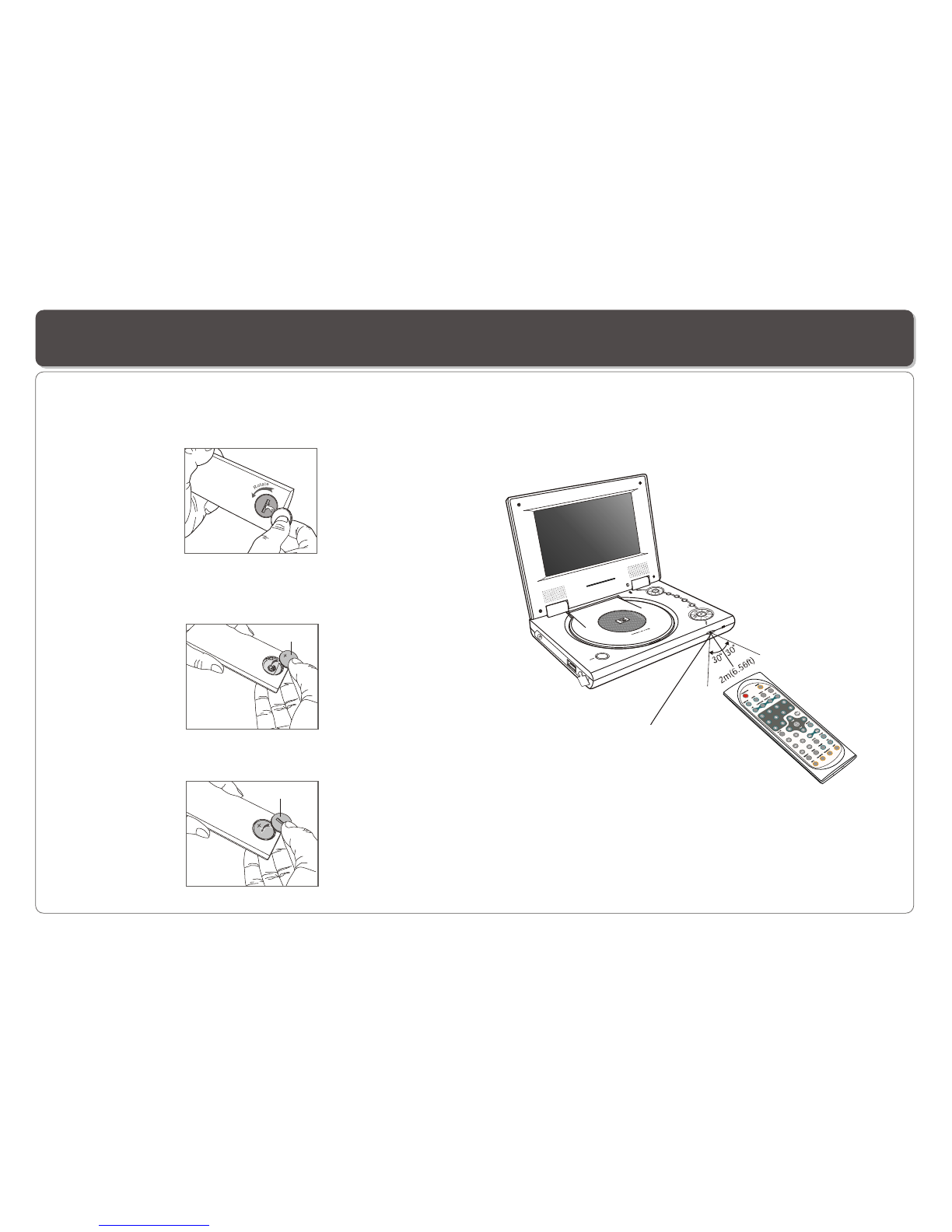
Remote Control Sensor
Using the Remote Control
Installing the battery Using the remote control
Point the remotecontrol directly at the remote sensor
on the frontof the DVD Player.
5
6
1. Open thebattery compartment cover using a coin.
3. Replace thebattery compartment cover and turn clockwise
until it stops.
2. Insert a3V lithium battery into the battery compartment with
the polarity (+ ) facing up as marked.
Battery
battery compartment
cover
STOP
TV/
DVD/
USB
SETUP/
LCD ad .
MENU/PBC
WOL+
WOL-
j
~ 7 ~
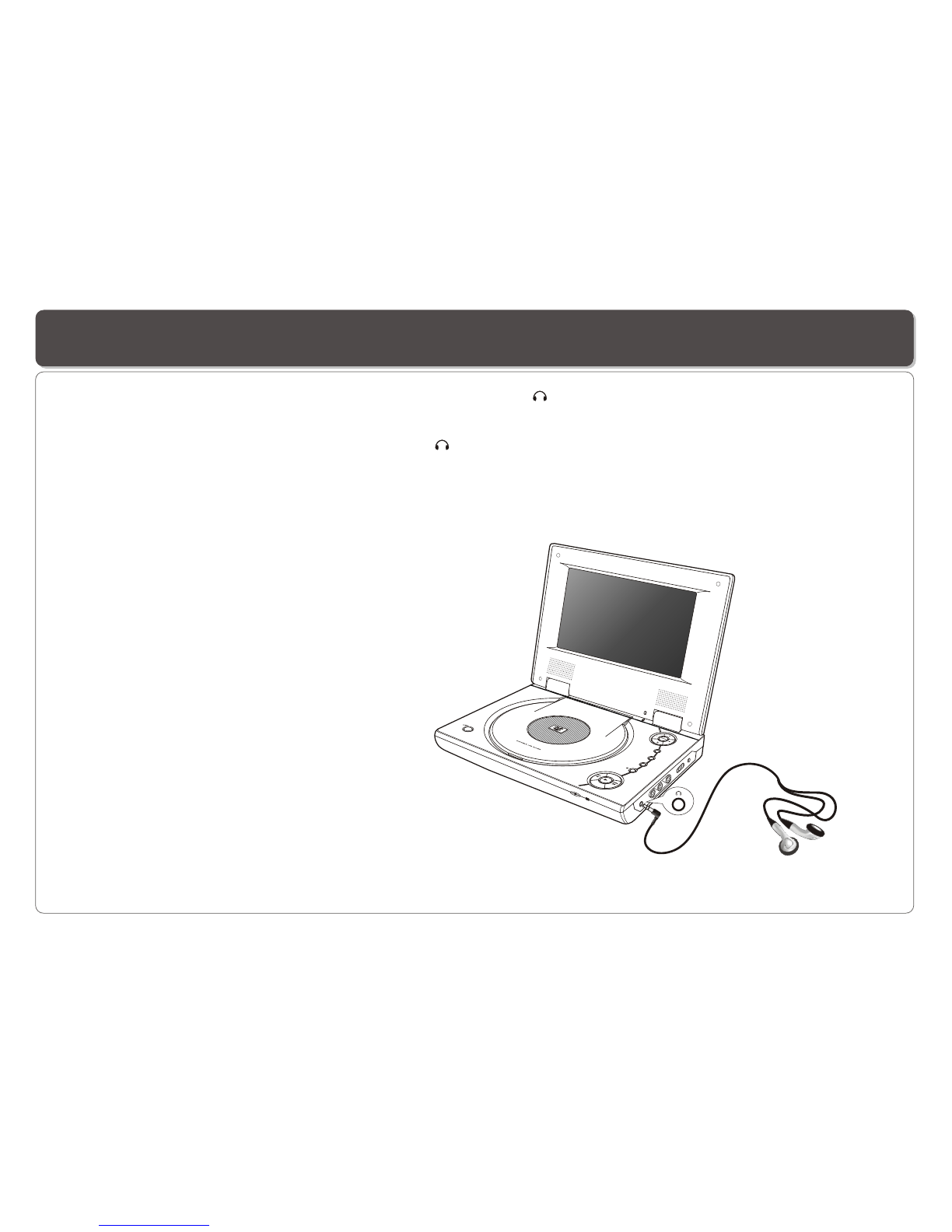
Connecting Earphones (Optional Accessory)
Note: When theearphone is connected to the Phone Jack ( ),the speaker will be disconnected.
*Earphone is anoptional accessory
You can attach an earphone with astereo mini-jack plug to the phone jack ( )for private listening. The volume can be adjusted
using VOL + and VOL - on the remotecontrol or on thePlayer .
~ 8 ~
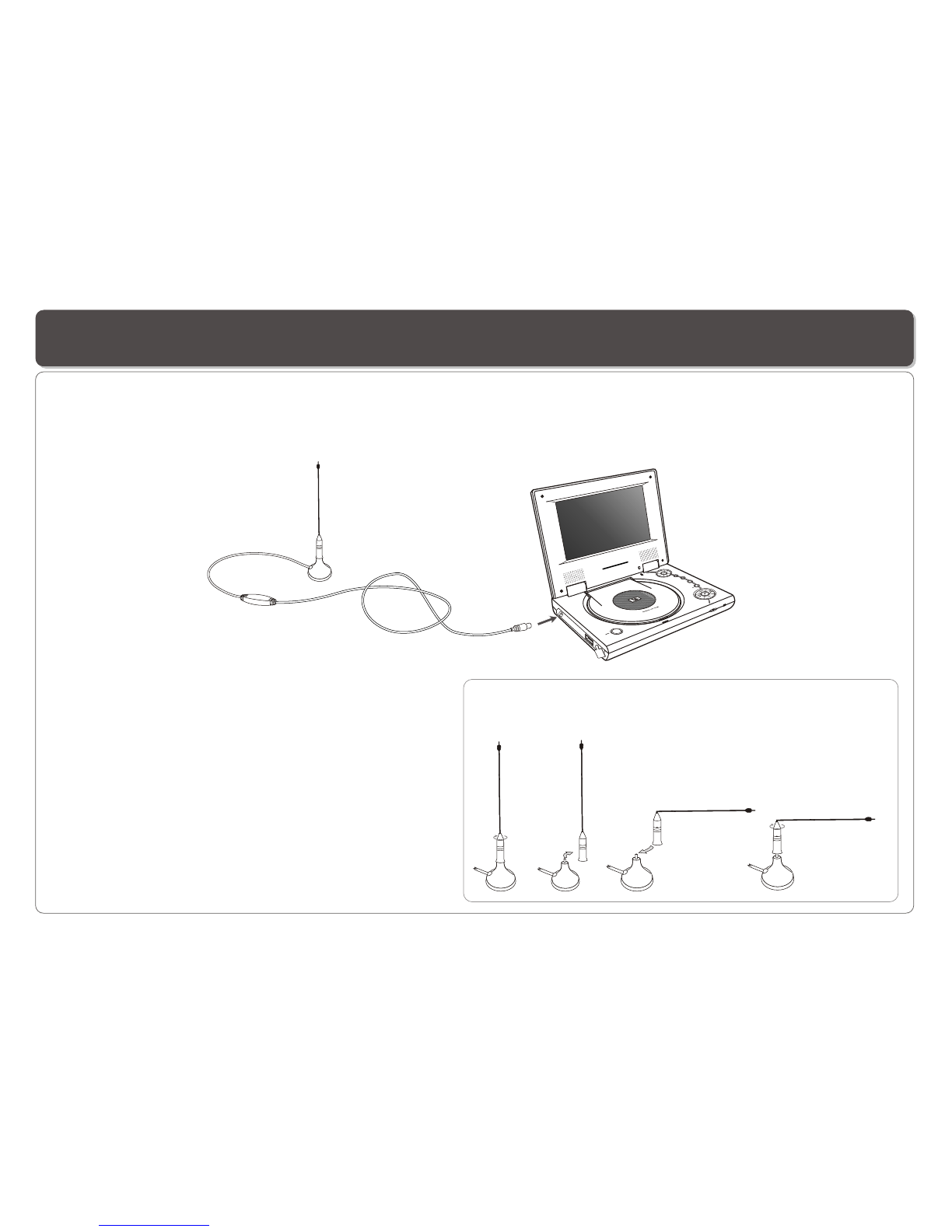
Connecting DIGITAL-TV Antenna
Toreceive digital TV and radio, you need to connect an antennato the player. Follow these steps:
1.Plug theantenna cable into the antenna socket on the Player.
2.Place theantenna on any surface.
3.The antenna hasa magnetic base which can be attached to any metal surface.
23
MENU/PBC
SETUP/
LCDad .
TV/
DVD/
USB
STOP
j
Two antennapoles are included for vertical and horizontal placement. When
placing the antennaon a vertical surface, a 90 degree-bend antenna maybe
used. To change, simplyunscrew the pole from the base and replace with the
other pole.
41
Suggestions to Improve TV Reception
You will significantly improve your TV reception by following
these tips.
1. Place theantenna near the windows.
2. Place theantenna on a metal surface especially of large
surface such asmetal chair, table, cooking pot, coat rack,
radiator, handetc.
3. Orient theantenna in different direction untila best
reception is obtained.
Note: This Players usesactive (powered) antenna, the
amplifier provides anincreased signal level compared to
passive (no power)antenna.
Other manuals for DVP-743
1
Table of contents
Other LENCO Portable DVD Player manuals

LENCO
LENCO MES-202 User manual

LENCO
LENCO DVP-935 User manual

LENCO
LENCO DVR-70 User manual

LENCO
LENCO TDV901 User manual

LENCO
LENCO DVP-744 User manual

LENCO
LENCO DVP-1064BK User manual

LENCO
LENCO DVP-706 User manual

LENCO
LENCO DVP-938 User manual

LENCO
LENCO DVP-1027 User manual

LENCO
LENCO DTVR-700 User manual

LENCO
LENCO WALKY-BOX User manual

LENCO
LENCO DVP-722 - User manual

LENCO
LENCO DVP-936 User manual

LENCO
LENCO DVP-1022 User manual

LENCO
LENCO DVP-947 BK User manual

LENCO
LENCO DVP-938 User manual

LENCO
LENCO MES-330 User manual

LENCO
LENCO DVP-901BK User manual

LENCO
LENCO DVP-738X2 User manual

LENCO
LENCO MES-415 User manual