LENCO DVP-74 User manual

ENGLISH
PORTABLE DVD PLAYER
PORTABLE DVD PLAYERPORTABLE DVD PLAYER
Please read this manual before operating
OWNER`S MANUALOWNER`S MANUAL
OWNER`S MANUALOWNER`S MANUAL


Table of Contents
~ 1 ~
Table of Contents...................................................................................................................................................................1
Safety Information..................................................................................................................................................................2
Remote Control......................................................................................................................................................................3
Description............................................................................................................................................................................4
Using the Remote Control.......................................................................................................................................................5
Connecting Earphones (OptionalAccessory)............................................................................................................................6
Connecting to a TV.................................................................................................................................................................7
Using USB Port......................................................................................................................................................................8
Using the AC Adaptor..............................................................................................................................................................9
Using the BatteryPack..........................................................................................................................................................10
Cautions in Using Battery Pack..............................................................................................................................................11
Installing Carrying Bag/CarHarness Kit(Optional Accessory)...................................................................................................12
Playing a Disc.................................................................................................................................................................13-15
Playing MP3 andRegular AudioCD........................................................................................................................................16
Playing Picture CD...............................................................................................................................................................17
Displaying and Sorting Files..................................................................................................................................................18
Setting Language forOSD, Menu,Audio, Subtitle....................................................................................................................19
Setting Screen forDisplay Format, Screen Saver, TVSystem ..................................................................................................20
Setting Audio for Downmix....................................................................................................................................................21
Setting Parental Control,Password, CameraAngle, Default.....................................................................................................22
Adjusting LCD Screen..........................................................................................................................................................23
Troubleshooting..............................................................................................................................................................24-25
Specifications......................................................................................................................................................................26

~ 2 ~
Safety Information
CLASS 1 LASERPRODUCT / KLASSE 1 LASER PRODUKT / LUOKAN 1 LASER LAITE / KLASS1 LASERAPPARAT / PRODUCTO
LASER CLASE.
INVISIBLE LASER RADIATION WHEN OPENAND INTERLOCKS DEFEATED. AVOID EXPOSURE TO BEAM.
1.Toprevent fire or electrical shock, do not expose this Player to rainor moisture.
2.Toavoid electrical shock, do not open the cabinet, no user-serviceable parts inside,refer servicing toqualified personnel only.
3.Certain countries mayregulate the disposal of the battery used to powerthis product. Pleaseconsult with yourlocal authority.
4.Listening with earphones for many hours at maximum volume may damage your hearing.
5.The Player shouldbe connected to a power supply only of the type described inthe operating instructionsor as markedon the Player.
Please read allof the safety and operating instructions before operating thisPlayer, followall warnings placed on the Player
and in theuser's manual. These safety and operating instructions should beretained for futurereference.
WARNING
SAFETY WARNING
Safety Information
Do not exposethe system toexcessive moisture, rain, sand, or heat sources.
Place the DVDPlayer on afirm, flat surface.
Keep the DVDPlayer away fromdomestic heating equipment and direct sunlight.
When placing theDVD Player ina cabinet, allow about one inch of space all around the DVD Player for ventilation.
Attention:
Remove the protectioncard inside the disc compartment before using this Player.

~ 3 ~
Remote Control
Remote Control 14.DVD/USB Button
Switches between DVDand USB
mode.
15.DISPLAYButton
Displays the currentdisc playback
information.
16.MUTE Button
17.ANGLE Button
Use to accessvarious
camera angles ona DVD.
18.LANGUAGE Button
Selects the voicelanguage in aDVD.
19.SLOW Button
20.VOL- Button
Use to decreasethe volume.
21.VOL+ Button
Use to increasethe volume.
22.FAST REVERSE( ) Button
23.FAST FORWARD ( ) Button
24.REPEAT Button
Allows you torepeat play
a title, chapter, track, ordisc.
25.MARK Button
Use to marka point wherethe
playback starts eachtime when
the MARK buttonis pressed
later on.
1.MENU/PBC Button
2.L/R Button
3.P/N Button
4.TITLE Button
5.SUBTITLE Button
6.Number Buttons (0,1,...,9)
7.SETUP Button
10.SKIP FORWARD ( )Button
11.SKIP BACKWARD ( ) Button
12.ZOOM Button
13.GOTO Button
Brings up thedisc menu.
Selects left, rightand stereo
sound tracks.
Selects PAL/NTSC/AUTO TVsystems.
Selects the subtitle'slanguage.
Brings up thesetup MENU
to set upthe system's
language, audio, display,
password etc.
Stops disc play.
Use to enterthe specific chapter, track
or time toplayback.
8.(PLAY/ENTER)/DIRECTION Buttons
9.STOP ( ) Buttons
Use to skipto next title,chapter or track.
Use to skipto previous title,
chapter or track.
2
3
4
5
6
7
8
9
10
11
12
15
16
17
18
19
20
21
22
23
24
14
13
25
1

STOP
DVD/USB
SETUP/
LCDad .
MENU/PBC
WOL+
WOL-
j
~ 4 ~
Front View
Right View
Bottom View
Left View
1.EARPHONE JACK
3.POWER ON/OFF
4.VIDEO OUTPUT
5.AUDIO OUTPUT (RIGHT)
6.AUDIO OUTPUT (LEFT)
1
2
2.REMOTE CONTROL SENSOR
3.USB Slot
1.LED LIGHT
Description
1.OPEN
2.DISC COVER
3.LCD
4.SPEAKER
2.DC IN 12V
7.MENU/PBC
9.DVD/USB
8.SETUP/LCD adj.
11.PLAYBACKBUTTONS
FAST REVERSE/SKIP-PREVIOUS
FAST FORWARD/SKIP-FORWARD
VOL+
VOL-
5.LCD on/off switch
1
2
3
4
6
7
8
11 10
52
3
5
16
2
9
6.CURSOR(UP/DOWN/LEFT/RIGHT),
ENTER( )
10.STOP
1.RELEASE LATCH(Battery
pack separation switch)
2.BATTERYPACK
1
4
4
MENU/PBC
SETUP/
LCDad .
DVD/USB
STOP
j
~ 5 ~
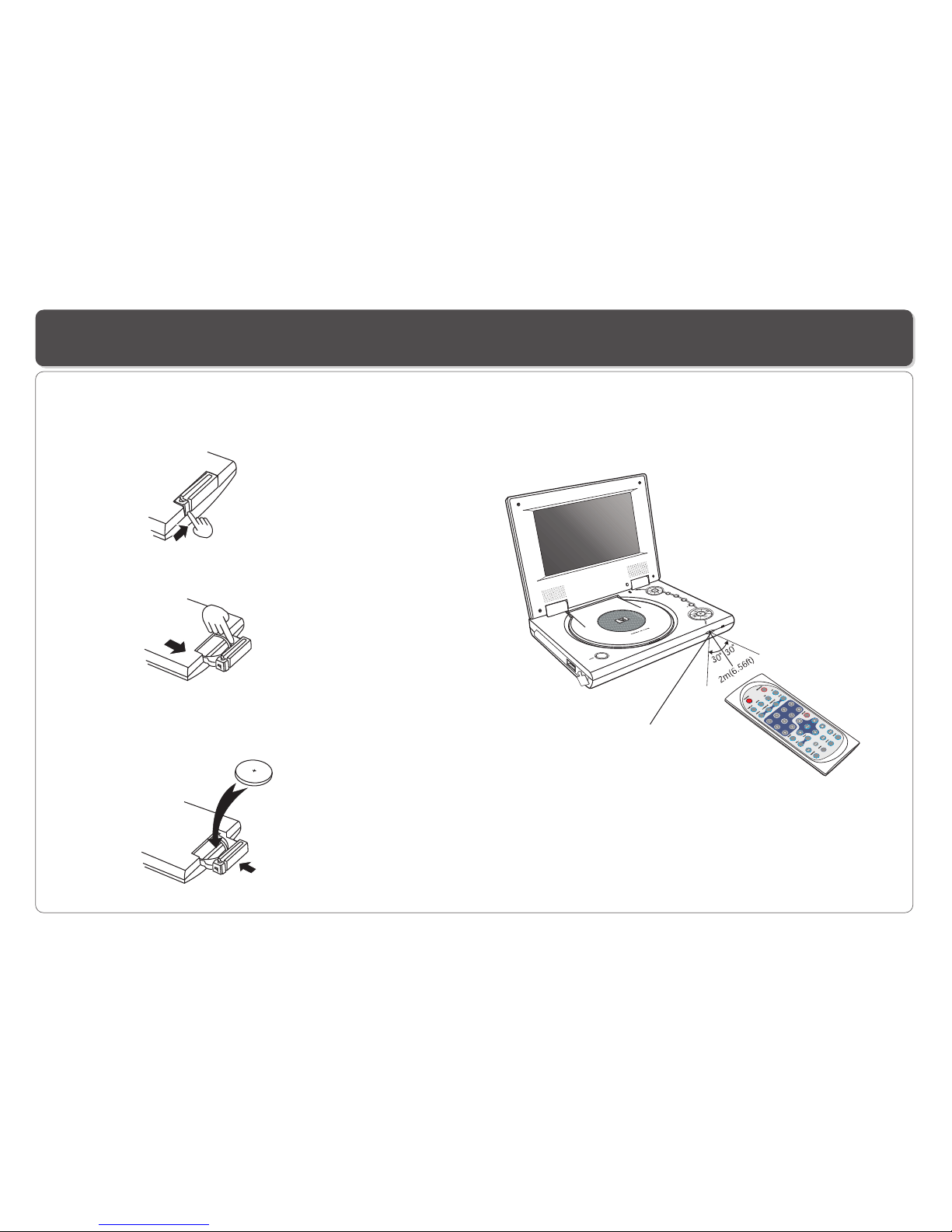
Remote Control Sensor
Using the Remote Control
Installing the battery Using the remote control
Point the remotecontrol directly at the remote sensor
on the frontof the DVD Player.
5
6
1. Press thelocking tab in the arrow direction.
(1)
(2)
(3)
(4)
2. Pull outthe battery tray.
3. Insert a3V lithium battery into the tray with the polarity ( + )
facing up asmarked.
4. Replace thebattery tray by pushing it until it clicks into place.

STOP
TV/
DVD/
USB
SETUP/
LCD ad .
MENU/PBC
WOL+
WOL-
j
~ 6 ~
Connecting Earphones (Optional Accessory)
Note: When theearphone is connected to the Phone Jack ( ),the speaker will be disconnected.
*Earphone is anoptional accessory
You can attach an earphone with astereo mini-jack plugto the phonejack ( )for private listening. The volume can be adjusted
using VOL + and VOL - on the remotecontrol or on thePlayer .

~ 7 ~
Connecting to a TV
TIPS
If you wishto view video on your TV only, close thedisplay panel of your DVD player.
With the displaypanel shut, use the remote to control DVD player.
1. Turnoff DVD player and TV.
2. Connect theaudio and video cables as illustrated below.
3.Turn on DVD player andTV.
4.Repeatedly press TV/Video button on your TV to select the input from the DVD player.
You can enjoy DVD quality video on your TV screen.
TV
AUDIO IN VIDEO IN
LR
Audio(left):White
Audio(right):Red
Video out: Yellow
Audio(left):White
Audio(right):Red
Video out: Yellow
AV CABLE

~ 8 ~
Using USB Port
USB slot
Pluging a USB device
1.Plug inthe USB device to the USB port on the player.
2.Repeatedly press DVD/USB to select USBmode.
Removing a USB device
You can remove the USB device anytimeeven it isplaying. To remove theUSB device, simplygrasp the end of the USB and remove it
from the slot.
Playing a USB device
The player accepts mostUSB devices such as MP3, DSC, USB- drive, Digital Camcorder etc. The USB in this Player supports
version 1.1/2.0.
1.Insert theUSB device and repeatedly press DVD/USB to select USBmode. The file manager appearsand the firstsong file ofthe
first folder plays.
2.Use direction key( and )to select thefile you want to play and press to play.
Other manuals for DVP-74
1
Table of contents
Other LENCO Portable DVD Player manuals

LENCO
LENCO DVP-715 User manual

LENCO
LENCO DVP-852 User manual

LENCO
LENCO MES-219 MPEG4 - User manual

LENCO
LENCO DVP-940 User manual

LENCO
LENCO DVT-950 User manual

LENCO
LENCO DVP-911 BK User manual

LENCO
LENCO DVP-1039 User manual

LENCO
LENCO DVP-847 User manual

LENCO
LENCO DVP-840 User manual

LENCO
LENCO MES-404 User manual

LENCO
LENCO MES-219 MPEG4 - User manual

LENCO
LENCO DVP-79 User manual

LENCO
LENCO DVP-9331 User manual

LENCO
LENCO DVP-9411 User manual

LENCO
LENCO DTVR-700 User manual

LENCO
LENCO MES-249 User manual

LENCO
LENCO MES-202 User manual

LENCO
LENCO DVP-936 User manual

LENCO
LENCO DVP-125 User manual

LENCO
LENCO DVP-935 User manual