KUNTENG KT-LCD11 User manual

用户手册
User Manual
KT-LCD11 E-Bike Special Meter
WWW.SZKTDZ.COM

ELECTRIC BICYCLE METER KT—LCD11 Product User Manual
- 1 -
Contents
Preface……………………………………………………………………………..………. 4
Outlook and Size…………………………………………………………………………... 4
Meter Dimension …………………………………………………………………… 4
Main Material and Color………………………………………………….………...... 4
Wiring Schematic……………………………………………………………….……. 4
Installation Instruction……………………………………………………………….…….. 5
Physical installation icon............................................................................................. 5
Function Overview……………………………………………………………………..….. 5
Display Content…………………………………………………………………….….…... 6
Normal Operation………………………………………………………………………...... 6
On/Off…………………………………………………………………………........... 6
Display Interface………………………………………………………….….……..... 7
Display 1………………………………………………………….….……..... 7
Display 2………………………………………………………….….……..... 8
Display 3………………………………………………………….….……..... 8
Display of Turned on Throttle……………………………………………………....... 9
Display of Pas ……………………………………………………………………........9
PAS Ratio (or Throttle) Gear Switch……………………………….……………. 9
Push Function…………………………………………………………..…………… 10
Cruise Function…………………………………………………………………...…10
Startup Backlights and Headlights…………………………..…………….……… 11
Brake status display…………………………..…………….………………………..11
Battery Capacity Indicator……………………………………..………………..........11
Single Data Clearing……………………………………………………………….... 12
Automatically Prompt Interface………………………………………………..….. 13
Error Code Display…………………………………………………….…........ 13
User Setting Project……………………………………………………………………..... 13
General Project Setting…………………………………………………………………… 13

ELECTRIC BICYCLE METER KT—LCD11 Product User Manual
- 2 -
Maximum Trip Speed………………………………………………………….......... 14
Wheel Diameter…………………………………………………………………..…. 14
Metric and Imperial Units…………………………………………………………... 15
Exit General Project Setting……………………………………………………….... 16
P Parameter Setting……………………………………………………………….…….... 16
P1 Motor Characteristic Parameter Setting ............................................................... 16
P2 Wheel Speed Pulse Signal Setting ....................................................................... 17
P3 Power Assist Control Mode Setting ...................................................................... 17
P4 Throttle Startup Setting ..................................................................................... 18
P5 Power Monitoring Setting ..................................................................................19
C Parameter Setting ............................................................................................................ 19
C1 Power-assist Sensor and Parameter Selection Setting ......................................... 19
C2 Motor Phase Classification Coding Setting .......................................................... 20
C3 Power-assist Ratio Gear Initialization Setting ..................................................... 21
C4 Throttle Function Setting .................................................................................. 22
C5 Controller Maximum Current Adjustment Setting ............................................... 23
C6 Backlight Brightness Adjustment Setting ............................................................. 24
C7 Cruise Function Setting ........................................................................................ 25
C8 Not Identified....................................................................................................... 25
C9 Power-on Password Setting .................................................................................. 26
C10 Automatic Restore Default Setting ..................................................................... 27
C11 Attribute Selection Setting .................................................................................. 27
C12 Controller Minimum Voltage Adjustment Setting ............................................. 28
C13 ABS brakes of the controller and parameters of anti-charge control Setting ......30
C14 Power-assist Tuning Parameters Setting .............................................................31
C15 Push-assist Speed Parameters Setting...................................................................31
Exit Parameter Setting................................................................................................. 32
L Parameter Setting ............................................................................................................ 32
L1 Parameters Setting .................................................................................................32
L2 Parameters Setting ...........................................................................................33

ELECTRIC BICYCLE METER KT—LCD11 Product User Manual
- 3 -
L3 Parameters Setting...........................................................................................33
Exit Parameter Setting............................................................................................. 34
Parameter Copy .................................................................................................................. 34
User Setting Note ............................................................................................................... 35
Version Information............................................................................................................ 36

ELECTRIC BICYCLE METER KT—LCD11 Product User Manual
- 4 -
Preface
The illustrated manual will help you understand and be familiar with the meter
function, guiding you on how to operate the meter, how to set the project parameters, how
to achieve the best match of the three as motor, controller and meter to improve electronic
control performance of the electric motor. This manual covers installation, operation,
parameter setting of the meter and how to use it properly, which help you resolve the
problems appeared in practical use.
Outlook and Size
○Meter Dimension
Meter Dimension
○Main Material and Color
PC material is mainly used for KT-LCD11 meter, and the housing color is black.
○Wiring Schematic

ELECTRIC BICYCLE METER KT—LCD11 Product User Manual
- 5 -
Installation Instruction
The meter body is mounted on the handlebars of the electric vehicle, adjusting
perspective. In the case that the vehicle is power off, the meter connectors are in plug
connection to corresponding controller connectors. Turn on the power, electric vehicle and
meter will be under normal operation, the meter installation is finished. The protection film
on meter display panel should be torn.
○Physical installation icon
Function Overview
KT-LCD11 meter provide you with a variety of functions such as vehicle controls and
vehicle status digitized displays to meet the trip demands.
◇Trip speed display (with displays of real-time speed (KM/H or MPH) and a single
maximum speed (MXS);
◇Trip distance display (with displays of a single trip distance (DST) and total trip distance

ELECTRIC BICYCLE METER KT—LCD11 Product User Manual
- 6 -
(ODO));
◇Display of turned on throttle (THR);
◇Power assistant ratio (or throttle) gear (PAS) switch;
◇6KM/H power assistant push ( ) function;
◇Cruise function (CRU);
◇Battery capacity indicator ( );
◇Real-time battery voltage (VOL) display;
◇Brake status display ( );
◇Turn on backlighting and lights ( );
◇Data clearing;
◇Fault code display;
◇User parameter setting;
◇24V, 36V, 48V supply voltage can automatic identification and be compatible.
Display Content
The display content is shown as follow.
Normal Operation
○On/Off
Hold button (SW) long, the meter is powered on and into normal operation, and
it provides the controller with power supply. Under normal operating status, hold

ELECTRIC BICYCLE METER KT—LCD11 Product User Manual
- 7 -
button (SW) long, the meter is powered off, meanwhile to shutdown the power supply of
controllers. When the vehicle is stopped and without any button operation on the
meter for five minutes, the meter will automatically shut down, and the power supply
of the electric vehicle will be powered off. In power off mode, the power consumption of
the meter and controller is zero.
○Display Interface
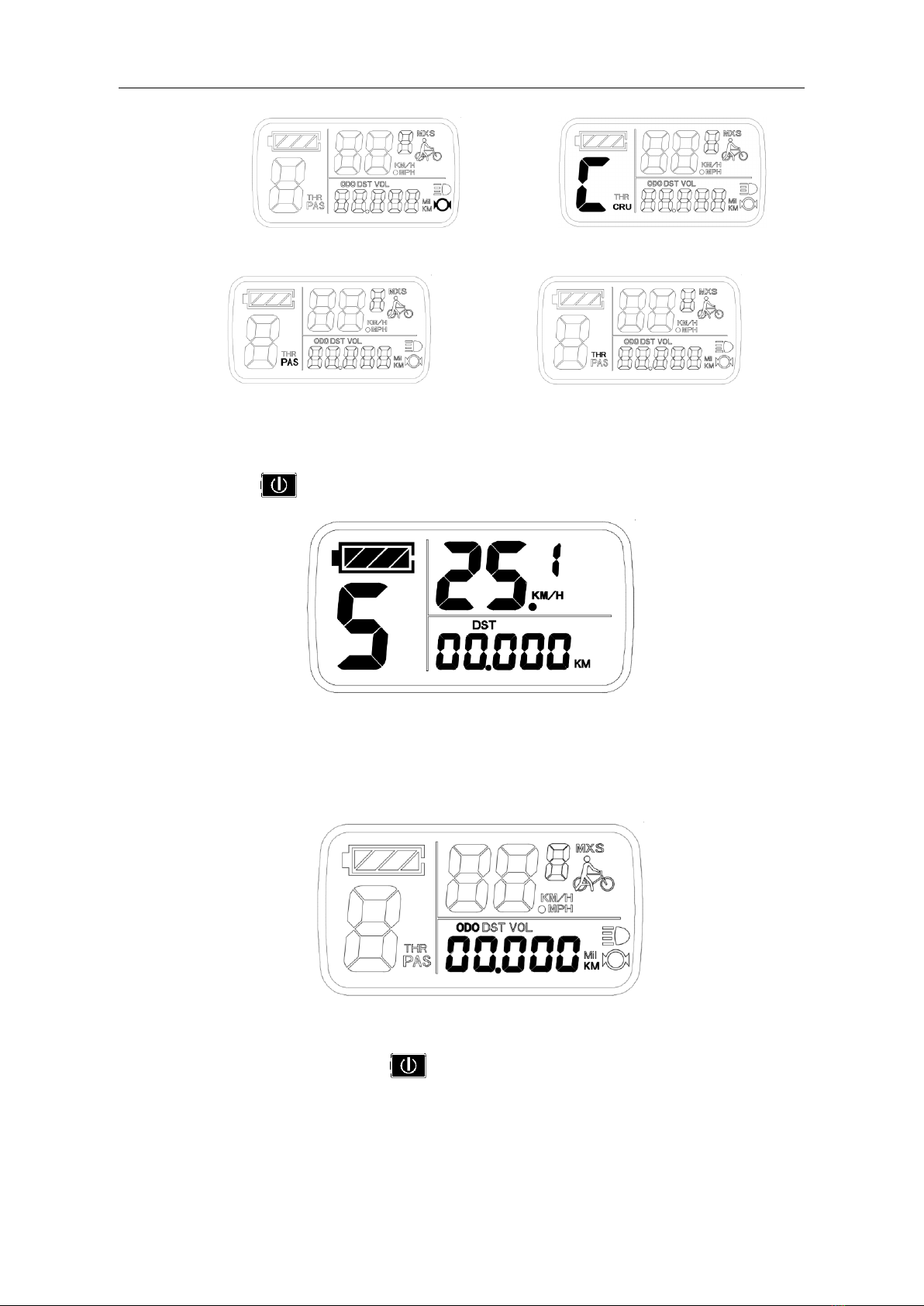
Hold button (SW) long, the meter is startup to enter display 1.
Display 1
The followings are shown on display 1.
Battery Capacity Indicator Power Assist Ratio Gear (ASSIST)
Real-time Trip Speed (KM/H) Single Trip Distance
6KM/H Power Assist Function Backlights and Headlights Status
ELECTRIC BICYCLE METER KT—LCD11 Product User Manual
- 8 -
Brake Status Cruise Function Display
Power-assist Startup Display Throttle Turned on Display
In display 1, hold button (SW) shortly to enter display 2.
Display 2
In the riding mode within 5 seconds, display 2 automatically jump to display 1
The followings are shown on display 2:
Total Trip Distance (ODO)
In display 2 or display 3, hold button (SW) shortly again to enter display 1.

ELECTRIC BICYCLE METER KT—LCD11 Product User Manual
- 9 -
Display 3
The followings are shown on display 3:
Single Maximum Speed (MXS) Real-time Voltage (VOL)
In each display interface, if you hold button (SW) long, the meter will be
powered-off together with that of the controller.
○Display of Turned on Throttle
Rotate the throttle control handle under normal operating of the meter, the display
interface shows the logo of turned-on throttle, see the Figure below.
○Display of Power-assist Startup
The meter is driving with power-assist under normal operating conditions, the display
interface flashes the power-assist startup sign (PAS) as shown in the figure. The sign will
be off automatically after about five seconds.
Table of contents
Other KUNTENG Bicycle Accessories manuals

KUNTENG
KUNTENG KT-LCD3 Operational manual

KUNTENG
KUNTENG KT-LCD8Y User manual

KUNTENG
KUNTENG KT-LCD8HP User manual

KUNTENG
KUNTENG KT-LCD10H User manual

KUNTENG
KUNTENG KT-LCD8Y User manual

KUNTENG
KUNTENG KT-LCD10YN User manual

KUNTENG
KUNTENG KT-LCD4 User manual

KUNTENG
KUNTENG KT-LCD7 User manual

KUNTENG
KUNTENG KT-LCD8H User manual

KUNTENG
KUNTENG KT-LCD7 User manual