KERN ILJ-C User manual

KERN & Sohn GmbH
Phone: +49-[0]7433- 9933-0
Fax: +49-[0]7433-9933-149
Internet: www.kern-sohn.com
Operating manual
Platform balance
KERN ILJ-C/ILS-C
Version 2.0
10/2013
GB
ILJ-C/ILS-C-BA-e-1320

2 ILJ-C/ILS-C-BA-e-1320
GB
KERN ILJ-C/ILS-C
Version 2.0 11/2013
Operating manual
Platform balance
Contents
1Technical data ................................................................................................... 5
1.1 Dimensions ............................................................................................................................... 7
2Appliance overview........................................................................................... 8
2.1 Display and Keyboard Summary ............................................................................................ 9
2.1.1 Navigation buttons / numeric input....................................................................................... 11
3Basic instructions ........................................................................................... 12
3.1 Proper use............................................................................................................................... 12
3.2 Improper Use .......................................................................................................................... 12
3.3 Warranty.................................................................................................................................. 12
3.4 Monitoring of Test Resources............................................................................................... 13
4Basic Safety Precautions................................................................................ 13
4.1 Pay attention to the instructions in the Operation Manual ................................................ 13
4.2 Personnel training.................................................................................................................. 13
5Transport and storage .................................................................................... 13
5.1 Testing upon acceptance ...................................................................................................... 13
5.2 Packaging / return transport ................................................................................................. 13
6Unpacking, Setup and Commissioning......................................................... 14
6.1 Installation Site, Location of Use.......................................................................................... 14
6.2 Unpacking and checking ....................................................................................................... 14
6.3 Placing..................................................................................................................................... 15
6.4 Mains connection ................................................................................................................... 16
6.4.1 Turning On the Power.......................................................................................................... 16
6.5 Connection of peripheral devices......................................................................................... 16
6.6 Initial Commissioning ............................................................................................................ 16
7Adjustment....................................................................................................... 17
7.1 Automatic adjustment using internal weight (ILJ-C only).................................................. 18
7.2 Menu settings ......................................................................................................................... 19
7.2.1 P1.1 INT.JUST. –Internal adjustment (models ILJ-C only)................................................. 19
7.2.2 P1.2 EXT.JUST.- External adjustment (ILS only)................................................................ 20
7.2.3 P1.3 BE.JUST. User adjustment (model ILS-C only) .......................................................... 21
7.2.4 P1.4 TEST JUST. –Adjustment report (models ILJ-C only)................................................ 22
7.2.5 Printing adjustment reports.................................................................................................. 23
7.3 Verification.............................................................................................................................. 24

ILJ-C/ILS-C-BA-e-1320 3
8Menu................................................................................................................. 26
8.1 Navigation in the menu.......................................................................................................... 26
8.2 Menu overview........................................................................................................................ 27
8.3 Exit menu / back to weighing mode ..................................................................................... 31
9Entry by navigation keys ................................................................................ 32
10 User............................................................................................................... 33
10.1 Login/logout............................................................................................................................ 33
10.2 Authorisation levels ............................................................................................................... 34
11 Weighing....................................................................................................... 35
11.1 Switch on-off balance ............................................................................................................ 35
11.2 Weighing ................................................................................................................................. 35
11.3 Weighing units switch-over................................................................................................... 36
11.4 Taring....................................................................................................................................... 36
11.4.1 Entering a tare value manually (pre-tare)........................................................................ 36
11.4.2 Deleting the tare value..................................................................................................... 36
11.5 Underfloor weighing............................................................................................................... 37
11.6 Selecting the operating mode............................................................................................... 38
11.6.1 Invoking operating modes:............................................................................................... 38
11.6.2 To select operating modes: ............................................................................................. 39
12 Weighing scale settings operating mode weighing.................................. 40
12.1 Filter - adaptation to ambient conditions and weighing options ...................................... 40
12.2 Rest position control.............................................................................................................. 41
12.3 Auto Zero................................................................................................................................. 42
12.4 Hide last decimal place.......................................................................................................... 43
12.5 Environmental conditions ..................................................................................................... 44
12.6 Printout mode ......................................................................................................................... 45
12.7 Setting weighing units........................................................................................................... 46
12.7.1 How to enable weighing units.......................................................................................... 46
12.7.2 How to set a standard weight unit.................................................................................... 47
12.8 Information display ................................................................................................................ 48
12.8.1 Special information .......................................................................................................... 49
12.8.2 Shortcut keys................................................................................................................... 50
13 Additional operating modes ....................................................................... 51
13.1 Parts counting ........................................................................................................................ 51
13.2 Weighing with tolerance range ............................................................................................. 56
13.3 Dosing...................................................................................................................................... 59
13.4 Percent determination............................................................................................................ 62
13.5 Animal weighing..................................................................................................................... 64
13.6 Statistics.................................................................................................................................. 66
13.7 Totalization.............................................................................................................................. 69
13.8 HOLD function ........................................................................................................................ 72

4 ILJ-C/ILS-C-BA-e-1320
14 Further useful functions “P6 OTHER“ ....................................................... 73
14.1 Language................................................................................................................................. 73
14.2 Authorisations ........................................................................................................................ 74
14.3 Acoustic signal for key operation......................................................................................... 75
14.4 Background illumination and brightness control for display............................................ 76
14.5 Date.......................................................................................................................................... 77
14.6 Time ......................................................................................................................................... 78
14.7 Date format.............................................................................................................................. 79
14.8 Time format............................................................................................................................. 80
15 GLP/ISO report “P5.3 GLP PRINT“ ............................................................. 81
16 Data output RS 232 and USB...................................................................... 83
16.1 Technical data......................................................................................................................... 83
16.2 Setting interface RS 232 ........................................................................................................ 84
16.3 Interface cable ........................................................................................................................ 85
16.4 Output log ............................................................................................................................... 85
16.4.1 Issue after pressing the PRINT ´button ........................................................................... 85
16.4.2 Remote control instructions ............................................................................................. 86
17 Connecting external devices ...................................................................... 88
17.1 Printer settings ....................................................................................................................... 89
17.1.1 Setting an adjustment report............................................................................................ 90
17.1.2 Set header ....................................................................................................................... 91
17.1.3 Print measured result....................................................................................................... 92
17.1.4 Adjust footer..................................................................................................................... 92
18 Data bases.................................................................................................... 93
18.1 Data base USER...................................................................................................................... 93
18.2 Data base products ................................................................................................................ 97
18.3 Data base Taring................................................................................................................... 100
18.4 Data base Weighing processes .......................................................................................... 101
18.5 Alibi memory......................................................................................................................... 104
18.6 Exporting and importing data bases.................................................................................. 105
19 Servicing, maintenance, disposal ............................................................ 108
19.1 Clean...................................................................................................................................... 108
19.2 Servicing, maintenance ....................................................................................................... 108
19.3 Disposal................................................................................................................................. 108
20 Instant help................................................................................................. 109
20.1 Error messages .................................................................................................................... 110
21 Declaration of conformity ......................................................................... 111

ILJ-C/ILS-C-BA-e-1320 5
1 Technical data
KERN
ILJ 25K-4CM
Readability (d)
0.1 g
Weighing range (max)
25 kg
Minimum load (Min)
5 g
Verification value (e)
1 g
Verification class
II
Reproducibility
0.1 g
Linearity
± 0.4 g
Stabilization time
3 sec.
Adjustment weight
internal
Warm-up time
2 h
Weighing Units
g, kg, ct
Smallest part weight for
piece counting
100 mg
Reference quantities at
piece counting
10, 20, 50, 100 freely selectable
Weighing plate, stainless
steel [mm]
347 x 259
Net weight (kg)
19.9
Permissible
ambient condition
+10° C to +40° C
Humidity of air
80 % relative (not condensing)
Input voltage
100 - 240 V AC, 50 Hz
Power pack
secondary voltage
15 V
Interface
RS 232C
Underfloor weighing device
Hooks

6 ILJ-C/ILS-C-BA-e-1320
KERN
ILS 30K-4C
ILS 50K-4C
Readability (d)
0.1 g
0.1 g
Weighing range (max)
30 kg
50 kg
Reproducibility
0.2 g
0.2 g
Linearity
± 0.4 g
± 0.4 g
Recommended adjusting
weight not supplied (class)
30 kg (E2)
50 kg (E2)
Warm-up time
2 h
4 h
Stabilization time
3 sec.
Weighing Units
g, kg, ct, lb, oz, ozt, dwt, tlh, tls, tlt, tlc, mom, gr, ti, N, baht, tola
Smallest part weight for
piece counting
100 mg
Reference quantities at
piece counting
10, 20, 50, 100 freely selectable
Weighing plate, stainless
steel [mm]
347 x 259
Net weight (kg)
13.5
Permissible
ambient condition
+10° C to +40° C
Humidity of air
80 % relative (not condensing)
Input voltage
100 - 240 V AC, 50 Hz
Power pack
secondary voltage
15 V
Interface
RS 232C
Underfloor weighing device
Hooks

ILJ-C/ILS-C-BA-e-1320 7
1.1 Dimensions

8 ILJ-C/ILS-C-BA-e-1320
2 Appliance overview
Example KERN ILS-C:
1. Weighing plate
2. Bubble level
3. Display
4. Buttons
5. Levelling screw

ILJ-C/ILS-C-BA-e-1320 9
2.1 Display and Keyboard Summary
Example ILJ-C:
1. Stability display
2. Zero indicator
3. The non-verified value is given in brackets in verified scales.
4. Weighing unit “g“
5. Information line

10 ILJ-C/ILS-C-BA-e-1320
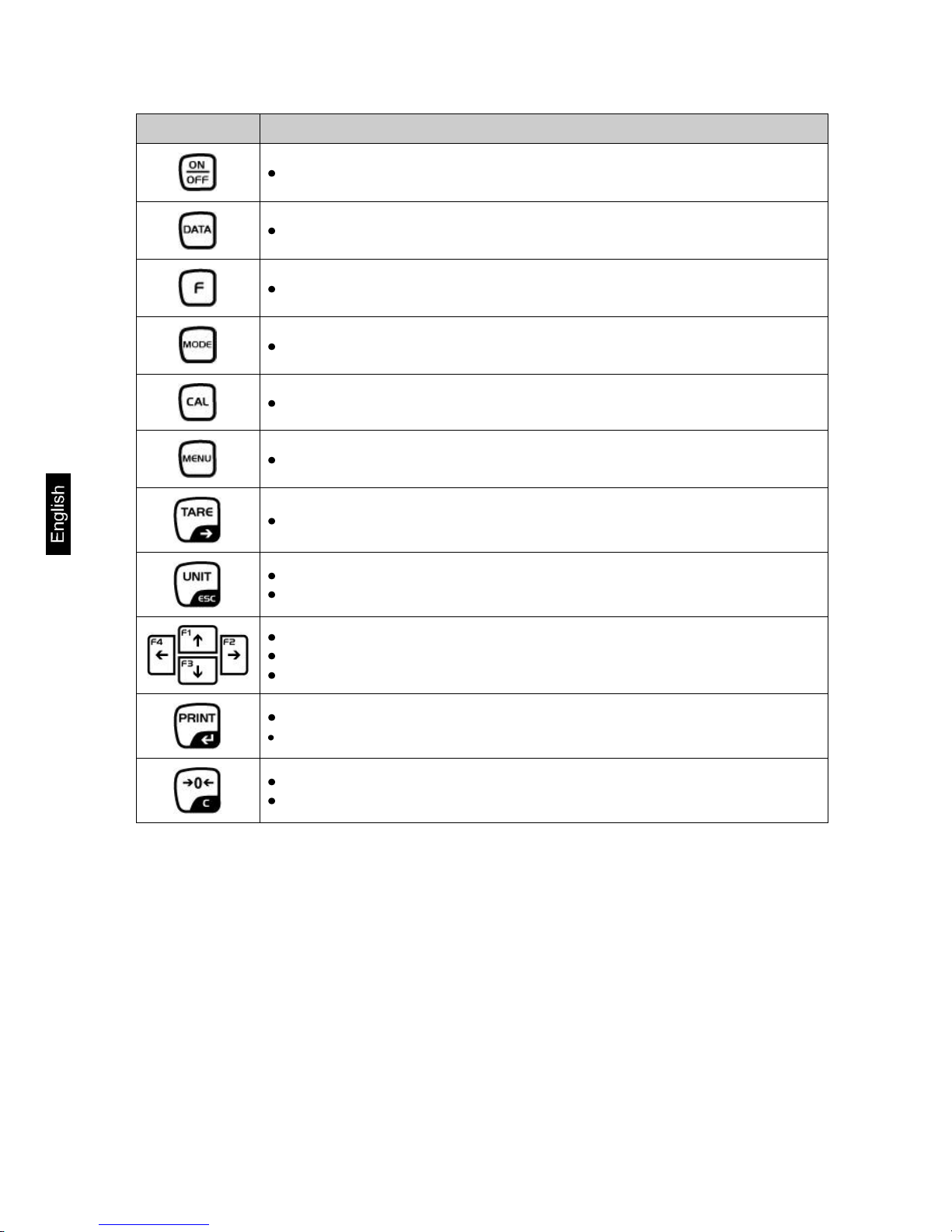
Button
Function
Turn on/off
Invoke data bases
Function key
Selection of operating mode
Invoke adjustment
Call up menu
Taring
Switch-over weighing unit
In menu: Return to weighing mode
Scroll backwards in menu
Scroll forward in menu
Navigation key, see chap. 2.1.1
Calculate weighing data via interface
Confirm/save in menu
Zeroing
Delete entry in data base
This manual suits for next models
2
Table of contents
Other KERN Scale manuals

KERN
KERN EMB 500-1BE User manual

KERN
KERN ALS Series User manual

KERN
KERN SFB User manual

KERN
KERN KERN MBB-M series User manual

KERN
KERN FIS User manual

KERN
KERN EMS Series User manual

KERN
KERN PFB Series User manual

KERN
KERN PBJ 420-3M User manual

KERN
KERN MBB User manual

KERN
KERN EW - 300 - 2M User manual