JVC KD-AR370 User manual

ENGLISH
ESPAÑOL
FRANÇAIS
CD RECEIVER KD-AR370/KD-G320
RECEPTOR CON CD KD-AR370/KD-G320
RECEPTEUR CD KD-AR370/KD-G320
For canceling the display demonstration, see page 7.
Para cancelar la demostración en pantalla, consulte la página 7.
Pour annuler la démonstration des affichages, référez-vous à la page 7.
For installation and connections, refer to the separate manual.
Para la instalación y las cone iones, refiérase al manual separado.
Pour l’installation et les raccordements, se référer au manuel séparé.
INSTRUCTIONS
MANUAL DE INSTRUCCIONES
MANUEL D’INSTRUCTIONS
For customer Use:
Enter below the Model
No. and Serial No. which
are located on the top or
bottom of the cabinet.
Retain this information
for future reference.
Model No.
Serial No.
GET0349-001A
[J]
Cover_KD-AR370_320[J]2.indd 2Cover_KD-AR370_320[J]2.indd 2 10/21/05 4:47:02 PM10/21/05 4:47:02 PM

2
ENGLISH
Thank you for purchasing a JVC product.
Please read all instructions carefully
before operation, to ensure your complete
understanding and to obtain the best possible
performance from the unit.
How to reset your unit
• Your preset adjustments will also be erased.
• If a disc is loaded, it will eject. Be careful not to
drop the disc.
How to forcibly eject a disc
• If this does not work, reset your unit.
• Be careful not to drop the disc when it ejects.
How to use the MODE button
If you press MO E, the unit goes into functions
mode, then the number buttons and 5/∞
buttons work as different function buttons.
Ex.: When number button 2 works as
MO (monaural) button.
To use these buttons for their original
functions again after pressing MODE, wait for
5 seconds without pressing any of these buttons
until the functions mode is cleared or press
MO E again.
INFORMATION (For .S.A.)
This equipment has been tested and found
to comply with the limits for a Class B digital
device, pursuant to Part 15 of the FCC
Rules. These limits are designed to provide
reasonable protection against harmful
interference in a residential installation.
This equipment generates, uses, and can
radiate radio frequency energy and, if not
installed and used in accordance with the
instructions, may cause harmful interference
to radio communications. However, there
is no guarantee that interference will not
occur in a particular installation. If this
equipment does cause harmful interference
to radio or television reception, which can
be determined by turning the equipment
off and on, the user is encouraged to try to
correct the interference by one or more of
the following measures:
– Reorient or relocate the receiving antenna.
– Increase the separation between the
equipment and receiver.
– Connect the equipment into an outlet on
a circuit different from that to which the
receiver is connected.
– Consult the dealer or an experienced
radio/TV technician for help.
Caution:
Changes or modifications not approved
by JVC could void the user’s authority to
operate the equipment.
IMPORTANT FOR LASER PROD CTS
1. CLASS 1 LASER PRO UCT
2. CAUTION: o not open the top cover.
There are no user serviceable parts inside
the unit; leave all servicing to qualified
service personnel.
3. CAUTION: Visible and invisible laser
radiation when open and interlock failed or
defeated. Avoid direct exposure to beam.
Time countdown indicator
EN02-05KD-AR370_320[J]f.indd 2EN02-05KD-AR370_320[J]f.indd 2 11/15/05 5:23:02 PM11/15/05 5:23:02 PM

ENGLISH
3
How to read this manual
• Button operations are mainly explained with
the illustrations in the table below.
• Some related tips and notes are explained in
“More about this unit” (see pages 20 – 22).
Press briefly.
Press repeatedly.
Press either
one.
Press and hold until your
desired response begins.
Press and hold both
buttons at the same time.
The following marks are used to indicate...
: Built-in CD player operations.
: xternal CD changer operations.
: Indicator displayed for the
corresponding operation.
How to detach/attach the control
panel
CONTENTS
Control panel — KD-AR370 and KD-G320 ....... 4
Remote controller — RM-RK50 .............. 5
Getting started ................................. 6
Basic operations .................................................... 6
Radio operations .............................. 7
Disc operations ................................. 8
Playing a disc in the unit ...................................... 8
Playing discs in the CD changer ............................ 9
Sound adjustments ........................... 11
General settings — PSM ................... 12
Satellite radio operations .................. 15
iPod®/D. player operations ................ 18
Other external component operations
... 20
More about this unit ......................... 20
Maintenance .................................... 23
roubleshooting ............................... 24
Specifications ................................... 27
Warning:
If you need to operate the unit while driving,
be sure to look ahead carefully or you may be
involved in a traffic accident.
For safety...
• Do not raise the volume level too much, as
this will block outside sounds, making driving
dangerous.
• Stop the car before performing any
complicated operations.
emperature inside the car...
If you have parked the car for a long time in hot
or cold weather, wait until the temperature in
the car becomes normal before operating the
unit.
Detaching...
Attaching...
EN02-05KD-AR370_320[J]f.indd 3EN02-05KD-AR370_320[J]f.indd 3 10/31/05 2:18:57 PM10/31/05 2:18:57 PM

4
ENGLISH
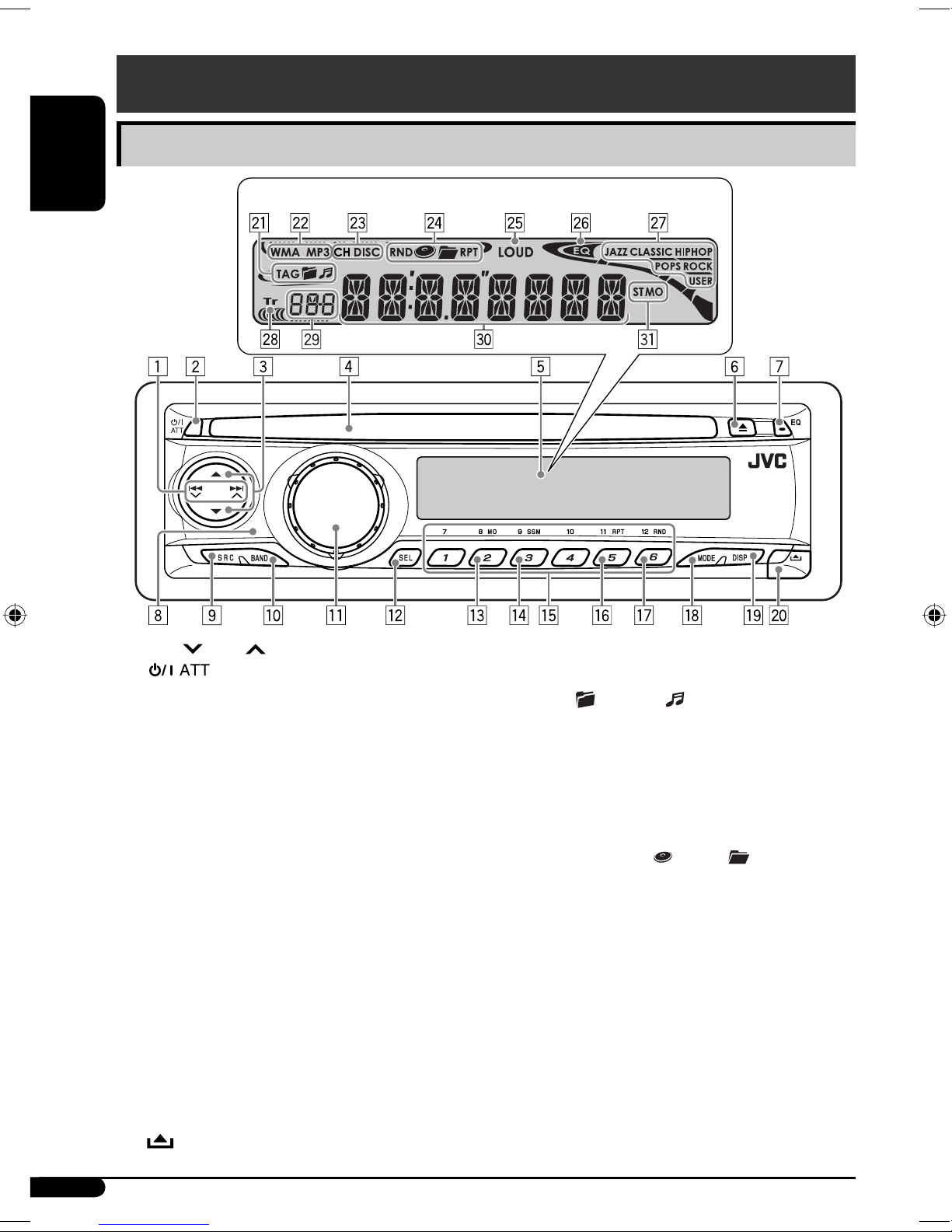
Control panel — KD-G612/KD-G611/KD-G511
1 4 /¢ buttons
2 (standby/on attenuator) button
3 5 (up) / ∞ (down) buttons
4 Loading slot
5 Display window
6 0 (eject) button
7 EQ (equalizer) button
8 Remote sensor
DO NOT expose the remote sensor to strong
light (direct sunlight or artificial lighting).
9 SR (source) button
p BAND button
q ontrol dial
w SEL (select) button
e MO (monaural) button
r SSM (Strong-station Sequential Memory)
button
t Number buttons
y RPT (repeat) button
u RND (random) button
i MODE button
o DISP (display) button
; (control panel release) button
Display window
a Disc information indicators—TAG (ID3
Tag), (folder), (track/file)
s Disc type indicators—WMA, MP3
d Playback source indicators—
H: Lights up only when CD-C is
selected as the playback source.
DIS : Lights up for the built-in CD player.
f Playback mode / item indicators—
RND (random), (disc), (folder),
RPT (repeat)
g LOUD (loudness) indicator
h EQ (equalizer) indicator
j Sound mode ( -EQ: custom equalizer)
indicators—JAZZ, LASSI , HIP HOP,
POPS, RO K, USER
k Tr (track) indicator
l Source display / Volume level indicator
/ Main display
z Tuner reception indicators—ST (stereo),
MO (monaural)
Parts identification
Display window
Control panel — KD-AR370 and KD-G320
EN02-05KD-AR370_320[J]f.indd 4EN02-05KD-AR370_320[J]f.indd 4 10/28/05 5:32:19 PM10/28/05 5:32:19 PM

ENGLISH
5
Remote controller — RM-RK50
Installing the lithium coin battery
(CR2025)
Aim the remote controller directly at the
remote sensor on the unit. Make sure there is
no obstacle in between.
Warning:
• Do not install any battery other than
CR2025 or its equivalent; otherwise, it may
explode.
• tore the battery in a place where children
cannot reach to avoid risk of accident.
• To prevent the battery from over-heating,
cracking, or starting a fire:
– Do not recharge, short, disassemble, heat
the battery, or dispose of it in a fire.
– Do not leave the battery with other
metallic materials.
– Do not poke the battery with tweezers or
similar tools.
– Wrap the battery with tape and insulate
when throwing away or saving it.
Caution:
Main elements and features
1 (standby/on/attenuator) button
• Turns the power on if pressed briefly or
attenuates the sound when the power is
on.
• Turns the power off if pressed and held.
2 5 U (up) / D (down) ∞ buttons
• Changes the FM/AM bands with 5 U.
• Changes the preset stations with D ∞.
• Changes the folder of the MP3/WMA
discs.
• While playing an MP3 disc on an
MP3-compatible CD changer:
– Changes the disc if pressed briefly.
– Changes the folder if pressed and held.
• While listening to the satellite ( IRIU or
XM) radio:
– Changes the categories.
• While listening to an Apple iPod® or a
JVC D. player:
– Pauses/stops or resumes playback with
D ∞.
– Enters the main menu with 5 U.
(Now 5 U/D ∞/2 R/F 3 work as the
menu selecting buttons.)*
3 VOL – / VOL + buttons
• Adjusts the volume level.
* 5 U : Returns to the previous menu.
D ∞ : Confirms the selection.
To be continued...
EN02-05KD-AR370_320[J]f.indd 5EN02-05KD-AR370_320[J]f.indd 5 11/15/05 5:23:08 PM11/15/05 5:23:08 PM

6
ENGLISH
!
• For FM/AM tuner
• For SIRIUS radio
• For XM radio
⁄ Adjust the volume.
@ Adjust the sound as you want. (See
pages and 2.)
Caution on volume setting:
Discs produce very little noise compared
with other sources. Lower the volume
before playing a disc to avoid damaging
the speakers by the sudden increase of the
output level.
To drop the volume in a
moment (ATT)
To restore the sound, press
it again.
To turn off the power
Volume level indicator
Volume level appears.
4 SO ND button
• Selects the sound mode (C-EQ: custom
equalizer).
5 SO RCE button
• Selects the source.
6 2 R (reverse) / F (forward) 3 buttons
• Searches for stations if pressed briefly.
• Fast-forwards or reverses the track if
pressed and held.
• Changes the tracks if pressed briefly.
• While listening to the satellite radio:
– Changes the channels if pressed briefly.
– Changes the channels rapidly if pressed
and held.
• While listening to an iPod or a D. player
(in menu selecting mode):
– Selects an item if pressed briefly. (Then,
press D ∞ to confirm the selection.)
– Skips 10 items at a time if pressed and
held.
Getting started
Basic operations
~ Turn on the power.
Ÿ
* You cannot select these sources if they
are not ready or not connected.
EN06-11KD-AR370_320[J]f.indd 6EN06-11KD-AR370_320[J]f.indd 6 10/28/05 5:34:24 PM10/28/05 5:34:24 PM

7
ENGLISH
Basic settings
• See also “General settings — PSM” on pages
12 – 14.
1
2
1 Canceling the display
demonstrations
Select “DEMO,” then “DEMO OFF.”
2 Setting the clock
Select “CLOCK H” (hour), then adjust
the hour.
Select “CLOCK M” (minute), then
adjust the minute.
3 Finish the procedure.
To check the current clock
time when the power is
turned off
Radio operations
~
Ÿ
Lights up when receiving an FM stereo
broadcast with sufficient signal strength.
Selected band appears.
! Start searching for a station.
When a station is received, searching
stops.
To stop searching, press the same button
again.
To tune in to a station manually
In step ! above...
1
2 Select a desired station frequency.
When an F stereo broadcast is hard to
receive
Reception improves, but stereo effect will be
lost.
To restore the stereo effect, repeat the same
procedure. “MONO OFF” appears and the MO
indicator goes off.
Lights up when monaural mode is activated.
EN06-11KD-AR370_320[J]2.indd 7EN06-11KD-AR370_320[J]2.indd 7 10/21/05 4:46:42 PM10/21/05 4:46:42 PM

8
ENGLISH
Listening to a preset station
1
2 Select the preset station ( – 6) you
want.
or
To check the other information while
listening to an F or A station
Disc operations
Playing a disc in the unit
All tracks will be played repeatedly until you
change the source or eject the disc.
To stop play and eject the
disc
Storing stations in memory
You can preset six stations for each band.
F station automatic presetting —
SS (Strong-station Sequential
emory)
1 Select the FM band (FM – FM3) you
want to store into.
2
3
“SSM” flashes, then disappears when
automatic presetting is over.
Local FM stations with the strongest signals are
searched and stored automatically in the FM
band.
anual presetting
Ex.: Storing FM station of 92.5 MHz into preset
number 4 of the FM1 band.
1
2
3
Clock Ô Frequency
Preset number flashes for a while.
EN06-11KD-AR370_320[J]2.indd 8EN06-11KD-AR370_320[J]2.indd 8 10/21/05 4:46:43 PM10/21/05 4:46:43 PM

9
ENGLISH
Playing discs in the CD changer
All discs in the magazine will be played
repeatedly until you change the source.
• Ejecting the magazine will also stop playing.
~
* If you have changed the external input
setting to “EXT IN” (see page 1 ), you
cannot select the CD changer.
Ÿ Select a disc.
For disc number from 01 – 06:
For disc number from 07 – 12:
About P3 and W A discs
MP3 and WMA “tracks” (words “file” and
“track” are used interchangeably) are recorded
in “folders.”
About the CD changer
It is recommended to use a JVC
MP3-compatible CD changer with your unit.
• You can also connect other CH-X series CD
changers (except CH-X99 and CH-X100).
These units are not compatible with MP3
discs.
• You cannot play any WMA disc in the CD
changer.
• You cannot use the KD-MK series CD
changers with this unit.
• Disc text information recorded in the CD
Text can be displayed when a JVC CD Text
compatible CD changer is connected.
• For connection, see Installation/Connection
Manual (separate volume).
To fast-forward or reverse the track
To go to the next or previous tracks
To go to the next or previous folders (only for
P3 or W A discs)
For MP3 discs:
For WMA discs:
To locate a particular track (for CD) or folder
(for P3 or W A discs) directly
To select a number from 01 – 06:
To select a number from 07 – 12:
• To use direct folder access on MP3/WMA
discs, it is required that folders are assigned
with 2-digit numbers at the beginning of their
folder names—01, 02, 03, and so on.
To select a
particular track in a
folder (for MP3 or
WMA discs):
EN06-11KD-AR370_320[J]2.indd 9EN06-11KD-AR370_320[J]2.indd 9 10/21/05 4:46:44 PM10/21/05 4:46:44 PM

10
ENGLISH
Changing the display information
While playing an audio CD or a CD Text
While playing an MP3 or a WMA*2 disc
• When “TAG DISP” is set to
“TAG ON” (see page 14)
• When “TAG DISP” is set to
“TAG OFF”
: Cloc with the current trac number
: Elapsed playing time with the
current trac number
*1 If the current disc is an audio CD,
“NO NAME” appears.
*2 Only for the built-in CD player.
*3 If an M 3/WMA file does not have Tag
information, folder name and file name
appear. In this case, the TAG indicator will
not light up.
Other main functions
Skipping tracks uickly during play
Only possible on JVC
MP3-compatible CD changer
• For MP3 or WMA discs, you can skip tracks
within the same folder
Ex : To select track 32 while playing a track
whose number is a single digit (1 to 9)
1
2
Each time you press the button, you can
skip 10 tracks
• After the last track, the first track will be
selected and vice versa
3
Prohibiting disc ejection
You can lock a disc in the loading slot
To cancel the prohibition, repeat the same
procedure
EN06-11KD-AR370_320[J]f.indd 10EN06-11KD-AR370_320[J]f.indd 10 11/15/05 5:23:38 PM11/15/05 5:23:38 PM
Other manuals for KD-AR370
1
This manual suits for next models
2
Table of contents
Other JVC Car Receiver manuals