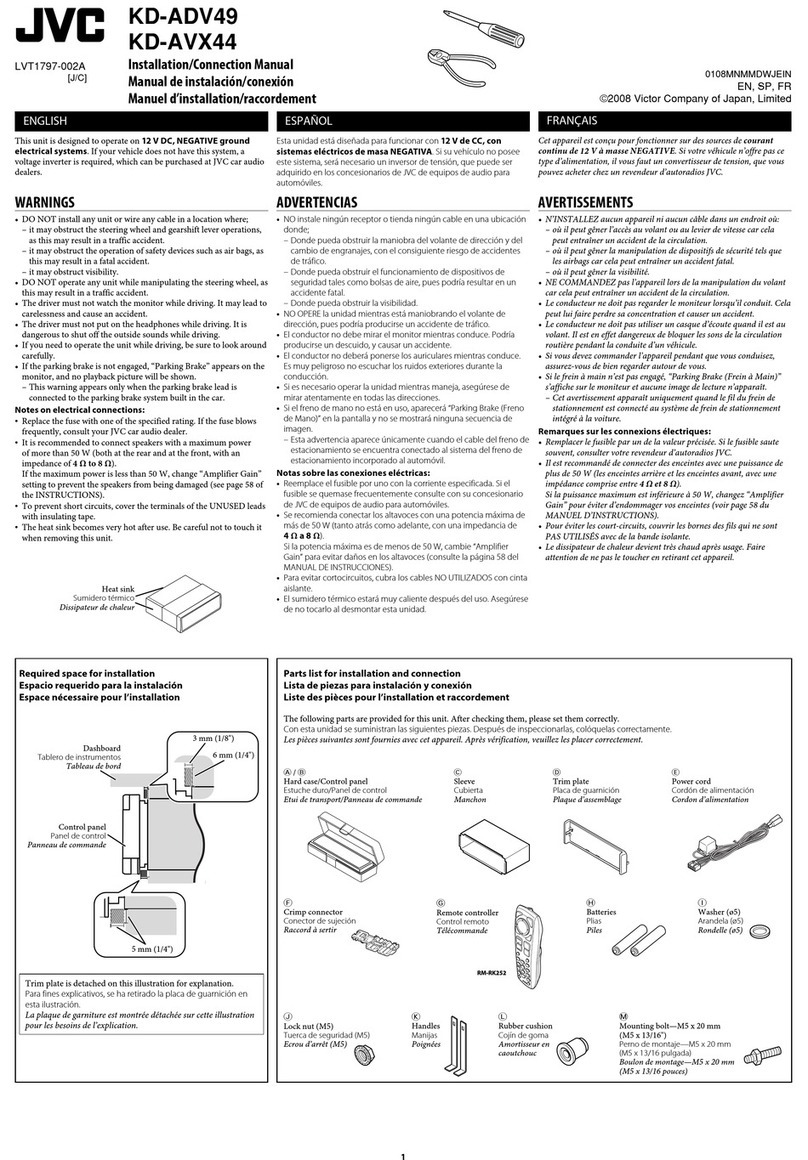
JVC KW-XG504 User manual

For canceling the display demonstration, see page 4.
For installation and connections, refer to the separate manual.
INSTRUCTIONS
GET0464-001A
[UI]
CD RECEIVER KW-XG504
Cover_KW-XG504[UI]_f.indd 1Cover_KW-XG504[UI]_f.indd 1 4/4/07 4:56:07 PM4/4/07 4:56:07 PM

2
Thank you for purchasing a JVC product.
Please read all instructions carefully before operation, to ensure your complete understanding and to obtain the best
possible performance from the unit.
IMPORTANT FOR LASER PRODUCTS
1. CLA 1 LA ER PRODUCT
2. CAUTION: Do not open the top cover. There are no user serviceable parts inside the unit; leave all servicing to
qualified service personnel.
3. CAUTION: Visible and/or invisible class 1M laser radiation when open. Do not view directly with optical
instruments.
4. REPRODUCTION OF LABEL: CAUTION LABEL, PLACED OUT IDE THE UNIT.
[European Union only]
For safety...
• Do not raise the volume level too much, as this will
block outside sounds, making driving dangerous.
• top the car before performing any complicated
operations.
Temperature inside t e car...
If you have parked the car for a long time in hot or cold
weather, wait until the temperature in the car becomes
normal before operating the unit.
Warning:
If you need to operate the unit while driving, be sure to
look around carefully or you may be involved in a traffic
accident.
EN02-07_KW-XG504[UI]_f.indd 2EN02-07_KW-XG504[UI]_f.indd 2 4/4/07 4:56:30 PM4/4/07 4:56:30 PM

3
How to reset your unit
• Your preset adjustments will also be erased.
How to forcibly eject a disc
• Be careful not to drop the disc when it ejects.
• If this does not work, reset your unit.
How to use t e MODE button
If you press MODE, the unit goes into functions
mode, then the number buttons and 5/∞ buttons
work as different function buttons.
[Within 5 seconds...]
CONTENTS
INTRODUCTIONS
Preparation ...................................... 4
OPERATIONS
Basic operations ................................ 5
• Using t e control panel ................ 5
• Using t e remote controller
(RM-RK50) ................................... 6
Listening to t e radio ......................... 8
Disc operations .................................. 9
EXTERNAL DEVICES
Listening to t e CD c anger ................ 11
Listening to t e iPod / D. player .......... 13
Listening to t e ot er external
components ...................................... 14
SETTINGS
Selecting a preset sound mode ............ 16
General settings — PSM ..................... 17
Assigning titles .................................. 19
REFERENCES
Maintenance ..................................... 20
More about t is unit .......................... 21
Troubles ooting ................................ 23
Specifications .................................... 26
EN02-07_KW-XG504[UI]_f.indd 3EN02-07_KW-XG504[UI]_f.indd 3 4/4/07 4:56:32 PM4/4/07 4:56:32 PM

4INTRODUCTIONS
Preparation
Cancel t e display demonstration and set t e clock
• ee also page 18.
~ Turn on the power.
Ÿ Enter the PSM settings.
! ] ⁄ Cancel the display de onstrations
elect “DEMO,” then “DEMO OFF.”
Set the clock
elect “CLOCK H” (hour), then adjust the hour.
elect “CLOCK M” (minute), then adjust the minute.
@ Finish the procedure.
Caution on volume setting:
Discs produce very little noise compared with other sources. Lower the volume before playing a disc to avoid
damaging the speakers by the sudden increase of the output level.
When the power is turned off: Check the current clock time
When the power is turned on: Change the display information
EN02-07_KW-XG504[UI]_f.indd 4EN02-07_KW-XG504[UI]_f.indd 4 4/4/07 4:56:32 PM4/4/07 4:56:32 PM
5OPERATIONS
Basic operations
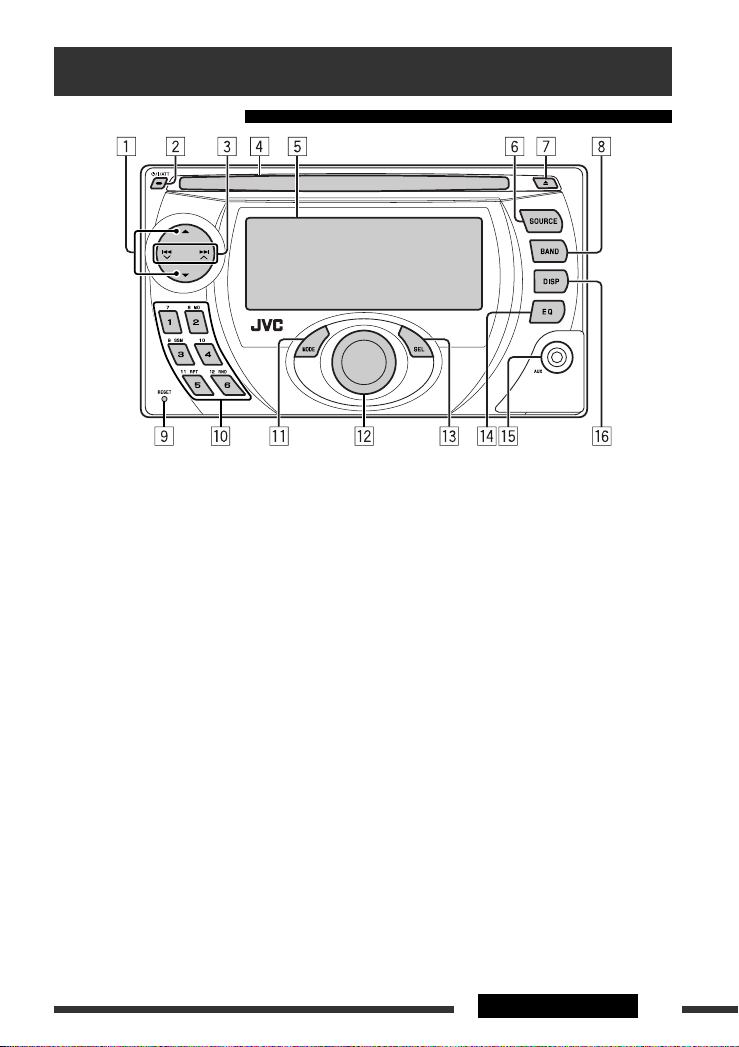
Using t e control panel
1 • FM/AM: elect preset station.
• CD/CD-CH: elect folder.
• IPOD/D.PLAYER: Enter the main menu/Pause or
stop playback/Confirm selection.
2 • Turn on the power.
• Turn off the power [Hold].
• Attenuate the sound (if the power is on).
3 • FM/AM: earch for station.
• CD/CD-CH: elect track.
• IPOD/D.PLAYER: elect track.
4 Loading slot
5 Display window
6 elect the source.
FM/AM = CD * = CD-CH */IPOD */D.PLAYER *
(or EXT IN) = AUX IN = (back to the beginning)
* You cannot select these sources if they are not
ready or not connected.
7 Eject disc.
8 elect the bands.
9 Reset button
p • FM/AM: elect preset station.
• CD/CD-CH: elect folder/track/disc (for CD
changer).
q Enter functions mode.
Press MODE, then one of the following buttons
(within 5 seconds)...
MO : Turn on/off monaural reception.
SSM : Automatic station presetting [Hold].
RPT : elect repeat play.
RND : elect random play.
5 / ∞ : kip 10 tracks.
w Volume control [Turn].
e • Enter the P M settings [Hold].
• Adjust the sound mode.
r elect the sound mode.
t AUX (auxiliary) input jack
y Change the display information.
EN02-07_KW-XG504[UI]_f.indd 5EN02-07_KW-XG504[UI]_f.indd 5 4/4/07 4:56:32 PM4/4/07 4:56:32 PM

6
Before using the re ote controller:
• Aim the remote controller directly at the remote
sensor on the unit.
• DO NOT expose the remote sensor to bright light
(direct sunlight or artificial lighting).
Display window
Using t e remote controller (RM-RK50)
Installing the lithiu coin battery (CR2025)
Remote sensor
1 Playback source indicators
2 Track information indicators
3 Main display
(Menu, playback information)
4 Tuner reception indicators
5 Playback mode/item indicators
(Random/Repeat)
6 • pectrum analyzer meter
• Volume level indicator
7 ound mode indicators
8 Equalizer indicator
9 Loudness indicator
p Analyzer indicator
q Clock indicator
w Track indicator
e ource display/Preset No./Track No./Folder No./
Disc No.
EN02-07_KW-XG504[UI]_f.indd 6EN02-07_KW-XG504[UI]_f.indd 6 4/4/07 4:56:33 PM4/4/07 4:56:33 PM

7OPERATIONS
Warning:
To prevent accidents and da age
• Do not install any battery other than CR2025 or
its equivalent.
• Do not leave the remote controller in a place
(such as dashboards) exposed to direct sunlight
for a long time.
• tore the battery in a place where children
cannot reach.
• Do not recharge, short, disassemble, heat the
battery, or dispose of it in a fire.
• Do not leave the battery with other metallic
materials.
• Do not poke the battery with tweezers or similar
tools.
• Wrap the battery with tape and insulate when
throwing away or saving it.
1 • Turns the power on if pressed briefly or
attenuates the sound when the power is on.
• Turns the power off if pressed and held.
2 • Changes the FM/AM bands with 5 U.
• Changes the preset stations with D ∞.
• Changes the folder of the MP3/WMA.
• While playing an MP3 disc on an
MP3-compatible CD changer:
– Changes the disc if pressed briefly.
– Changes the folder if pressed and held.
• While listening to an Apple iPod or a JVC
D. player:
– Pauses/stops or resumes playback with D ∞.
– Enters the main menu with 5 U.
(Now 5 U/D ∞/2 R/F 3 work as the menu
selecting buttons.)*
*
5 U : Returns to the previous menu.
D
∞ : Confirms the selection.
3 Adjusts the volume level.
4 elects the sound mode (iEQ: intelligent equalizer).
5 elects the source.
6 • earches for stations if pressed briefly.
• Fast-forwards or reverses the track if pressed and
held.
• Changes the tracks if pressed briefly.
• While listening to an iPod or a D. player (in menu
selecting mode):
– elects an item if pressed briefly. (Then, press
D ∞ to confirm the selection.)
– kips 10 items at a time if pressed and held.
EN02-07_KW-XG504[UI]_f.indd 7EN02-07_KW-XG504[UI]_f.indd 7 4/4/07 4:56:33 PM4/4/07 4:56:33 PM

8
Listening to the radio
Change the display information
~ Select “FM/AM.”
Ÿ Select the bands.
! Search for a station to listen—Auto Search.
Manual Search: Hold either one of the buttons until “M” flashes on the display, then press it repeatedly.
* If no title is assigned to a station, “NO NAME” appears. To assign a title to a station, see page 19.
Select preset station.
When an FM stereo broadcast is hard
to receive
1
2
Reception improves, but stereo effect will be lost.
• M indicator lights up.
FM station automatic presetting —
SSM (Strong-station Sequential
Memory)
You can preset up to six stations for each band.
1
2
Lights up when receiving an FM stereo
broadcast with sufficient signal strength.
EN08-13_KW-XG504[UI]_f.indd 8EN08-13_KW-XG504[UI]_f.indd 8 4/4/07 4:57:11 PM4/4/07 4:57:11 PM

9OPERATIONS
Continued on the next page
3
Local FM stations with the strongest signals are
searched and stored automatically in the FM band.
Manual presetting
Ex.: Storing FM station of 92.5 MHz into preset number
4 of the FM1 band.
1
2
3
Disc operations
Insert the disc.
Playback starts automatically.
Change the display information
MP3/WMA: Album name/performer (folder name *1) = Track
title (file name *1) = Elapsed playing time and Current track
number = (back to the beginning)
Audio CD/CD Text: Disc title/performer *2 = Track title *2 =
Elapsed playing time and Current track number = (back to the
beginning)
*1 If the file does not ha e Tag information
or “TAG DISP” is set to “TAG OFF” (see
page 19), folder name and file name
appear. TAG indicator will not light up.
*2 “NO NAME” appears for an audio CD.
EN08-13_KW-XG504[UI]_f.indd 9EN08-13_KW-XG504[UI]_f.indd 9 4/4/07 4:57:14 PM4/4/07 4:57:14 PM

10 OPERATIONS
Prohibiting disc ejection
To cancel the prohibition, repeat the same
procedure.
o stop play and eject the disc
• Press S URCE to listen to another
playback source.
Pressing (or holding) the following buttons allows you to...
Disc type
(Number buttons) *1
MP3/WMA
Press: Select track
Hold: Reverse/fast-forward
track
Select folder Locate particular folder
directly *2
Audio CD/
CD Text
Press: Select track
Hold: Reverse/fast-forward
track
—
Locate particular track directly
*1 Press to select number 1 to 6; hold to select number 7 to 12.
*2 It is required that folders be assigned with 2-digit numbers at the beginning of their folder names—01, 02, 03, and
so on.
After pressing M DE, press the following buttons to...
Disc type
MP3/WMA
Skip 10 tracks (within
the same folder)
TRK RPT:
Repeat current track
FLDR RPT:
Repeat current folder
FLDR RND:
Randomly play all tracks of
current folder, then tracks of
next folders
DISC RND:
Randomly play all tracks
Audio CD/
CD Text
Skip 10 tracks TRK RPT:
Repeat current track
DISC RND:
Randomly play all tracks
• To cancel repeat play or random play, select “RPT OFF” or “RND OFF.”
EN08-13_KW-XG504[UI]_f.indd 10EN08-13_KW-XG504[UI]_f.indd 10 4/4/07 4:57:15 PM4/4/07 4:57:15 PM
Table of contents
Other JVC Car Receiver manuals