IRRESISTIA BTVA28i User manual

IRRESISTIA®
Smart Body Fat Scale
VA Screen & Heart Rate
(BTVA28i)
User Manual

Ver. 1 Rev. 1
- 2 -

Ver. 1 Rev. 1
- 3 -
Thank you for choosing IRRESISTIA Smart
Body Fat Scale with VA Screen & Heart rate
functions! It is your personal health assistant
which uses Bio-electrical Impedance Analysis
(BIA) technology to provide you with your body
metrics data. This guide will help you get the
most out of your purchase.
§ Register your product within 30 days of
purchase for Extended Warranty & Support:
§ For any queries regarding product usage or
any other related concerns please contact
us:
Email: [email protected].uk
Visit: irresistia.co.uk/pages/contact

Ver. 1 Rev. 1
- 4 -
Important precautions & safety measures:
• Never disassemble the scale and handle the
scale carefully to avoid breakage.
• Never drop the scale or hit the glass surface with
any object as it can break and may cause injuries.
• Never jump or stamp on the scale. This scale is a
high-precision measuring device and doing so
can damage the internal components.
• Never immerse the scale in water or any other
liquid. To clean the surface, use a damp cloth or
glass cleaner. Do not use any chemicals.
• Never use the scale with wet feet as it will lead
to improper results.
• Never use the scale while wearing shoes or
socks as the scale cannot perform fully if doing
so.
• Never use the scale on a soft surface such as
carpet or linoleum as it may affect the accuracy
of the readings. Place the scale on a hard, flat
surface during use.

Ver. 1 Rev. 1
- 5 -
• This smart scale should not be used to diagnose
or treat any medical conditions. You should
always consult a doctor when undertaking any
diet or exercise program.
• If you are pregnant, you should not overly rely on
the data provided by this smart scale. Data
provided by the smart scale is for reference and
is not a substitute for advice from a licensed
health care professional.
• If you have a pacemaker or any other internal
electrical device in your body, please do not use
this scale as it uses Bio-electrical impedance
current to analyse your body metrics. This may
cause unwanted interference with your internal
device.
• Check the device before each use. Do not use
the device if damaged. Continuous usage of a
damaged product may cause injury or give
improper results.

Ver. 1 Rev. 1
- 6 -
How to use your smart body fat scale
Download ‘Fitdays’ App and install batteries
1. Scan the QR code below or search for ‘Fitdays’
app on the Apple App Store or Google Play Store.
2. Open the battery compartment and insert the
AAA batteries included in the box.
3. Select your preferred unit of measure
(kg/lb/st:lb) by pressing the button inside the
battery compartment.

Ver. 1 Rev. 1
- 7 -
Creating account and pairing the scale
4. Open the ‘Fitdays’ app and allow Bluetooth and
Location permissions if prompted.
Register an account with
your personal details.
After registration, fill in
all your essential details
such as gender, birthday
and height.
Next, press [Account]
and select [Device].
Press [+] on top right to
start searching for your
scale. Select ‘My_Scale’
to add the device.
5. Once the device has been paired, press ‘Go to
measure’ to finalise the process. The scale is
now ready to be calibrated.

Ver. 1 Rev. 1
- 8 -
Calibrating and using the scale
Your smart body fat scale must be calibrated the
first time and every time thereafter only when it is
moved or flipped upside down to ensure accurate
results.
6. To begin, place your scale of a hard, flat surface.
7. Step onto the scale with one foot until the digits
appear on the display and then step off
immediately.
8. Once the calibration process is completed, the
scale will show ‘0.00’ indicating the scale has
been calibrated and ready to be used.
9. To measure, step onto the scale and keep
standing still until all the data appears on the
display and all the icons have stopped blinking.
Your analysed data will appear on scale as well
as on your phone after completion.

Ver. 1 Rev. 1
- 9 -
Additional features
Your Smart body fat scale has Auto-recognition function.
After the initial use, you can use the smart scale without
opening the app.
After taking a measurement, when you open the app
within smart scale’s range, it will automatically sync and
assign the measured data to appropriate user when the
difference is within 2kg range.
If the difference is more than 2kg, the App will prompt to
select and assign the data to appropriate profile.
If the data does not belong to you, you may select and
delete it. To delete any data, press [Select], then select the
data and press [Delete].
Ver. 1 Rev. 1
- 10 -
Connecting Fitdays App to Fitness Apps
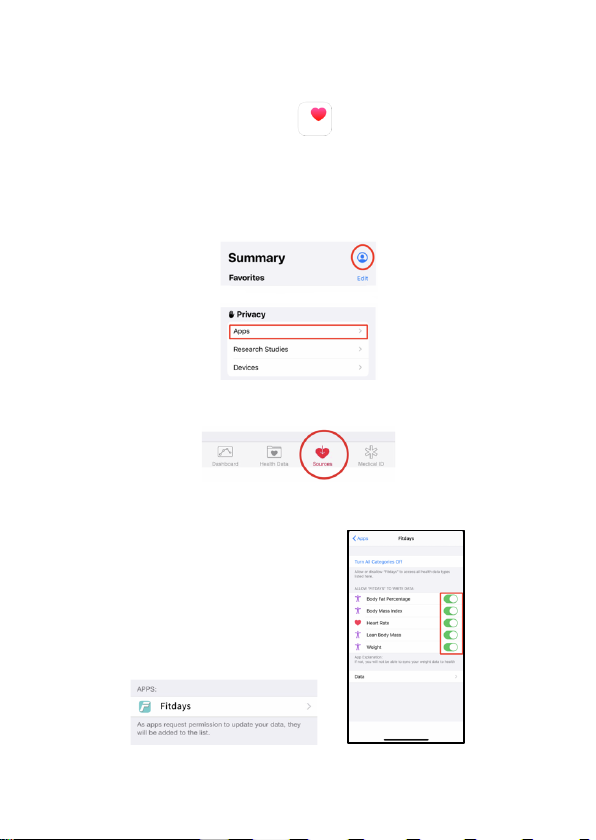
• Apple’s Health App
1. Open the Health App on your device.
a. On iOS version 13 and above:
i. Press the avatar icon on top right corner
ii. Select Apps under Privacy
b. On iOS version below 13:
i. Press the Sources icon from the menu
2. Select Fitdays App from the list and turn on all switches to
allow Fitdays to sync your data with Health App.
Table of contents
Other IRRESISTIA Scale manuals