
ICP DAS USA tDS-722 User manual
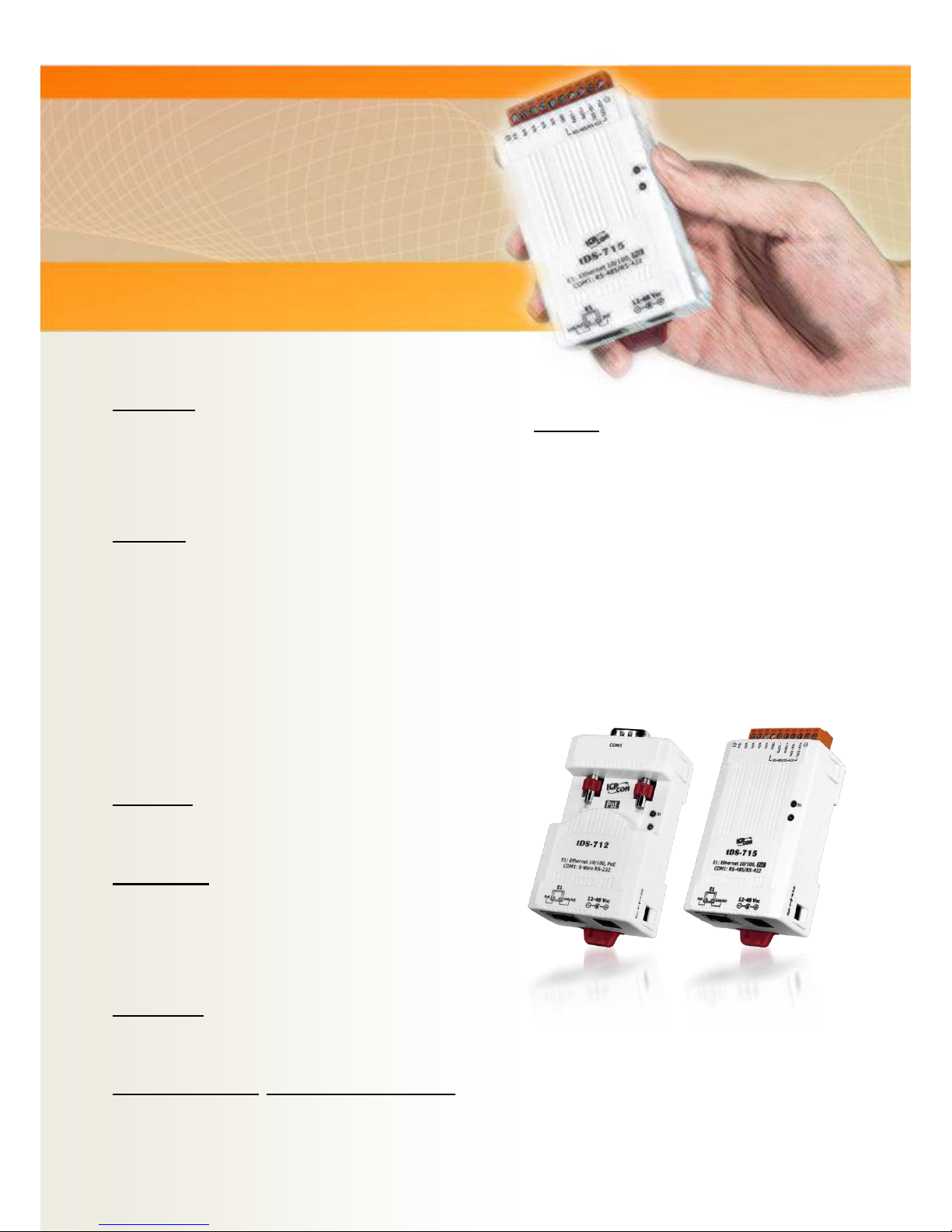
tDS-700 Series
User Manual Ver.1.9.1
Tiny Serial-to-Ethernet Device Server
WARRANTY
All products manufactured by ICP DAS are warranted
against defective materials for a period of one year
from the date of delivery to the original purchaser.
WARNING
ICP DAS assumes no liability for damages consequent
to the use of this product. ICP DAS reserves the right
to change this manual at any time without notice. The
information furnished by ICP DAS is believed to be
accurate and reliable. However, no responsibility is
assumed by ICP DAS for its use, nor for any
infringements of patents or other rights of third
parties resulting from its use.
COPYRIGHT
Copyright © 2016 by ICP DAS. All rights are reserved.
TRADEMARKS
Names are used for identification purposes only and
may be registered trademarks of their respective
companies.
CONTACT US
If you have any questions, please feel free to contact
us via email at:
SUPPORT
This manual relates to the following modules:
tDS-712, tDS-722, tDS-732
tDS-715, tDS-725, tDS735
tDS-718, tDS-724, tDS-734
tDS-712i, tDS-722i, tDS-732i
tDS-715i, tDS-725i, tDS735i
tDS-718i, tDS-724i, tDS-734i
tDSM-712

Tiny Serial-to-Ethernet Device Server
Copyright © 2016 ICP DAS CO., Ltd. All Rights Reserved. -2 -
TABLE OF CONTENTS
PACKING LIST............................................................................................................................................................. 4
MORE INFORMATION................................................................................................................................................ 4
1. INTRODUCTION ................................................................................................................................................ 5
1.1 ETHERNET SOLUTIONS.......................................................................................................................................... 7
1.2 VXCOMM TECHNOLOGY......................................................................................................................................... 8
1.3 WEB SERVER TECHNOLOGY................................................................................................................................. 10
2. HARDWARE INFORMATION .......................................................................................................................... 11
2.1 SPECIFICATIONS ................................................................................................................................................. 11
2.2 FEATURES.......................................................................................................................................................... 12
2.3 SELECTION GUIDE............................................................................................................................................... 13
2.4 APPEARANCE ..................................................................................................................................................... 14
2.5 DIMENSIONS ...................................................................................................................................................... 16
2.5.1 tDS-700 Series Module..................................................................................................................................... 16
2.5.2 CA-002 Cable.................................................................................................................................................... 17
2.6 PIN ASSIGNMENTS .............................................................................................................................................. 18
2.6.1 tDS-712/tDS-712i/tDSM-712.......................................................................................................................... 18
2.6.2 tDS-722/tDS-722i ............................................................................................................................................ 18
2.6.3 tDS-732/tDS-732i ............................................................................................................................................ 19
2.6.4 tDS-715/tDS-715i ............................................................................................................................................ 19
2.6.5 tDS-725/tDS-725i ............................................................................................................................................ 20
2.6.6 tDS-735/tDS-735i ............................................................................................................................................ 20
2.6.7 tDS-718/tDS-718i ............................................................................................................................................ 21
2.6.8 tDS-724/tDS-724i ............................................................................................................................................ 21
2.6.9 tDS-734/tDS-734i ............................................................................................................................................ 22
2.7 WIRING NOTES FOR RS-232/485/422 INTERFACES ........................................................................................... 23
2.7.1 RS-232 Wiring.................................................................................................................................................. 23
2.7.2 RS-422 Wiring.................................................................................................................................................. 24
2.7.3 RS-485 Wiring.................................................................................................................................................. 24
3. SETTING UP THE TDS-700 MODULE............................................................................................................. 25
4. WEB CONFIGURATION ................................................................................................................................... 33
4.1 LOGGING IN TO THE TDS-700 WEB SERVER ......................................................................................................... 33
4.2 HOME PAGE ....................................................................................................................................................... 35
4.3 NETWORK SETTING ............................................................................................................................................ 36
4.3.1 IP Address Settings..................................................................................................................................... 36
4.3.2 General Settings ......................................................................................................................................... 39

Tiny Serial-to-Ethernet Device Server
Copyright © 2016 ICP DAS CO., Ltd. All Rights Reserved. -3 -
4.3.3 Restore Factory Defaults............................................................................................................................ 41
4.3.4 Remote Firmware Update.......................................................................................................................... 43
4.4 SERIAL PORT PAGE ............................................................................................................................................. 44
4.4.1 Port1 Settings............................................................................................................................................. 44
4.5 FILTER PAGE...................................................................................................................................................... 47
4.5.1 Accessible IP (filter is disabled when all zero) .......................................................................................... 47
4.6 MONITOR PAGE.................................................................................................................................................. 49
4.7 CHANGE PASSWORD............................................................................................................................................ 50
4.8 LOGOUT PAGE .................................................................................................................................................... 51
5. TYPICAL APPLICATIONS ................................................................................................................................ 52
5.1 VIRTUAL COM APPLICATION............................................................................................................................... 53
5.2 DIRECT SOCKET CONNECTION APPLICATIONS........................................................................................................ 54
5.3 ETHERNET I/O APPLICATIONS ............................................................................................................................ 57
5.4 PAIR-CONNECTION APPLICATIONS........................................................................................................................ 59
5.5 TCP CLIENT MODE APPLICATIONS....................................................................................................................... 66
6. CGI CONFIGURATION ..................................................................................................................................... 74
6.1 CGI URL SYNTAX............................................................................................................................................... 74
6.2 CGI COMMAND LIST ........................................................................................................................................... 75
APPENDIX A: GLOSSARY ......................................................................................................................................... 77
1. ARP (ADDRESS RESOLUTION PROTOCOL)..................................................................................................................... 77
2. CLIENTS AND SERVERS ............................................................................................................................................... 77
3. ETHERNET................................................................................................................................................................ 78
4. FIRMWARE .............................................................................................................................................................. 78
5. GATEWAY................................................................................................................................................................ 78
6. ICMP (INTERNET CONTROL MESSAGE PROTOCOL)......................................................................................................... 78
7. INTERNET ................................................................................................................................................................ 78
8. IP (INTERNET PROTOCOL)ADDRESS ............................................................................................................................. 79
9. MAC (MEDIA ACCESS CONTROL)ADDRESS .................................................................................................................. 79
10. PACKET .............................................................................................................................................................. 79
11. PING .................................................................................................................................................................. 79
12. RARP (REVERSE ADDRESS RESOLUTION PROTOCOL)................................................................................................. 80
13. SOCKET .............................................................................................................................................................. 80
14. SUBNET MASK..................................................................................................................................................... 80
15. TCP (TRANSMISSION CONTROL PROTOCOL)............................................................................................................. 80
16. TCP/IP .............................................................................................................................................................. 81
17. UDP (USER DATAGRAM PROTOCOL)...................................................................................................................... 81
APPENDIX B: ACTUAL BAUD RATE MEASUREMENT............................................................................................ 82
Tiny Serial-to-Ethernet Device Server
Copyright © 2016 ICP DAS CO., Ltd. All Rights Reserved. -4 -
Packing List
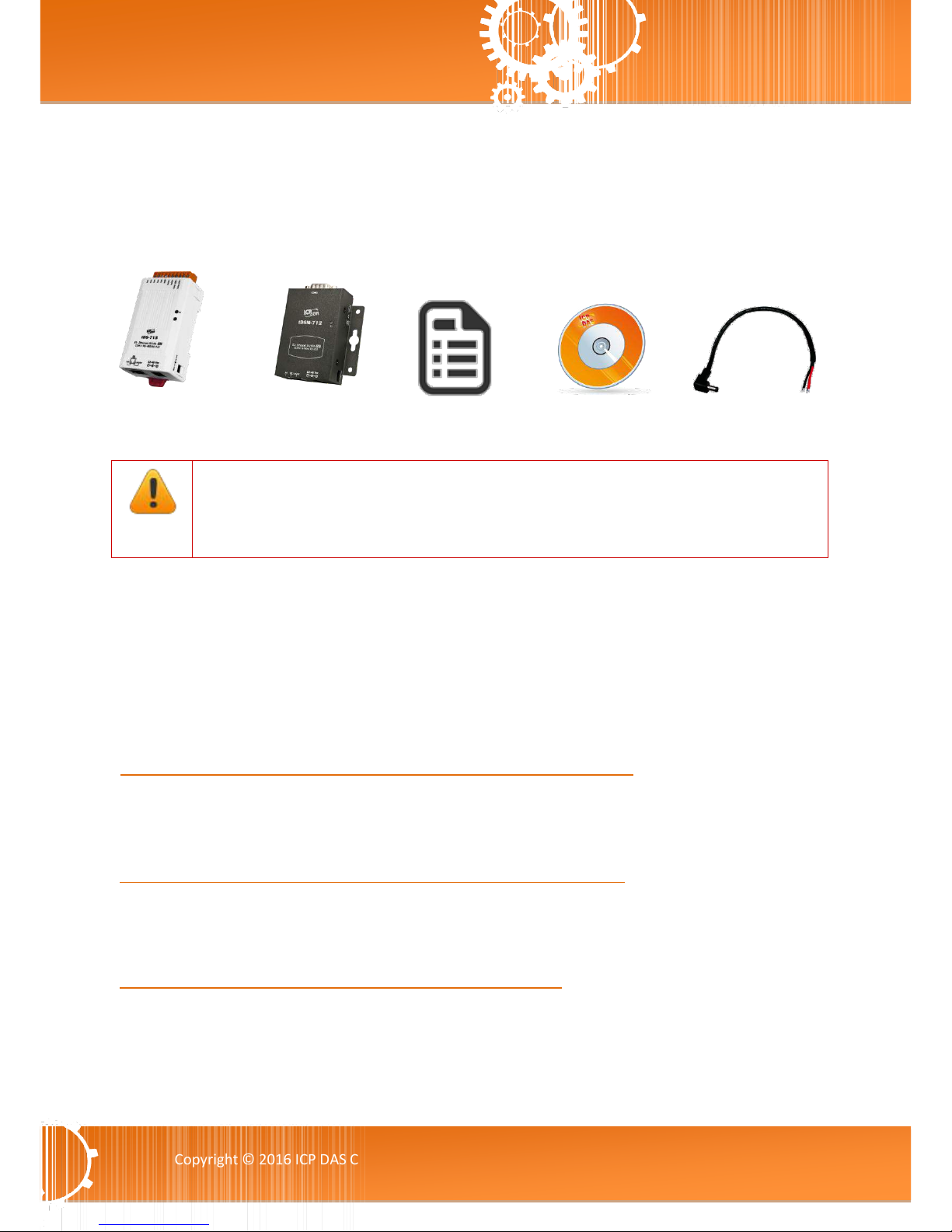
The shipping package includes the following items:
Note
If any of these items are missing or damaged, please contact the local distributor for
more information. Save the shipping materials and cartons in case you need to ship the
module in the future.
More Information
Documentation
CD:\NAPDOS\tDS-700\Document
http://ftp.icpdas.com/pub/cd/tinymodules/napdos/tds-700/document/
Firmware
CD:\NAPDOS\tDS-700\Firmware
http://ftp.icpdas.com/pub/cd/tinymodules/napdos/tds-700/firmware/
Software
CD:\NAPDOS\Software
http://ftp.icpdas.com/pub/cd/tinymodules/napdos/software/
tDS-700/tDS-700i/tDSM-700 Series
Quick Start
Software CD
CA-002 Cable
Or

Tiny Serial-to-Ethernet Device Server
Copyright © 2016 ICP DAS CO., Ltd. All Rights Reserved. -5 -
1. Introduction
The tDS-700 is a series of Serial-to-Ethernet device servers that are
designed to add Ethernet and Internet connectivity to any RS-232
and RS-422/485 device, and to eliminate the cable length limitation
of legacy serial communications. By using the VxComm
Driver/Utility, the built-in COM Port of the tDS-700 series can be
virtualized to a standard PC COM Port in Windows. Therefore,
users can transparently access or monitor serial devices over the
Internet/Ethernet without the need for software modification.
tDS-700 device servers can be used to create a pair-connection application (as well as serial-bridge
or serial-tunnel), and then route data between two serial devices via TCP/IP. This is useful when
connecting mainframe computers, servers or other serial devices that do not themselves have
Ethernet capability. By virtue of its protocol independence and flexibility, the tDS-700 meets the
demands of virtually any network-enabled application.

Tiny Serial-to-Ethernet Device Server
Copyright © 2016 ICP DAS CO., Ltd. All Rights Reserved. -6 -
In harsh industrial environments, the tDS-700 series (for i version) also adds 2500 VDC and +/- 4 kV
ESD protection component that diverts the potentially damaging charge away from sensitive circuit
to protects the module and equipment from the sudden and momentary electric current.
To achieve maximum space savings, the tDS-700 is offered in an amazingly small form-factor that
enables it to be easily installed anywhere, even directly attached to a serial device or embedded
into a machine. The tDS-700 features a powerful 32-bit MCU that allows it to efficiently handle
network traffic. The tDS-700 offers true IEEE 802.3af-compliant (classification, Class 1) Power-over-
Ethernet (PoE) functionality using a standard category 5 Ethernet cable that allows it to receive
power from a PoE switch such as the NS-205PSE. If there is no PoE switch available on site, the tDS-
700 can accepts power input from a DC adapter.
Comparison of Device Servers:
Series
Features
PPDS
PDS
DS
tDS
tGW
Virtual COM
Yes
Yes
Yes
Yes
-
Programmable
Yes
Yes
-
-
-
PoE
Yes
-
-
Yes
Yes
Modbus Gateway
Yes
-
-
-
Yes
Multi-client
About 20 Sockets
1 Sockets/Port
10 Sockets/Port
Remarks
Professional
Powerful
Isolation for
DS-715
Cost-effective,
Entry-level
Cost-effective,
Entry-level
Tiny Serial-to-Ethernet Device Server
Copyright © 2016 ICP DAS CO., Ltd. All Rights Reserved. -7 -
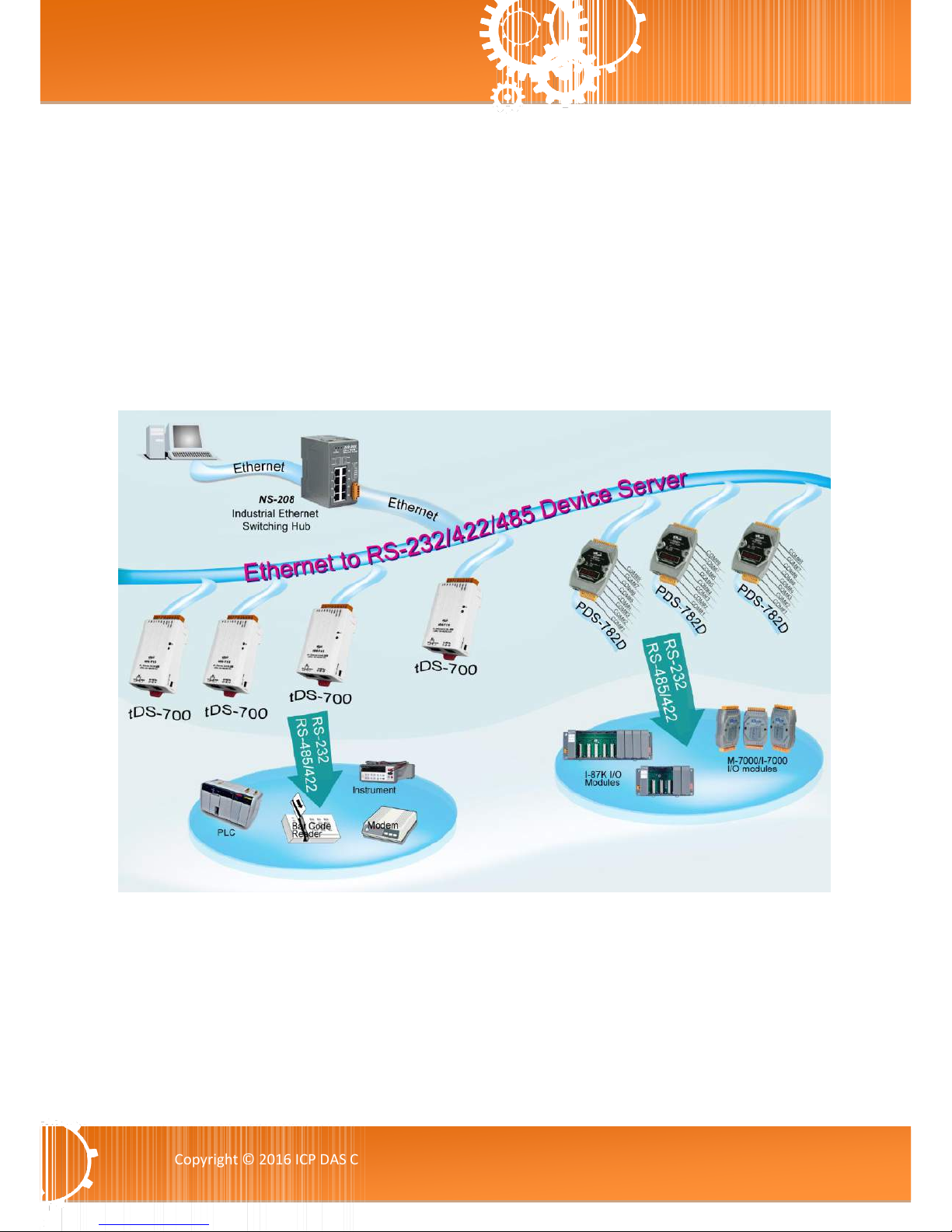
1.1 Ethernet Solutions
Nowadays, the Ethernet protocol has become the foremost standard for local area networks.
Connectivity via the Internet is now common in many of the latest applications from home
appliances, to vending machines, to testing equipment, to UPS, etc. An Ethernet network can link
office automation and industrial control networks, access remote systems and share data and
information between machines from multiple vendors, and also provides a cost-effective solution
for industrial control networks.
Tiny Serial-to-Ethernet Device Server
Copyright © 2016 ICP DAS CO., Ltd. All Rights Reserved. -8 -
1.2 VxComm Technology
In general, writing a TCP/IP program is more difficult than writing a COM Port program. Another
issue is that perhaps the existing the COM Port communication system was built many years ago
and is now outdated.
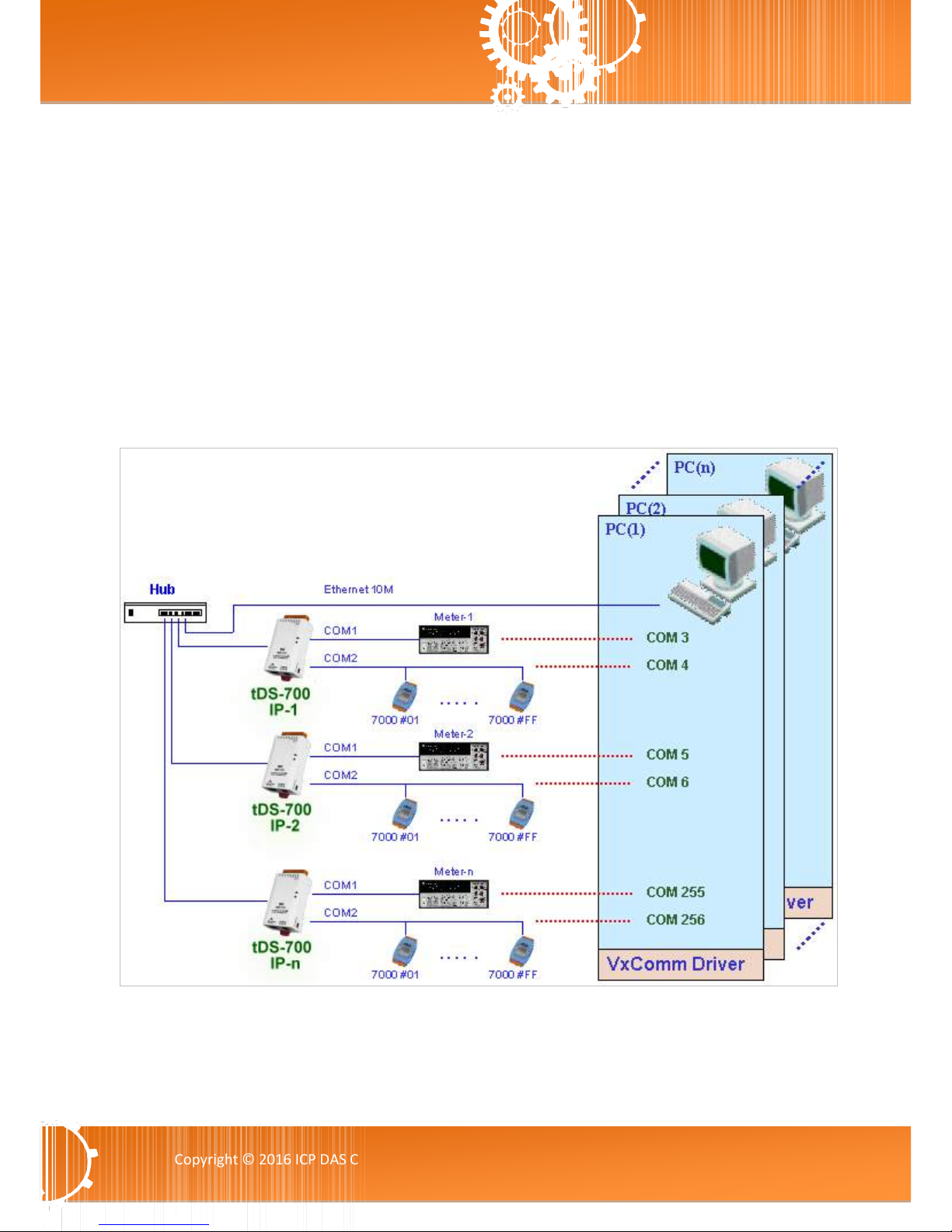
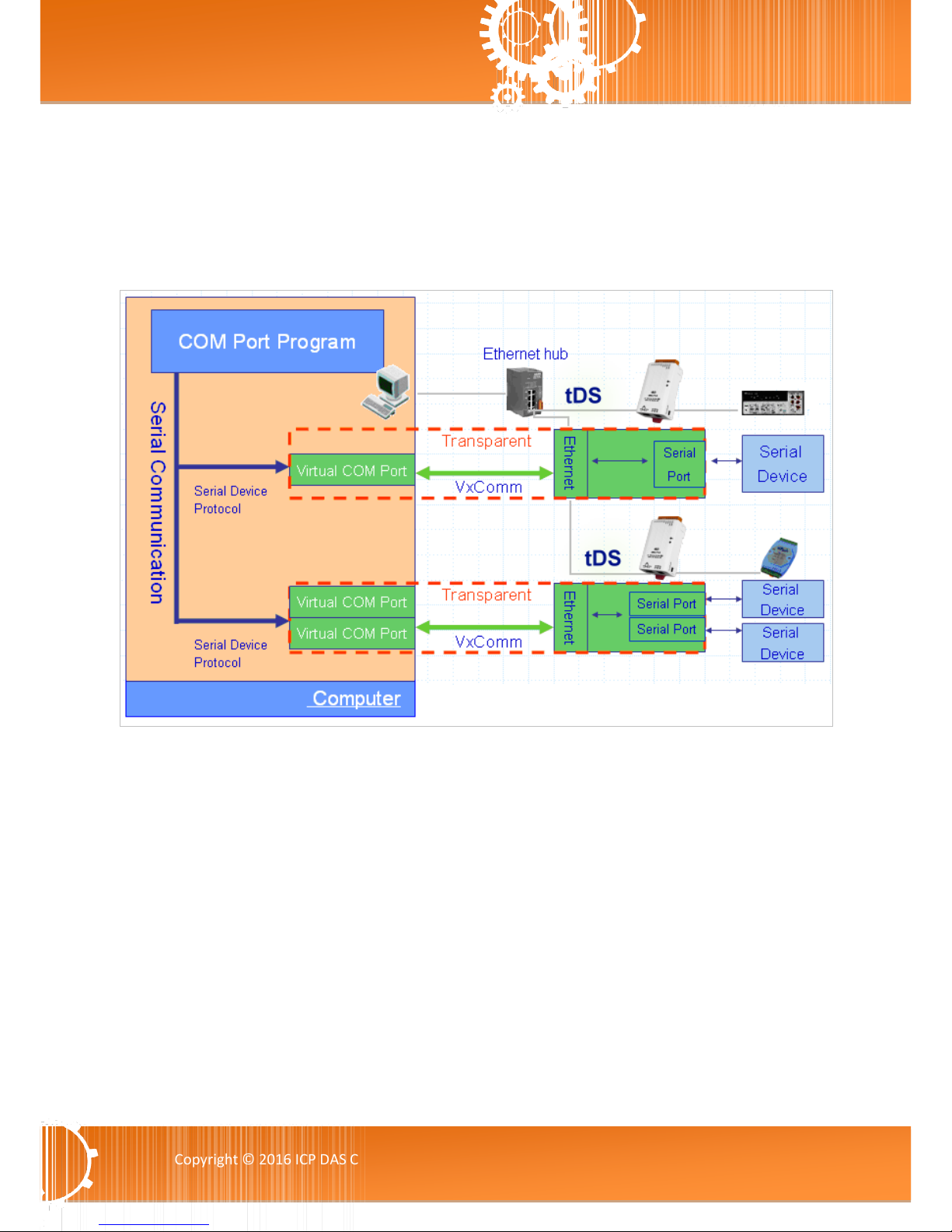
As a result, a new technology, VxComm was developed to virtualize the COM Ports of the tDS-700
to allow up to 256 COM Ports to be used on a central computer. The VxComm driver saves time
when accessing serial devices through the Ethernet without the need for reprogramming the COM
Port software on the PC.
Tiny Serial-to-Ethernet Device Server
Copyright © 2016 ICP DAS CO., Ltd. All Rights Reserved. -9 -
The VxComm driver controls all the details of the Ethernet TCP/IP programming technique,
meaning that, with the assistance of tDS-700 and VxComm technology, your COM Port program will
be able to access your serial devices through the Ethernet in the same way as through a COM Port.
Tiny Serial-to-Ethernet Device Server
Copyright © 2016 ICP DAS CO., Ltd. All Rights Reserved. -10 -
1.3 Web Server Technology
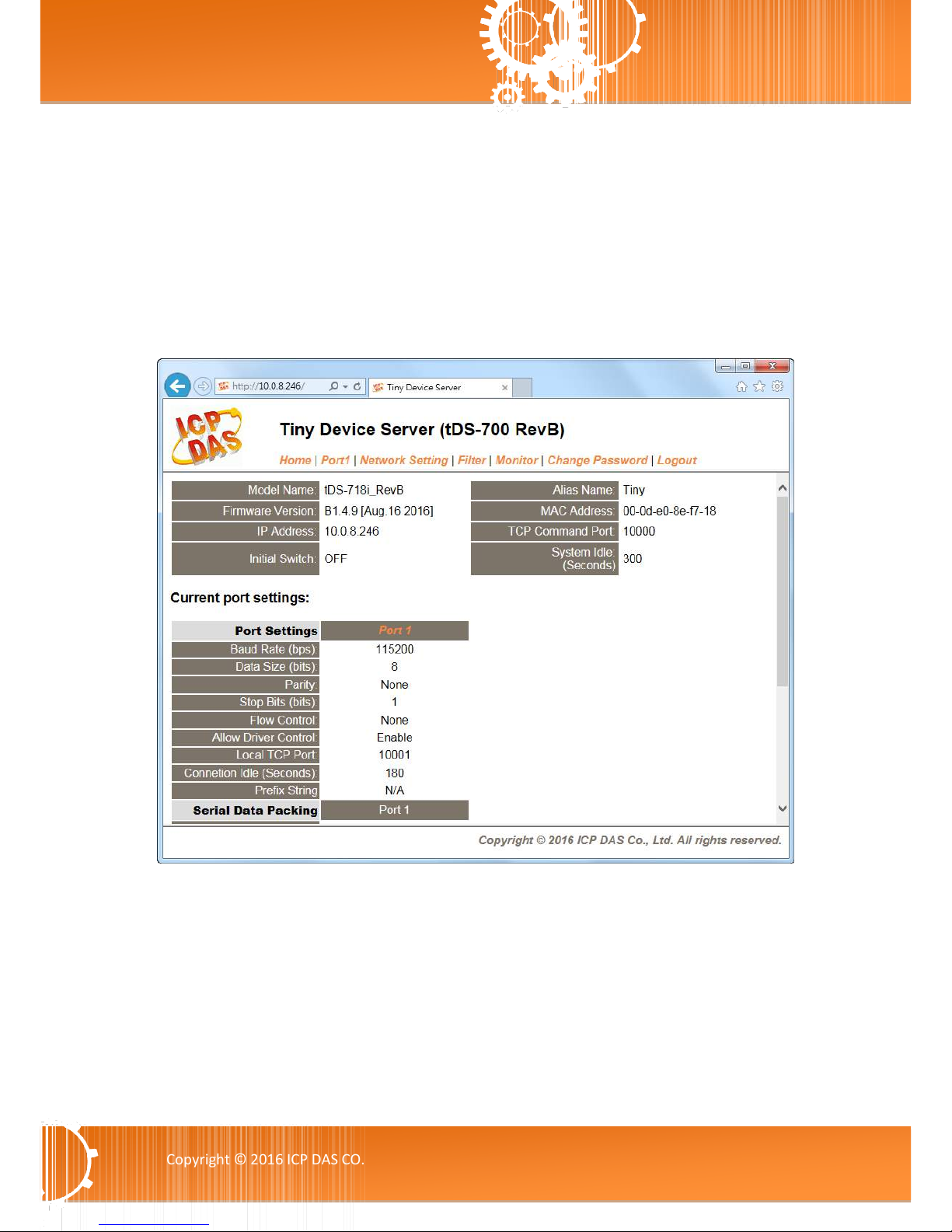
Web server technology enables the tDS-700 to be configured via a standard web browser interface,
e.g. Google Chrome, Internet Explorer, or Firefox, etc. This means that it is easy to check the
configuration of the tDS-700 via an Ethernet network without needing to install any other software
tools, thereby reducing the learning curve required for maintaining the device.
This manual suits for next models
19
Table of contents
Other ICP DAS USA Network Card manuals


Popular Network Card manuals by other brands



Buffalo
Buffalo AirStation WLI-PCM-L11GP user manual

National Instruments
National Instruments NI 9234 operating instructions

Hama
Hama 49276 Operating instruction

Linksys
Linksys WCF54G - Wireless-G Compact Flash Card Product data

Compaq
Compaq Wireless LAN 100 specification

Bose
Bose PowerMatch Dante quick start guide