Hytera PD46X User manual

Preface
Thanks for your favor in our product. This manual is helpful for you to quickly know how to use the
product. To avoid body injury or property loss caused by misoperation, please read the Safety
Information Booklet carefully before use.
This manual is applicable to the following product:
PD46X Digital Mobile Radio (X may represent 0, 2, 5, 6 or 8)

Icon Conventions
: Indicates functions that are available on digital channel only.
: Indicates functions that are available on analog channel only.
Functions marked with no icon are available on both analog and digital channels.
Disclaimer
Hytera Communications Corporation Limited (the Company) endeavors to achieve the accuracy and
completeness of this manual, but no warranty of accuracy or reliability is given. All the specifications and
designs are subject to change without notice due to continuous technology development. No part of this
manual may be copied, modified, translated, or distributed in any manner without the express written
permission of us.
We do not guarantee, for any particular purpose, the accuracy, validity, timeliness, legitimacy or
completeness of the Third Party products and contents involved in this manual.
If you have any suggestions or would like to learn more details, please visit our website at:
http://www.hytera.com.
FCC Statement
This equipment has been tested and found to comply with the limits for a Class B digital
device, pursuant to part 15 of FCC Rules. These limits are designed to provide
reasonable protection against harmful interference in a residential installation. This
equipment generates and can radiate radio frequency energy and, if not installed and
used in accordance with the instructions, may cause harmful interference to radio
communications. However, there is no guarantee that interference will not occur in a
particular installation. If this equipment does cause harmful interference to radio or
television reception, which can be determined by turning the equipment off and on, the
user is encouraged to try to correct.
The interference by one or more of the following measures:
● Reorient or relocate the receiving antenna. Increase the separation between the
equipment and receiver.
● Connect the equipment into an outlet on a circuit different from that to which the
receiver is connected.

● Consult the dealer or an experienced radio/TV technician for help
Operation is subject to the following two conditions: 1. This device may not cause harmful
interference, and 2. This device must accept any interference received, including
interference that may cause undesired operation.
Note:” Changes or modifications to this unit not expressly approved by the party
responsible for compliance could void the user’s authority to operate the equipment.”
Compliance with RF Exposure Standards
Hytera’s 2-way radio complies with the following RF energy exposure standards and
guidelines:
• United States Federal Communications Commission, Code of Federal Regulations; 47
CFR §§ 1.1307, 1.1310 and 2.1093
• American National Standards Institute (ANSI) / Institute of Electrical and Electronic
Engineers (IEEE) C95. 1-1992
• Institute of Electrical and Electronic Engineers (IEEE) C95.1-1999 Edition
RF Exposure Compliance and Control Guidelines and
Operating Instructions
To control your exposure and ensure compliance with the occupational/controlled
environment exposure limits always adhere to the following procedures.
Guidelines:
• Do not remove the RF Exposure Label from the device.
• User awareness instructions should accompany device when transferred to other users.
• Do not use this device if the operational requirements described herein are not met.
Operating Instructions:
• Transmit no more than the rated duty factor of 50% of the time. To transmit (talk), push
the Push-To-Talk (PTT) button. To receive calls, release the PTT button. Transmitting
50 % of the time, or less, is important because this radio generates measurable RF
energy exposure only when transmitting (in terms of measuring for standards
compliance).
• Hold the radio in a vertical position in front of face with the microphone (and the other

parts of the radio, including the antenna) at least one inch (2.5 cm) away from the nose.
Keeping the radio at the proper distance is important because RF exposures decrease
with distance from the antenna. Antenna should be kept away from eyes.
• When worn on the body, always place the radio in a Hytera’s approved clip, holder,
holster, case, or body harness for this product. Using approved body-worn accessories is
important because the use of Hytera’s or other manufacturer’s non-approved accessories
may result in exposure levels, which exceed the FCC’s occupational/controlled
environment RF exposure limits.
• If you are not using a body-worn accessory and are not using the radio in the intended
use position in front of the face, then ensure the antenna and the radio are kept at least
2.5 cm (one inch) from the body when transmitting. Keeping the radio at the proper
distance is important because RF exposures decrease with increasing distance from the
antenna.
• Use only manufacturer’s name approved supplied or replacement antennas, batteries,
and accessories. Use of non-manufacturer-name approved antennas, batteries, and
accessories may exceed the FCC RF exposure guidelines.
•For a list of Hytera’s approved accessories (see the user manual), or (visit the following
website which lists approved accessories: www.hytera.cn)
• For a list of Hytera’s approved accessories (see the user manual), or (visit the following
website which lists approved accessories: www.hytera.cn
EU Regulatory Conformance
As certified by the qualified laboratory, the product is in compliance with the essential
requirements and other relevant provisions of the Directive 1999/5/EC. Please note
that the above information is applicable to EU countries only.

Contents
1. Items in the Package..........................................................................................................................1
2. Product Overview...............................................................................................................................3
2.1 Product Controls.............................................................................................................................3
2.2 Programmable Keys .......................................................................................................................4
3. Before Use ..........................................................................................................................................5
3.1 Attaching the Battery.......................................................................................................................5
3.2 Attaching the Antenna.....................................................................................................................5
3.3 Attaching the Belt Clip.....................................................................................................................5
3.4 Attaching the Accessories...............................................................................................................6
3.5 Charging the Battery.......................................................................................................................7
4. Status Indications...............................................................................................................................9
4.1 LCD Icon.........................................................................................................................................9
4.2 LED Indicator................................................................................................................................10
5. Menu Navigation...............................................................................................................................11
6. Basic Operations..............................................................................................................................12
6.1 Turning the Radio On/Off..............................................................................................................12
6.2 Adjusting the Volume....................................................................................................................12
6.3 Selecting a Zone...........................................................................................................................12
6.4 Selecting a Channel......................................................................................................................12
6.5 Locking and Unlocking the Keypad...............................................................................................12
7. Call Services.....................................................................................................................................14
7.1 Call on Digital Channel ............................................................................................................14
7.2 Call on Analog Channel .........................................................................................................15
8. Features and Operations .................................................................................................................16
8.1 Home Screen................................................................................................................................16
8.2 Managing the Contact ...........................................................................................................16
8.3 Message ................................................................................................................................16
8.4 Call Log .................................................................................................................................17
8.5 Scan..............................................................................................................................................18
8.6 Setting the Radio ..........................................................................................................................19
8.7 Device Information........................................................................................................................21
8.8 One Touch Call .....................................................................................................................21
8.9 Time-out Timer (TOT)...................................................................................................................22
8.10 Busy Channel Lockout................................................................................................................22
8.11 Monitor .................................................................................................................................22

8.12 CTCSS/ CDCSS ...................................................................................................................23
8.13 Squelch Off ............................................................................................................................23
8.14 TDMA Direct Mode ................................................................................................................23
8.15 VOX............................................................................................................................................23
9. Troubleshooting...............................................................................................................................25
10. Care and Cleaning..........................................................................................................................27
11. Optional Accessories.....................................................................................................................28

1
1. Items in the Package
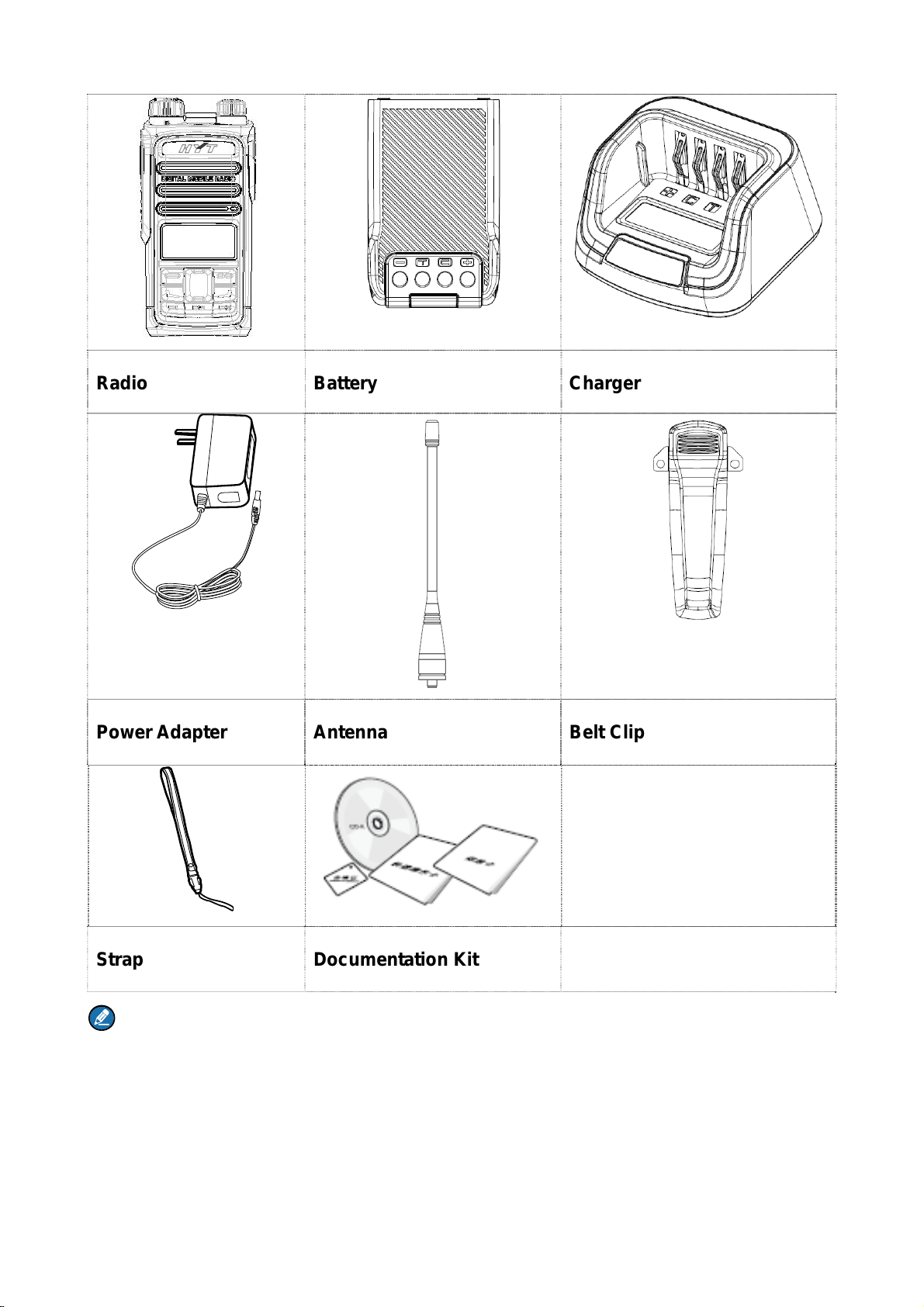
Please unpack carefully and check if all items listed below are received. If any item is missing or
damaged, please contact your dealer.
2
Radio Battery Charger
Power Adapter Antenna Belt Clip
Strap Documentation Kit
Note
The frequency band is marked on the label of antenna; if not, please refer to the label on the radio for
frequency band information.
3
1. Product Overview
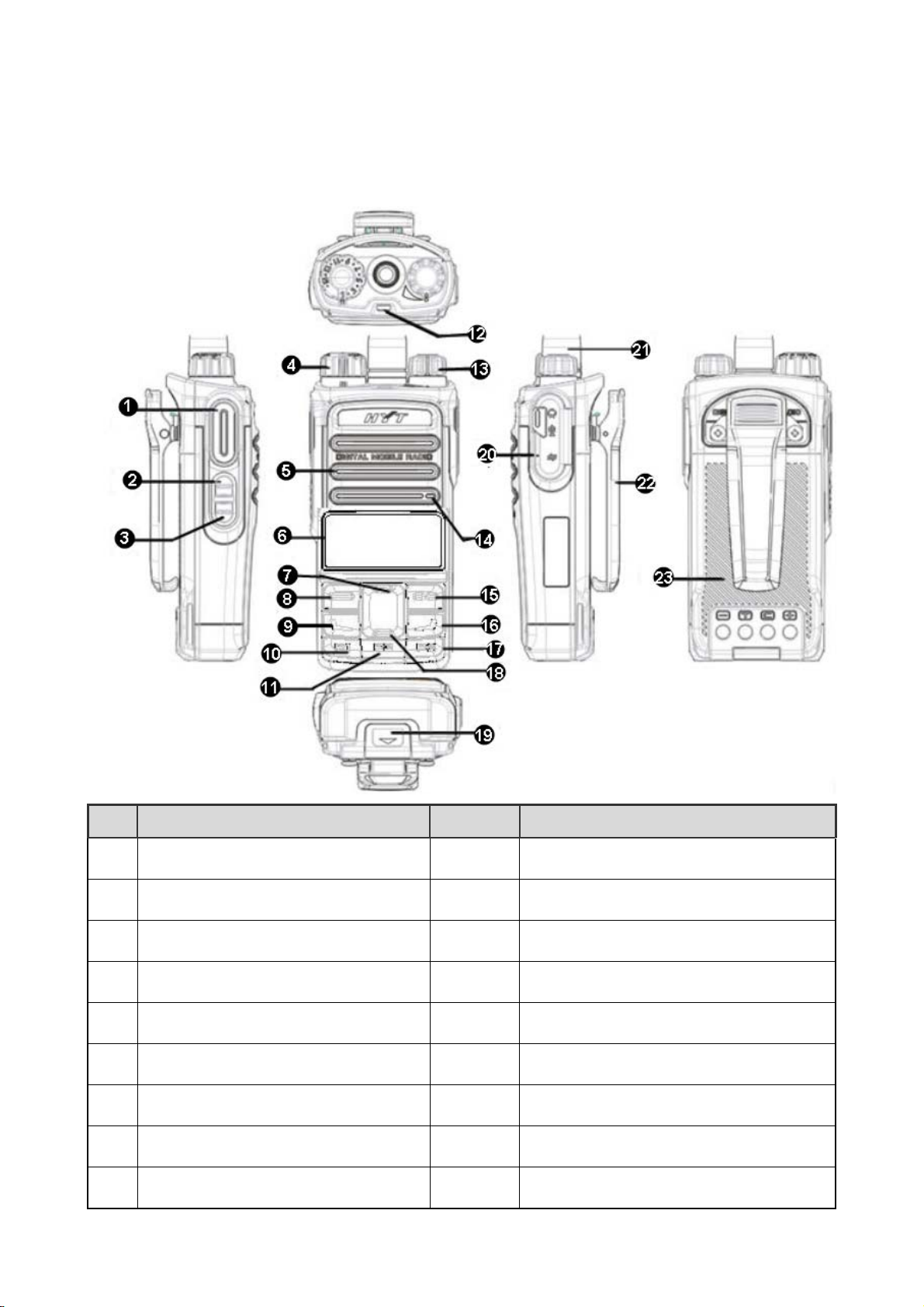
1.1 Product Controls
No. Part Name No. Part Name
○
1 PTT (Push-to-Talk) Key ○
13 Power On/Off/Volume Control Knob
○
2 SK1 (Side Key 1) ○
14 Microphone
○
3 SK2 (Side Key 2) ○
15 Cancel/Return Key
○
4 Channel Selector Knob ○
16 Call End Key
○
5 Speaker ○
17 P3 Key
○
6 LCD Display ○
18 Down Key
○
7 UpKey ○
19 Battery Latch
○
8 OK/Menu Key ○
20 Accessory Connector
○
9 Call Key ○
21 Antenna

4
No. Part Name No. Part Name
○
10 P1 Key ○
22 Belt Clip
○
11 P2 Key ○
23 Battery
○
12 LED Indicator / /
1.2 Programmable Keys
For enhanced convenience, you may request your dealer to program the SK1, SK2, P1, P2 and P3 keys
as shortcuts to certain feature.
Table of contents
Other Hytera Portable Radio manuals

Hytera
Hytera TETRA PT580H User manual

Hytera
Hytera X1ei User manual

Hytera
Hytera PD75X User manual

Hytera
Hytera PD985/G User manual

Hytera
Hytera TF-612 User manual

Hytera
Hytera TC-508 User manual

Hytera
Hytera PD60Xi Um User manual

Hytera
Hytera PD35X User manual

Hytera
Hytera PD682 Um User manual

Hytera
Hytera PD48X User manual

Hytera
Hytera BP36X User manual

Hytera
Hytera PD79XIS FM IIB User manual

Hytera
Hytera PD362i User manual

Hytera
Hytera PD785 User manual

Hytera
Hytera TF-515 User manual

Hytera
Hytera PD36X User manual

Hytera
Hytera HP78X User manual

Hytera
Hytera PD792IS User manual

Hytera
Hytera PD782iG User manual

Hytera
Hytera HP56 Series User manual