
Huawei E5830 User manual
3 Customer Services, Hutchison 3G UK Ltd, PO Box 333, Glasgow, G2 9AG
three.co.uk
© 2009 Hutchison 3G UK Limited. A Hutchison Whampoa company.
Published by Hutchison 3G UK Limited, trading as 3.
The contents of this publication are believed to be correct at the time of going to press, but any
information, products or services mentioned may be modied, supplemented or withdrawn.
DD0949801 Jul09
<224mm>
<112mm>
PANTONE Green C: For positional purposes only – Do NOT Print
0949801 User Guide aw3.indd 1 8/7/09 10:20:32
Set-up guide
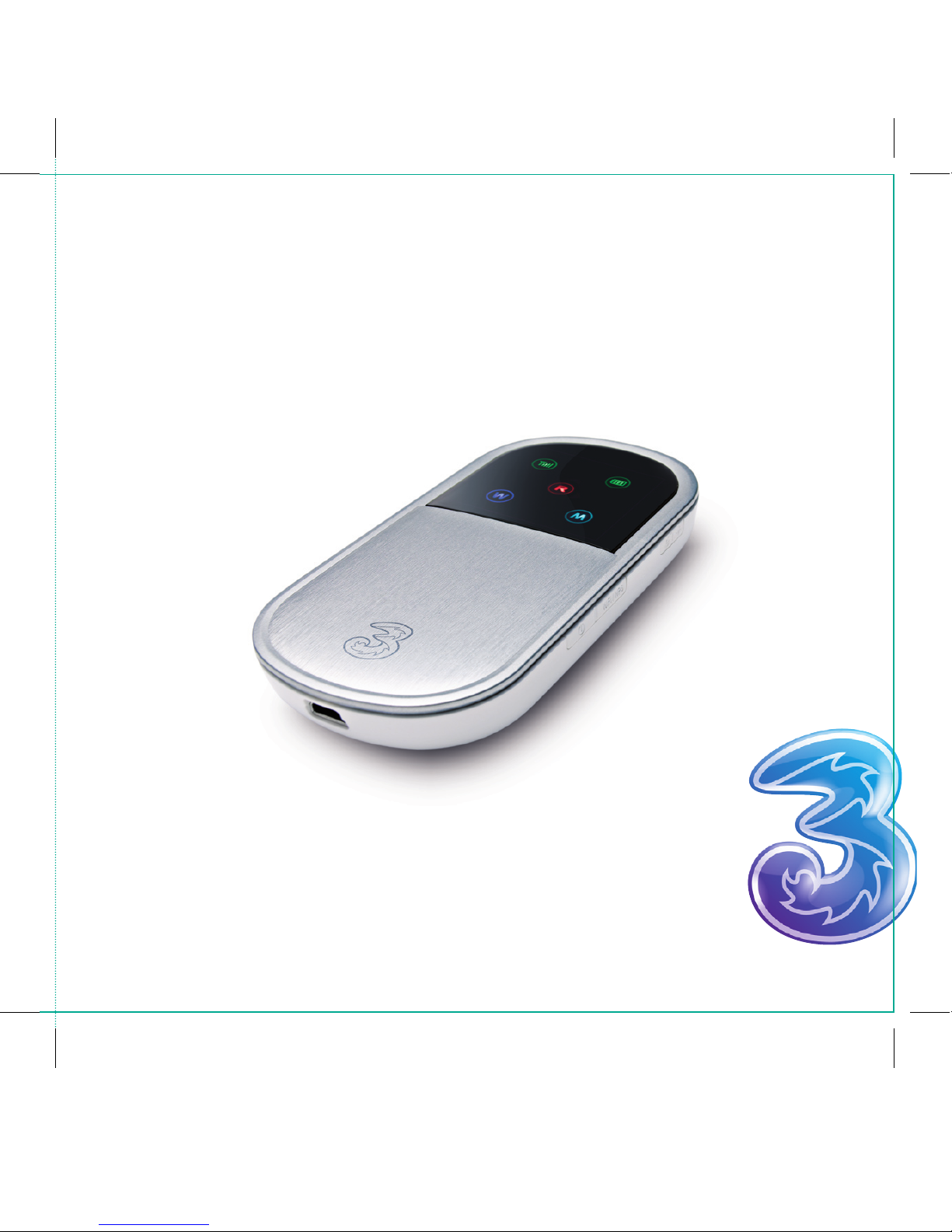
Huawei E5830
Wireless Modem
Your own Mobile Wi-Fi, on the network
designed and built for the Mobile Internet
Mobile Wi-Fi
0949801 User Guide aw3.indd 2 8/7/09 10:20:32

Set-up your own
Mobile Wi-Fi
Your new wireless modem sends out a Wi-Fi signal so that
you can connect to the internet without the need for wires.
Your modem can link multiple devices at any one time,
for example your laptop or iPod touch.
About this set-up guide
We’ll tell you how to set up your modem and get it working.
For help with connecting individual devices, you’ll need to
look at the help cards that came in your modem packaging
for individual instructions.
<224mm>
<112mm>
PANTONE Green C: For positional purposes only – Do NOT Print
0949801 User Guide aw3.indd 3 8/7/09 10:20:32
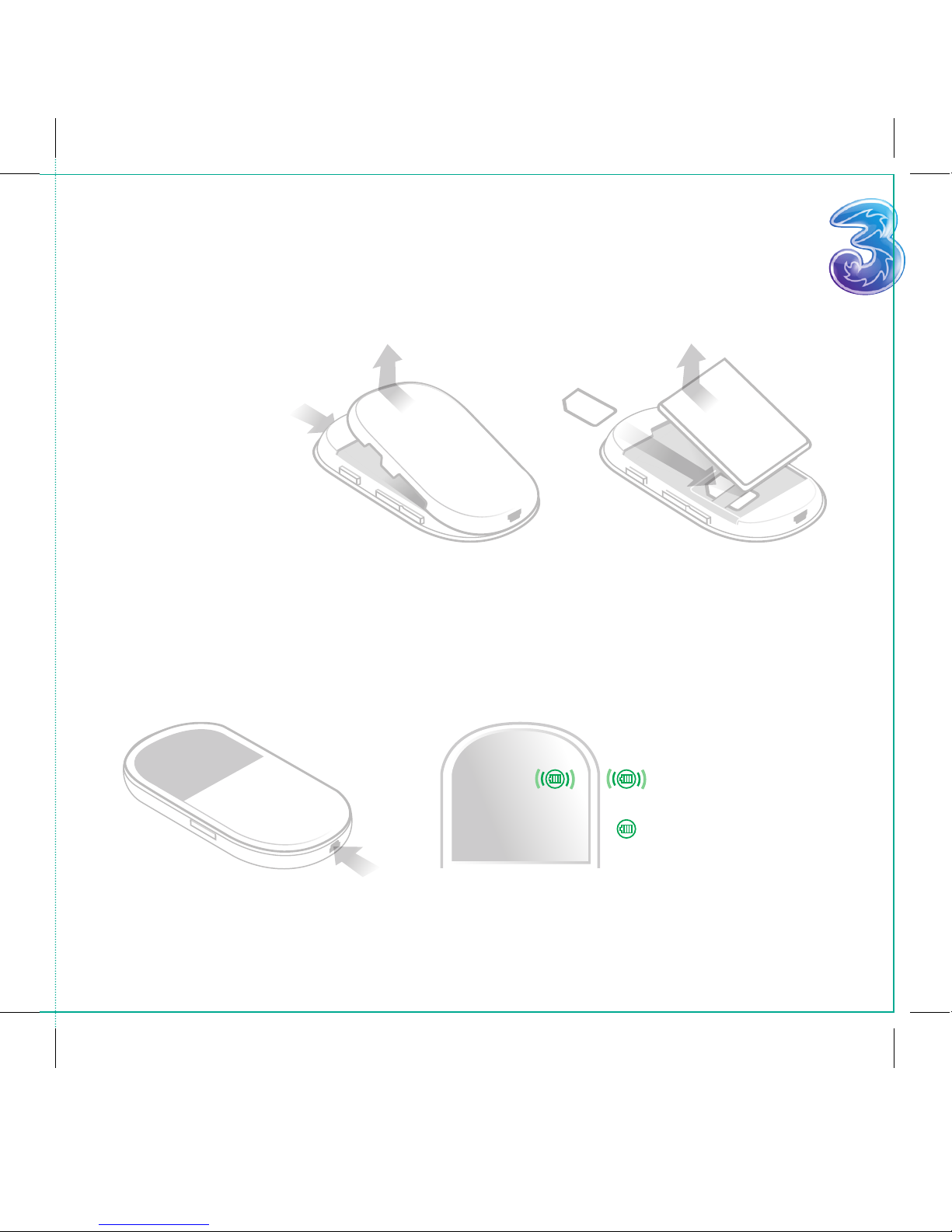
First of all, you’ll
need to insert the
SIM and battery
into your modem.
Before you do anything
Tip: The battery will gradually lose power, even
when it’s not being used, so if you haven’t used it
for a while, you’ll probably need to recharge it.
Important note: Whenever you take the SIM or
battery out of your modem, make sure you turn it
off rst and unplug the charger.
Now connect your modem to the charger and plug this into the mains. It’ll take around
12 hours to fully charge your modem the rst time. Every time you charge it after
that, it’ll only take an hour. Depending on how you use your internet (eg browsing or
downloading), will affect how quickly your battery runs out. Make sure you have your
charger to hand.
Green blinking – the battery
is being charged
Green – battery power is full
1.
2. 3.
4.
0949801 User Guide aw3.indd 4 8/7/09 10:20:32
Getting to know your modem
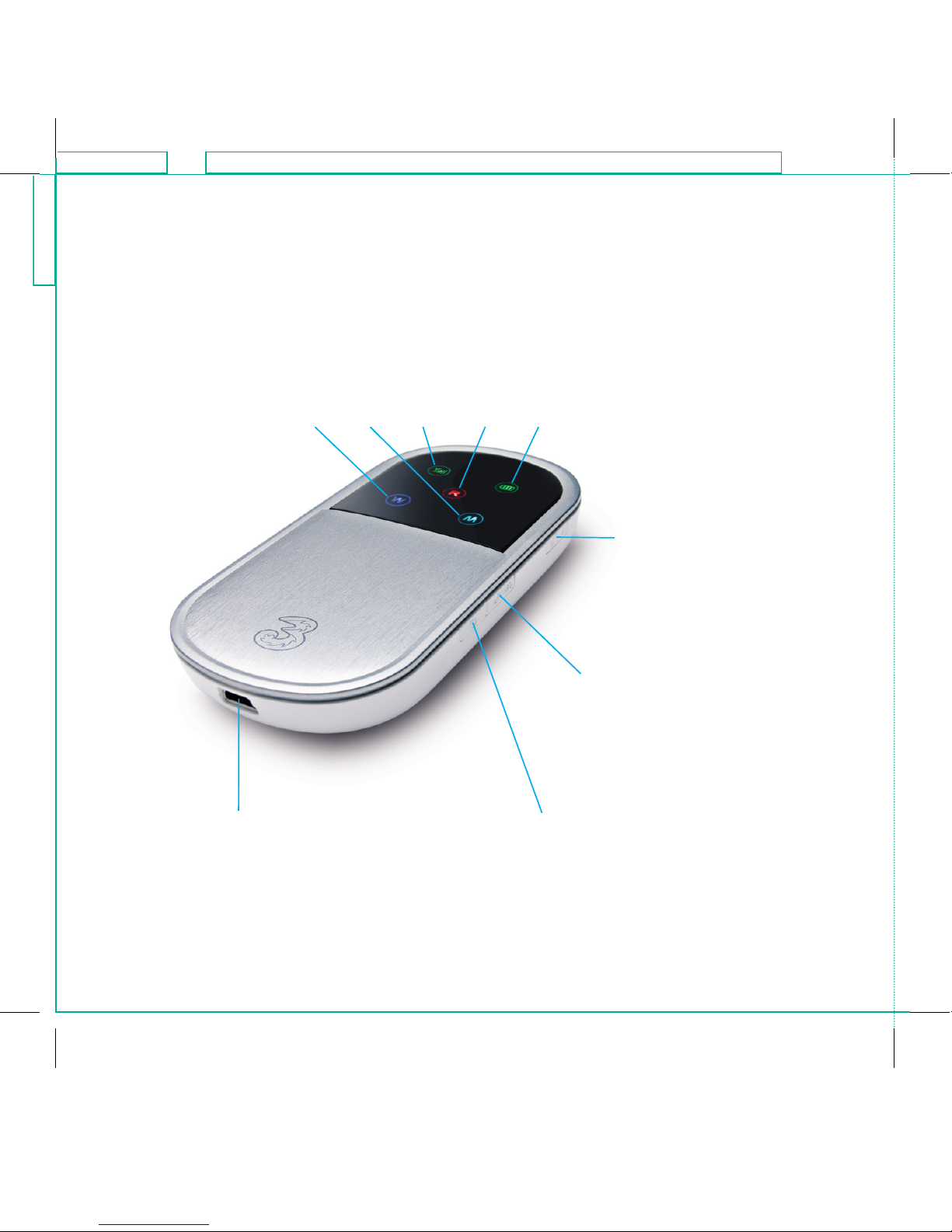
Wi-Fi key
Press this key to turn your Wi-Fi signal
on or off. Turning this key on will
enable you to connect your laptop
and other devices to your modem
Charger
Charging connection
and mini USB port
Power key
Press and hold down this key for 2 seconds
to turn your modem on or off
Connect key
Press and hold down this key for
2 seconds to connect your modem
to the internet via the 3 network
Light indicators
Wi-Fi Mode Signal Roaming Battery
<224mm>
<112mm>
PANTONE Green C: For positional purposes only – Do NOT Print
0949801 User Guide aw3.indd 5 8/7/09 10:20:33
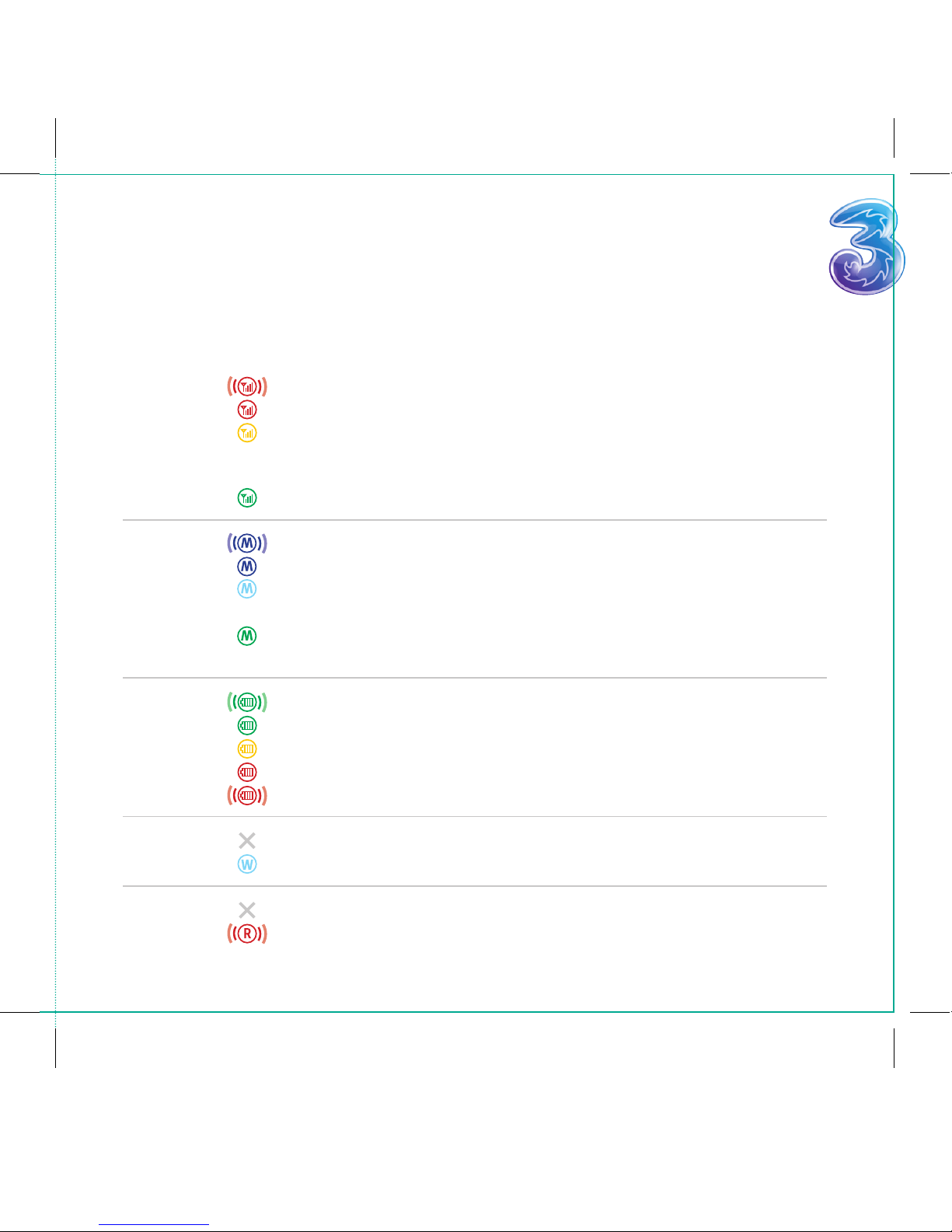
Getting to know your modem What the lights mean
Signal
Mode
Battery
Wi-Fi
Roaming
Red (blinking)
Red
Yellow
Green
Dark blue (blinking)
Dark blue
Light blue
Green
Green (blinking)
Green
Yellow
Red
Red (blinking)
No light
Blue
No light
Red (blinking)
You need to insert the SIM card
Your modem can’t detect a 3 network
Your modem can detect a 3 network but the signal is weak.
This could be because you’re in a heavily enclosed area
(like a basement) so try moving to a more open area
Your modem can detect a 3 network
Your modem is connecting to the internet
Your modem is connected to the internet
Your modem is connected to the internet via the High Speed
Internet Network (HSDPA) – giving you a faster connection
Your modem couldn’t connect to the 3 network (the signal
light will probably be red)
The battery is being charged
The battery power is fully charged
The battery power is half charged
The battery power is low and it needs to be charged
The battery power is very low and needs to be charged
Wi-Fi is off
Wi-Fi is on
Your modem is not connected to another network
Your modem is on another network. This will only happen
if you’re using your modem abroad
0949801 User Guide aw3.indd 6 8/7/09 10:20:33

Step 2
Press the Wi-Fi key to turn on the Wi-Fi
signal, so the modem can connect to
your laptop and other devices.
Get your modem working
Step 1
Turn on your modem by pressing
and holding down the Power key
for 2 seconds.
The signal light should turn green to
show that’s it’s detected the 3 network.
If the light is red, then the modem has
not detected the 3 network, so try
moving to a different location to
nd a stronger signal.
<224mm>
<112mm>
PANTONE Green C: For positional purposes only – Do NOT Print
0949801 User Guide aw3.indd 7 8/7/09 10:20:33

Step 3
Press and hold down the Connect
key for 2 seconds so your modem can
connect to the internet, through the
3 network. A dark blue light will blink
to show that the modem is connecting
and will stop blinking once it’s fully
connected. See the previous page for
the difference between the signal
lights and what they mean.
Step 4
You’re now ready to connect up your
laptop, iPod touch or other devices.
For detailed device instructions, see the
help cards that came with your modem.
0949801 User Guide aw3.indd 8 8/7/09 10:20:34
Other manuals for E5830
2
Table of contents
Other Huawei Modem manuals

Huawei
Huawei E3272 Instruction manual

Huawei
Huawei WiMAX Reference guide

Huawei
Huawei B681 User manual

Huawei
Huawei E220 User manual

Huawei
Huawei E397U-53 User manual

Huawei
Huawei HiLink E3131 User manual

Huawei
Huawei Turbo Stick E182 User manual

Huawei
Huawei E392 User manual

Huawei
Huawei E8278 User manual

Huawei
Huawei SoftBank 005HW User manual


