
Huawei M735 User manual
Safety Precautions
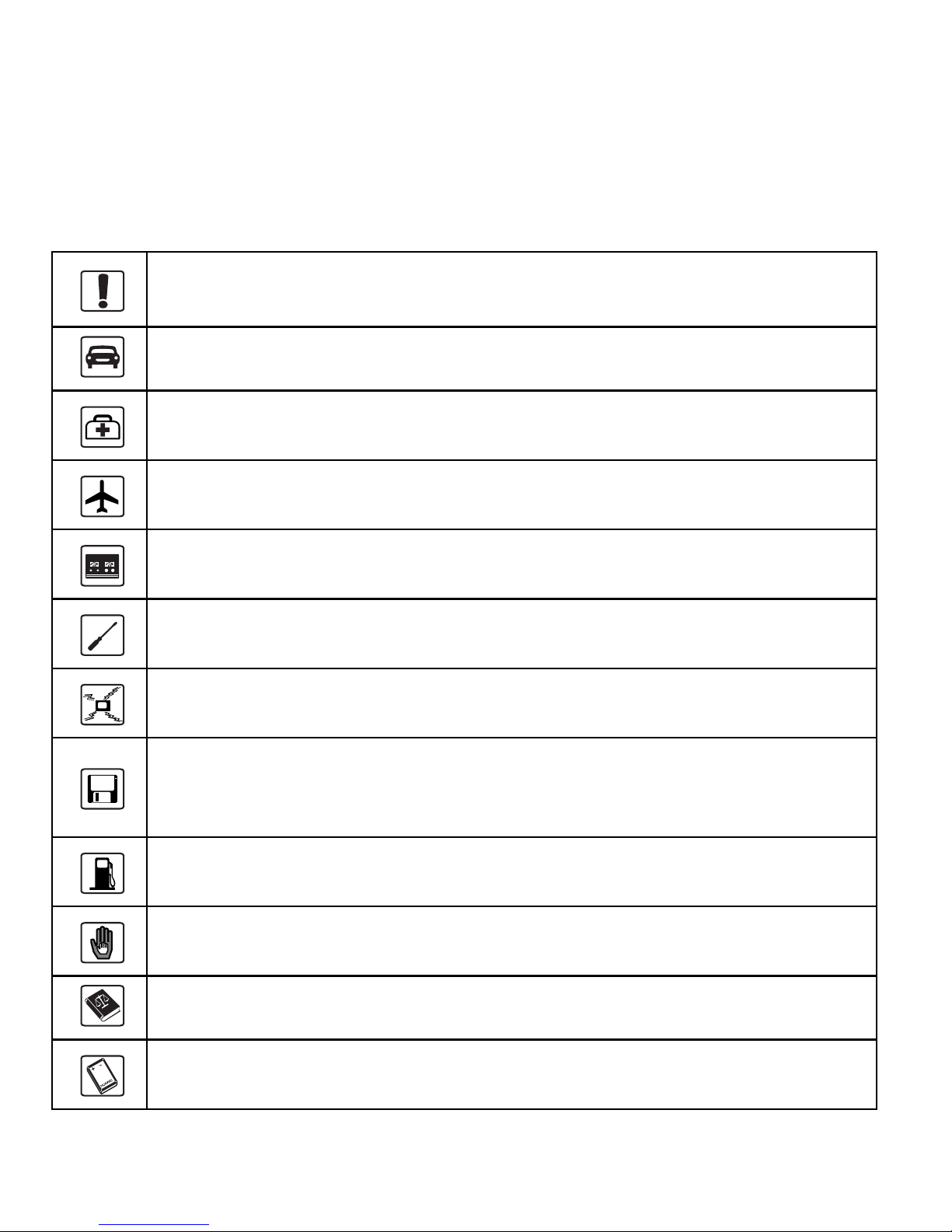
Before using the phone, read safety precautions and inform your children
about using the phone correctly and safely. For details, see "Warnings and
Precautions" on page 44.
Do not switch on your phone when using the phone is prohibited or
when using the phone may cause interference or danger.
Do not use your phone while driving.
Follow the rules or regulations set forth by the hospitals and health
care facilities. Switch off your phone near medical apparatus.
Switch off your phone in an aircraft. The phone may cause
interference to control signals of the aircraft.
Switch off your phone near high-precision electronic devices. The
phone may affect the performance of these devices.
Do not attempt to disassemble your phone or its accessories. Only
qualified personnel are allowed to service or repair the phone.
Do not place your phone or the accessories in containers with strong
electromagnetic field.
Do not place magnetic storage media near your phone. Radiation
emitted from the phone may erase the information stored on the
magnetic storage media.
Do not place your phone in a high-temperature place or where it can
come in contact with flammable gas, such as a gas station.
Keep your phone and its accessories away from children. Do not
allow children to use your phone without guidance.
Use only approved batteries and chargers to avoid explosion.
Observe the laws or regulations on using the phone. Respect others'
privacy and legal rights when using your phone.
Copyright © Huawei Technologies Co., Ltd. 2010. All
rights reserved.
No part of this document may be reproduced or transmitted in any form or
by any means without prior written consent of Huawei Technologies Co.,
Ltd.
The product described in this manual may include copyrighted software of
Huawei Technologies Co., Ltd and possible licensors. Customers shall not
in any manner reproduce, distribute, modify, decompile, disassemble,
decrypt, extract, reverse engineer, lease, assign, or sublicense the said
software, unless such restrictions are prohibited by applicable laws or such
actions are approved by respective copyright holders under licenses.
Trademarks and Permissions
, HUAWEI, and are trademarks or registered trademarks of
Huawei Technologies Co., Ltd.
Other trademarks, product, service and company names mentioned are the
property of their respective owners.
Notice
Some features of the product and its accessories described herein rely on
the software installed, capacities and settings of local network, and may
not be activated or may be limited by local network operators or network
service providers, thus the descriptions herein may not exactly match the
product or its accessories you purchase.

Huawei Technologies Co., Ltd reserves the right to change or modify any
information or specifications contained in this manual without prior notice
or obligation.
NO WARRANTY
THE CONTENTS OF THIS MANUAL ARE PROVIDED "AS IS".
EXCEPT AS REQUIRED BY APPLICABLE LAWS, NO WARRANTIES
OF ANY KIND, EITHER EXPRESS OR IMPLIED, INCLUDING BUT
NOT LIMITED TO, THE IMPLIED WARRANTIES OF
MERCHANTABILITY AND FITNESS FOR A PARTICULAR PURPOSE,
ARE MADE IN RELATION TO THE ACCURACY, RELIABILITY OR
CONTENTS OF THIS MANUAL.
TO THE MAXIMUM EXTENT PERMITTED BY APPLICABLE LAW,
IN NO CASE SHALL HUAWEI TECHNOLOGIES CO., LTD BE
LIABLE FOR ANY SPECIAL, INCIDENTAL, INDIRECT, OR
CONSEQUENTIAL DAMAGES, OR LOST PROFITS, BUSINESS,
REVENUE, DATA, GOODWILL OR ANTICIPATED SAVINGS.
Import and Export Regulations
Customers shall comply with all applicable export or import laws and
regulations and will obtain all necessary governmental permits and licenses
in order to export, re-export or import the product mentioned in this
manual including the software and technical data therein.

i
Table of Contents
1 Getting to Know Your Phone ............................................ 1
Your Phone...........................................................................................1
Keys and Functions..............................................................................2
Screen Icons .........................................................................................4
2 Getting Started ................................................................... 6
Installing the Battery............................................................................6
Charging the Battery............................................................................6
Powering On/Off the Phone.................................................................7
Using the Stylus ...................................................................................7
Dragging and Flicking .........................................................................8
Standby Screen.....................................................................................9
3 Voice Services ................................................................... 11
Making a Call.....................................................................................11
Answering a Call................................................................................11
Hearing Aid Mode..............................................................................12
Operations During a Call ...................................................................13
4 Text Entry......................................................................... 15
On-Screen Keyboard Mode ...............................................................15
5 SMS ................................................................................... 16
Writing and Sending a Message ........................................................16
Reading a Message ............................................................................17

ii
6 MMS.................................................................................. 18
Writing and Sending a Multimedia Message.....................................18
Receiving a Multimedia Message......................................................18
Viewing a Multimedia Message ........................................................19
7 Contacts ............................................................................ 20
Adding a Contact ...............................................................................20
Searching for a Contact......................................................................20
8 @metro App StoreSM ....................................................... 22
Accessing @metro App StoreSM ........................................................22
Changing Your @metro App StoreSM Settings ..................................23
Using On-line Help ............................................................................23
9 Alarm Clock...................................................................... 26
Enabling an Alarm Clock...................................................................26
Disabling an Alarm Clock..................................................................26
10 Music Player ................................................................... 27
Adding a Playlist................................................................................27
Playing Music ....................................................................................27
11 Camera............................................................................ 31
Taking a Picture .................................................................................31
Viewing a Picture...............................................................................32
Taking Pictures Sequentially .............................................................34
Taking a Picture in Self-Timer Mode ................................................34
Setting a Picture Effect ......................................................................34

iii
12 Security ........................................................................... 35
Enabling or Disabling the Phone Lock..............................................35
Changing the Phone Lock Code ........................................................35
Locking the Keypad...........................................................................36
13 Bluetooth®Connection................................................... 37
Sending Data Through a Bluetooth®Connection..............................37
Receiving Data Through a Bluetooth®Connection...........................38
Listening to Music Through a Bluetooth®Stereo Headset ...............39
Sending a Contact Through a Bluetooth®Connection ......................40
Other Bluetooth®Operations.............................................................40
14 TTY Operation............................................................... 41
Using the TTY Device .......................................................................41
Setting the TTY Mode .......................................................................41
15 Troubleshooting ............................................................. 42
16 Warnings and Precautions ............................................ 44
17 Futurewei Technologies, Inc. Limited Warranty ........ 53

1 Getting to Know Your Phone
Your Phone
12
13
14
9
10
11
1
8
2
3
7
4
6
5
The preceding figure is provided for your reference only.
1 Earpiece 8 Volume Keys
2 Screen 9 Camera
3 Talk/Send Key 10 Speaker
4 Microphone 11 Stylus Pen
1
2
5 Navigation 12 Strap Hole
6 End/Power Key 13 Charger Interface/Data Cable
Connecter
7 Camera Key 14 Headset Jack
Keys and Functions
Press … To …
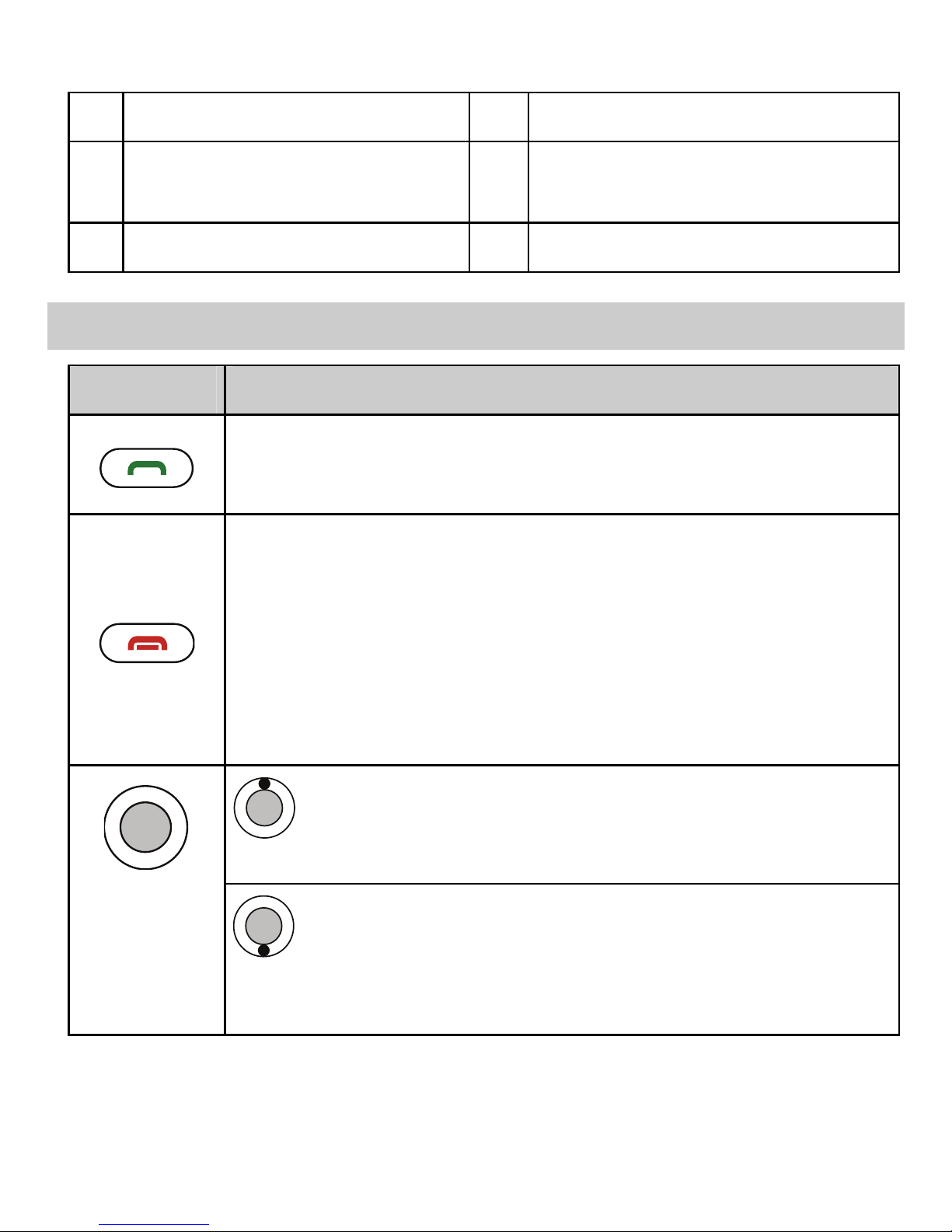
Access the all calls menu in standby mode.
Dial a number or answer a call.
Power on or power off the phone by pressing and
holding the key.
End a call or reject a call.
Return to the standby screen.
Turn on or turn off the screen backlight in standby
mode.
: Access Contacts in standby mode; increase the
volume during a call.
: Access the Messages menu in standby mode;
access the screen for writing a message by pressing and
holding the key; decrease the volume during a call.

Press … To …
: Press the left or right navigation key to switch
between the screens.
Access the main menu in standby mode.
Confirm a selection in menu mode.
Start playing music after the music player is launched.
Increase the volume in standby mode or during a call and
music playing.
Decrease the volume in standby mode or during a call and
music playing.
Launch the camera in standby mode by pressing the
key.
Take a picture after the camera is launched.
3
4
Screen Icons
Icon Description
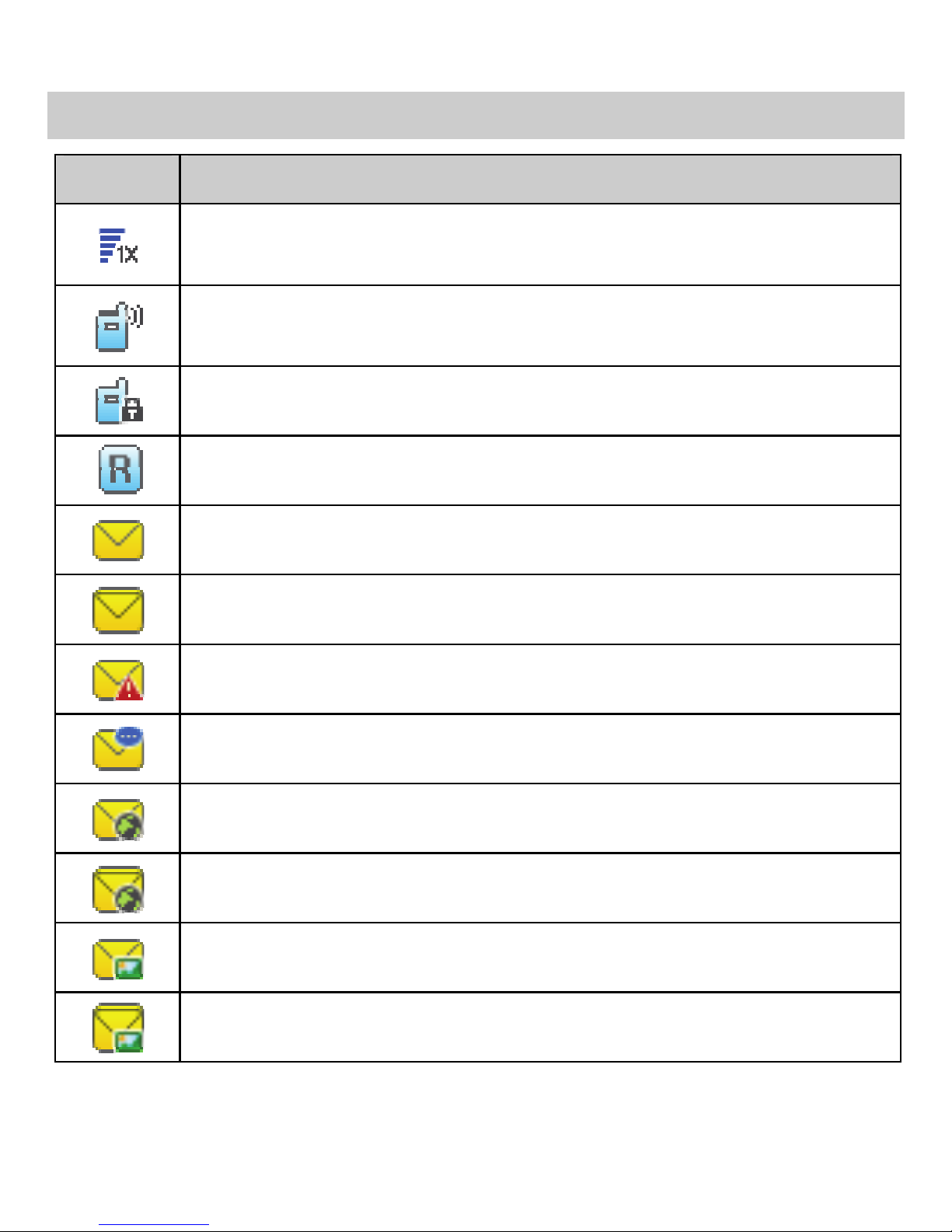
Indicates the signal strength. The more the bars are, the
stronger the signal is.
Incoming call; a call is being set up; or the phone is in
conversation.
Voice privacy function is enabled.
Phone is in the roaming status.
New message is received.
Memory for messages is full.
Urgent message is received.
New voice mail is received.
New PUSH message is received.
PUSH message is full.
New MMS is received.
MMS is full.
Table of contents
Other Huawei Cell Phone manuals

Huawei
Huawei T520 User manual

Huawei
Huawei Mobile Phones User manual

Huawei
Huawei KIWI KIW-L22 Technical specifications

Huawei
Huawei P20 lite User manual

Huawei
Huawei M931 User manual

Huawei
Huawei Comet User manual

Huawei
Huawei Ascend G700 User manual

Huawei
Huawei AT&T Fusion U8652 User manual

Huawei
Huawei C2828 User manual

Huawei
Huawei U8815 User manual

Huawei
Huawei Ascend W1 Installation guide

Huawei
Huawei u8820 User manual

Huawei
Huawei U8220 User manual

Huawei
Huawei T261L User manual

Huawei
Huawei Mobile Phones User manual

Huawei
Huawei CAG-L03 User manual

Huawei
Huawei P SMART User manual

Huawei
Huawei DRA-LX9 User manual

Huawei
Huawei T211 User manual

Huawei
Huawei Ascend Y330 User manual


