Huawei G7002 User manual

G7002
GSM Mobile Phone
User Guide

Copyright © Huawei Technologies Co., Ltd. 2009. All
rights reserved.
No part of this document may be reproduced or transmitted in any
form or by any means without prior written consent of Huawei
Technologies Co., Ltd.
The product described in this manual may include copyrighted
software of Huawei Technologies Co., Ltd and possible licensors.
Customers shall not in any manner reproduce, distribute, modify,
decompile, disassemble, decrypt, extract, reverse engineer, lease,
assign, or sublicense the said software, unless such restrictions are
prohibited by applicable laws or such actions are approved by
respective copyright holders under licenses.
Trademarks and Permissions
, HUAWEI, and are trademarks or registered trademarks
of Huawei Technologies Co., Ltd.
Other trademarks, products, services, and company names
mentioned are the property of their respective owners.
Notice
Some features of the product and its accessories described herein
rely on the software installed, capacities and settings of local
network, and may not be activated or may be limited by local
network operators or network service providers. Thus the
descriptions herein may not exactly match the product or its
accessories you purchase.
Huawei Technologies Co., Ltd reserves the right to change or modify
any information or specifications contained in this manual without
prior notice or obligation.

NO WARRANTY
THE CONTENTS OF THIS MANUAL ARE PROVIDED “AS IS”. EXCEPT
AS REQUIRED BY APPLICABLE LAWS, NO WARRANTIES OF ANY
KIND, EITHER EXPRESS OR IMPLIED, INCLUDING BUT NOT LIMITED
TO, THE IMPLIED WARRANTIES OF MERCHANTABILITY AND FITNESS
FOR A PARTICULAR PURPOSE, ARE MADE IN RELATION TO THE
ACCURACY, RELIABILITY OR CONTENTS OF THIS MANUAL.
TO THE MAXIMUM EXTENT PERMITTED BY APPLICABLE LAW, IN NO
CASE SHALL HUAWEI TECHNOLOGIES CO., LTD BE LIABLE FOR ANY
SPECIAL, INCIDENTAL, INDIRECT, OR CONSEQUENTIAL DAMAGES,
OR LOST PROFITS, BUSINESS, REVENUE, DATA, GOODWILL OR
ANTICIPATED SAVINGS.
Import and Export Regulations
Customers shall comply with all applicable export or import laws and
regulations and will obtain all necessary governmental permits and
licenses in order to export, re-export or import the product
mentioned in this manual including the software and technical data
therein.

i
Contents
1 Getting to Know Your Phone .................................................... 1
Your Phone ..........................................................................1
Keys and Functions...............................................................2
Screen Icons.........................................................................1
2 Installation and Charging .......................................................... 2
Installation ...........................................................................2
Charging the Battery ............................................................3
3 Getting Started ........................................................................ 4
Using the Stylus....................................................................4
Using the Widget Bar ...........................................................4
Calibrating the Screen ..........................................................5
USB .....................................................................................5
Phone Lock ..........................................................................5
PIN and PUK ........................................................................6
Locking the Screen and the Keypad ......................................6
Entertainment ......................................................................6
4 Voice Services .......................................................................... 7
Making a Call.......................................................................7
Answering a Call ..................................................................7
5 Text Entry................................................................................. 8
Text Entry Screen..................................................................8
Entering Letters....................................................................9
Entering Numbers ................................................................9
6 Messaging ............................................................................... 9
Creating and Sending a Text Message...................................9

ii
Creating and Sending a Multimedia Message......................10
7 Phonebook ............................................................................ 10
Creating a Contact .............................................................10
Searching for a Contact......................................................11
8 Camera.................................................................................. 11
Accessing the Camera Screen .............................................11
Taking a Picture..................................................................12
9 Video Recorder ...................................................................... 13
Video Recorder Screen .......................................................13
Recording a Video File ........................................................14
10 Media Players....................................................................... 14
Accessing the Video Player Screen ......................................14
Accessing the Audio Player Screen......................................15
11 FM Radio............................................................................. 16
Accessing the FM Radio Screen...........................................16
Scheduling the Recording of Radio Programs ......................17
12 Network Services.................................................................. 18
STK ....................................................................................18
WAP ..................................................................................18
13 Bluetooth ............................................................................ 19
Transferring Data................................................................19
Using a Bluetooth Headset .................................................19
14 Warnings and Precautions..................................................... 20

1
1 Getting to Know Your Phone
Your Phone
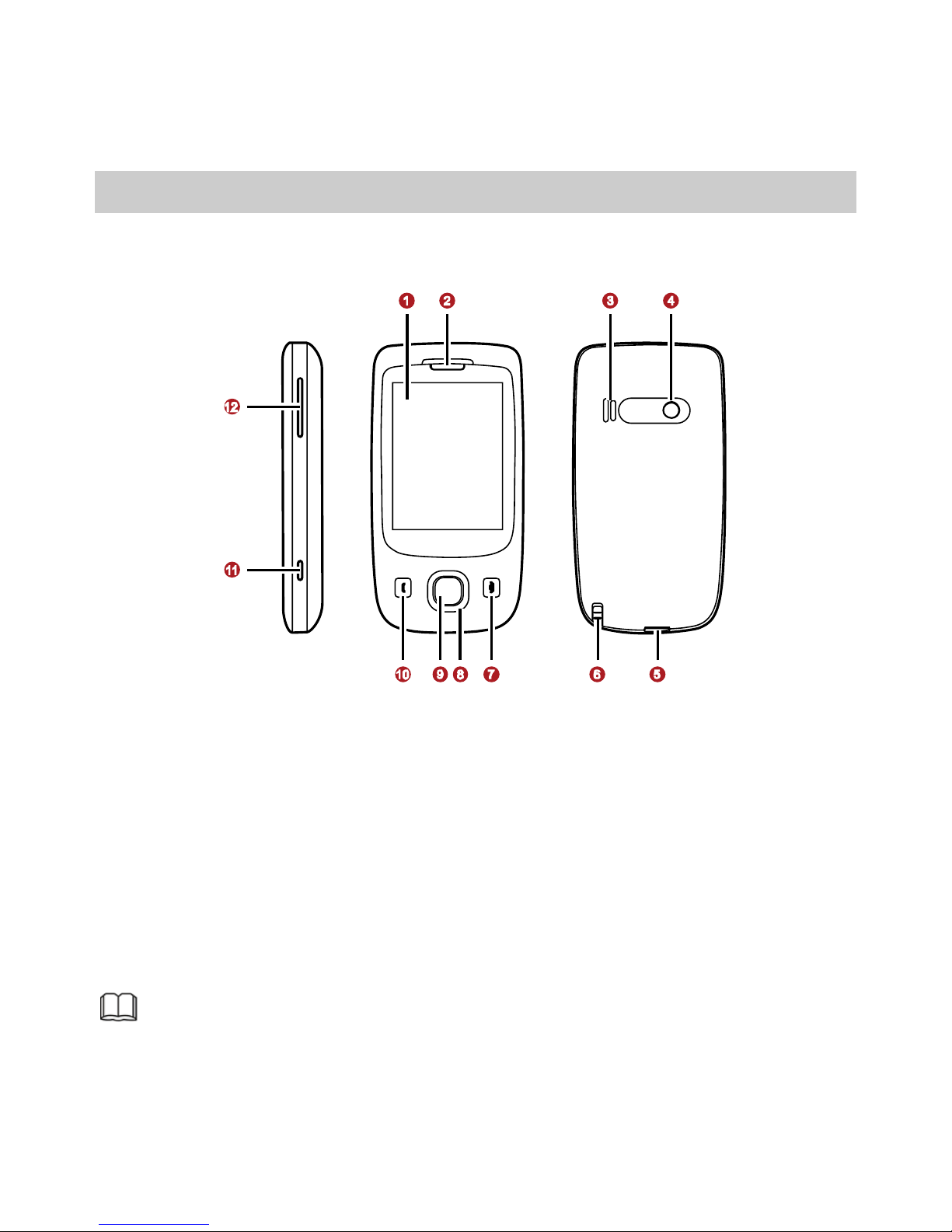
The following figure shows the appearance of your phone and it is
for your reference only.
1 Screen 7 End/Power key
2 Earpiece 8 Navigation keys
3 Speaker 9 Confirm key
4 Camera 10 Call/Answer key
5 Charger/Universal serial bus
(USB)/Headset jack 11 Shortcut button for the
camera
6 Stylus 12 Volume/Scroll key
If an accessory of the phone is not included in the packing
box, it might be provided as a giveaway or you need to
purchase it separately.

2
Keys and Functions
Press ...
To …
zEnd a call.
zReturn to the standby mode.
zTurn off the backlight in standby mode (by
pressing it) and power on or off the phone (by
pressing and holding it).
zScroll through the submenus on a menu screen or
the options on an option screen.
zAccess User Profiles (by pressing the up key),
Shortcuts (by pressing the down key), Write
message (by pressing the left key), and the
camera screen (by pressing the right key) in
standby mode.
zAccess the main menu in standby mode.
zConfirm a selection.
zDial a number or answer a call.
zView the records on the Call history screen in
standby mode.
Access the camera screen.
zScroll up and down the submenus on a menu
screen or the options on an option screen.
zAdjust the volume in standby mode, during a call,
during music playing, or during FM radio
listening.

1
Screen Icons
Icon Indicates …
Signal strength and line.
The keypad is locked.
Unread text messages.
Unread multimedia messages.
General packet radio service (GPRS).
Alarms.
Unconditional forwarding is enabled.
Missed calls.
Headset profile.
Battery power level. The current battery power is full.
The alert type is Ring only.
The alert type is Vib. only.
The alert type is Vib. then ring.
The alert type is Vib. and ring.
The Bluetooth function is enabled.

2
2 Installation and Charging
Installation
Removing the Back Cover
Installing the SIM Card
When installing the subscriber identity module (SIM) card, ensure
that the golden contact area on the SIM card is facing downward
and that the beveled edge of the SIM card is properly aligned with
that of the SIM card slot.
Installing a microSD Card
1. Push the metal cover of the microSD card slot in the direction as
indicated by ain the following left figure, and then open the
cover in the direction as indicated by b.
2. Place the microSD card in the slot. Ensure that the beveled edge
of the microSD card is properly aligned with that of the slot.

3
3. Close the metal cover in the direction as indicated by ain the
following right figure, and then push the cover in the direction as
indicated by bto fix the microSD card.
If no microSD card is included in the packing box, a microSD
card might be provided as a giveaway or you need to
purchase a microSD card separately.
Installing the Battery
Charging the Battery
1. Connect the charger to the charger jack on the phone.
2. Connect the charger to a power socket.
The charging starts, with the charging icon displayed in an
animated state.
If the battery power is exhausted when you charge the
battery, the charging icon might appear on the screen a few
minutes after the charger is connected to the power socket.
Table of contents
Other Huawei Cell Phone manuals

Huawei
Huawei SnapTo User manual

Huawei
Huawei H892L Dimensions

Huawei
Huawei G5500 User manual

Huawei
Huawei FLA-LX1 User manual

Huawei
Huawei Ascend P1 User manual

Huawei
Huawei Ascend P7 mini User manual

Huawei
Huawei C2206 User manual

Huawei
Huawei Mate 30 Pro User manual

Huawei
Huawei Y625-U21 Technical specifications

Huawei
Huawei MAR-LX3Am User manual

Huawei
Huawei U8950 Operating manual

Huawei
Huawei U1310 User manual

Huawei
Huawei Ascend Y 200 Dimensions

Huawei
Huawei Ascend G6 User manual

Huawei
Huawei Ascend Y5 User manual

Huawei
Huawei U8500 User manual

Huawei
Huawei Mobile Phones User manual

Huawei
Huawei Y6 User manual

Huawei
Huawei Mate 10 User manual

Huawei
Huawei Ascend Y User manual