
Hitachi PSC-A128EX3 User manual

A12124920A
IMPORTANT:
READ AND UNDERSTAND
THIS MANUAL BEFORE USING
THIS CENTRAL CONTROLLER.
KEEP THIS MANUAL FOR
FUTURE REFERENCE.
HITACHI Air Conditioner
Managing System
Remote Access
Model: PSC-A128EX3
Thank you for choosing our Air Conditioner
Managing System.
● Pleasekeepthismanualinasafeplace.
● Ifyouhaveanyquestionsorconcerns,
pleasecontactdistributororyourdealer.
Operation Manual


TABLE OF CONTENTS
1. Safety Summary ...................................................................................................................... 2
2. SystemConguration............................................................................................................... 6
3. AboutThisManual ................................................................................................................... 7
4. Preparation .............................................................................................................................. 7
4.1 Test Run ........................................................................................................................... 7
4.2 PCSpecication(preparedonsite).................................................................................. 7
4.3 NetworkEnvironment ....................................................................................................... 8
4.3.1ConnectingtheremotePCwiththededicatedLAN ................................................... 8
4.3.2ConnectingtheremotePCwiththeexistingLAN....................................................... 8
4.3.3UsingtheremotePCthroughinternet ........................................................................ 8
4.3.4ChangingIPAddressofPCforRemoteAccesssoftware ........................................ 10
5. Setup...................................................................................................................................... 16
5.1 Installation ...................................................................................................................... 16
5.1.1InstallingRemoteAccesssoftware........................................................................... 16
5.2 Starting Remote Access ................................................................................................. 19
5.2.1SettingIPAddressofCentralStationEX ................................................................. 19
5.2.2 Starting Remote Access ........................................................................................... 21
6. Troubleshooting ..................................................................................................................... 22
7. Cleaning................................................................................................................................. 23
A12124920A 1

1. Safety Summary
Important Notice
● HITACHIpursuesapolicyofcontinuingimprovementindesignandperformanceinitsproducts.
Assuch,HITACHIreservestherighttomakechangesatanytimewithoutpriornotice.
● HITACHIcannotanticipateeverypossiblecircumstancethatmightinvolveapotentialhazard.
● CentralStationEXisdesignedforstandardairconditioningapplicationsonly.Donotusethisproduct
foranythingotherthanthepurposesforwhichitwasintendedfor.
● Theinstallerandsystemspecialistmustsafeguardagainstleakageinaccordancewithlocalpipetter
andelectricalcodes.TheInternationalOrganizationforStandardization:(ISO5149)orEuropean
Standard(EN378)maybeapplicable,iflocalregulationsarenot.Nopartofthismanualmaybe
reproducedinanywaywithouttheexpressedwrittenconsentofHITACHI.
● Ifyouhavequestions,pleasecontactyourdistributorordealer.
● Thismanualprovidesdescriptions,andbasicandadvancedinformationtomaintainandserviceCentral
StationEXwhichappliesaswellforothermodels.
● Thismanualshouldbeconsideredapermanentpartoftheairconditioningequipmentandshould
remainwiththeairconditioningequipment.
Product Inspection upon Arrival
1. Uponreceivingthisproduct,inspectitforanydamagesincurredintransit.Claimsfordamage,either
apparentorconcealed,shouldbeledimmediatelywiththeshippingcompany.
2. Checkthemodelnumber,electricalcharacteristics(powersupply,voltage,andfrequencyrating),and
anyaccessoriestodetermineiftheyagreewiththepurchaseorder.
3. ThestandardutilizationforCentralStationEXisexplainedintheseinstructions.Donotuseofthis
equipmentforpurposesotherthanwhatitdesignedfor.
4. Pleasecontactyourlocalagentorcontractorasanyissuesinvolvinginstallation,performance,or
maintenancearise.Liabilitydoesnotcoverdefectsoriginatingfromunauthorizedmodications
performedbyacustomerwithoutthewrittenconsentof
HITACHI
.Performinganymechanical
alterationsonthisproductwithouttheconsentofthemanufacturerwillrenderyourwarrantynulland
void.
2 A12124920A
Signal Words
Indicatesahazardoussituationthat,ifnotavoided,couldresultindeathorserious
injury.
Indicatesahazardoussituationthat,ifnotavoided,couldresultinminorormoderate
injury.
Indicatesinformationconsideredimportant,butnothazard-related(forexample,
messagesrelatingtopropertydamage).
General Precautions
Toreducetheriskofseriousinjuryordeath,readtheseinstructionsthoroughlyand
followallwarningsorcautionsincludedinallmanualsthataccompaniedtheproduct
and are attached to the unit. Refer back to these safety instructions as needed.
● Thissystem,includingRemoteAccess,shouldbeinstalledbypersonnelcertiedby
HITACHI
.
Personnelmustbequaliedaccordingtolocal,state,andnationalbuildingandsafetycodesand
regulations.Incorrectinstallationcouldcauseleaks,electricshock,reorexplosion.Inareaswhere
Seismic‘’Performancerequirementsarespecied,theappropriatemeasuresshouldbetakenduring
installationtoguardagainstpossibledamageorinjurythatmightoccurinanearthquake.Iftheproductis
notinstalledcorrectly,injuriesmayoccurduetoafallingproduct.
● UseappropriatePersonalProtectiveEquipment(PPE),suchasglovesandprotectivegogglesand,
whereappropriate,haveagasmasknearby.Alsouseelectricalprotectionequipmentandtoolssuited
forelectricaloperationpurposes.Keepawetclothandareextinguishernearbyduringbrazing.Use
careinhandling,rigging,andsettingofbulkyequipment.
● Whentransporting,becarefulwhenpickingup,movingandmountingtheseunits.Althoughtheunitmay
bepackedusingplasticstraps,donotusethemfortransportingtheunitfromonelocationtoanother.
Donotstandonorputanymaterialontheunit.Getapartnertohelp,andbendwithyourkneeswhen
liftingtoreducestrainonyourback.Sharpedgesorthinaluminumnsontheairconditionercancut
ngers,sowearprotectivegloves.
● Donottouchoradjustanysafetydevicesinsidetheindoororoutdoorunits.Allsafetyfeatures,
disengagement,andinterlocksmustbeinplaceandfunctioningcorrectlybeforetheequipmentisput
intooperation.Ifthesedevicesareimproperlyadjustedortamperedwithinanyway,aseriousaccident
canoccur.Neverbypassorjump-outanysafetydeviceorswitch.
● HITACHI
willnotassumeanyliabilityforinjuriesordamagecausedbynotfollowingstepsoutlinedor
describedinthismanual.Unauthorizedmodicationsto
HITACHI
productsareprohibitedasthey…
◦ Maycreatehazardswhichcouldresultindeath,seriousinjuryorequipmentdamage;
◦ Willvoidproductwarranties;
◦ Mayinvalidateproductregulatorycertications;
◦ MayviolateOSHAstandards;
Takethefollowingprecautionstoreducetheriskofpropertydamage.
● Becarefulthatmoisture,dust,orvariantrefrigerantcompoundsdonotentertherefrigerantcycle
duringinstallationwork.Foreignmattercoulddamageinternalcomponentsorcauseblockages.
● Ifairltersarerequiredonthisunit,donotoperatetheunitwithouttheairltersetinplace.
Iftheairlterisnotinstalled,dustmayaccumulateandbreakdownmayresult.
● Donotinstallthisunitinanyplacewheresilicongasescancoalesce.
A12124920A 3

● WheninstallingCentralStationEXinahospitalorotherfacilitywhereelectromagneticwavesare
generatedfromnearbymedicaland/orelectronicdevices,bepreparedfornoiseandelectronic
interferenceElectromagneticInterference(EMI).Donotinstallwherethewavescandirectlyradiate
intotheelectricalbox,controllercable,orcontroller.Inverters,appliances,high-frequencymedical
equipment,andradiocommunicationsequipmentmaycausetheproducttomalfunction.
Theoperationoftheproductmayalsoadverselyaectthesesamedevices.Installtheproductat
least3mawayfromsuchdevices.
● Whenawirelesscontrollerisused,locateitatadistanceofatleast1meterbetweentheindoor
unitandelectriclighting.Ifnot,thereceiverpartoftheunitmayhavedicultyreceivingoperation
commands.
● Donotinstalltheunitinanylocationwhereanimalsandplantscancomeintodirectcontactwiththe
outletairstream.Exposurecouldadverselyaecttheanimalsandplants.
● Donotinstalltheunitinanyplacewhereoilcanseepontotheunits,suchastableorseatingareasin
restaurants,andsoforth.Fortheselocationsorsocialvenues,usespecializedunitswithoil-resistant
featuresbuiltintothem.Inaddition,useaspecializedceilingfandesignedforrestaurantuse.These
specializedoil-resistantunitscanbeorderedforsuchapplications.However,inplaceswherelarge
quantitiesofoilcansplashontotheunit,suchasafactory,eventhespecializedunitscannotbeused.
Theseproductsshouldnotbeinstalledinsuchlocations.
Installation Precautions
Takethefollowingprecautionstoreducetheriskofelectricshock,reor
explosionresultinginseriousinjuryordeath:
● WheninstallingCentralStationEXinto…
▫ Awall:Makesurethewallisstrongenoughtoholdtheproduct’sweight.Itmaybenecessaryto
constructastrongwoodormetalframetoprovideaddedsupport.
▫ Aroom:Properlyinsulateanyrefrigeranttubingruninsidearoomtoprevent“sweating”thatcan
causedrippingandwaterdamagetowallandoors.
● DonotinstallCentralStationEXinthefollowingplaces.Doingsocanresultinanexplosion,re,
damage,corrosion,orproductfailure.
▫ Explosiveorammableatmosphere
▫ Whereare,oil,steamorpowdercandirectlyentertheunit,suchasnearbyorabovea
kitchenstove.
▫ Whereoil(includingmachineryoil)maybepresent.
▫ Wherecorrosivegasessuchaschlorine,bromine,orsuldecanaccumulate,suchasnearahot
tuborhotspring.
▫ Wheredense,salt-ladenairowisheavy,suchasincoastalregions.
▫ Wheretheairqualityisofhighacidity.
▫ Whereharmfulgasescanbegeneratedfromdecomposition.
● Performatestruntoensurenormaloperation.Safetyguards,shields,barriers,covers,andprotective
devicesmustbeinplacewhilethecompressor/unitisoperating.Duringthetestrun,keepngersand
clothingawayfromanymovingparts.
● Cleanupthesitewhennished,rememberingtocheckthatnometalscrapsorbitsofwiringhave
beenleftbehindinsidetheunitbeinginstalled.
Afterinstallationworkforthesystemhasbeencompleted,explainthe“SafetyPrecautions”,theproper
useandmaintenanceofCentralStationEXtothecustomeraccordingtotheinformationinallmanuals
thatcamewiththesystem.Allmanualsandwarrantyinformationmustbegiventotheuserorleftnearthe
IndoorUnit.
4 A12124920A

Electrical Precautions
Takethefollowingprecautionstoreducetheriskofelectricshock,reor
explosionresultinginseriousinjuryordeath.
● Highlydangerouselectricalvoltagesareusedinthissystem.Carefullyrefertothewiringdiagram
andtheseinstructionswhenwiring.Improperconnectionsandinadequategroundingcancause
serious injury or death.
● Beforeservicing,openandtagalldisconnectswitches.Neverassumethatelectricalpoweris
disconnected.Checkwithmeterandequipment.
● Onlyuseelectricalprotectionequipmentandtoolssuitedforthisinstallation.
● UsespeciedcablesbetweenCentralStationEXandthepowersupply/airconditioner/external
equipment.
● Shieldedcommunicationcableisnotalwaysrequiredbutstronglyrecommendedtoprevent
communicationissuesforapplicationssuchas:HeavyandLightIndustrialBuildings,Telecom
Centers,DataCenters,Airports,RadioStations,Hospitals/Healthcarebuildings,andOces.
● Useadedicatedpowersupplyfortheairconditionerattheunit’sratedvoltage.
● Besuretoinstallcircuitbreakers(groundfaultinterrupter,isolatingswitch,moldedcasecircuit
breakerandsoon),withthespeciedcapacity.Ensurethatthewiringterminalsaretightenedsecurely
torecommendedtorquespecications.
● Clampelectricalwiressecurelywithacableclampafterallwiringisconnectedtotheterminalblock.
Inaddition,runwiressecurelythroughthewiringaccesschannel.
● Wheninstallingthepowerlines,donotapplytensiontothecables.Securethesuspendedcablesat
regularintervals,butnottootightly.
● TurnOFFanddisconnectCentralStationEXfromthepowersourcewhenwiring.
DonotopenthebackcoverwithoutturningOFFthemainpowersupply.
● Donotcleanwith,orpourwaterinto,CentralStationEXasitcouldcauseelectricshockand/or
damagetheproduct.Donotusestrongdetergentsuchasasolvent.Cleanwithasoftcloth.
● Checkthatthegroundcableissecurelyconnected.Donotconnectgroundwiringtogaspiping,water
piping,lightningconductor,ortelephonegroundcables.
● Iftherearefrequentoccurrenceswithblownfusesorippedcircuitbreakers,shutdownthesystem
immediatelyandcontactyourservicecontractor.
A12124920A 5

ConnectCentralStationEXtoH-LINK(communicationline)tocontrolandmonitorairconditioners.
Usethissoftwaretocontrolandmonitorairconditionersremotelyonpersonalcomputers(PCs)through
CentralStationEX.
2. System Conguration
NOTICE:
● Adequatemonitoringandcontrolmaynotbeassumeduponoccurrenceofdevicefailure.Itisstrongly
recommendedtopreparealternateplan(suchastouseRemoteControlSwitchtocontrol/monitorair
conditioners)forsuchcases.
● Conducttestrunonallindoorunitstoensuresystemisoperatingcorrectly.
● Uponrecovery,makechangeorcontrolagainasnecessaryifairconditioningsystemisnotworkingas
expected.
● CentralStationEX,CentralStationEXAdapterandtheirperipheralsareassumedtobealwaysON.
Energycalculation,usagehistoryandotherhistoryrecordsforperiodwithinwhichanyofthedevicewas
turnedOFFmaynotbeavailable.
● ControllingandmonitoringonthesystemareallbasedontheclockonCentralStationEX.
CorrectoperationmaynotbeexpectedduetounnecessaryclocksettingchangeonCentralStationEX.
● Usekeyboardexclusivelyforinputtingcharacterstrings.
● 60,61,64and65alarmindicatescommunicationfailurebetweenairconditionersandthissystem.
Henceeachvalueshownonscreenmaynotbeofactualvalue.
● Thescreen-shotimageinthismanualmaydifferfromtheactualcontrollerimage.
● Whileyouarereadingpulseviaexternalinput,pulsecountisnotaccumulatedwhenpoweriscutor
checkingconnection.Thismayaffecttousageaccumulationandcalculation.Thisimportantitemneedsto
bewelldiscussedwithcustomerpriortosystemlaunch.
<Example>
LAN
(Ethernet®)
Remote
Access
software
PC
(Field-Supplied)
Remote
Access
software
PC
(Field-Supplied)
LAN
(Ethernet®)
External
Input Line
Indoor
Unit Indoor
Unit
Power Line
100-240VAC±10%
(50/60Hz)
External Input Line
LAN
(Ethernet
®
)
Pulse
Transmission
Meter
(Field-Supplied)
Pulse
Transmission
Meter
(Field-Supplied)
Ethernet
®
Hub
(Field-Supplied)
Extension Adapter
(PSC-AD128EX3)
Power Line
100-240VAC±10%
(50/60Hz)
Power Line
PSC-A128EX3
External Device
(Demand Controller,
Lighting, etc.)
(Field-Supplied)
H-LINK
(Wiring for Control)
H-LINK
(Wiring for Control)
Power Line
Extension Adapter
(PSC-AD128EX3)
Power Line
100-240VAC±10%
(50/60Hz)
H-LINK
(Wiring for Control)
Indoor
Unit Indoor
Unit
Indoor
Unit Indoor
Unit
Indoor
Unit Indoor
Unit Indoor
Unit Indoor
Unit
Line Termination
Equipment
(Field-Supplied)
VPN Router
(Field-Supplied)
Internet
(*1) RC-lessindoorunitindicatestheindoorunitwithoutremotecontroller.
Thisdoesnotincludeinstanceswheremultipleindoorunitsareconnectedorsettobecontrolledandmonitored
byasingleremotecontroller.
● ToconnectRC-lessindoorunits(*1)tothesystem,the
indoorunitsneedtosupportdualsetpoint.
Maximumexternalinput128
Maximumexternaloutput128
6 A12124920A

ThisoperationmanualdescribesthesetupprocedureforRemoteAccesssoftware.
RefertotheoperationmanualforCentralStationEXforhowtooperatethesoftware.
3. About This Manual
4.1 Test Run
● TestrunsofCentralStationEXandEnergyCalculationSoftware(ifinuse)needtobecompletedbefore
installingRemoteAccesssoftware.CompleteinstallationofCentralStationEXandEnergyCalculation
SoftwareaccordingtotheinstallationandmaintenancemanualsforCentralStationEXandEnergy
CalculationSoftware.
● PCisnecessarytoinstallRemoteAccesssoftware.PreparePCwhichmeetsthespecicationshownin
thefollowingsection“4.2PCSpecication(PreparedonSite)”.
4. Preparation
4.2 PCSpecication(PreparedonSite)
■ TheocialnameofWindows®isMicrosoftWindowsOperatingSystem.
■ Microsoft®,Windows®,andMicrosoft®Excel®are either registered trademarks or trademarks of Microsoft
CorporationintheUnitedStatesand/orothercountries.
■ Intel®Core™i3isaregisteredtrademarkortrademarkofIntelCorporationoritssubsidiariesintheUnited
States and other countries.
■ Ethernet®isaregisteredtrademarkofFujiXeroxCo.,Ltd.
■ ThelifespanofPCsfortheremotemanagementsoftwareisdierentfromthatofairconditioners.
SincethePCneedstobeupdatedregularly,pleasemakeanarrangementwiththecustomeraboutthe
computerupdateconsideringthemaintenanceperiodofthecomputermanufacturer.
■ Usea2-buttonmouse.
■ PCforRemoteAccesssoftwareshouldmeettheabovespecications.Operationisnotguaranteedforall
PCsthatmeetthespecications.
Item Specication
OS Windows7®(32bit/64bit)Professional Windows10®(32bit/64bit)Pro
CPU Intel®Core™i32.0GHzorgreater
Memory 4GByteormore
Resolution 1280 × 800 or more
HardDiskSpace
16GBytefor32bitand20GBytefor64bitasWindows®minimum system
requirements
ThefollowingadditionalharddiskspaceisneededforVRFRemote
Management Software.
-1GByteormorefor1connection(upto16connections)
-0.25GByteormorefor1additionalrefrigerantcycleforenergycalculation
Interface
IEEE802.3(1000BASE-T)
SDmemorycardslot(usedwheninstallingthissoftwareorsavingdata)
USBmemoryslot(usedwhensavingdata)
Application SpreadsheetsoftwaresuchasMicrosoft®Excel®isneededtoopenoreditthe
outputcsvles.
A12124920A 7
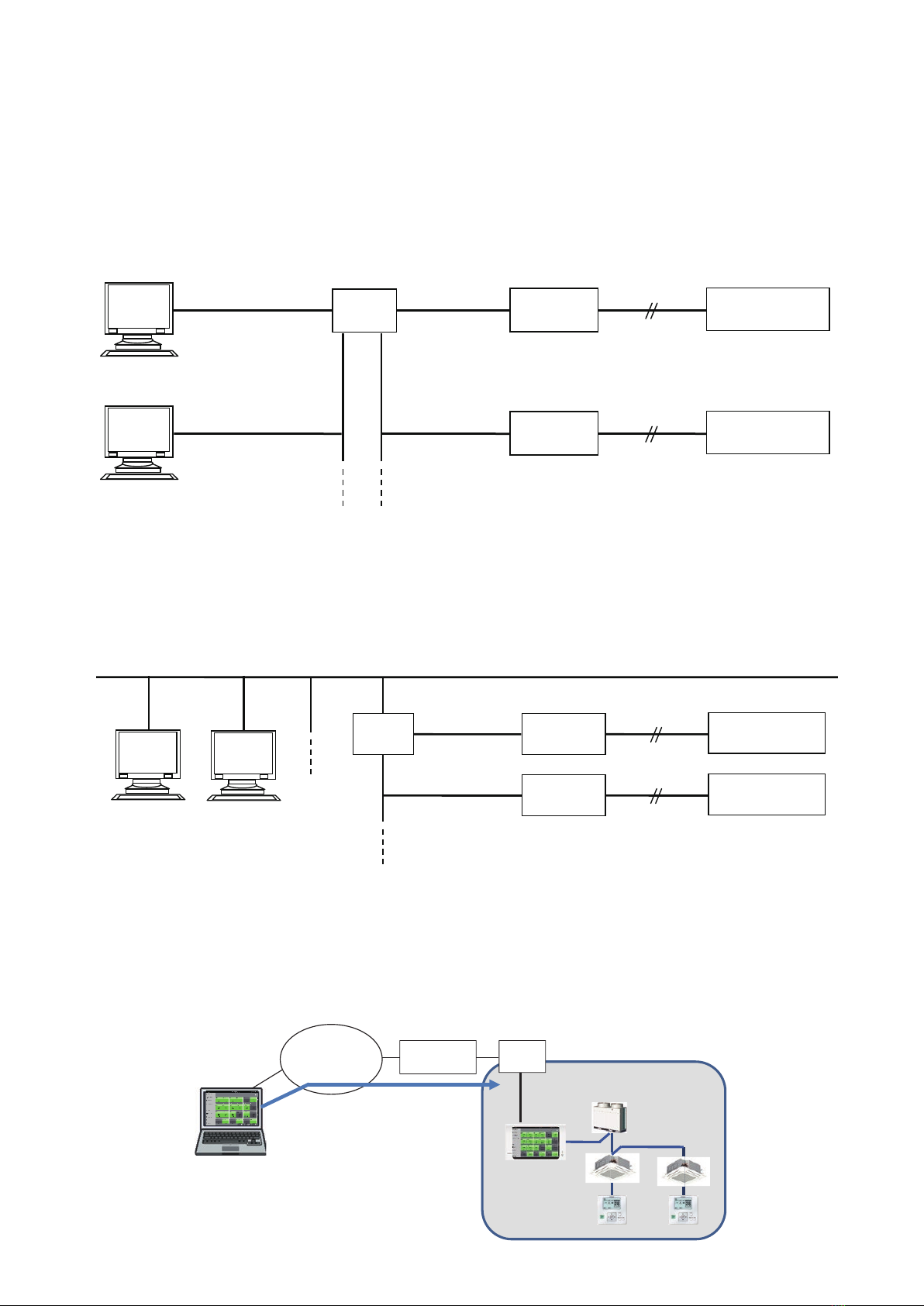
4.3 NetworkEnvironment
CentralStationEXisdesignedtobeusedintheLANenvironment.
4.3.1 ConnectingtheremotePCwiththededicatedLAN
Asthecongurationexampleshownbelow,connectCentralStationEX(andCentralStationEXAdapter)and
PCsforRemoteAccesssoftwarethroughEthernet®Hub.
4.3.2 ConnectingtheremotePCwiththeexistingLAN
Asthecongurationexampleshownbelow,connectCentralStationEX(andCentralStationEXAdapter)and
PCsfortheRemoteAccesssoftwaretotheexistingLANenvironment.
4.3.3 UsingtheremotePCthroughinternet
Asthecongurationexampleshownbelow,connectCentralStationEX(andCentralStationEXAdapter)and
PCsforRemoteAccesssoftwarewithaVPNrouter.BuildaprivatenetworkusingaVPNroutertoensure
securitywhenmonitoringandcontrollingairconditionersremotelythroughinternet.
PC 1 for Remote
A
ccess software
H-LINK
LAN
Central Station EX
Air Conditioner
LAN
H-LINK
LANLAN
Ethernet®
Hub
PC 2 for Remote
Access software
PSC-A128EX3
Central Staion EX Adapter
PSC-AD128EX3
Air Conditioner
LAN
H-LINK
LAN
Trunk LAN
H-LINK
LAN
PC 1 for
Remote
Access software
PC 2 for
Remote
Access software
Ethernet®
Hub Air Conditioner
Air Conditioner
Central Station EX
PSC-A128EX3
Central Staion EX Adapter
PSC-AD128EX3
CongurationexampleofthededicatedLAN
CongurationexampleoftheexistingLAN
Congurationexampleoftheinternetconnection
Internet
Line termination
device
VPN
Router
PC for Remote
A
ccess software
VPN Connection
Private Network
8 A12124920A
Table of contents
Other Hitachi Air Conditioner Accessories manuals


Popular Air Conditioner Accessories manuals by other brands

Unitary products group
Unitary products group 2CE Series installation instructions

Qlima
Qlima EU-ODZ104 user manual

EMI
EMI 550000565 installation instructions

ActronAir
ActronAir MRE-035AS installation manual

Mitsubishi Electric
Mitsubishi Electric RCN-K-E installation manual

Tecnosystemi
Tecnosystemi smart clima INFINITY BLUE RIVER user manual


