
Hama SMART 00186437 User manual
00186437
AIR PURIFIER „SMART“
LUFTREINIGER
M
GOperating Instructions DBedienungsanleitung
GOperating Instructions
Thank you for choosing aHama product.
Take your time and read the following instructions and information completely.Please keep these instructions in
asafe place for futurereference. If you sell the device, please pass these operating instructions on to the new
owner.
1. Explanation of warning symbols and notes
Risk of electric shock
This symbol indicates arisk of electric shock from touching product parts carrying hazardous voltage.
Warning
This symbol is used to indicate safety instructions or to draw your attention to specichazards and risks.
Note
This symbol is used to indicate additional information or important notes.
2. Safety instructions
•The product is intended for private, non-commercial use only.
•Use the product only for the intended purpose.
•Protect the product from dirt, moistureand overheating and use it in dry rooms only.
•Do not use the product in the immediate vicinity of heaters, other heat sources or in direct sunlight.
•The product is intended only for use inside buildings.
•Only use the article under moderate climatic conditions.
•As with all electrical products, this device should be kept out of the reach of children.
•Do not operate the product outside the power limits specied in the technical data.
•Do not use the product in areas in which electronic products arenot permitted.
•Do not use the product in adamp environment and avoid splashing water.
•Do not drop the product and do not expose it to any major shocks.
•Do not modify the product in any way.Doing so voids the warranty.
•Keep the packaging material out of the reach of children due to the risk of suffocation.
•Dispose of packaging material immediately in accordance with the locally applicable regulations.
•Route all cables so that thereisnorisk of tripping.
•Do not bend or crush the cable.
•Always pull directly on the plug when disconnecting the cable, never on the cable itself.
•This device is not intended for use by persons (including children) with reduced physical, sensory or mental
capabilities, or lack of experience and knowledge, unless they have been given supervision or instruction
concerning use of the device by aperson responsible for their safety.
Risk of electric shock
•Do not open the device or continue to operate it if it becomes damaged.
•Do not use the product if the
AC adapter,the adapter cable or the mains cable aredamaged.
•Do not attempt to service or repair the product yourself.Leave any and all service work to qualied experts.
3. Package contents
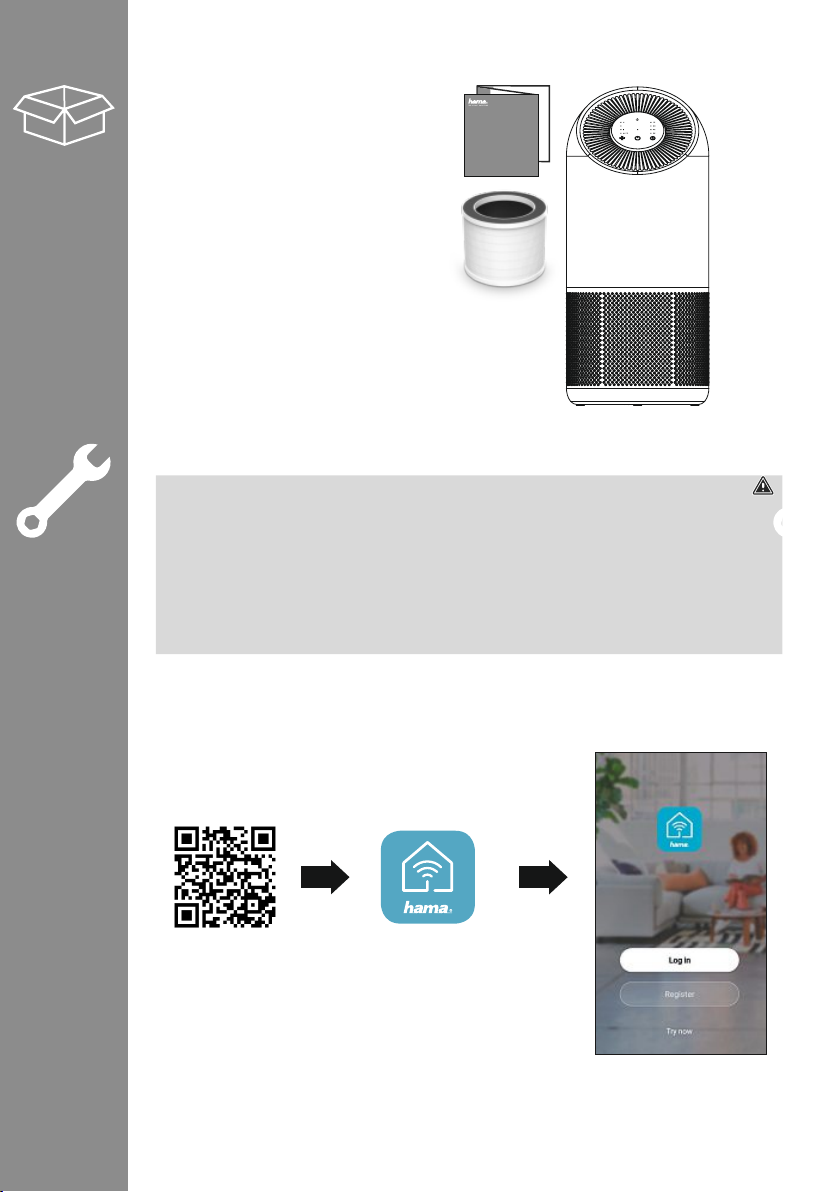
1xair purier
1xcombi lter
1xoperating instructions
4. Connection to the mains
Warning
•Only operate the product from an approved socket that is connected to the public power supply.The socket
must be installed close to the product and must be easily accessible.
•Disconnect the product from the power supply using the On/Off switch –ifthis is not available, unplug the
power cordfromthe socket.
•If using amulti-socket power strip, make surethat the total power consumption of all connected devices
does not exceed the power strip‘s maximum throughput rating.
•If you will not be using the product for aprolonged period, disconnect it from mains power.
•Place the air purier on astable, at surface. Connect the air purier to aproperly installed socket.
5. Installing the app
•Download the „Hama Smart Home (Solution)“ app using the QR code and install it.
00186437
AIR PURIFIER
LUFTREINIGER
M
https://de.hama.com/
smarthome#smart-solution
6. Integrating devices into the Hama Smart Home (Solution) app
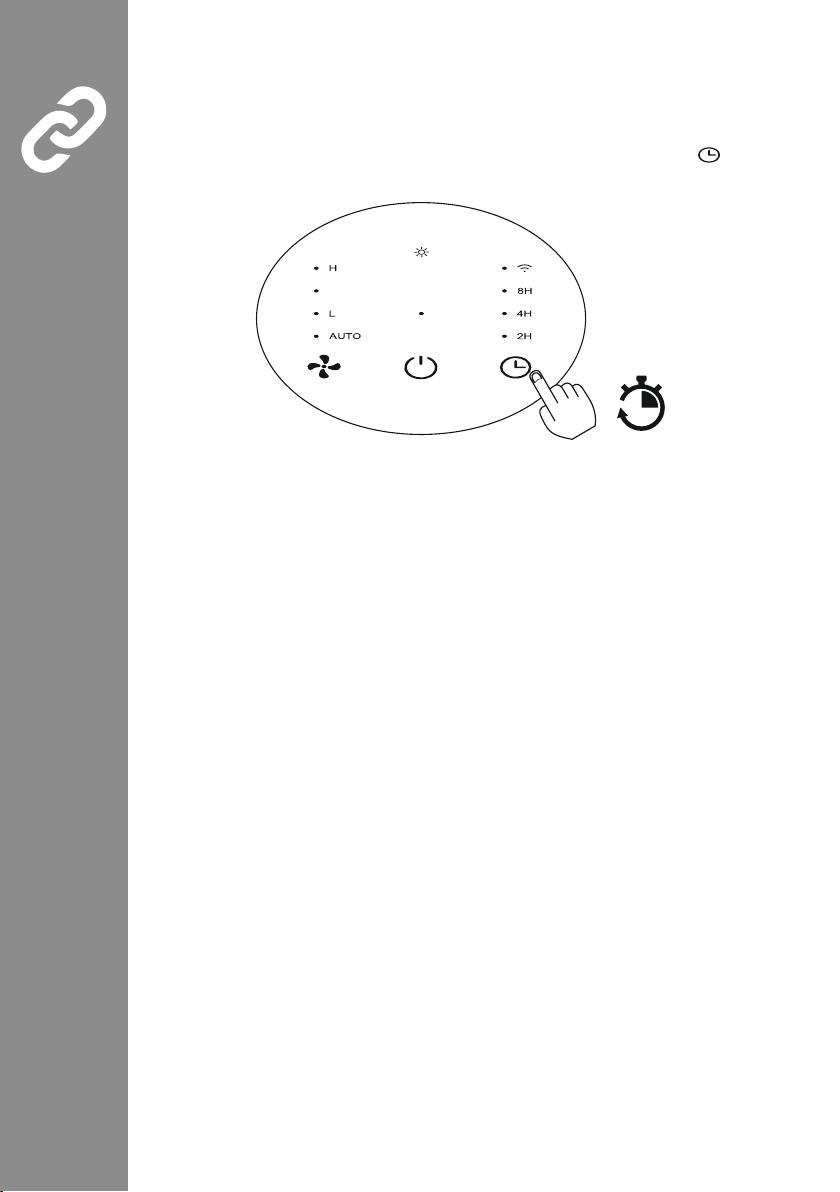
•Make sureyour mobile phone is connected to a2.4 GHz WiFi network. To connect the air purier to the app,
rst connect it to aproperly installed socket. If the air purier is now in standby status, the WiFi symbol should
ash quickly on the display.Ifthe symbol does not appear or ashes slowly,press and hold the button for
5seconds. Now the WiFi symbol ashes quickly.
5s
M
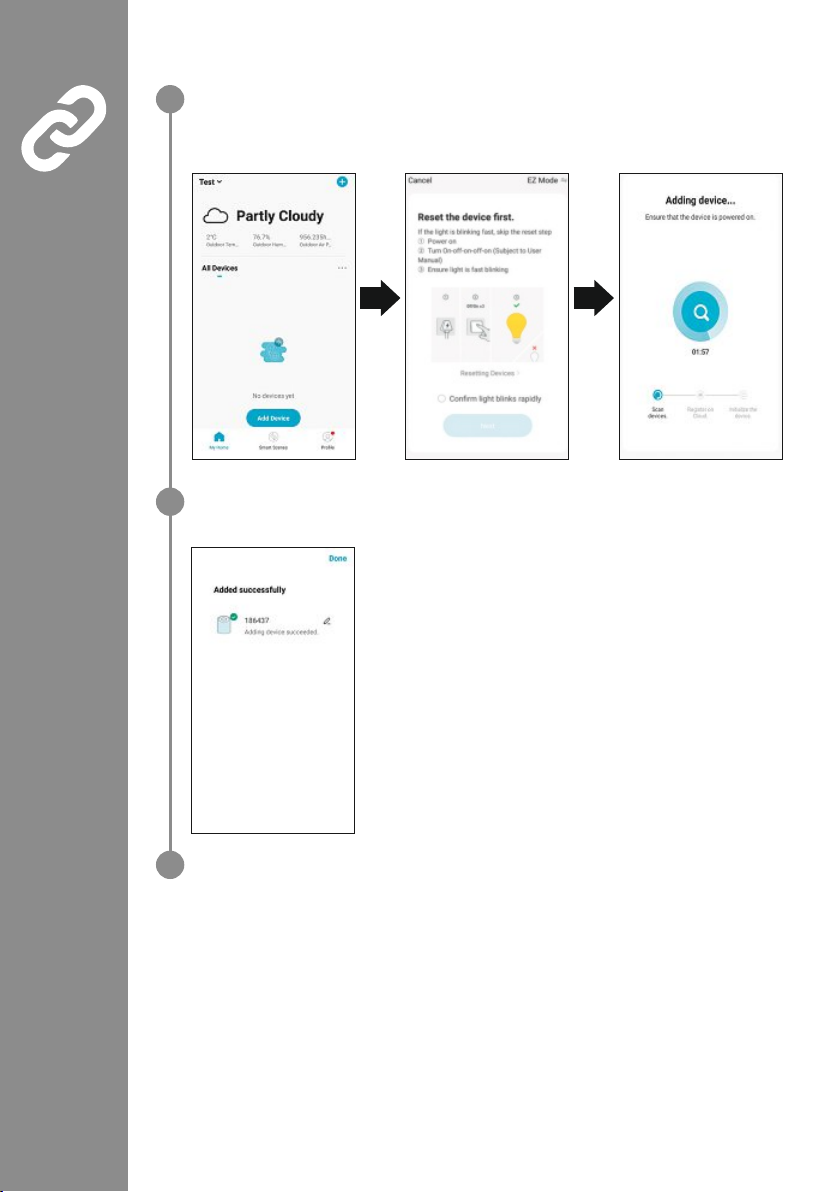
•Open the app and select „My home“ at the bottom left-hand edge of the screen.
•Then tap the „+“ at the top right-hand edge of the screen and select the category „Air purier“.
•Now select your WiFi network and enter your password.
•Check the box in the „Next step“ and click NEXT.
•If the connection is successful, the app conrms that the air purier has been incorporated. Youcan
now assign the air purier adifferent name if you wish.
•Click on „Done“ to complete the process.
1
2
3
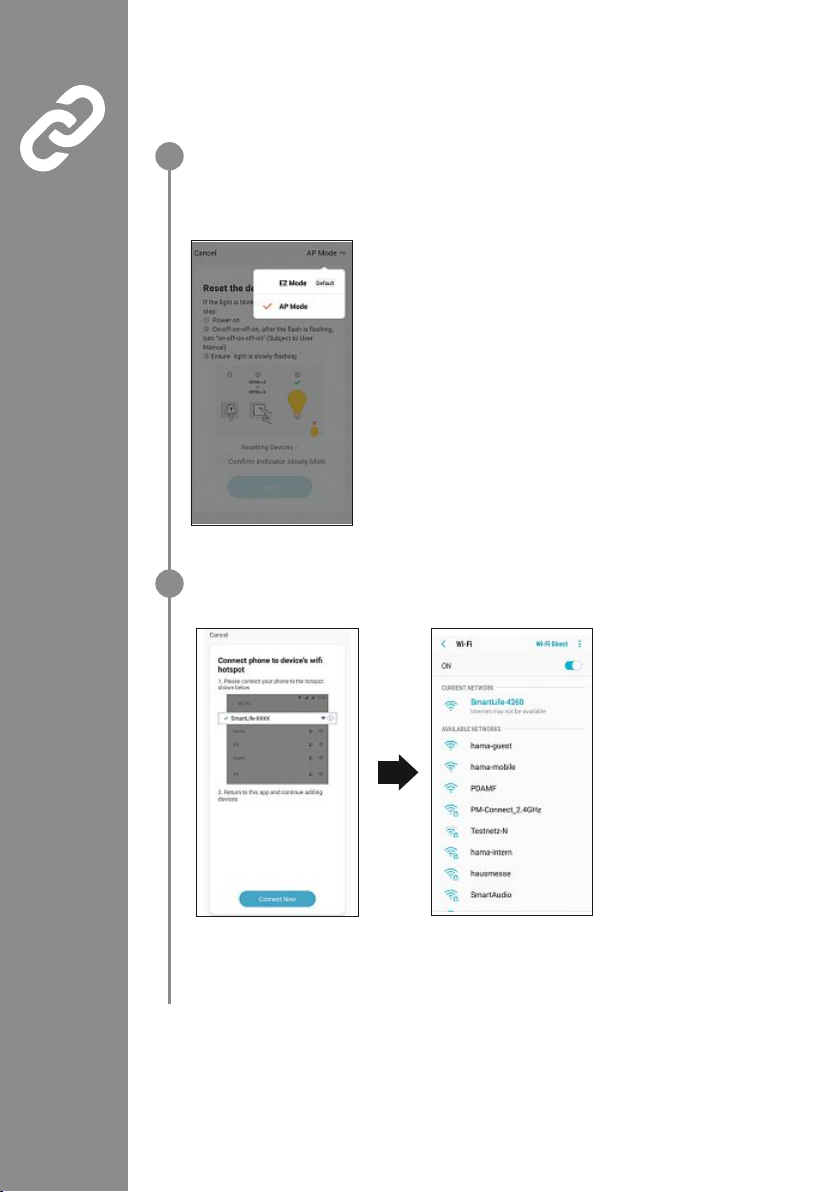
If the previously described method for integrating the air purier does not work, thereisthe
option of connecting the device via access point (AP) mode.
•In the rst step, the WiFi indicator on the air purier display must ash slowly.Ifthis is not the case,
repeatedly for about 5seconds until it ashes slowly.
•Now proceed in the same way as described before. Beforeyou tick „Next step“, select AP mode in the
top right-hand corner.
•The following screen appears:
•Now tick the next step, click Next and select „Connect now“ in the next screen. In the WLAN network
overview,select the network with the name „SmartLife_XXXX“.
•Youcan ignoreany error message that you arecurrently not connected to the Internet and then return
to the Hama Smart Home (Solution). Your air purier is now connected.
1
2
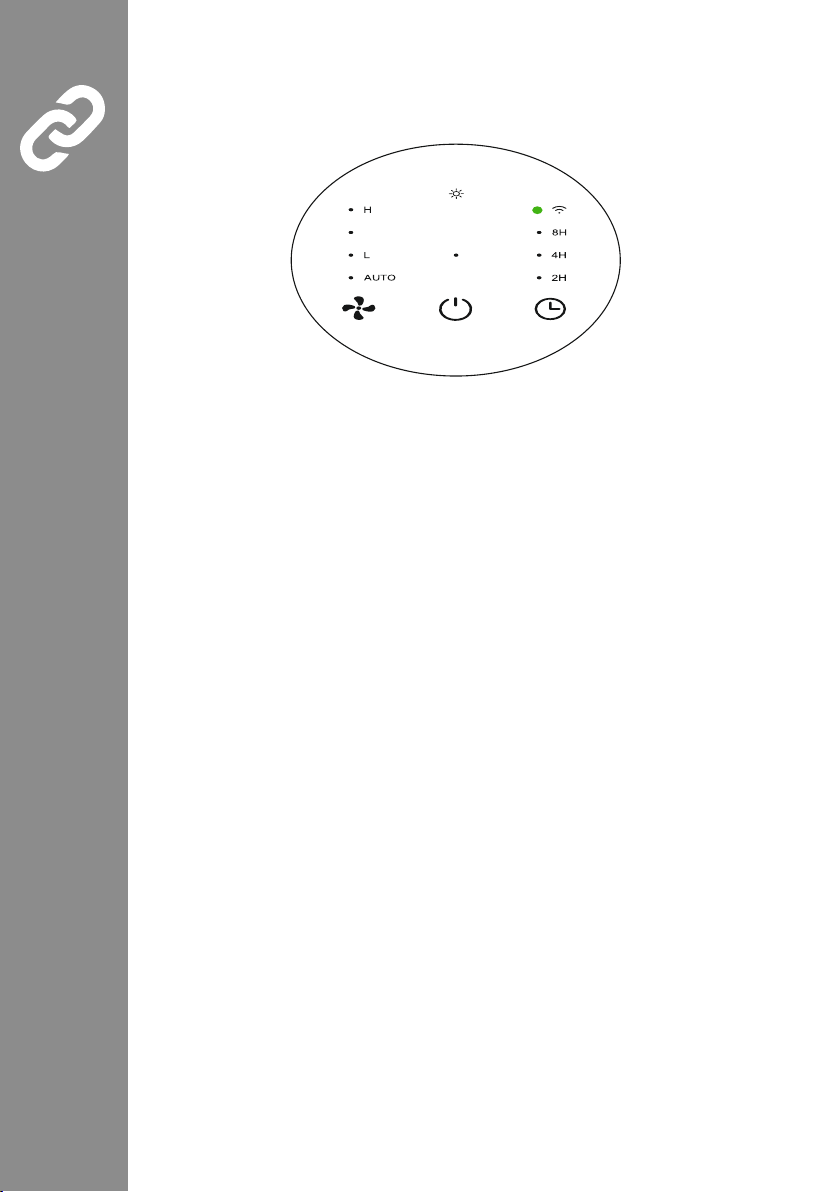
•After asuccessful connection, you will see that the WiFi symbol on the display stops ashing.
It may disappear for asecond and then light up green permanently.
M
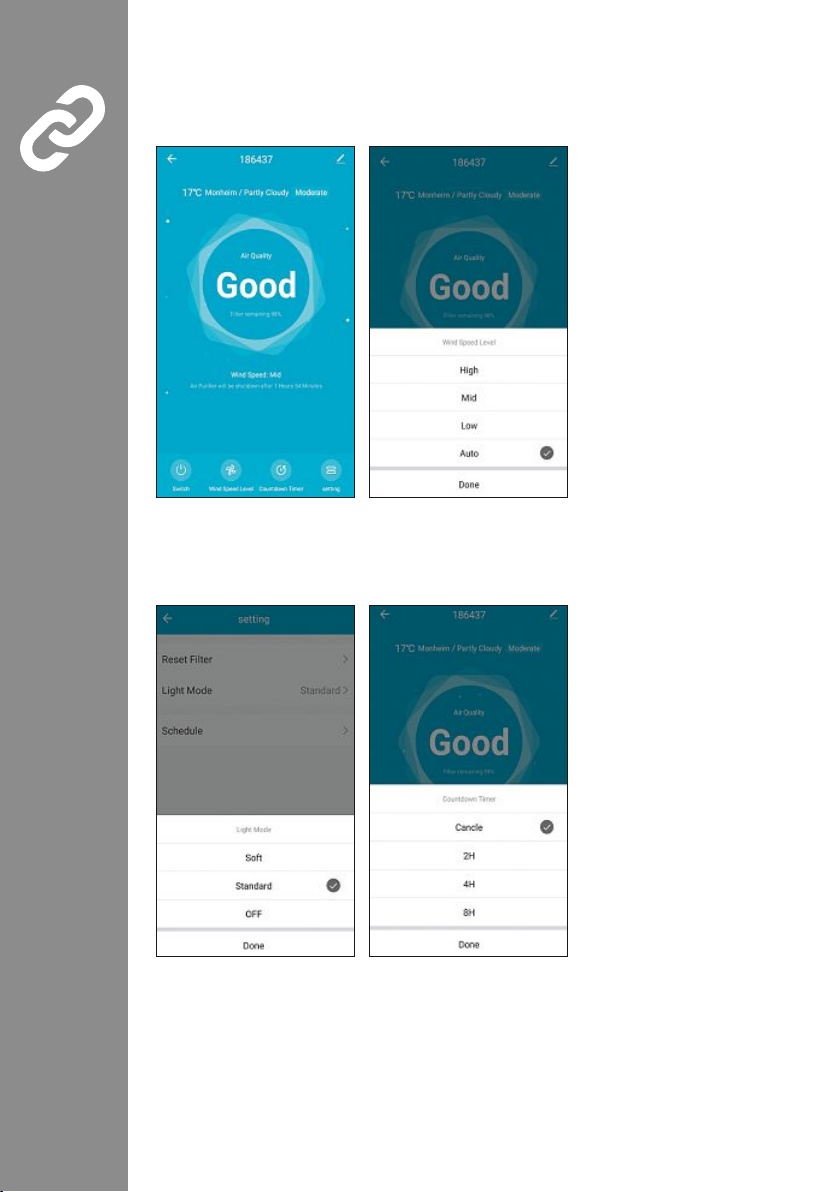
•To operate or congurethe device, select 186437 (air purier) under „My Home“. Tapon„Switch“ at the
bottom left. The air purier is now switched on as shown in Figure1.
•Press „Wind Speed“. Youcan select between Auto, Low, Medium and High. Your selection is displayed
accordingly at the top (Figure2).
Figure3 Figure4
•Under „Settings“, you can also set the light mode to Gentle (light dimmed), StandardorOff (Figure3).
•Tap„Settings“ at the bottom right. The timer can be set between 2, 4and 8hours. To cancel the timer,press
„Settings“ again and then press „Cancel“ (Figure4).
Figure1 Figure2
6.1 Control via voice assistants
The following voice commands aresupported:
•Switch on /off
„Alexa /OKGoogle, switch the air purier on.“
„Alexa /OKGoogle, switch the air purier off.“
„Alexa /OKGoogle, switch the air purier to low,medium, high, auto.“
7. Technical data
Device dimensions 244 x244 x544 cm
Power supply 24V
Power consumption 45 W
CADR value 250 m³/h
Suitable for rooms up to 21 m² (Ansi/AHAM AC -12015) -
65 m² (NRCC -54013 -2011)
Filter type Pre/coarse lter; Hepa 13 lter; Activated charcoal lter
Weight 4.08kg
8. Care and maintenance
Note
Disconnect the device from the mains beforecleaning and during prolonged periods of non-use.
•Only clean this product with aslightly damp, lint-free cloth and do not use aggressive cleaning agents.
•Ensurethat no water is able to enter the product.
•*See also the „Replace Filter“ section for detailed cleaning instructions.

8.1 Inserting/changing the filter
Warning
•Make surethat the product is disconnected from the mains.
•Since the lter contains all the collected pollutants, it should only be changed outdoors and with
appropriate careagainst contact contamination (gloves/respiratory protection).
•The lter must be inserted beforethe rst start-up.
To do this, proceed as follows:
1
4
Verpackung
3
2
Filter
5
•Lay the air purier on its side.
•Turn the base plate aquarter turn anticlockwise. The base plate can be removed. (Fig. 1)
•Remove the used lter,ifany,and dispose of it in your household waste. (Fig. 2)
•Remove the new lter from the protective packaging (Fig. 3) and insert it into the device. (Fig. 4)
•Now reinsert the base plate into the latching lugs. Turn the base plate clockwise to tighten. (Fig. 5)
•After a lter change, go to the Hama Smart Home (Solution) app to reset the lter.Click the „Reset lter“ eld.
Table of contents
Languages:
Other Hama Air Cleaner manuals


