Halton Rex Expander Product manual

Halton Rex Expander (RX ) - Installation,
commissioning, and maintenance guide
Enabling Wellbeing All rights reserved ©Halton

Contents
1 Introduction ........................................................................................................................................................... 4
1.1 Copyright and disclaimers ............................................................................................................................ 4
1.2 About this document ..................................................................................................................................... 4
1.3 Summary of changes ................................................................................................................................... 4
1.4 Safety notes ................................................................................................................................................. 5
1.5 Contact information ...................................................................................................................................... 5
2 Product description ............................................................................................................................................... 6
2.1 Overview ....................................................................................................................................................... 6
2.2 Operating principle ....................................................................................................................................... 6
2.3 Structure and materials ................................................................................................................................ 9
2.4 Dimensions and weight .............................................................................................................................. 11
3 Transport, storage and handling ......................................................................................................................... 12
3.1 Pre-packing and packing ............................................................................................................................ 12
3.2 Shipping and handling ................................................................................................................................ 12
3.2.1 Handling the product .......................................................................................................................... 12
3.3 Checking the received equipment .............................................................................................................. 12
3.4 Unpacking ................................................................................................................................................... 12
3.5 ifting the equipment .................................................................................................................................. 13
3.6 Storing the equipment ................................................................................................................................ 13
4 Installation ........................................................................................................................................................... 14
4.1 Before you start .......................................................................................................................................... 14
4.1.1 Safety during installation .................................................................................................................... 14
4.1.2 Installation process ............................................................................................................................ 14
4.1.3 Installation requirements .................................................................................................................... 15
4.1.4 Checks before installation .................................................................................................................. 16
4.2 Step by step instructions ............................................................................................................................ 16
4.2.1 Installing the unit ................................................................................................................................ 16
4.2.2 Connecting the unit to the ductwork ................................................................................................... 16
4.2.3 Connecting the water circuit connections .......................................................................................... 17
4.3 Checks after installation ............................................................................................................................. 18
5 Commissioning ................................................................................................................................................... 19
5.1 Before you start .......................................................................................................................................... 19
5.1.1 Safety during commissioning ............................................................................................................. 19
5.1.2 Commissioning process ..................................................................................................................... 19
5.1.3 Commissioning information ................................................................................................................ 19
5.2 Step by step instructions ............................................................................................................................ 21
5.2.1 Adjusting the position of the manual actuator of HAQ control ........................................................... 21
Halton Rex Expander (RXP) - Installation, commissioning, and maintenance guide 2
1.0 All rights reserved ©Halton

6 Maintenance ....................................................................................................................................................... 22
6.1 Before you start .......................................................................................................................................... 22
6.1.1 Safety during maintenance ................................................................................................................ 22
6.1.2 Checks before maintenance .............................................................................................................. 22
6.1.3 Maintenance information .................................................................................................................... 22
6.2 Maintenance schedule ............................................................................................................................... 22
6.3 Step by step instructions ............................................................................................................................ 22
6.3.1 Cleaning the unit ................................................................................................................................ 22
6.3.2 Opening the front panel ..................................................................................................................... 23
6.3.3 Filling in the maintenance documents ................................................................................................ 23
6.4 Checks after maintenance .......................................................................................................................... 23
7 End of life ............................................................................................................................................................ 24
7.1 Removing the product from use ................................................................................................................. 24
7.2 Recycling and waste disposal .................................................................................................................... 24
8 Troubleshooting and repairs ............................................................................................................................... 26
8.1 Troubleshooting .......................................................................................................................................... 26
8.2 Fault reporting and reclamations ................................................................................................................ 26
8.3 Spare parts ................................................................................................................................................. 26
9 Technical reference data .................................................................................................................................... 27
9.1 Connections: Electric actuator of HAQ control ........................................................................................... 27
Halton Rex Expander (RXP) - Installation, commissioning, and maintenance guide 3
1.0 All rights reserved ©Halton

1 Introduction
1.1 Copyright and disclaimers
The contents of this document are strictly confidential and for information purposes only. Disclosing the information
in this document without an appropriate contract or permission by Halton to any third party is prohibited. This
document remains the sole property of Halton and may not be duplicated, borrowed, copied, amended, modified,
reproduced, transmitted or distributed to any third party without the prior written consent of Halton. Any information
held in this document or associated materials may only be used for the purpose specified in this document.
Halton disclaims any and all liability related to this document. Halton gives no explicit or implied warranties in terms
of this document. Any permitted use of the information included herein is at your own risk. Halton may amend or
replace the information included in this document at its sole discretion without further notice and liability.
All intellectual property rights or applications thereof, including without limitation copyright, model rights, patents,
trade secrets, trade names, trademarks, know-how (whether registered or unregistered) attributable to this
document remain the sole and exclusive property of Halton. No rights or licenses are granted.
1.2 About this document
This document provides the instructions on how to install, commission, and maintain the product. This document is
intended for properly trained persons performing these tasks.
Note: Project-specific variations are possible.
1.3 Summary of changes
Release Date Description
1.0 15-Sep-2021 First release
Halton Rex Expander (RXP) - Installation, commissioning, and maintenance guide 4
1.0 All rights reserved ©Halton

1.4 Safety notes
All information in this section is important and relevant for your safety. Pay special attention to these icons and the
related safety texts when used later in context in this document.
Cautions
CAUTION
FA ING HAZARD
Pay special attention and use proper equipment when working at height.
CAUTION
PERSONA INJURY HAZARD
Do not lift objects over 20 kg (44 lbs) alone. Use a lift or seek assistance.
CAUTION
PERSONA INJURY HAZARD
Follow all local health and safety regulations and use proper personal protective
equipment.
Notices
NOTICE
NOTICE
All installation, commissioning, and maintenance work must only be carried out by
qualified personnel.
NOTICE
NOTICE
All electrical work must only be carried out by qualified personnel.
1.5 Contact information
For contact information, see www.halton.com.
Halton Rex Expander (RXP) - Installation, commissioning, and maintenance guide 5
1.0 All rights reserved ©Halton

2 roduct description
2.1 Overview
Figure 1. Halton Rex Expander
Compact CAV/VAV chilled beam with 4-way air distribution for suspended ceilings. Ensures silent and pleasant
room conditions even with higher cooling capacities.
Application area
▪ Cooling and ventilation in offices, hospital rooms, schools, and public spaces.
▪ Can be used in Halton’s demand-based ventilation systems.
Key features
▪ Active chilled beam with 4-way air distribution.
▪ Adjustable airflow using manual CAV or motorised VAV, with the Halton Air Quality (HAQ) control.
▪ Throw pattern expanded to corners, which ensures pleasant room conditions even with high cooling
capacities.
2.2 Operating principle
The primary supply air enters the plenum of the Halton Rex Expander chilled beam, from which it is diffused into
the room through the nozzles and supply slots. The air jets from the nozzles induce ambient room air efficiently
through the heat exchanger, where the air is cooled by means of the cool water circulating in the heat exchanger.
The supply slots direct the air jets horizontally along the ceiling surface, which prevents the feeling of draught.
Halton Rex Expander (RXP) - Installation, commissioning, and maintenance guide 6
1.0 All rights reserved ©Halton

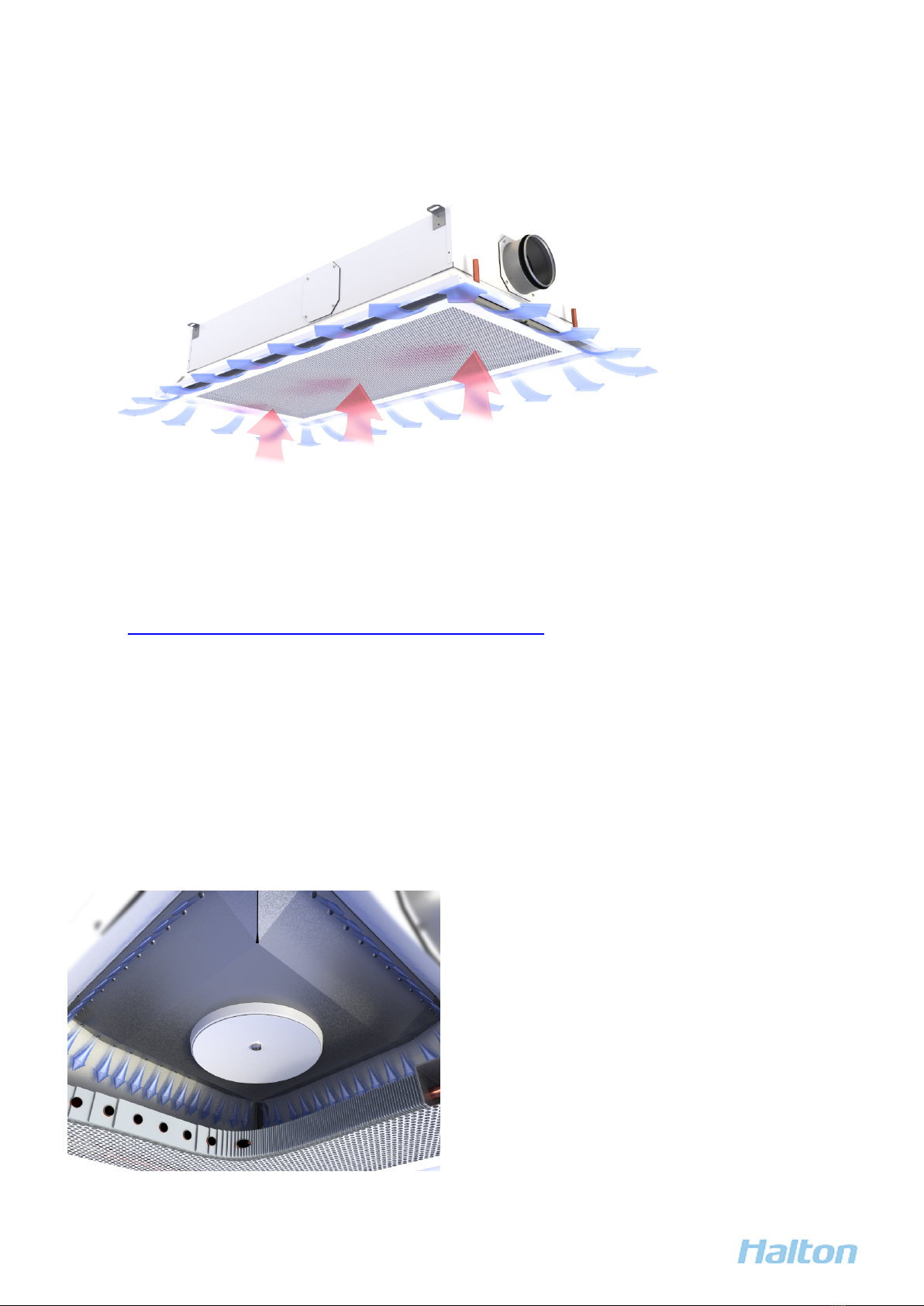
Figure 2. Operating principle of the Halton Rex Expander chilled beam
In figure Operating principle of the Halton Rex Expander chilled beam, the blue arrows show the supply air coming
through the supply slots. The red arrows show the ambient room air going through the front panel and the heat
exchanger.
Halton Air Quality (HAQ) control
Halton Air Quality (HAQ) control is used for adjusting or controlling the rate of the additional supply airflow in a
room space. In normal conditions, fresh supply air is provided through the nozzles. Whenever additional air is
needed (boost/VAV function), the HAQ control opens and provides more air. VAV stands for Variable Air Volume.
The HAQ control can also be used as a Constant Air Volume (CAV) damper, that is, it can be used for adjusting the
k-factor to achieve the correct airflow with a certain pressure level. This removes the need for changing or plugging
the nozzles of the Halton Rex Expander chilled beam.
Figure 3. VAV function: Supply air from nozzles (normal mode)
Halton Rex Expander (RXP) - Installation, commissioning, and maintenance guide 7
1.0 All rights reserved ©Halton

Figure 4. VAV function with HAQ control: Supply air from nozzles and HAQ control (boost mode)
Figure 5. Manual actuator of HAQ control
Figure 6. Electric actuator of HAQ control
Halton Rex Expander (RXP) - Installation, commissioning, and maintenance guide 8
1.0 All rights reserved ©Halton

2.3 Structure and materials
Figure 7. Halton Rex Expander parts
Halton Rex Expander (RXP) - Installation, commissioning, and maintenance guide 9
1.0 All rights reserved ©Halton

No. art Description
1 Front panel Pre-painted galvanised steel
Polyester-painted, white (RA 9003), with special colours available.
2 Nozzles Nozzle plate: galvanised steel
3 HAQ control
(optional)
Painted galvanised steel
4 Actuator of HAQ
control (optional)
Electric actuator (shown in the figure): connecting cable length 0.9 m
Manual actuator: galvanised steel
5 Plenum Pre-painted galvanised steel
Polyester-painted, white (RA 9003)
6 Brackets Galvanised steel
7 Spigot Galvanised steel
8 Frame Pre-painted galvanised steel
Polyester-painted, white (RA 9003), with special colours available.
9 Connection pipes Copper. ø 12 mm with a wall thickness of 0.9–1.0 mm, fulfilling the
requirements of European Standard EN 1057:1996.
10 Coil/Heat
exchanger
Pipes: copper
Fins: aluminium
Halton Rex Expander (RXP) - Installation, commissioning, and maintenance guide 10
1.0 All rights reserved ©Halton
Table of contents
Other Halton Ventilation Hood manuals

Halton
Halton Capture Ray KVE-UV User manual

Halton
Halton EcoloAir 3000CFM User manual

Halton
Halton KVE (SJ-SK) User manual

Halton
Halton KVF Capture Jet Instruction Manual

Halton
Halton Capture Jet KVE-WW User manual

Halton
Halton MM1 Series User manual

Halton
Halton ECOV-10 Specifications

Halton
Halton KVE-UV User manual

Halton
Halton Capture Jet KVESJ User manual

Halton
Halton MM1 Series User manual