
Hach MTC301 User manual

DOC022.53.80026
MTC301
05/2021, Edition 4
User Manual


Table of Contents
Section 1 Product overview................................................................................. 3
Section 2 Specifications........................................................................................ 3
Section 3 Safety information............................................................................... 4
3.1 Intended use ....................................................................................................... 4
3.2 Use of hazard information..................................................................................... 4
3.3 Precautionary labels............................................................................................. 4
3.4 Product hazards.................................................................................................... 5
Section 4 Preparation for use.............................................................................. 5
Section 5 Calibration.............................................................................................. 7
5.1 Calibration notes................................................................................................... 7
5.2 Calibration procedure........................................................................................... 8
Section 6 Sample measurement....................................................................... 8
6.1 Sample measurement notes................................................................................. 8
6.2 Sample measurement procedure......................................................................... 9
Section 7 Verify the calibration.......................................................................... 9
7.1 Verification procedure......................................................................................... 10
Section 8 Maintenance........................................................................................ 10
8.1 Clean the probe.................................................................................................. 10
8.2 Fill the probe....................................................................................................... 11
8.3 Replace the filling solution.................................................................................. 11
8.4 Storage............................................................................................................... 12
Section 9 Troubleshooting................................................................................. 13
Section 10 Consumables..................................................................................... 13
1

Table of Contents
2

Section 1 Product overview
The Intellical MTC301 series ORP probes are digital, combination electrodes that measure the
oxidation reduction potential (ORP/Redox) of wastewater, drinking water and general water samples.
The probes are refillable and have a built-in temperature sensor and a ceramic pin reference
junction. A 28-mL bottle of reference electrolyte filling solution is supplied with the probe. Refer to
Figure 1.
Note: Do not use the probe for measurements in organic solvents.
Figure 1 Probe overview
1 Probe soaker bottle with storage solution 5 Cable
2 Platinum electrode, reference junction and
temperature sensor
6 Probe soaker bottle holder
3 Filling-hole plug 7 Electrode filling and storage solution
4 Protective tape and filling hole
Section 2 Specifications
Specifications are subject to change without notice.
Specifications Details
Probe type Digital combination electrode with a refillable Ag/AgCl
reference and a built-in temperature sensor
Range ±1200 mV
Resolution 0.1 mV
Reference type Ag/AgCl
Reference junction Ceramic pin
Temperature accuracy ±0.3 °C (±0.54 °F)
Operating temperature 0 to 80 °C (32 to 176 °F)
Storage temperature 5 to 40 °C (41 to 104 °F)
Minimum immersion depth 20 mm (0.79 in.)
Body material (standard) Epoxy
English 3

Specifications Details
Reference potential versus Standard
Hydrogen Electrode
207 mV at 25 °C
Electrolyte filling solution 3 M KCl saturated with AgCl
Storage solution Hach pH electrode storage solution1 or 3 M KCl
Cable connection M12 digital output and connector
Dimensions Diameter: 12 mm (0.47 in.)
Length: 175 mm (6.9 in.) total; 103 mm (4.1 in.) below head
Cable length: MTC30101: 1 m (3.3 ft); MTC30103: 3 m
(9.8 ft)
Warranty 1 year on the probe. This warranty covers manufacturing
defects, but not improper use or wear.
Certifications CE, FCC/ISED
Section 3 Safety information
3.1 Intended use
The Intellical probes are intended for use by individuals who measure water quality parameters in the
laboratory. The Intellical probes do not treat or alter water.
3.2 Use of hazard information
D A N G E R
Indicates a potentially or imminently hazardous situation which, if not avoided, will result in death or
serious injury.
WARNING
Indicates a potentially or imminently hazardous situation which, if not avoided, could result in death
or serious injury.
CAUTION
Indicates a potentially hazardous situation that may result in minor or moderate injury.
N O T I C E
Indicates a situation which, if not avoided, may cause damage to the instrument. Information that
requires special emphasis.
3.3 Precautionary labels
Read all labels and tags attached to the instrument. Personal injury or damage to the instrument
could occur if not observed. A symbol on the instrument is referenced in the manual with a
precautionary statement.
Electrical equipment marked with this symbol may not be disposed of in European
domestic or public disposal systems. Return old or end-of-life equipment to the
manufacturer for disposal at no charge to the user.
1Use of other storage solutions can cause permanent damage to the probe.
4 English

3.4 Product hazards
CAUTION
Chemical exposure hazard. Obey laboratory safety procedures and wear all of the
personal protective equipment appropriate to the chemicals that are handled. Refer to
the current safety data sheets (MSDS/SDS) for safety protocols.
CAUTION
Chemical exposure hazard. Dispose of chemicals and wastes in accordance with local,
regional and national regulations.
CAUTION
Personal injury hazard. Glass components can break. Handle with care to prevent cuts.
Section 4 Preparation for use
N O T I C E
Make sure to remove the protective tape from the filling hole of new probes. A probe with a blocked
filling hole will not operate correctly.
New probes are filled with electrolyte filling solution and have a soaker bottle that contains storage
solution to keep the glass bulb and reference junction hydrated. Prepare the probe for calibration and
measurement as follows.
1. Remove the protective tape from the filling hole. Refer to Figure 2.
2. Rinse the reference junction and glass bulb with deionized water. Blot dry with a lint-free cloth.
3. If the inner filling solution is low, add more filling solution. Refer to Fill the probe on page 11.
4. Make sure that the meter has the correct date and time settings. The service-life time stamp in
the probe comes from the date and time settings in the meter.
Note: Some meters automatically open the date and time settings when the meter starts for the first time, or
after battery replacement.
5. Connect the probe to the meter.
6. Open the filling hole before use. Keep the level of the electrolyte filling solution above the level of
the measurement liquid during use. Refer to Figure 3.
English 5

Figure 2 Remove the protective tape
6 English
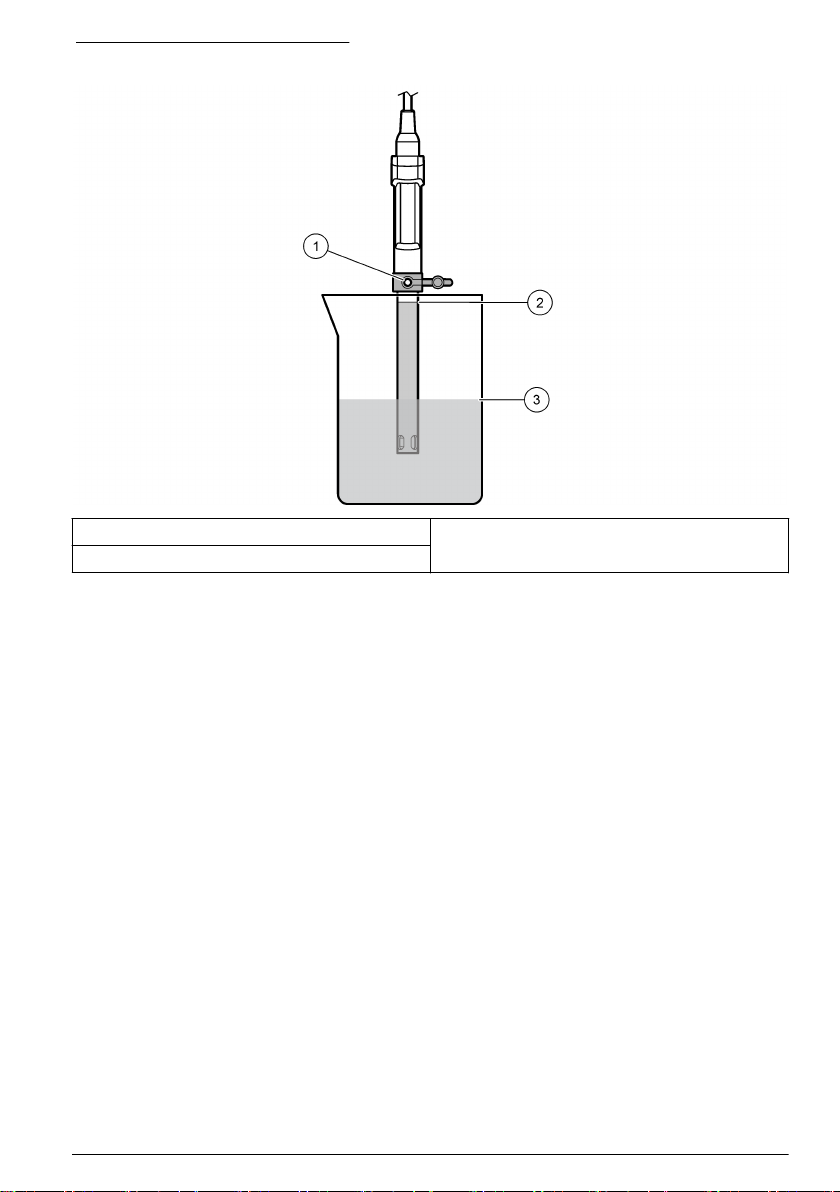
Figure 3 Probe position during use
1 Open filling hole 3 Level of calibration solution or sample
2 Level of electrolyte filling solution
Section 5 Calibration
The procedure that follows is applicable to meters that can connect to Intellical ORP (MTC) probes.
Refer to the applicable meter documentation for meter operation and probe-specific settings.
5.1 Calibration notes
Read the notes that follow before calibration:
• The meter shows the standard solution to use for calibration. If necessary, change the standard
solution in the probe settings menu.
• Do not dilute the standard solution. Discard the standard solution after each calibration.
• If the calibration standard is ZoBell's ORP/Redox standard solution, calibrate the probe at a
solution temperature that is between 0 and 30 °C (32 to 86 °F). If the calibration standard is Light’s
solution, calibrate the probe at 25 °C (77 °F).
• Use the single display mode for calibration when more than one probe is connected to the meter (if
applicable).
• Calibrate the probes and verify the calibration regularly for best results. Use the meter to set
calibration reminders.
• The calibration data is stored in the probe. When a calibrated probe is connected to a different
meter with the same calibration options, a new calibration is not necessary.
• Air bubbles below the sensor when in solution can cause a slow response or error in the
calibration. Make sure to remove air bubbles during calibration.
English 7

5.2 Calibration procedure
1. Go to the
calibrate menu.
Select the probe, if
applicable. The
display shows the
ORP/Redox
standard solution to
use for calibration.
2. Pour the fresh
standard solution
into a beaker.
3. Open the filling
hole.
4. Rinse the probe
with deionized water.
Dry the probe with a
lint-free cloth.
5. Put the probe in
the standard solution
with the sensor and
reference junction
fully in the solution.
Do not put the probe
on the bottom or
sides of the beaker.
6. Shake the probe
from side to side to
remove air bubbles.
7. Stir gently, then
read the ORP/Redox
value of the standard
solution. The display
shows the mV value
when the reading is
stable.
8. Save the
calibration.
Section 6 Sample measurement
The procedure that follows is applicable to meters that can connect to Intellical ORP (MTC) probes.
Refer to the applicable meter documentation for meter operation and probe-specific settings.
6.1 Sample measurement notes
Read the notes that follow before sample measurements.
• For measurements in reducing-type samples, soak the probe in Reducing Solution for ORP
Electrodes for 3-10 minutes before the initial sample measurement. The soak time significantly
decreases the stabilization time.
• Rinse the probe with deionized water and dry with a lint-free cloth between measurements to
prevent contamination.
• If complete traceability is necessary, enter a sample ID and operator ID before measurement.
Refer to the meter manual for instructions.
• The meter automatically saves the measurement data when the user manually reads each data
point and when the meter is set to read at regular intervals. The user must manually save each
data point when the meter is set to read continuously.
8 English
Table of contents
Other Hach Test Equipment manuals

Hach
Hach Iron UniCell HCT 159 User manual

Hach
Hach Polymetron 9523 Quick manual

Hach
Hach Pocket Pro+ Multi 1 User manual

Hach
Hach AquaChek TruTest User manual

Hach
Hach Pocket Pro CondLR User manual

Hach
Hach HQ Series User manual

Hach
Hach Pocket Pro Salinity User manual

Hach
Hach Pocket Pro User manual

Hach
Hach LANGE DR 900 User manual

Hach
Hach LightDeck MINI User manual

Hach
Hach Pocket Pro+ Multi 2 User manual

Hach
Hach Eclox User manual

Hach
Hach Pocket Pro+ Multi 1 User manual

Hach
Hach Pocket Pro+ Multi 2 User manual

Hach
Hach TSS sc User manual

Hach
Hach Pocket Pro+ Multi 1 User manual

Hach
Hach Pocket Pro User manual

Hach
Hach Pocket Pro User manual

Hach
Hach POLYMETRON 8310 User manual


