GVM GVM-PRO-SD650B User manual

GVM-PRO-SD650B

CONTENTS
Important Safety Instructions ---------------------------------------------- Page 1~2
Product introduction ---------------------------------------------------------- Page 3
Warning ------------------------------------------------------------------------ Page 3
Disclaimers -------------------------------------------------------------------- Page 4
Product parameter ------------------------------------------------------------ Page 4
Product structure diagram ---------------------------------------------------- Page 5
Installation method ------------------------------------------------------- Page 6~10
Description of product control keys ----------------------------------------- Page 11
Function introduction & instructions for use --------------------------- Page 12~13
APP control ------------------------------------------------------------------- Page 14
Use and preservation -------------------------------------------------------- Page 15
Quick troubleshooting ------------------------------------------------------- Page 16
Packing list ------------------------------------------------------------------- Page 17
Precautions ------------------------------------------------------------------- Page 17
Product Warranty -------------------------------------------------------- Page 18~19

1
IMPORTANT SAFETY INSTRUCTIONS
First and foremost: this product is a professional lighting and staging equipment
and should be used by a professional lighting technician or under the guidance of a
professional. When using this product, you must always follow the cautions below:
1.Read the product manual carefully before use.
2.This product is only suitable to use in a temperature range of -20℃ to 45℃.
3.Do not place the equipment near flammable and volatile solvents such as alcohol
and gasoline.
4.Before storing the device, make sure it has cooled down completely. When being
stored, unplug the power cord from the device. The equipment should be stored in
its carrying case or a well-ventilated and dry place.
5.This lighting fixture is not for general illumination and should not be used as such.
Individuals with eye injuries or sensitivity should avoid using this lighting fixture.
6.This is a professional light and children are prohibited from using it. Parents or
guardians must closely supervise children when they are near the equipment to
prevent personal injury caused by colliding with or misusing the equipment.
7.Before using the equipment, please remove the protective cover.
8.When the lighting fixture is on, it is forbidden to stare directly at the light source
under any circumstances. High-intensity lighting should only be used under the
guidance of a professional lighting technician. Avoid staying in a high-intensity light
environment for a long time. If feeling any discomfort, please immediately turn off
the lighting fixture, and seek medical attention.
9.When the lighting fixture is on, use it carefully and avoid contacting high-
temperature components such as LED light sources to prevent being burnt.
10.Do not use damaged equipment or accessories. Wait for a professional repairman to
inspect and repair it before it is confirmed that the equipment can function normally.
11.If the light source is damaged or deformed due to heat, please stop using it and
contact the manufacturer, service agents, or qualified repairman promptly to replace
the light source to avoid accidents.
12.If the product is cracked due to falling, squeezing, or strong impact during use,
please stop use it to avoid being electrically shocked by touching internal electronic
components.
13.Do not disassemble the product by yourself. If the product malfunctions, it must be
checked and repaired by the manufacturer or authorized repair personnel.
14.Before cleaning and maintenance, be sure to unplug the power To unplug supply.
never pull on the cable but always pull the plug itself. This device shall only operate
with earthed power outlets or emergency power generators.

2
15.When cleaning the device, do not wipe it with a wet cloth. Use a dry and soft cloth to
wipe off the dirt.
16.If an extension cord is required, it needs to have the necessary capacity to power the
respective unit. Using an extension cord with a lower current capacity than the
devices need may cause overheating.
17.For some products with long power cords, please place the power cords properly
and avoid contact with overheated surfaces that may damage or trip personnel.
Please use the original power cords of our manufactory. The damage caused by
using non-original power cords is not covered by our repair service.
18.Do not use product accessories that are not recommended by our brand to avoid
fire, electric shock, or personal injury.
19.Some products use batteries for power supply. Do not use any batteries, power
sources, or accessories that are not specified in the user manual. Please keep
batteries and other accessories out of reach of children and infants. If a child or
infant swallows a battery or accessory, seek medical attention immediately. If the
battery leaks, changes color, deforms, smokes, or emits an odor, remove it
immediately. Be careful not to get burned during the removal. A continued use of
such batteries may cause a fire, electric shock, or skin burns. Do not use any
deformed or modified batteries. Do not disassemble or modify this product or the
battery. Do not heat the battery or solder it. Do not let the battery come into contact
with fire or water, or subject it to strong external force. Do not insert the battery's
positive and negative ends incorrectly, or mix and use old and new batteries or
different types of batteries.
20.For some products with built-in lithium batteries, please use a dedicated charger for
charging, and follow the correct operating instructions within the prescribed voltage
and temperature range.
21.The warranty last for one year. Consumables like batteries, adapters, power cords,
and other accessories are not covered by the warranty.
22.The one-year warranty will be invalidated if the equipment is found to have been
repaired privately. The related repair costs will be charged.
23.Equipment malfunctions caused by non-standard operations are not covered by the
warranty.
24.The safety instructions are based on our factory's strict testing. If there are any
changes in the equipment's design and specifications, we reserve the right not to
notify you. Customers can visit our official website to check the latest digital version
of the instructions and learn about the newest product information.
Keep these instructions!

3
PRODUCT INTRODUCTION
WARNING:
High-power LED lights are strictly prohibited from being directly viewed or shining
into other people's eyes.
Do not unplug the power cord or connecting wires while the light is on to avoid
personal injury.
Do not cover the heat dissipation port when the lamp is in operation.
Keep children away from touching or using this light.
As professional lighting equipment, please make sure to operate it correctly
according to the user manual.
Thank you for purchasing our “GVM-PRO-SD650B”. This product is specially
designed for senior photographers. The product usage scenarios are suitable for live
broadcast / outdoor / studio photography, etc., and can also be used for YouTube
video shooting.
The main features of the product are:
1.It has high-definition COB beads, which help to restore and enrich the color of
objects, providing you with natural and vivid shooting effects.
2.APP control, can be controlled through your iOS and Android smart mobile
device; support Bluetooth Mesh networking, you can group control with GVM
brand devices that support Mesh networking.
3.With standard DMX interface, DMX control mode of low precision 8bit and high
precision 16bit can be realized.
4.3 lighting modes, CCT mode, light source matching mode, light effect Mode.
We firmly believe that the correct use of this product will be of great help to your
shooting work. It is strongly recommended that you read the following user guide
carefully before using the product.

4
DISCLAIMERS
1.Before using this product, please read the text carefully to ensure that the correct
operation of the product is carried out. Failure to follow and not following the
instructions and warnings in this document may cause damage to the product or
other surrounding items, or even harm you and others around you.
2.By using this product, you are deemed to have carefully read the disclaimer and
warning, understand and agree all the terms and contents of this statement, and
promise to take full responsibility for the use of this product and the possible
consequences.
3.Design and specifications are subject to change without notice.
◆
◆
◆
◆
◆
◆
◆
◆
◆
◆
◆
◆
◆
◆
◆
◆
◆
◆
◆
◆
◆
PRODUCT PARAMETER
Brand : GVM
Product Model : GVM-PRO-SD650B
Product Name : Photography light
Product Type : Photography fill light
Features : Multiple light effect modes, high display index lamp beads
Control Methods : DMX, Wireless remote control, Light body control, APP Bluetooth
MESH network control
Lamp Beads Quantity : 1 (COB lamp beads)
Color Rendering Index : ≥97
Color Temperature : 2700K~6800K
Lumen: Bare light 21300lux/1m ; standard cover 81300lux/1m
Light Adjustment Method : Step-less adjustment
Power : 650W
Product Net Weight : 6.7KG
Controller Net Weight : 2.6KG
Product Size (mm) : 484 × 278 × 164
Controller Size (mm) : 136×133×335
Power Supply Mode : AC & Battery (V-mount battery)
Voltage : AC:100V~240V
Cooling : Heat sink + fan
Product Material : Aluminum alloy
Commodity rigin : O China. Huizhou

5
PRODUCT STRUCTURE DIAGRAM
Controller
Light
Control input
Vents
Light stand interface
Vents
Bowens mount
lamp beads
Angle lock handle
U-frame
Fixture knob
Display screen
Knob①:
Brightness adjustment /
selection confirmation
Menu key
Mode key Battery plate
Return key
Cooldown key
Knob②:
CCT adjustment /
rate adjustment
Power button
controller output
interface
DMX output
interface
DMX input interface
ACinput

6
1
INSTALLATION METHOD
Loosen the light stand fixing knob, install the light to the light stand as shown
below, then tighten the light stand fixing knob.
2Loosen the angle locking handle, adjust the angle of the spotlight, then tighten
the angle locking handle.

7
3Insert the standard cover into the corresponding Bowens bayonet socket of the
light, then turn it clockwise gently. To remove the cover on the light, pull it
outward and rotate it counterclockwise.
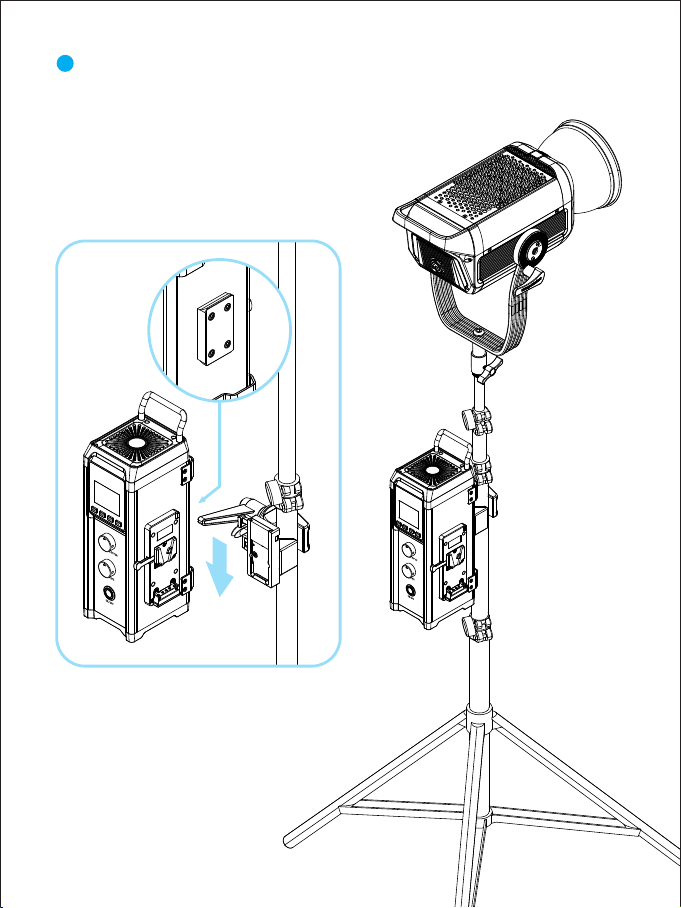
4Install the controller fixing clip on the light stand as shown in the figure below.

8
5Follow the steps shown in the figure below to install the controller on the
controller fixing clip first.
Table of contents
Other GVM Lighting Equipment manuals
Popular Lighting Equipment manuals by other brands

Qazqa
Qazqa Suplux SL 3 Black 103062 instruction manual

Commercial Electric
Commercial Electric 54568141 Use and care guide

CREE LIGHTING
CREE LIGHTING 304 Series installation instructions

Goobay
Goobay 49867 user manual

ECOMAN ITALIA
ECOMAN ITALIA LED T8 instruction manual

Alkalite
Alkalite Krypton KT-81 user manual