GoVideo T1530 User manual

T1530
Introduction ⋯⋯⋯⋯⋯⋯⋯⋯⋯⋯⋯⋯⋯⋯⋯⋯⋯⋯1~10
WARNING & CAUTION ⋯⋯⋯⋯⋯⋯⋯⋯⋯⋯⋯⋯⋯⋯⋯1
Important Safety Instructions ⋯⋯⋯⋯⋯⋯⋯⋯⋯⋯⋯⋯2
Packing List ⋯⋯⋯⋯⋯⋯⋯⋯⋯⋯⋯⋯⋯⋯⋯⋯⋯⋯⋯⋯7
Front Panel Overview ⋯⋯⋯⋯⋯⋯⋯⋯⋯⋯⋯⋯⋯⋯⋯⋯8
Rear Panel Overview ⋯⋯⋯⋯⋯⋯⋯⋯⋯⋯⋯⋯⋯⋯⋯⋯9
Remote Control Overview ⋯⋯⋯⋯⋯⋯⋯⋯⋯⋯⋯⋯⋯10
Getting Started ⋯⋯⋯⋯⋯⋯⋯⋯⋯⋯⋯⋯⋯⋯⋯⋯11~15
Using the Remote Control ⋯⋯⋯⋯⋯⋯⋯⋯⋯⋯⋯⋯⋯11
Connecting the Power Adapter ⋯⋯⋯⋯⋯⋯⋯⋯⋯⋯⋯12
Connecting Antenna/Cable ⋯⋯⋯⋯⋯⋯⋯⋯⋯⋯⋯⋯⋯13
Basic Operations ⋯⋯⋯⋯⋯⋯⋯⋯⋯⋯⋯⋯⋯⋯⋯⋯⋯14
Sleep Mode ⋯⋯⋯⋯⋯⋯⋯⋯⋯⋯⋯⋯⋯⋯⋯⋯⋯⋯⋯⋯15
Advanced Settings⋯⋯⋯⋯⋯⋯⋯⋯⋯⋯⋯⋯⋯⋯⋯16~30
About the Setup Menu⋯⋯⋯⋯⋯⋯⋯⋯⋯⋯⋯⋯⋯⋯⋯16
Setup Menu Overview ⋯⋯⋯⋯⋯⋯⋯⋯⋯⋯⋯⋯⋯⋯⋯17
Channel Settings ⋯⋯⋯⋯⋯⋯⋯⋯⋯⋯⋯⋯⋯⋯⋯⋯⋯19
Picture Settings ⋯⋯⋯⋯⋯⋯⋯⋯⋯⋯⋯⋯⋯⋯⋯⋯⋯⋯21
V-Chip Settings ⋯⋯⋯⋯⋯⋯⋯⋯⋯⋯⋯⋯⋯⋯⋯⋯⋯⋯23
TV Guide & MPAA Ratings ⋯⋯⋯⋯⋯⋯⋯⋯⋯⋯⋯⋯⋯25
Closed Caption Settings ⋯⋯⋯⋯⋯⋯⋯⋯⋯⋯⋯⋯⋯⋯26
Sound Settings ⋯⋯⋯⋯⋯⋯⋯⋯⋯⋯⋯⋯⋯⋯⋯⋯⋯⋯27
Other Settings⋯⋯⋯⋯⋯⋯⋯⋯⋯⋯⋯⋯⋯⋯⋯⋯⋯⋯⋯28
Power Saving Mode ⋯⋯⋯⋯⋯⋯⋯⋯⋯⋯⋯⋯⋯⋯⋯⋯30
Advanced Connections ⋯⋯⋯⋯⋯⋯⋯⋯⋯⋯⋯⋯⋯31~33
DVD Player/VCR Connections⋯⋯⋯⋯⋯⋯⋯⋯⋯⋯⋯⋯31
Audio Connections ⋯⋯⋯⋯⋯⋯⋯⋯⋯⋯⋯⋯⋯⋯⋯⋯32
External Device Connections ⋯⋯⋯⋯⋯⋯⋯⋯⋯⋯⋯⋯33
Help ⋯⋯⋯⋯⋯⋯⋯⋯⋯⋯⋯⋯⋯⋯⋯⋯⋯⋯⋯⋯⋯34~38
Troubleshooting⋯⋯⋯⋯⋯⋯⋯⋯⋯⋯⋯⋯⋯⋯⋯⋯⋯⋯34
Care & Maintenance ⋯⋯⋯⋯⋯⋯⋯⋯⋯⋯⋯⋯⋯⋯⋯⋯35
Customer Support⋯⋯⋯⋯⋯⋯⋯⋯⋯⋯⋯⋯⋯⋯⋯⋯⋯36
Technical Specifications ⋯⋯⋯⋯⋯⋯⋯⋯⋯⋯⋯⋯⋯⋯38

1
T1530
WARNING & CAUTION
CAUTION : TO REDUCE THE RISK OF
ELECTRIC SHOCK, DO NOT
REMOVE COVER (OR BACK).
NO USER-SERVICEABLE PARTS
INSIDE. REFER SERVICING TO
QUALIFIED SERVICE PERSONNEL.
This symbol is intended to alert the user to the
presence of uninsulated“dangerous voltage”within
the product’s enclosure that may be of sufficient
magnitude to constitute a risk of electric shock to
persons.
This symbol is intended to alert the user to the
presence of important operating and maintenance
(servicing) instructions in the literature
accompanying the appliance.
“WARNING - To Reduce The Risk Of Fire Or Electric Shock, Do Not Expose This
Apparatus To Rain Or Moisture.”
“Apparatus shall not be exposed to dripping or splashing and no objects filled with
liquids, such as vases, shall be placed on the apparatus.”
“CAUTION - These servicing instructions are for use by qualified service personnel
only. To reduce the risk of electric shock, do not perform any servicing other than that
contained in the operating instructions unless you are qualified to do so.”
RISK OF ELECTRIC SHOCK
DO NOT OPEN
CAUTION

2
Important Safety Instructions
1) Read these instructions.
2) Keep these instructions.
3) Heed all warnings.
4) Follow all instructions.
5) Do not use this apparatus near water.
6) Clean only with a dry cloth.
7) Do not block any of the ventilation openings. Install in accordance with the
manufacturer's instructions.
8) Do not install near any heat sources such as radiators, heat registers, stoves, or other
apparatus (including amplifiers) that produce heat.
9) Do not defeat the safety purpose of the polarized or grounding type plug. A polarized
plug has two blades with one wider than the other. A grounding type plug has two
blades and a third grounding prong. The wide blade or the third prong is provided for
your safety. When the provided plug does not fit into your outlet, consult an electrician
for replacement of the obsolete outlet.
10) Protect the power cord from being walked on or pinched particularly at plugs,
convenience receptacles, and the point where they exit from the apparatus.
11) Only use the attachments/accessories specified by the manufacturer.
12) Use only with a cart, stand, tripod, bracket, or table specified by the manufacturer, or
sold with the apparatus. When a cart is used, use caution when moving the
cart/apparatus combination to avoid injury from tip-over.
13) Unplug this apparatus during lightning storms or when unused for long periods of time.
14) Refer all servicing to qualified service personnel. Servicing is required when the
apparatus has been damaged in any way, such as power supply cord or plug is damaged,
liquid has been spilled or objects have fallen into the apparatus, the apparatus has been
exposed to rain or moisture, does not operate normally, or has been dropped.

3
T1530
Failure to follow directions noted by this symbol could result in severe injury or death.
Failure to follow directions noted by this symbol could result in bodily harm or damage to
equipment.
Please read the following safety instructions as they are designed to prevent damage to property
and harm to the user.
After reading this, please keep the manual handy.
Warning
Use only AC 100-240V
This TV is for domestic use only.
-Use proper receptacle with AC 100-240V.
Improper voltage may cause electric shock
or fire.
Unplug from the wall
If the TV has been dropped or the cabinet
cracked, turn off the power and unplug
immediately.
-Failure to do so may cause an electric shock
or fire. Contact the retail store or nearest
service center.
Do NOT use wet cloth or hands
Do NOT pull the plug out by the wire or touch the plug with wet hands.
Unplug from the wall
If your TV does not operate normally (in
particular, any unusual sounds or smells) it -
unplug it immediately and contact the retail
store or nearest service center.
Prohibited
Do NOT excessively bend the plug and wire nor
place heavy objects upon them, which may
cause damage.
-
Failure to do so may cause an electric shock or fire.

4
Warning
Unplug from the wall
If water or any foreign object is inserted into
TV, turn off power and unplug to prevent
electric shock, fire or injury. Contact the retail
store or nearest service center.
Prohibited
Do NOT try to modify the wire or the signal
cable.
-If the power cord has been damaged,
replace it to prevent electric shock, fire or
injury.
Prohibited
Do NOT set a glass of water, chemicals or any
small metal objects on the TV.
-This may cause damage, electric shock or fire.
Prohibited
Place the TV on a flat and stable surface.
-The TV may cause injury if allowed to fall.
Prohibited
Disconnect power plug and antenna cable from
external connections during storms or lightning, or
if the TV is not in use for a long period of time.
-This may cause electric shock or a fire.
Clean plug with a dry cloth
If the connector between the plug and the pin is dusty
or dirty, clean it properly with a dry cloth to prevent
electric shock or fire.
Do NOT open cover
Do NOT remove cover (or back). No user
serviceable parts inside.
-This may cause electric shock or fire. Refer
servicing to qualified service personnel.
Do NOT use in bathroom
Do NOT operate TV in place with high humidity
such as a bathroom.
-This may cause electric shock or a fire.
Prohibited
Never insert anything metallic into the TV
openings.
-This may cause an electric shock, fire or injury.
Keep the TV away from children.

5
T1530
Do NOT pull or plug in the wire with wet hands.
-This may cause an electric shock.
Do NOT use or store electric stove near the
TV.
-This may cause electric shock or fire.
Do NOT unplug by pulling the wire or signal
cable.
-This may cause a breakdown, electric shock
or fire due to damage to the cable.
Do NOT connect too many extension cords or
plugs to an outlet.
-This may cause electric shock or fire.
Prohibited
Prohibited Prohibited
Do not cover the vents on the TV cabinet.
-Poor ventilation may cause a malfunction or
fire due to the increased temperature inside the
TV.
Make sure the TV plugged in properly. If the TV is plugged in
improperly, it may cause an electric shock or fire.
Do NOT place any heavy object on the TV.
This may cause damage to the TV.
Warning: Keep away from children.
Prohibited Prohibited
Make sure TV is plugged properly.
Prohibited
For antenna installation, refer servicing to
qualified service personnel.
-Excercise extreme caution near power lines.
-
Strong winds may knock down an outdoor
antenna. Make sure it is securely fastened.
Place TV in a location with low humidity and a
minimum of dust. Do NOT place TV near a
humidifier or cooking stove.
-This may cause electric shock or fire.
Install any antenna securely
to prevent wind damage Prohibited
Caution

6
Do NOT plug the TV into a loose receptacle or
power outlet.
-This may cause heat and/or fire. Refer
servicing to qualified personnel to repair or
replace the outlet.
Disconnect the plug from the outlet when you
relocate the TV.
-Failure to do so may cause an electric shock
or fire.
Prohibited Prohibited
Disconnect the plug from the outlet when you
are cleaning the room or will be away for a long
period of time.
-This may cause fire.
Use caution when adjusting the position/angle
of the TV or stand to prevent injury. Setting the
stand up at a narrow angle may cause the TV
to fall and cause injury.
Unplug the wire Prohibited
Do not place the TV face down.
-This may cause electric shock or fire. Do not cause any impact on panel surface.
-This may cause damage to the TV.
Prohibited Prohibited
Do NOT use old and new batteries together.
-This may cause damage or fire due to
leakage of chemicals from battery inside.
Make sure to insert batteries in the proper
direction (+/-) to prevent damage or fire.
Prohibited Insert with proper
polarity
Caution
7
T1530
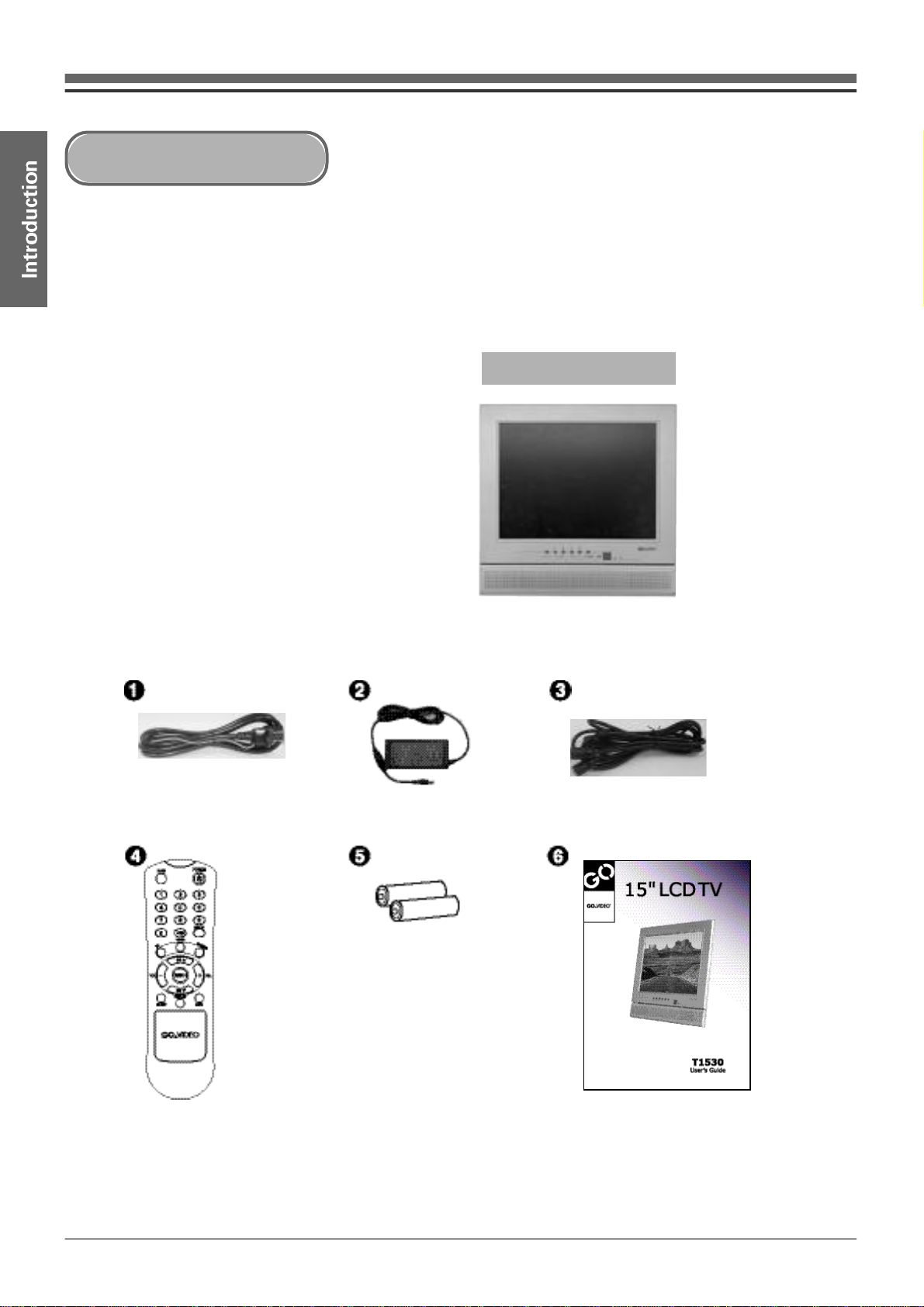
Make sure the following items are included with your TV Set.
If any items are missing, contact your dealer.
①Power Cord
②Power Adapter
③Antenna Cable
④Remote Control
⑤AAA Batteries (2)
⑥User's Guide
T1530 LCD TV
Packing List

8
①MENU button : Press to display and exit the Setup menu.
②~ ③CH
▼/▲
buttons : Press to select channels when watching TV.
Also use to move up and down in the Setup menu.
④~ ⑤Audio -/+ buttons : Press to adjust the volume level.
Also use to move left and right in the Setup menu.
⑥TV/Video button : Press repeatedly to select the desired input (TV, Video, or S-Video).
⑦Power button : Press to turn the TV on and off.
⑧Power LED : Displays the current Power Status (Green = On, Red = Standby, None = Off).
⑨Remote Signal Sensor : Point the remote control here to operate the TV.
⑩Speaker
Front Panel Overview

9
T1530
①Power/DC12V
②S-Video Input
③Video Input
④Audio Input (Left)
⑤Audio Input (Right)
⑥Antenna Input
⑦Headphone Output
Rear Panel Overview
Other manuals for T1530
2
Table of contents
Other GoVideo LCD TV manuals