
Garett FIT 14 User manual

User manual
MULTILANGUAGE
www.garett.eu
SmartWatch
Garett
FIT 14

MULTILANGUAGE
English 3
Polski 13
Český 23
Lietuvos 33
Magyar 43
Nederlands 53
Română 63
Slovenčina 72
Українська 82
INFO (EN/PL) 84

English
SECURITY ISSUES
Before use, carefully read the user's manual and save it for later use. The
manufacturer is not responsible for any damage / injury caused by improper
use. Depending on the part of the device, some functions may differ with the
functions described in the operating instructions.
Only clean the device with a soft, slightly damp cloth. Do not use
chemicals or detergents to clean this device.
Do not dive in the device.
In the event of damage, take the device to an authorized service centre
for inspection / repair. Attempting to repair it yourself may lead to
damage to the device and will void the warranty.
Do not immerse the device in hot water.
It is forbidden to use the device if it is damaged.
Using this device near medical devices may disrupt their operation. Pay
special attention when using the wristband near medical devices, such
as pacemakers, hearing aids and other electronic medical devices.
It is forbidden to throw equipment into the fire. There is a risk of battery
explosion and, as a consequence, life and health hazards.
The device should be protected against heat sources and direct
sunlight.
IMPORTANT! The band is not a medical device. The Garett Fit 14 model and
the JYouPro application are not intended for medical diagnosis, treatment or
as a preventive measure against disease or illness. Before changing your
sleep habits and physical activity, first consult your doctor.

PRODUCT DESCRIPTION
INSTALLATION
Put on the wristband and adjust the length of the strap so that the strap of the
device is not loose.
3. Sensors
1. Display
2. Touch button for switching on / off / entering the menu / changing functions /
LED
4. Strap
OPERATION
Press and hold the touch on / off button (2) to turn the device on. When you
want to turn off the device, go to the menu to disable the band and hold down
the touch button (2).
Note: Before first use, make sure that the band is connected to the
application. The device will automatically synchronize the time and the
physical activity data will be saved correctly.
Turn on / off
CHARGING
2. Insert the device into the holder so that its contacts on the back side contact
the contacts of the charging holder. Then connect the other end of the cable to
the USB port of your computer or USB power adapter.
1. The band is charging using the charging handle attached to the device.
Note: The device should be stable when charging on a flat surface and
the magnetic tip should adhere to the contacts. The first charging
should last approx. 1 hour.
BEFORE FIRST USE
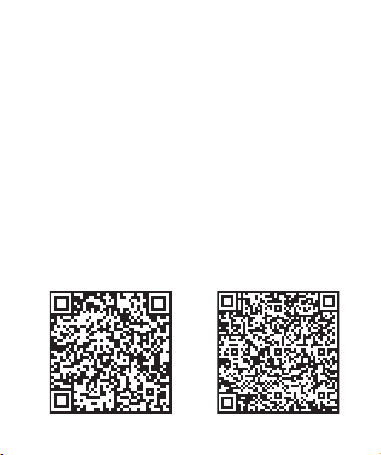
The band works with a smartphone using the JYouPro application. Before
using, download this application from the Google Play Store or AppStore and
install it on your phone.
The application can be searched by entering the name "JYouPro" in the
browser, or by scanning the corresponding QR code shown below.
iOS Android

PAIRING
The device in standby mode measures and analyzes data on physical activity
and sleep. The Garett Fit 14 band is equipped with an accelerometer (G-
sensor), which monitors the user's body movements and processes them
based on algorithms that allow to determine the details of sleep and physical
activity.
Note: The Garett Fit 14 band does not require a permanent connection with
the smartphone, but to fully use the functions of the device it should be paired
with the smartphone using the application. Before using the bands for the first
time, user data must be entered in the application.
Note: Each time the watch and the application are turned on, the data is
synchronized automatically (devices must be paired!).
1.Turn on Bluetooth connectivity on your phone.
3. Open the JYouPro application.
2. Make sure the band is on.
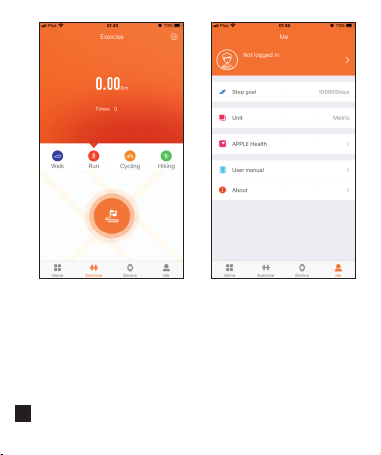
After pairing the wristband with the phone, enter user data ("Me" tab at the
bottom of the screen, then click on the icon portrait): sex, date of birth, weight,
height. It is also possible to change units of measure, weight (Me / Unit tab).
After connecting the wristband with the phone, the recording and analysis of
physical activity and sleep automatically begin. After disconnection, the band
display shows time and activity information. The data is also stored in the
memory of the band.
4. Go to the "Device" tab at the bottom of the screen, then select the "Scanning
device" option, then select the device named "S5"
6. After successful pairing, the hour on the band will update.
5. During pairing, place the armband near the telephone with which it will be
connected.
Note: The Garett Fit 14 sports band works with smartphones that support
Bluetooth 4.0. It is also compatible with Android 5.1, iOS8 (and higher).

8. Sport: several sports activities to choose from. Depending on the intensity
of exercise LED (2) changes color: green - low intensity, blue - medium
intensity, red - high intensity. To end the selected activity, press the touch
button (2) for a longer time. Steps, distance covered, calories burned will be
included in the activity statistics of the current day.
6. Blood pressure
5. Pulsemeter
7.Pulse oximeter
10.Light: LED color configuration (2).
11. Settings:
• Stopwatch: stopwatch function.
• Find phone: the phone search function. Starts an audible alarm on the
phone.
9. MSG: last notification from the connected phone.
• Reset: reset the device to the factory settings.
• Display device name and software version.
• Power Off: turn off the wristband.
1. Screen of the main menu. We can change the watch face by holding down
the touch button (2). After the menu, we move with short touches of the button
(2). The functions are selected by a long press of the button (2).
2. The number of steps taken.
3. Good distance
4. The number of calories burned.
DISPLAY MENU

Keep your body relaxed and
motionless during tests. Hold the
device at the same height as your
heart, do not talk during the test. The
measurement should last at least 1
minute to obtain the optimal result.
To start measuring the heart rate /
pressure / saturation from the band,
go to the selected function and wait
for the results to appear. Before you
start measuring, make sure that the
sensor touches your skin. The
measurement area should be kept
clean, soiling can negatively affect
the result.
Heart rate measurement, attention:

JYOUPRO APPLICATION
The result of the last pressure
measurement is displayed in the
upper part of the screen. Clicking
"Start" remotely starts the
measurement. By clicking the
lower half of the screen, we will
Sleep
Heart rate
On the main application screen,
there are tabs:
Blood pressure
Home (Ekran główny)
We'll see there activity statistics
from the current day. By clicking
the lower half of the screen, we
will display reports from previous
periods.
In this tab we will find information
about the quality of our last sleep.
By clicking the lower half of the
screen, we will display reports
from previous periods.
Walk
In the upper part of the screen,
the result of the last pulse
measurement is displayed.
Clicking "Start" remotely starts
the measurement. By clicking the
lower half of the screen, we will
display reports from previous
periods.
1
display reports from previous
periods.
Exercise
By clicking the icon, we enforce
manual synchronization of all
data from the wristband exercise
In this tab we can register the
selected activity and the route we
are traveling using the phone's
GPS. By clicking the icon in the
upper right we will display the
corner earlier recorded activities.
For the function to work, the
application must have permanent
access to the GPS.
• Unit - selection of units of
measurement.
In this tab we will configure
settings related to band user:
• By clicking the portrait icon we
set: sex, date of birth, height,
weight.
Me
• Step goal - daily goal steps.
• About - version information
application.
2
Table of contents
Languages:
Other Garett Watch manuals

Garett
Garett SARA User manual

Garett
Garett KLARA User manual

Garett
Garett Kids Life Max 4G RT User manual

Garett
Garett Lady Elegance RT User manual

Garett
Garett Smile User manual

Garett
Garett Action User manual

Garett
Garett Kids 5 User manual

Garett
Garett Women LISA User manual

Garett
Garett G11 User manual

Garett
Garett GT20S User manual







