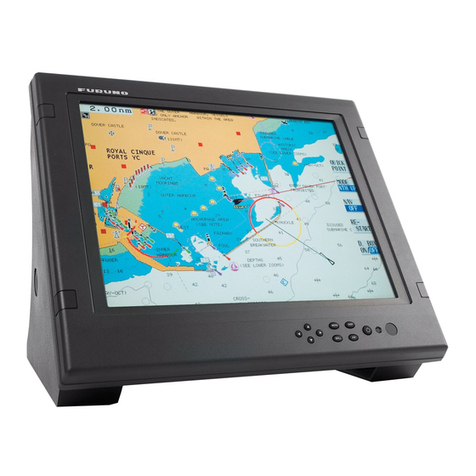
Furuno TZT9 User manual

www.furuno.com
All brand and product names are trademarks, registered trademarks or service marks of their respective holders.
Installation Manual
Multi Function Display
Model TZT9/TZT14
SAFETY INSTRUCTIONS ................................................................................................ i
SYSTEM CONFIGURATION ........................................................................................... ii
EQUIPMENT LISTS........................................................................................................ iii
1. MOUNTING..............................................................................................................1-1
1.1 Mounting Considerations ...................................................................................................1-1
1.2 Flush Mounting ..................................................................................................................1-2
1.3 Desktop Mounting ..............................................................................................................1-4
2. WIRING....................................................................................................................2-1
2.1 Wiring Instructions .............................................................................................................2-1
2.2 CAN bus/NMEA0183 Data Conversion and CAN bus Bridging.........................................2-8
2.3 Example NavNet TZtouch System Configurations...........................................................2-11
3. SETTING UP THE EQUIPMENT.............................................................................3-1
3.1 How to Set Time Zone, Language and Units.....................................................................3-3
3.2 Menu Initial Setup ..............................................................................................................3-5
3.3 How to Set up the Radar....................................................................................................3-8
3.4 How to Set up the Sounder..............................................................................................3-11
3.5 Wireless LAN Setting .......................................................................................................3-13
PACKING LISTS ......................................................................................................... A-1
OUTLINE DRAWINGS ................................................................................................ D-1
INTERCONNECTION DIAGRAM ................................................................................ S-1


i
SAFETY INSTRUCTIONS
The installer must read the appropriate safety instructions before attempting to install the equip-
ment.
Indicates a potentially hazardous situation which, if not
avoided, could result in death or serious injury.
Indicates a potentially hazardous situation which, if not
avoided, may result in minor or moderate injury.
WARNING
CAUTION
Warning, Caution Prohibitive Action Mandatory Action
WARNING
ELECTRICAL SHOCK HAZARD
Do not open the equipment
unless totally familiar with
electrical circuits.
Only qualified personnel should
work inside the equipment.
Turn off the power at the
switchboard before beginning
the installation.
Fire or electrical shock can result
if the power is left on.
CAUTION
Be sure that the power supply is
compatible with the voltage
rating of the equipment.
Connection of an incorrect power
supply can cause fire or damage
the equipment.
Ground the equipment to prevent
electrical shock and mutual
interference.
Use the proper fuse.
Use of an incorrect fuse may
damage the equipment.
The front panel is made of glass.
Handle it with care.
Injury can result if the glass breaks.
Observe the following compass safe
distances to prevent interference to a
magnetic compass:
Standard
compass
TZT9
TZT14
Steering
compass
0.50 m 0.30 m
0.64 m 0.40 m
(Examples of symbols)
MCU-002 0.05 m 0.05 m

ii
SYSTEM CONFIGURATION
RADAR SENSOR
DRS2D/DRS4D
OR
RADAR SENSOR
DRS4A/DRS6A/DRS12A/DRS25A
CCD Camera
CCD Camera
FI-5002
SC-30
GP-330
FI-50, etc.
IF-NMEA2K1/2
Multi Function
Display
TZT9/TZT14
12/24 VDC
: Standard Supply
Event SW
External Buzzer
Speed Alarm
Power input for CAN bus
IP Camera
Echo Sounder
(FCV-1150, BBDS1, DFF series)
Environmental category
Sensor units: Exposed to the weather
All other units: Protected from the weather
NAVpilot-700
12-24 VDC
POWER SUPPLY UNIT*
PSU-017
*: The power supply unit is required when you connect the radar sensor.
PSU-012: w/DRS2D/4D/4A/6A/12A
PSU-013: w/DRS25A
PSU-017: w/DRS2D/4D
For details of the power supply unit, see the installation manual of the radar sensor (IME-35670).
HUB -101 FA-30/50
FAX-30
FUSION-Link Equipment
FAR-2xx7 series
Wide Monitor
Network Equipment
12-24 VDC
POWER SUPPLY UNIT*
PSU-012/PSU-013
MCU-002

iii
EQUIPMENT LISTS
Standard supply
Optional supply
Name Type Code No. Qty Remarks
Multi Function Display TZT9 - 1
TZT14 -
Installation Materials
CP19-01500 000-020-450 1 For TZT9
000-022-431
CP19-01600 000-020-451 1 For TZT14
000-022-432
Accessories
FP19-01700 000-022-620 1 For TZT9
000-022-621
FP19-01900 000-022-622 1 For TZT14
000-022-623
Spare Parts
SP19-01301 001-175-310 1 Fuses (for TZT9)
001-201-370
SP19-01201 001-166-210 1 Fuses (for TZT14)
001-201-420
Name Type Code No. Remarks
Joint Box TL-CAT-012 000-016-714-01 For LAN network
Remote Control Unit MCU-002 -
NMEA2000-Interface
Unit IF-NMEA2K1 -
NMEA Data Converter IF-NMEA2K2 -
Network HUB HUB-101 -
Junction Box FI-5002 -
Rectifier RU-3423 000-030-443
PR-62 000-013-484 100VAC
000-013-485 110VAC
000-013-486 220VAC
000-013-487 230VAC
RU-1746B-2 000-030-439
CAN bus Cable Assy M12-05BM+05BF-010 001-105-750-10 w/connectors (light), 1 m
M12-05BM+05BF-020 001-105-760-10 w/connectors (light), 2 m
M12-05BM+05BF-060 001-105-770-10 w/connectors (light), 6 m
M12-05BFFM-010 001-105-780-10 w/connector (light), 1 m
M12-05BFFM-020 001-105-790-10 w/connector (light), 2 m
M12-05BFFM-060 001-105-800-10 w/connector (light), 6 m
CB-05PM+05BF-010 000-167-968-10 w/connectors (heavy), 1 m
CB-05PM+05BF-020 000-167-968-10 w/connectors (heavy), 2 m
CB-05PM+05BF-060 000-167-970-10 w/connectors (heavy), 6 m
CB-05BFFM-010 000-167-971-10 w/connector (heavy), 1 m
CB-05BFFM-020 000-167-972-10 w/connector (heavy), 2 m
CB-05BFFM-060 000-167-973-10 w/connector (heavy), 6 m

EQUIPMENT LISTS
iv
DVI-D Cable Assy. DVI-D/D S-LINK 5M 001-132-960-10 24 pin, for video output, 5 m
DVI-D/D S-LINK 10M 001-133-980-10 24 pin, for video output, 10 m
External Buzzer OP03-136 000-086-443 Buzzer: PKB5-3A40
Replacement Kit OP19-9 001-233-680 For TZT9
OP19-10 001-233-690
OP19-11 001-233-700 For TZT14
OP19-12 001-233-710
Network (LAN) Cable MOD-Z073-030+ 000-167-171-10 LAN cable, straight, 2 pairs,
3 m
MOD-Z072-020+ 001-167-880-10 LAN cable, cross-pair, 2 m
MOD-Z072-050+ 001-167-890-10 LAN cable, cross-pair, 5 m
MOD-Z072-100+ 001-167-900-10 LAN cable, cross-pair, 10 m
CAN bus Connector SS-050505-FMF-TS001 000-168-603-10 Micro style: 3
NC-050505-FMF-TS001 000-160-807-10 Mini style: 2, micro style: 1
LTWMC-05BMMT-
SL8001 000-168-604-10 Micro style, male, termina-
tion resistor
LTWMN-05AMMT-
SL8001 000-160-508-10 Mini style, male, termination
resistor
LTWMC-05BFFT-
SL8001 000-168-605-10 Micro style, female, termina-
tion resistor
LTWMN-05AFFT-
SL8001 000-160-509-10 Mini style, female, termina-
tion resistor
FRU-0505-FF-IS 001-077-830-10 w/inline terminator
MJ Cable Assy MJ-A6SPF0016-005C 000-159-689-10 for FAX-30
Operator’s Manual OME-44700-* 000-176-016-1* English
OMJ-44700-* 000-176-015-1* Japanese
Name Type Code No. Remarks

1-1
1. MOUNTING
1.1 Mounting Considerations
When selecting a mounting location for TZT9/14, keep the following in mind:
• The temperature at the mounting location shall be between -15°C and +55°C (wire-
less LAN: 0°C and +55°C).
• The humidity at the mounting location shall be 93% or less at 40°C.
• Locate the unit away from exhaust pipes and ventilators.
• The mounting location should be well ventilated.
• Mount the unit where shock and vibration are minimal (comply with IEC 60945
Ed.4).
• Keep the unit away from electromagnetic field generating equipment such as mo-
tors and generators.
• For maintenance and checking purposes, leave sufficient space around the unit and
leave slack in cables. Minimum recommended space is shown in the outline draw-
ing for the display units.
• Do not mount the TZT9/14 on the overhead.
• A magnetic compass will be affected if the equipment is placed too close to it. Ob-
serve the compass safe distances shown in the SAFETY INSTRUCTIONS to pre-
vent disturbance to the magnetic compass.
The TZT9/14 can be flush mounted in a console or panel, or mounted on a desktop.
When removing the equipment
If the equipment is removed from the vessel, cover the connector of the cable with the
supplied cap to keep dust out of the connector.
TZT9 TZT14

1. MOUNTING
1-2
1.2 Flush Mounting
Select a flat mounting location and install the unit as shown below.
1. Prepare a cutout in the mounting location using the template (supplied) for the
TZT9 or TZT14.
2. Attach the flush mounting sponge (supplied as installation materials) to the back
of the TZT9/14.
3. Screw the wing bolts and the wing nuts of the flush mount fixture so that the pro-
tector for screw moves to the flush mount fixture.
4. Connect all cables at the back of the TZT9/14. (See chapter 2.)
Flush mounting sponge
Flush mount fixture
Flush mount fixture
Wing bolt
Protector for
screw
Move to the fixture.
Wing nut
Flush mount fixture

1. MOUNTING
1-3
5. Set the TZT9/14 to the cutout.
6. Fasten the flush mount fixtures to the holes for the hanger at both sides of TZT9/
14 with two hex. bolts (M8x15, supplied).
7. Fasten each wing bolt so that the protector for screw touches the mounting panel.
8. Fasten the wing nuts tightly.
TZT9/14 with a fixing panel, top view
Flush mount fixture
Holes for the hanger
Hex. bolt (M8x15)
Mounting panel
Flush mount fixture
Wing bolt
Wing nut
Protector for screw

1. MOUNTING
1-4
1.3 Desktop Mounting
Follow the procedure below to mount the TZT9 or TZT14 on a desktop.
1. Fix the hanger by using self-tapping screws (supplied).
2. Screw knob bolts into the TZT9/14, set the unit to the hanger and tighten the knob
bolts.
Knob bolt
Hanger
TZT9/14
Other manuals for TZT9
5
This manual suits for next models
1
Table of contents
Other Furuno Monitor manuals

Furuno
Furuno FEA-2107 User manual

Furuno
Furuno PM30 User manual

Furuno
Furuno TZTL12F Manual

Furuno
Furuno MU-151C User manual

Furuno
Furuno MU-155C Manual

Furuno
Furuno MFD8 Manual

Furuno
Furuno MU-231 User manual

Furuno
Furuno MFDBB Instruction Manual

Furuno
Furuno NavNet TZtouch3 TZT9F Manual

Furuno
Furuno MU-155C Manual

Furuno
Furuno NAVNET TZTOUCH2 TZTL15F User manual

Furuno
Furuno Mu-190HD User manual

Furuno
Furuno TZT12F Manual

Furuno
Furuno FMD-3200-BB Manual

Furuno
Furuno MU-152HD User manual

Furuno
Furuno RD-20 User manual

Furuno
Furuno RD-33 User manual

Furuno
Furuno NAVNET 3D MFDBB User manual

Furuno
Furuno FMD-811 User manual

Furuno
Furuno MU-152 User manual